
Contributions Importer for GitHub





This tool helps users to import contributions to GitHub from private git repositories, or from public repositories that are not hosted in GitHub.

How it Works
In its simplest case, this tool copies all commits from a source git repository to a mock git repository. Each copied commit will report the same commit date, but the original code is not copied, nor is the commit message.
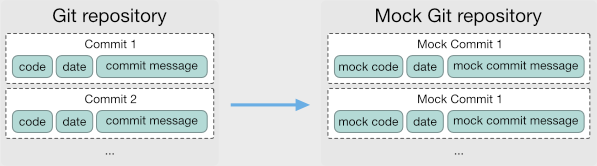
Contributions Importer will create instead mock code to report which languages have been used in the source repository.
You can also have multiple source git repositories as well to report activities from several private git repositories.
Reasons
GitHub shows contributions statistics of its users. There are several reasons why this feature could be debatable.
Moreover, this mechanism only rewards developers who work on GitHub-maintained repositories.
Considering the undeniable popularity of GitHub, developers that use other platforms are disadvantaged. In fact, it is increasing the number of developers that refer to their GitHub contributions in resumes. Similarly, recruiters may use GitHub to find talent.
In more extreme cases, some developers decided to boycott GitHub's lock-in system and developed tools that can alter GitHub's contribution graph with fake commits: Rockstar and Vanity text for GitHub are good examples.
Instead, Contributions Importer for GitHub aims to generate an overall realistic activity overview.
Installation
To install using pip:
pip install git-import-contributions
Using brew:
brew tap miromannino/tap
brew install git-import-contributions
Usage
The git-import-contributions CLI provides an interface for importing contributions into a mock Git repository using data from either a CSV file or other repositories. This tool is designed for developers and operates exclusively via the command line.
The git-import-contributions CLI has two main modes of operation: stats and repo.
General Syntax
git-import-contributions <action> [options]
Actions
1. Stats Mode
Generates commits in a mock repository based on a CSV file containing contribution statistics.
Command:
git-import-contributions stats \
    --csv <path-to-csv> \
    --mock_repo <mock-repo-path> \
    --generator <generator-type>
Options:
--csv <path>: Path to the CSV file containing contribution statistics.--mock_repo <path>: Path to the mock Git repository.--generator <file-extension>: Type of generator to use for file creation (e.g.,.ts).
Other Optional Options:
--max-commits-per-day <number>: Maximum number of commits per day (default: 10).--author <email>: Filter commits by the specified author(s) (optional). Accepts multiple email addresses.
Example:
The contributions are saved in a CSV file data.csv as the following:
contributions,date
4,2024-08-05
2,2024-08-09
0,2024-08-10
0,2024-08-11
Let's import:
git-import-contributions stats \
    --csv data.csv \
    --mock_repo mock-repo \
    --generator .py \
    --max-commits-per-day 5 \
    --author "example@example.com"
2. Repo Mode
Imports contributions into a mock repository by analyzing one or more existing repositories.
Command:
git-import-contributions repo \
    --repos <repo-paths> \
    --mock_repo <mock-repo-path>
Options:
--repos <paths>: Paths to the repositories to analyze (required). Accepts multiple paths.--mock_repo <path>: Path to the mock Git repository (required).
Other Optional Options:
--author <email>: Filter commits by the specified author(s) (optional). Accepts multiple email addresses.--max-commits-per-day <min max>: Set a range for the number of commits per day (optional).--commit-max-amount-changes <number>: Limit the number of changes per commit (optional).--changes-commits-max-time-backward <seconds>: Maximum time backward for splitting large commits (optional).--ignored-file-types <types>: List of file types to ignore (e.g.,.csv,.txt) (optional).--ignore-before-date <YYYY-MM-DD>: Ignore commits before this date (optional).--collapse-multiple-changes: Collapse multiple changes into one per type of file (optional).--keep-commit-messages: Keep original commit messages instead of using mocked ones (optional).--start-from-last: Start importing from the last commit in the mock repository (optional).
Example:
The repositories to analyze are in folder repo1 and repo2.
The mock repo is instead in the mock-repo folder.
git-import-contributions repo \
    --repos repo1 repo2 \
    --mock_repo mock-repo \
    --author "dev@example.com" \
    --max-commits-per-day 5 10 \
    --ignore-before-date 2020-01-01
Advanced Features
The repo mode supports additional options to control how contributions are imported:
-
Masking Commit Time Commit times can be randomized using
--changes-commits-max-time-backward. -
Limiting Changes per Commit Use
--commit-max-amount-changesto set a cap on the number of changes in a single commit. -
Incremental Imports Use
--start-from-lastto import contributions incrementally starting from the most recent commit in the mock repository -
Ignoring Commits Before a Date Use
--ignore-before-dateto skip commits older than a specific date.
Help
To view the full list of commands and options:
git-import-contributions --help
For specific actions:
git-import-contributions stats --help
git-import-contributions repo --help
Other good tutorials about this project
- How I Restored My Git Contributions by Rajan Joshi
- Import Contributions from Bitbucket to GitHub by Daniel Mai
Contributing
We welcome contributions from the community. Please fork the repository, create a new branch, and submit a pull request with your changes.
Ensure all tests pass and update documentation as needed.
Install dev dependencies
To install dev dependencies
pipenv install --dev
Install the pre-commit scripts with:
pipenv run pre-commit install
Code style
Regarding code styles like indentation and whitespace, follow the conventions you see used in the source already.
The project uses black as auto formatter using the settings in pyproject.toml.
Submitting pull requests
- Create a new branch; avoid working directly in the
masterbranch. - Write failing tests for the changes you plan to implement.
- Make the necessary changes to fix the issues.
- Ensure all tests, including the new ones, pass successfully.
- Update the documentation to reflect any modifications.
- Push your changes to your fork and submit a pull request.
Use from source
Make sure you have first of all pipenv installed and install all required dependencies:
./scripts/install-dependencies.sh
You can then use the CLI with:
./scripts/cli.sh --help
Tests
In order to run tests:
Make sure you have first of all pipenv installed and install all required dependencies:
./scripts/install-dependencies.sh
Start tests with:
./scripts/run-tests.sh
Install from source
To install from source using pip:
pip install .
To uninstall
pip uninstall git-import-contributions
1 maintainer

Metadata
1 maintainer
Release files for git-import-contributions 2.0.2
For a detailed explanation of source distributions (sdists) and built distributions (wheels), please see the package formats documentation.
Source distribution (sdist)
| File | Size | Uploaded | |
|---|---|---|---|
| git_import_contributions-2.0.2.tar.gz | 22.0 kB | Details |
Built distribution (wheel)
| File | Interpreter | ABI | Platform | Reset |
|---|---|---|---|---|
| git_import_contributions-2.0.2-py3-none-any.whl | Python 3 | none | any | Details |
Total release size: 47.7 kB
Release files / git_import_contributions-2.0.2.tar.gz
| Download URL | git_import_contributions-2.0.2.tar.gz |
|---|---|
| Size | 22.0 kB |
| Tags | Source |
|
SHA-256 checksum How to use checksums |
b65cf65a9242e47324038b67771345c6f23c73cd16596cd856002c299b16f00b
|
|
BLAKE2b-256 checksum How to use checksums |
9dd64f295cdf277456979457118ed05977bd26e995955dd0c027816fc4bd58a9
|
| Upload date | |
|
Uploaded using Trusted Publishing? What is trusted publishing? |
Yes |
| Uploaded via |
twine/6.1.0 CPython/3.12.9
|
Provenance
Provenance describes where a file came from. On PyPI, provenance is shared via attestations, which provide a verifiable record of the build or publishing details. View details, limitations and caveats.


PyPI Publish Attestation
PyPI verified that this artifact, at this checksum, originated from the publisher listed below.
Signed by GitHub Actions, verified by PyPI on Feb 26, 2025.
Transparency logRelease files / git_import_contributions-2.0.2-py3-none-any.whl
| Download URL | git_import_contributions-2.0.2-py3-none-any.whl |
|---|---|
| Size | 25.7 kB |
| Tags | Python 3 |
|
SHA-256 checksum How to use checksums |
374d76558c88837a36d20e1610185e937faab91b07f8ddd4efefe88483f3e4f0
|
|
BLAKE2b-256 checksum How to use checksums |
4c438827569b3a2b1901008b89fd3670d1081474161a277d395c862e65940731
|
| Upload date | |
|
Uploaded using Trusted Publishing? What is trusted publishing? |
Yes |
| Uploaded via |
twine/6.1.0 CPython/3.12.9
|
Provenance
Provenance describes where a file came from. On PyPI, provenance is shared via attestations, which provide a verifiable record of the build or publishing details. View details, limitations and caveats.
PyPI Publish Attestation
PyPI verified that this artifact, at this checksum, originated from the publisher listed below.
Signed by GitHub Actions, verified by PyPI on Feb 26, 2025.
Transparency log













