

A local Git dashboard for people juggling agents and too many repos.
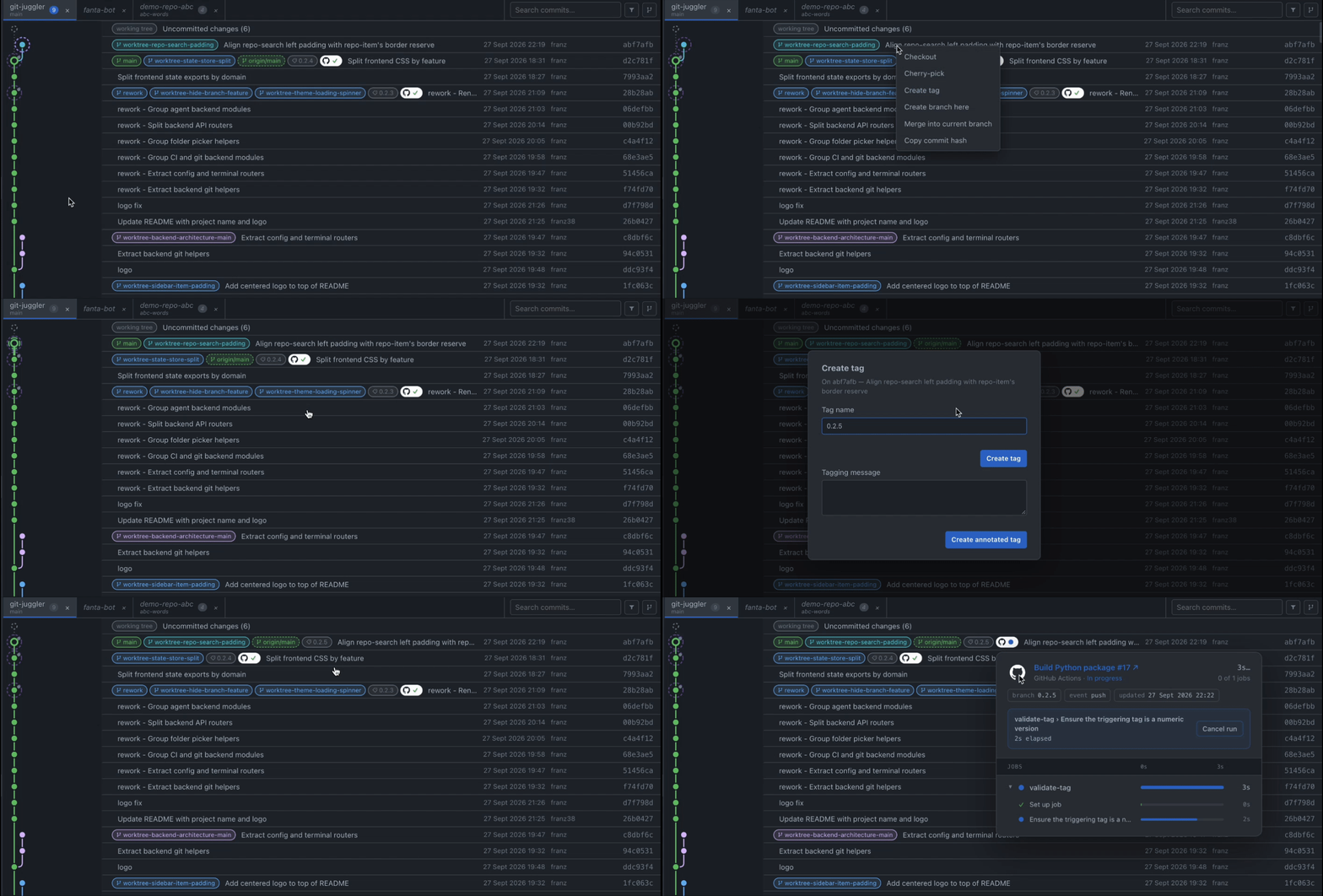
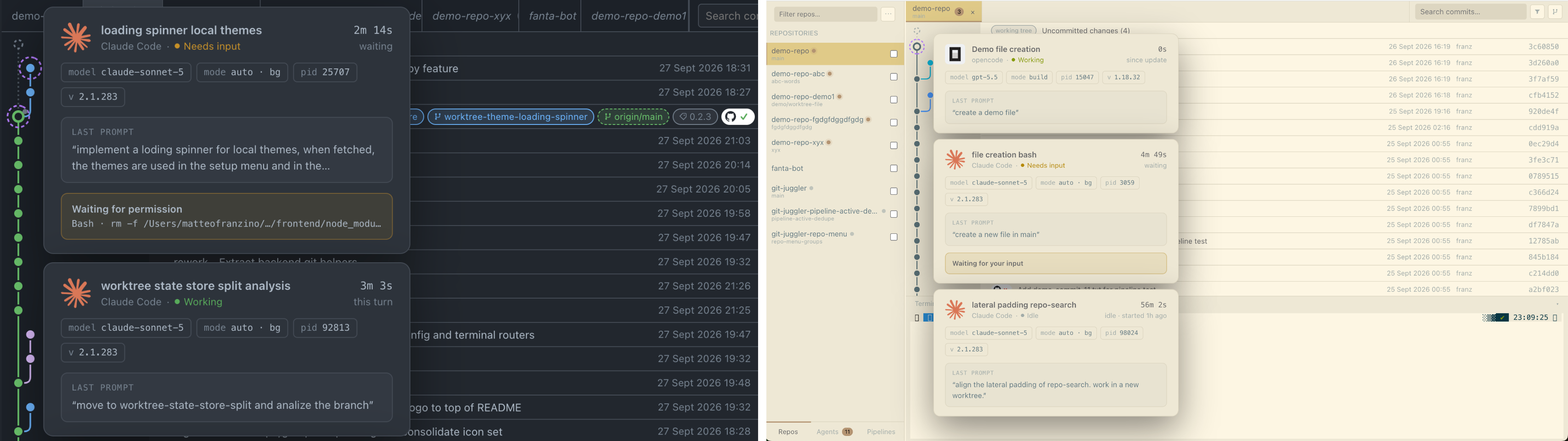
Watch agents work live, follow every repo’s git graph, and catch what changed across your workspace — all from one place, without opening a dozen editors.
What it does
- Scans the immediate children of one or more configured folders for Git repos.
- Lets you inspect and manage each repo's graph, branches, tags, stashes, dirty files, and file diffs.
- Keeps a persistent terminal per open repo and runs Git actions there so you see the real commands and output.
- Tracks local Claude Code and OpenCode sessions.
- Connects GitHub Actions and Jenkins runs to commits and active pipelines.
- VS Code-compatible themes.
How to install
git-juggler is published on PyPI. The recommended way to install it is with
pipx, which puts the git-juggler command on your
PATH in its own isolated environment, without touching your system Python:
pipx install git-juggler
git-juggler [path-to-scan] [--host HOST] [--port PORT] [--no-open]
<path-to-scan> is optional and defaults to the current directory. It is used
to seed the initial search path; after that, search paths are managed in the app
from the welcome wizard or Settings.
--host HOSTchanges the bind host from the default127.0.0.1.--port PORTchanges the backend port from the default8000.--no-opendisables opening the app in your browser automatically.
If you don't have pipx yet:
macOS
brew install pipx
pipx ensurepath
Linux
sudo apt install pipx   # Debian/Ubuntu
sudo dnf install pipx   # Fedora
pipx ensurepath
Many recent distros (like macOS with Homebrew) block a plain global
pip install outside a virtual environment (PEP 668); pipx is the
supported way around that.
Windows
py -m pip install --user pipx
py -m pipx ensurepath
Restart your terminal after ensurepath so the updated PATH takes effect.
To upgrade later: pipx upgrade git-juggler.
Dev mode
Use the dev script to start both the backend and frontend dev servers:
./scripts/dev.sh [path-to-scan] [--port PORT] [--no-open]
path-to-scanis optional. On first run, it seeds the folder whose immediate children are scanned for Git repos.--port PORTis optional. It changes the backend port from the default8000; if you use it, updatesrc/frontend/vite.config.tslocally so Vite proxies/apiand/wsto the same port.--no-opendisables opening the app in your browser automatically.
Or run them manually in two terminals:
python3 -m venv .venv
.venv/bin/pip install -e .
.venv/bin/git-juggler <path-to-scan> --reload [--no-open]
cd src/frontend
npm install
npm run dev                                     # http://localhost:5173 (proxies /api and /ws to :8000)
Open http://localhost:5173.
By default, ./scripts/dev.sh opens http://localhost:5173 in your browser.
Production (single port)
cd src/frontend && npm install && npm run build
cd ../.. && .venv/bin/git-juggler <path-to-scan> [--no-open]
The backend serves the built frontend in this mode, so only port 8000 is needed. By default, it opens the app in your browser.
Build a Python package
The Python wheel includes the built frontend assets. The generated assets are
not committed; scripts/build-package.sh builds them and copies them into the
backend package before creating the distributions.
python3 -m venv .venv
.venv/bin/pip install build
./scripts/build-package.sh
The wheel and source distribution are written to dist/.
Install the wheel locally with:
pipx install dist/git_juggler-*.whl --force
git-juggler <path-to-scan> [--no-open]
Versions are derived from Git tags. GitHub Actions runs the same build, uploads the distributions as artifacts, and publishes tagged releases to PyPI.
1 maintainer

Metadata
1 maintainer
Release files for git-juggler 0.2.11
For a detailed explanation of source distributions (sdists) and built distributions (wheels), please see the package formats documentation.
Source distribution (sdist)
| File | Size | Uploaded | |
|---|---|---|---|
| git_juggler-0.2.11.tar.gz | 5.5 MB | Details |
Built distribution (wheel)
| File | Interpreter | ABI | Platform | Reset |
|---|---|---|---|---|
| git_juggler-0.2.11-py3-none-any.whl | Python 3 | none | any | Details |
Total release size: 5.9 MB
Release files / git_juggler-0.2.11.tar.gz
| Download URL | git_juggler-0.2.11.tar.gz |
|---|---|
| Size | 5.5 MB |
| Tags | Source |
|
SHA-256 checksum How to use checksums |
cef4acbda79e6e907d488e6264e23be923517961b455dfbbca14d54d2dc17e5a
|
|
BLAKE2b-256 checksum How to use checksums |
b18f22e8c58aec52ba69e5bc19743203b6f69b0a1ee7a8ffb765719bc60fb775
|
| Upload date | |
|
Uploaded using Trusted Publishing? What is trusted publishing? |
Yes |
| Uploaded via |
twine/7.0.0 CPython/3.13.14
|
Provenance
Provenance describes where a file came from. On PyPI, provenance is shared via attestations, which provide a verifiable record of the build or publishing details. View details, limitations and caveats.


PyPI Publish Attestation
PyPI verified that this artifact, at this checksum, originated from the publisher listed below.
Signed by GitHub Actions, verified by PyPI on Sep 29, 2026.
Transparency logRelease files / git_juggler-0.2.11-py3-none-any.whl
| Download URL | git_juggler-0.2.11-py3-none-any.whl |
|---|---|
| Size | 407.8 kB |
| Tags | Python 3 |
|
SHA-256 checksum How to use checksums |
311475370f24293e4b108987b26c9bc2141a359c8943c0bf064e70717e620b3c
|
|
BLAKE2b-256 checksum How to use checksums |
3c7054b78631a3a4fd656b5bee551c1c94ce966997aa8f1546f2775ef4c010d2
|
| Upload date | |
|
Uploaded using Trusted Publishing? What is trusted publishing? |
Yes |
| Uploaded via |
twine/7.0.0 CPython/3.13.14
|
Provenance
Provenance describes where a file came from. On PyPI, provenance is shared via attestations, which provide a verifiable record of the build or publishing details. View details, limitations and caveats.
PyPI Publish Attestation
PyPI verified that this artifact, at this checksum, originated from the publisher listed below.
Signed by GitHub Actions, verified by PyPI on Sep 29, 2026.
Transparency log













