
git-machete










💪 git-machete is a robust tool that simplifies your git workflows.
🦅 The bird's eye view provided by git-machete makes merges/rebases/push/pulls hassle-free
even when multiple branches are present in the repository
(master/develop, your topic branches, teammate's branches checked out for review, etc.).
🎯 Using this tool, you can maintain small, focused, easy-to-review pull requests with little effort.
👁 A look at a git machete status gives an instant answer to the questions:
- What branches are in this repository?
- What is going to be merged (rebased/pushed/pulled) and to what?
🚜 git machete traverse semi-automatically traverses the branches, helping you effortlessly rebase, merge, push and pull.

🔌 See also VirtusLab/git-machete-intellij-plugin — a port into a plugin for the IntelliJ Platform products, including PyCharm, WebStorm etc.
🎓 Check out our tutorial to get started!
Install
We provide a couple of alternative ways of installation. See PACKAGES.md for the full list.
git-machete requires Python >= 3.6. Python 2.x is no longer supported.
Using Homebrew (macOS & most Linux distributions)
brew install git-machete
Using pip
You need to have Python and pip installed from system packages.
For user-wide install:
pip install --user git-machete
Please verify that your PATH variable has ${HOME}/.local/bin/ included.
For system-wide install:
sudo -H pip install git-machete # system-wide install
Tip: pass an extra -U flag to pip install to upgrade an already installed version.
Using conda
conda install -c conda-forge git-machete
Using Scoop (Windows)
scoop install git-machete
Using snap (most Linux distributions)
Tip: check the guide on installing snapd if you don't have Snap support set up yet in your system.
sudo snap install --classic git-machete
It can also be installed via Ubuntu Software (simply search for git-machete).
Note: classic confinement is necessary to ensure access to the editor installed in the system (to edit e.g. .git/machete file or rebase TODO list).
Using Alpine, Arch, Gentoo & other Linux distro-specific package managers
Check Repology for the available distro-specific packages.
Using Nix (macOS & most Linux distributions)
On macOS and most Linux distributions, you can install via Nix:
nix-channel --add https://nixos.org/channels/nixos-unstable unstable  # if you haven't set up any channels yet
nix-env -i git-machete
Note: since nixos-21.05, git-machete is included in the stable channels as well.
The latest released version, however, is generally available in the unstable channel.
Stable channels may lag behind; see repology for the current channel-package mapping.
Using Pex
The Pex tool (short for Python EXecutable) allows you to build "pex" files which are executable Python environments in a single file.
Assuming you have already installed the pex utility, you can build git-machete as a pex:
pex git-machete -m git_machete.bin:main -o git-machete
Then put the produced git-machete file somewhere on your PATH.
Quick start
Discover the branch layout
cd your-repo/
git machete discover
See and possibly edit the suggested layout of branches.
Branch layout is always kept as a .git/machete text file, which can be edited directly or via git machete edit.
See the current repository state
git machete status --list-commits
Green edge means the given branch is in sync with its parent.
Red edge means it is out of sync — parent has some commits that the given branch does not have.
Gray edge means that the branch is merged to its parent.
Interactively navigate and check out branches
git machete go
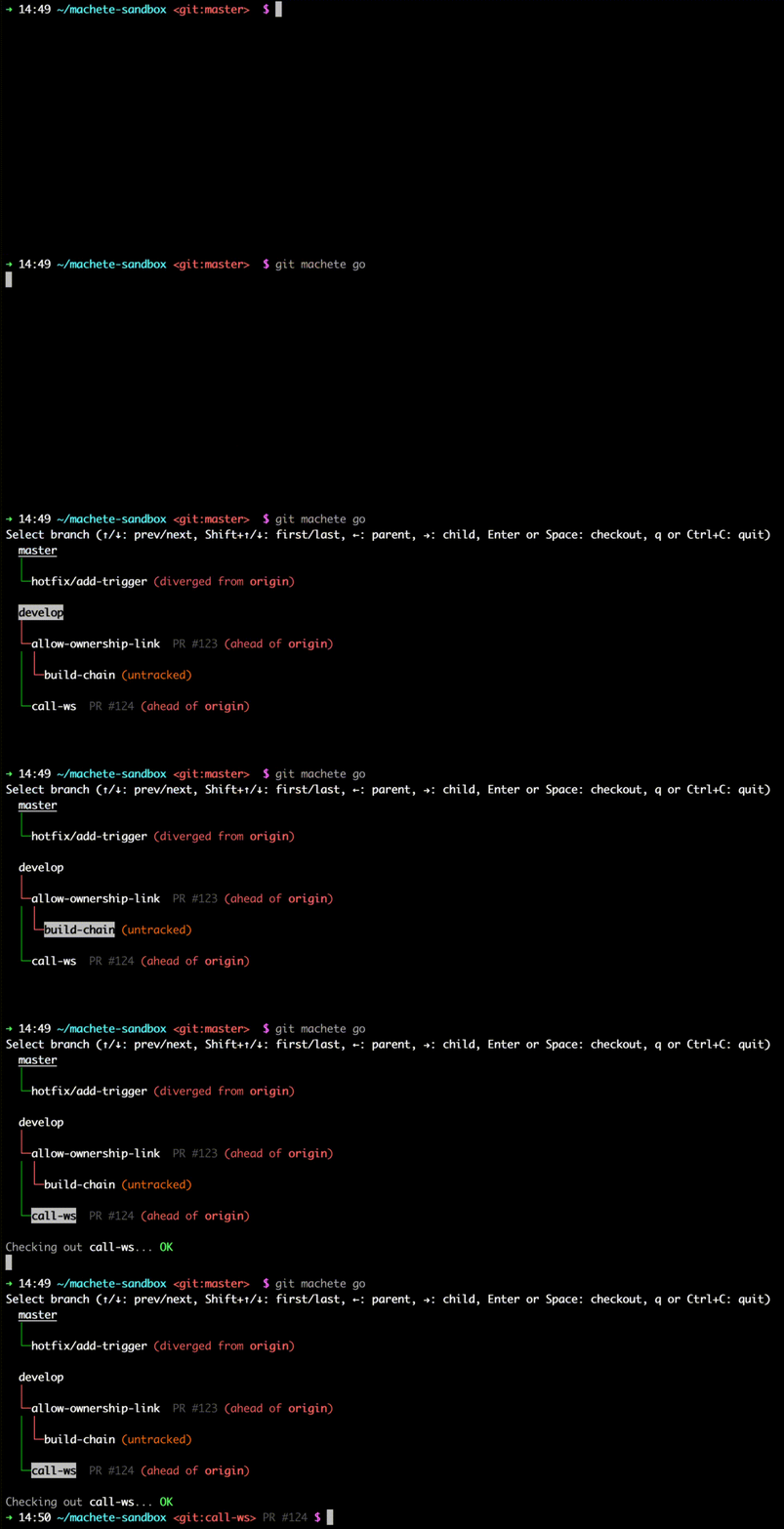
Select a branch to check out using an interactive interface with keyboard navigation (arrow keys, Enter to select).
Note: interactive mode is not supported on Windows yet. Use git machete go <down|next|prev|up> instead.
Rebase, reset to remote, push, pull all branches as needed
git machete traverse --fetch --start-from=first-root
Put each branch one by one in sync with its parent and remote tracking branch.
Fast-forward merge a child branch into the current branch
git machete advance
Useful for merging the child branch to the current branch in a linear fashion (without creating a merge commit).
GitHub & GitLab integration
Check out the given PRs into local branches, also traverse chain of pull requests upwards, adding branches one by one to git-machete and check them out locally as well:
git machete github checkout-prs [--all | --by=<github-login> | --mine | <PR-number-1> ... <PR-number-N>]
git machete gitlab checkout-mrs [--all | --by=<gitlab-login> | --mine | <MR-number-1> ... <MR-number-N>]
Create the PR/MR, using the upstream (parent) branch from .git/machete as the base:
git machete github create-pr [--draft]
git machete gitlab create-mr [--draft]
The entire chain of PRs/MRs will be posted in the PR/MR description (example for GitHub):
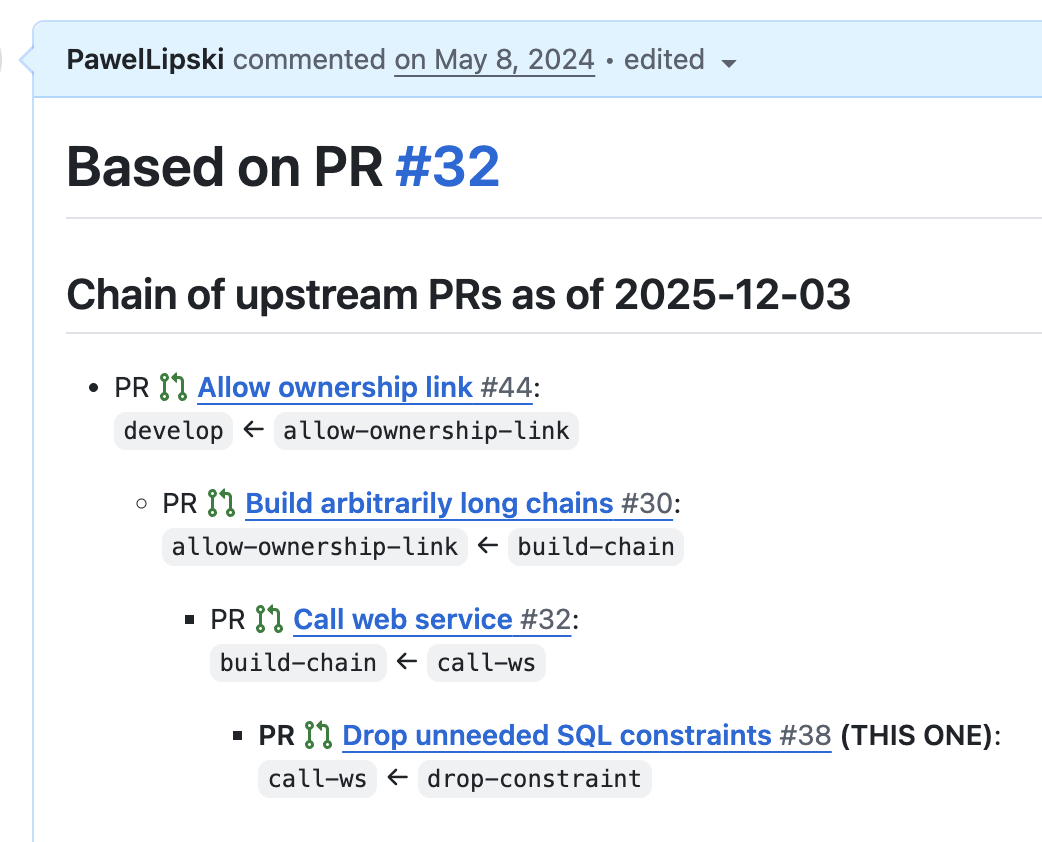
Note: for private repositories (or side-effecting operations like create-pr/create-mr on public repositories),
a GitHub API token with repo access or a GitLab API token with api access is required.
See the docs for github
or gitlab for how to provide the token.
Shell completions
When git-machete is installed via Homebrew (and a few other supported package managers, see PACKAGES.md),
shell completions should be installed automatically.
For other package managers (like pip), or when your shell doesn't pick up the Homebrew-installed completion, use the following:
Bash
Put the following into ~/.bashrc or ~/.bash_profile:
eval "$(git machete completion bash)"  # or, if it doesn't work:
source <(git machete completion bash)
Fish
Put the following into ~/.config/fish/config.fish:
git machete completion fish | source
Zsh
Put the following into ~/.zshrc:
eval "$(git machete completion zsh)"  # or, if it doesn't work:
source <(git machete completion zsh)
AI coding agents (Cursor, Claude Code, Codex CLI, GitHub Copilot, ...)
Install with GitHub CLI (v2.90+):
gh skill install VirtusLab/git-machete git-machete --scope user
--scope user puts the skill under ~/.<agent>/skills/git-machete/ so every repo on your machine picks it up;
without it gh skill install defaults to .<agent>/skills/git-machete/ in the current repo only.
In a TTY gh prompts for which agent(s) to install for; non-interactively it defaults to GitHub Copilot —
pass --agent claude-code/--agent cursor etc. for others.
To pull in upstream changes later, run gh skill update.
If you don't use gh, copy skills/git-machete/SKILL.md from this repo
into ~/.cursor/skills/git-machete/, ~/.claude/skills/git-machete/, ~/.codex/skills/git-machete/, or ~/.agents/skills/git-machete/ by hand.
FAQ
I've run git machete discover... but the branch layout I see in .git/machete doesn't exactly match what I expected. Am I doing something wrong?
No! It's all right, discover is based on an (imperfect)
heuristic
which usually yields branch layout close to what the user would expect.
It still might not be perfect and — for example — declare branches to be children of main/develop instead of each other.
Just run git machete edit to fix the layout manually.
If you're working on JetBrains IDEs, you can use git-machete IntelliJ plugin
to have branch name completion when editing .git/machete file.
Also, consider git machete github checkout-prs or git machete gitlab checkout-mrs
instead of git machete discover if you already have GitHub PRs/GitLab MRs opened.
Sometimes when I run update or traverse, too many commits are taken into the rebase... how to fix that?
Contrary to the popular misconception, git doesn't have a notion of "commits belonging to a branch". A branch is just a movable reference to a commit.
This makes it hard in general case to determine the range of commits that form the "unique history" of the given branch. There's an entire algorithm in git-machete for determining the fork point of the branch (i.e. the place after which the unique history of the branch starts).
One thing that you can do to help fork-point algorithm in its job, is to not delete local branches instantly after they're merged or discarded. They (or specifically, their reflogs) will be still useful for a while to determine fork points for other branches (and thus, the range of commits taken into rebase).
Also, you can always override fork point for a branch explicitly
with git machete fork-point --override-to... command.
Can I use git merge for syncing stacked branches?
There are two commonly used ways to put a branch back in sync with its base (parent) branch:
- rebase the branch onto its base branch
- merge the base branch into the branch
While git-machete supports merging base branch (like main) to update the branch
(git machete traverse --merge),
this approach works poorly with stacked branches.
You might end up with a very tangled history very quickly, and a non-trivial sequence of git cherry-picks might be needed to restore order.
That is why we recommend using rebase over merge for stacked branches. However, we still recommend using merge for the narrow case of backporting hotfixes.
Is it possible to create stacked PRs from forks in GitHub?
Due to the limitations of GitHub's PR model, it is not possible to cleanly create stacked PRs from forks. Generally, PRs need to be created in whatever repository the base branch lives.
Let's consider a hypothetical chain qux ➔ foo ➔ bar ➔ master,
where master lives in the original repo and qux, bar, foo live in a fork.
In such case, a PR for bar ➔ master will be opened in the original repo, as expected.
The subsequent PRs (foo ➔ bar, qux ➔ foo), however, will have base branches from the fork
— and hence they'll be opened in the fork instead of the original repo.
This is usually undesirable, as there'll be no way to retarget these PRs to master (which lives in the original repo),
and thus no way to merge them directly to master via GitHub.
The alternative is to always open the PRs directly to master in the original repo (even from the further branches),
but this is also inconvenient as the range of commits would need to be narrowed down manually when viewing the PRs.
In what order should I merge stacked PRs?
We recommend merging PRs from the top-most (closest to the root branch, typically main or master).
In other words, PR should only be merged when its base is a root branch.
This way, you don't end up with a big-ball-of-code PR at the end. Avoiding such "balls" is one of the main reasons for opening small PRs in the first place.
How to cleanly slide out a PR merged via a merge queue or Squash button?
When the PRs are are merged remotely — for example, by using a merge queue or GitHub's squash-merge button, you can use the following workflow to cleanly manage your branch dependencies after a PR is merged:
- Once the PR is merged remotely, run
git machete slide-out --no-rebase <branch>to remove the branch from the layout without triggering any rebases - Then run
git machete traverse -WH(or-WLfor GitLab instead of GitHub) to:- Pull the fresh
master/mainbranch (-Wincludes--fetch) - Put all child PRs back in sync
- Retarget child PRs to their new base branches
- Pull the fresh
Note: git-machete can sometimes detect merges automatically and suggest slide-out during traverse.
The config option git config machete.squashMergeDetection simple usually works well for this, but isn't perfect.
The exact detection mode is more precise but might take longer on larger repositories.
If automatic detection doesn't work reliably for your workflow, git machete slide-out --no-rebase + git machete traverse -WH is a good fallback approach.
Reference
Check out the tutorial for a guide on how to use the tool.
Find the docs at Read the Docs.
You can also check git machete help and git machete help <command>.
For the excellent overview for the reasons to use small & stacked PRs, see Ben Congdon's blog post.
Git compatibility
git-machete (since version 2.13.0) is compatible with git >= 1.8.0.
Contributions
Contributions are welcome! See contributing guidelines for details.
1 maintainer

Metadata
1 maintainer
Release files for git-machete 3.46.0
For a detailed explanation of source distributions (sdists) and built distributions (wheels), please see the package formats documentation.
Source distribution (sdist)
| File | Size | Uploaded | |
|---|---|---|---|
| git_machete-3.46.0.tar.gz | 209.2 kB | Details |
Built distribution (wheel)
| File | Interpreter | ABI | Platform | Reset |
|---|---|---|---|---|
| git_machete-3.46.0-py3-none-any.whl | Python 3 | none | any | Details |
Total release size: 437.8 kB
Release files / git_machete-3.46.0.tar.gz
| Download URL | git_machete-3.46.0.tar.gz |
|---|---|
| Size | 209.2 kB |
| Tags | Source |
|
SHA-256 checksum How to use checksums |
4d9c9d6eec5c17b204d7d49542d6b3f1c79464594d50535c87f7048c5c25cd11
|
|
BLAKE2b-256 checksum How to use checksums |
19ca3d12a30e7609a3eecad08ed41fb6ded1812ad789f53b632564c7c39b17cd
|
| Upload date | |
|
Uploaded using Trusted Publishing? What is trusted publishing? |
No |
| Uploaded via |
twine/7.0.0 CPython/3.13.7
|
Release files / git_machete-3.46.0-py3-none-any.whl
| Download URL | git_machete-3.46.0-py3-none-any.whl |
|---|---|
| Size | 228.6 kB |
| Tags | Python 3 |
|
SHA-256 checksum How to use checksums |
cf14f5f19b53c56214860285a019e777d34182f8f51f20f5fac2ddff478395e1
|
|
BLAKE2b-256 checksum How to use checksums |
b4a904d0dd4f4689982b25798c65ffd95cf70b2fa656fb3cdbad9ca17c6ee637
|
| Upload date | |
|
Uploaded using Trusted Publishing? What is trusted publishing? |
No |
| Uploaded via |
twine/7.0.0 CPython/3.13.7
|














