
Quick and pretty overview of many git local repositories at once compared to their remotes

Project description
Git Overview
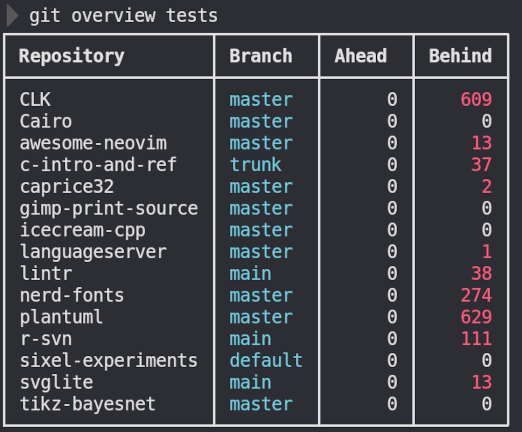
A powerful command-line tool to quickly scan directories and display the status of all Git repositories. Get an overview of which repositories are ahead/behind their remotes across your entire projects folder.
Features
- 🔍 Recursive scanning - Automatically finds all Git repositories in a directory tree
- 📊 Multi-branch support - Check status for current branch plus main/master or custom branches
- 🎨 Beautiful output - Colorful, formatted tables with Unicode box-drawing characters
- 💾 Multiple formats - Pretty, simple, and CSV output formats
- ⚡ Parallel processing - Fast scanning using multiple threads
- 📁 Exclusion support - Skip specific directories from scanning
Installation
Install from PyPI
pip install git-overview
Manual Installation
# Download the script and make it executable
wget https://raw.githubusercontent.com/yourusername/git-overview/main/git-overview.py
chmod +x git-overview.py
sudo mv git-overview.py /usr/local/bin/git-overview
Install as DEB Package (Ubuntu/Debian)
wget https://github.com/yourusername/git-overview/releases/latest/download/git-overview_all.deb
sudo dpkg -i git-overview_all.deb
Usage
It can be invoked
# Scan current directory
git overview

# Scan specific directory
git overview ~/projects

# Include main/master branches
git overview --main

# Check specific additional branches
git overview --branch develop,feature/new-feature

# Exclude directories
git overview --exclude node_modules,dist,build

# Simple output (no colors/Unicode)
git overview --format simple

# CSV output
git overview --format csv

# Sort by ahead/behind count
git overview --sort ahead
Requirements
- Python 3.6+
- Git
License
GPL-3.0 License - See LICENSE file for details.
Release history Release notifications | RSS feed

Download files
Download the file for your platform. If you're not sure which to choose, learn more about installing packages.
Source Distribution
Built Distribution
Filter files by name, interpreter, ABI, and platform.
If you're not sure about the file name format, learn more about wheel file names.
Copy a direct link to the current filters
File details
Details for the file git_overview-0.1.tar.gz.
File metadata
- Download URL: git_overview-0.1.tar.gz
- Upload date:
- Size: 20.6 kB
- Tags: Source
- Uploaded using Trusted Publishing? No
- Uploaded via: twine/6.1.0 CPython/3.13.3
File hashes
| Algorithm | Hash digest | |
|---|---|---|
| SHA256 |
19164ed3e3f37d8aa184c0e44590b04d18e73bac5cf33d44360d2ada2bf0f104
|
|
| MD5 |
35c3e6dcb47688fca3f84d71cbb49ff2
|
|
| BLAKE2b-256 |
df8be1fccbe9a9717cbb34e12e73b8f3f630347e9830746659fbc3f9a51c2ce7
|
File details
Details for the file git_overview-0.1-py3-none-any.whl.
File metadata
- Download URL: git_overview-0.1-py3-none-any.whl
- Upload date:
- Size: 21.7 kB
- Tags: Python 3
- Uploaded using Trusted Publishing? No
- Uploaded via: twine/6.1.0 CPython/3.13.3
File hashes
| Algorithm | Hash digest | |
|---|---|---|
| SHA256 |
4b22853b1078fde85a0b548558c9c9f403f69094ab09e8ef792d574811c7ac7d
|
|
| MD5 |
14e8e7e78604050027e36e2d38871007
|
|
| BLAKE2b-256 |
0299d41cef59414c367459ebb2b328850b2386c4d2ad1ae23f8c3a3cafdf6e93
|






