
Git-Pandas



Git-Pandas is a powerful Python library that transforms Git repository data into pandas DataFrames, making it easy to analyze and visualize your codebase's history, contributors, and development patterns. Built on top of GitPython, it provides a simple yet powerful interface for extracting meaningful insights from your Git repositories.
What's New in v2.6.0
- 📦 Smaller Default Install:
redisandcoverageare no longer installed bypip install git-pandas. Usepip install "git-pandas[redis]"forRedisDFCacheandpip install "git-pandas[coverage]"forRepository.coverage(). - 🐼 pandas 3 Support: The
pandas<3cap is gone; the suite runs green against pandas 2 and pandas 3. - 📈 Usable Cumulative Blame:
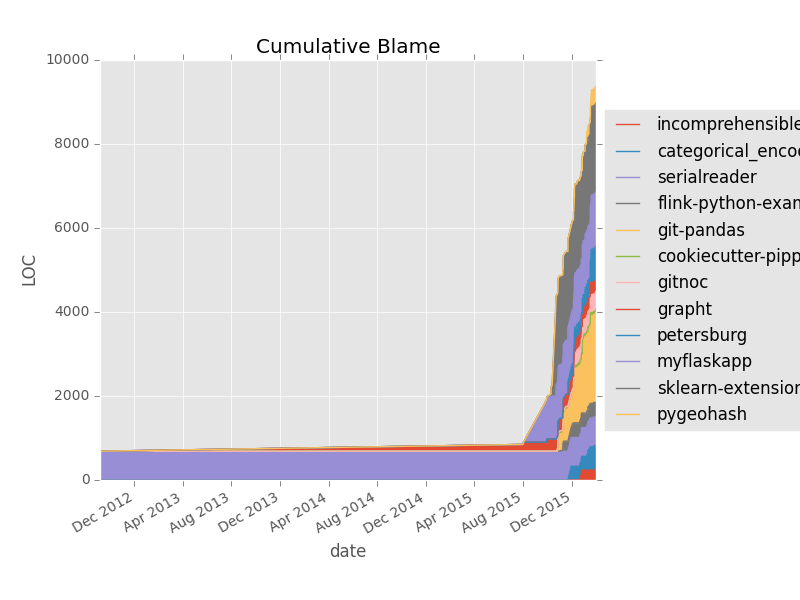
cumulative_blame()andparallel_cumulative_blame()now return only contributor columns on an ascendingDatetimeIndex, sodf.sum(axis=1), date slicing, and.diff()work as expected. - 🎯 Exact
num_datapoints:revs(num_datapoints=N)returns exactlyNevenly spaced revisions instead of over-sampling. - 🧮 Honest Project Limits:
ProjectDirectory.commit_history(),file_change_history(),hours_estimate()andrevs()now split a project-widelimitacross repositories without dropping the remainder, so small limits no longer return empty or short frames. - 🔢 Finite Punchcards:
punchcard(normalize=...)no longer emitsNaNfor an all-zero metric.
See the changelog for the full list, including the migration notes for
the cumulative_blame and revs output changes.
Why Git-Pandas?
- Easy to Use: Simple API that converts Git data into familiar pandas DataFrames
- Comprehensive Analysis: From basic commit history to complex metrics like bus factor
- Flexible: Works with single repositories or entire project directories
- Performance Optimized: Advanced caching system with multiple backends
- Remote Operations: Safe remote fetching and cache warming capabilities
- File-Level Insights: Granular analysis including file-wise bus factor
Core Components
Repository
The Repository class provides a wrapper around a single Git repository, offering methods to:
- Extract commit history with filtering by extension and directory
- Analyze file changes and blame information with file-level granularity
- Track branch and tag information
- Generate cumulative blame statistics
- Calculate file ownership and bus factor at repository or file level
- NEW: Safe remote fetching and cache warming
- NEW: Cache management and performance monitoring
ProjectDirectory
The ProjectDirectory class enables analysis across multiple repositories:
- Automatically discovers and analyzes nested Git repositories
- Aggregates metrics across multiple repositories
- Provides project-level insights and statistics
- NEW: Bulk remote operations across multiple repositories
- NEW: Shared cache management for improved performance
Key Features
Repository Analysis
- Commit History: Track changes with extension and directory filtering
- File Analysis: Monitor edited files and blame information
- Branch & Tag Management: Access repository structure information
- Cumulative Blame: Generate time-series data of code ownership
- File Ownership: Approximate file ownership and contribution patterns
- NEW: File-wise bus factor analysis for granular risk assessment
Project Insights
- Bus Factor: Calculate project sustainability metrics at repository or file level
- Development Time: Estimate hours spent per project or author
- NEW: Cross-repository cache management and statistics
Performance Optimization
- Multi-Backend Caching: EphemeralCache, DiskCache, and RedisDFCache
- Cache Management: Invalidate, monitor, and warm caches for optimal performance
- Remote Operations: Safe fetching without affecting working directory
- Bulk Operations: Parallel processing for multiple repositories
GitHub Integration
- Profile Analysis: Analyze GitHub.com profiles via
GitHubProfileobject - Repository Metrics: Extract repository-specific insights
- Contributor Insights: Track external contributions and collaborations
Visualization Tools
- Plotting Helpers: Built-in utilities for common Git analytics
- Punchcard Analysis: Generate and visualize commit patterns
- Blame Visualization: Create cumulative blame charts
- Time Series Analysis: Track changes and patterns over time
Installation
Git-Pandas requires Python 3.8+ and can be installed using pip:
pip install git-pandas
Optional Dependencies
For enhanced functionality, install additional packages:
# For parallel processing
pip install joblib

# For Redis caching
pip install "git-pandas[redis]"

# For Repository.coverage() / .coverage file parsing
pip install "git-pandas[coverage]"

# For visualization
pip install matplotlib seaborn
Quick Start
Basic Repository Analysis
from gitpandas import Repository
from gitpandas.cache import DiskCache

# Create repository with persistent caching
cache = DiskCache('/tmp/git_cache.gz', max_keys=1000)
repo = Repository('/path/to/repo', cache_backend=cache)

# Get commit history with filtering
commits_df = repo.commit_history(
    branch='main',
    limit=1000,
    ignore_globs=['*.pyc', '*.log'],
    include_globs=['*.py', '*.js']
)

# Analyze blame information
blame_df = repo.blame(by='repository')

# Calculate bus factor for entire repository
bus_factor_df = repo.bus_factor(by='repository')

# NEW: Calculate file-wise bus factor
file_bus_factor_df = repo.bus_factor(by='file')
Cache Management (New in v2.5.0)
# Get cache statistics
stats = repo.get_cache_stats()
print(f"Cache usage: {stats['global_cache_stats']['cache_usage_percent']:.1f}%")

# Warm cache for better performance
result = repo.warm_cache(
    methods=['commit_history', 'blame', 'file_detail'],
    limit=100
)
print(f"Created {result['cache_entries_created']} cache entries")

# Invalidate specific cache entries
repo.invalidate_cache(keys=['commit_history'])

# Clear all cache for this repository
repo.invalidate_cache()
Remote Operations (New in v2.5.0)
# Safely fetch changes from remote (read-only)
result = repo.safe_fetch_remote(dry_run=True)
if result['remote_exists'] and result['changes_available']:
    # Actually fetch the changes
    fetch_result = repo.safe_fetch_remote()
    print(f"Fetch status: {fetch_result['message']}")
Multi-Repository Analysis
from gitpandas import ProjectDirectory

# Analyze multiple repositories with shared cache
project = ProjectDirectory('/path/to/projects', cache_backend=cache)

# NEW: Bulk operations across all repositories
result = project.bulk_fetch_and_warm(
    fetch_remote=True,
    warm_cache=True,
    parallel=True,
    cache_methods=['commit_history', 'blame']
)

print(f"Processed {result['repositories_processed']} repositories")
print(f"Cache entries created: {result['summary']['total_cache_entries_created']}")

# Get project-wide cache statistics
cache_stats = project.get_cache_stats()
print(f"Total repositories: {cache_stats['total_repositories']}")
print(f"Cache coverage: {cache_stats['cache_coverage_percent']:.1f}%")
Available Methods
Repository Class
# Core Analysis
repo.commit_history(branch=None, limit=None, days=None, ignore_globs=None, include_globs=None)
repo.file_change_history(branch=None, limit=None, days=None, ignore_globs=None, include_globs=None)
repo.blame(rev="HEAD", committer=True, by="repository", ignore_globs=None, include_globs=None)
repo.bus_factor(by="repository", ignore_globs=None, include_globs=None)  # by="file" for file-wise
repo.punchcard(branch=None, limit=None, days=None, by=None, normalize=None, ignore_globs=None, include_globs=None)

# Repository Information
repo.list_files(rev="HEAD")
repo.has_branch(branch)
repo.is_bare()
repo.has_coverage()
repo.coverage()
repo.get_commit_content(rev, ignore_globs=None, include_globs=None)

# NEW: Remote Operations (v2.5.0)
repo.safe_fetch_remote(remote_name='origin', prune=False, dry_run=False)
repo.warm_cache(methods=None, **kwargs)

# NEW: Cache Management (v2.5.0)
repo.invalidate_cache(keys=None, pattern=None)
repo.get_cache_stats()
ProjectDirectory Class
# Initialize with multiple repositories
project = ProjectDirectory(
    working_dir='/path/to/project',  # or list of repo paths
    ignore_repos=None,
    verbose=True,
    cache_backend=None,
    default_branch='main'
)

# NEW: Bulk Operations (v2.5.0)
project.bulk_fetch_and_warm(fetch_remote=False, warm_cache=False, parallel=True, **kwargs)
project.invalidate_cache(keys=None, pattern=None, repositories=None)
project.get_cache_stats()
Cache Backends
EphemeralCache (In-Memory)
from gitpandas.cache import EphemeralCache

cache = EphemeralCache(max_keys=1000)
repo = Repository('/path/to/repo', cache_backend=cache)
DiskCache (Persistent)
from gitpandas.cache import DiskCache

cache = DiskCache('/path/to/cache.gz', max_keys=500)
repo = Repository('/path/to/repo', cache_backend=cache)
RedisDFCache (Distributed)
from gitpandas.cache import RedisDFCache

cache = RedisDFCache(
    host='localhost',
    port=6379,
    db=12,
    max_keys=1000,
    ttl=3600  # 1 hour expiration
)
repo = Repository('/path/to/repo', cache_backend=cache)
Common Parameters
Most analysis methods support these filtering parameters:
branch: Branch to analyze (defaults to repository's default branch)limit: Maximum number of commits to analyzedays: Limit analysis to last N daysignore_globs: List of glob patterns for files to ignoreinclude_globs: List of glob patterns for files to includeby: How to group results (usually 'repository' or 'file')
Documentation
For comprehensive documentation, examples, and API reference:
Performance Tips
- Use caching for any analysis beyond one-off queries
- Choose the right cache backend for your use case:
- EphemeralCache: Development, interactive analysis
- DiskCache: Regular workflows, CI/CD
- RedisDFCache: Team environments, production
- Filter data early using glob patterns and limits
- Warm your cache before intensive analysis sessions
- Use parallel processing for multiple repositories
Contributing
We welcome contributions! Please review our Contributing Guidelines for details on:
- Code of Conduct
- Development Setup
- Pull Request Process
- Starter Issues
Development Setup
# Clone the repository
git clone https://github.com/wdm0006/git-pandas.git
cd git-pandas

# Install in development mode
make install-dev

# Run tests
make test

# Run linting and formatting
make lint
make format
License
This project is BSD licensed (see LICENSE.md)
Version History
- v2.6.0 (2026): pandas 3 support, optional
redis/coverageextras, and correctness fixes to cumulative blame output shape,revs(num_datapoints=...), punchcard normalization, and project-widelimitallocation - v2.5.0 (2026): File-wise bus factor, cache management, remote operations, performance guide, and a large correctness batch across caching and multi-repository aggregation
- v2.4.0 (2024): Enhanced caching system with timestamps
- v2.2.1 (2023): Stability improvements and bug fixes
1 maintainer

Metadata
1 maintainer
Release files for git-pandas 2.6.0
For a detailed explanation of source distributions (sdists) and built distributions (wheels), please see the package formats documentation.
Source distribution (sdist)
| File | Size | Uploaded | |
|---|---|---|---|
| git_pandas-2.6.0.tar.gz | 586.4 kB | Details |
Release files / git_pandas-2.6.0.tar.gz
| Download URL | git_pandas-2.6.0.tar.gz |
|---|---|
| Size | 586.4 kB |
| Tags | Source |
|
SHA-256 checksum How to use checksums |
96bb40013c12cf02b192bbf02f7d5b24ddecd58364801e911463f07bce9e3146
|
|
BLAKE2b-256 checksum How to use checksums |
84b50b0eeb38042fd0ab31a93c5e4d792c4144c80a4554cb67b5758632b6250c
|
| Upload date | |
|
Uploaded using Trusted Publishing? What is trusted publishing? |
Yes |
| Uploaded via |
twine/7.0.0 CPython/3.13.14
|
Provenance
Provenance describes where a file came from. On PyPI, provenance is shared via attestations, which provide a verifiable record of the build or publishing details. View details, limitations and caveats.


PyPI Publish Attestation
PyPI verified that this artifact, at this checksum, originated from the publisher listed below.
Signed by GitHub Actions, verified by PyPI on Oct 3, 2026.
Transparency log













