
A fast terminal-based Git repository selector with fuzzy finding

Project description
🐙 🚀 Git Repo Jumper
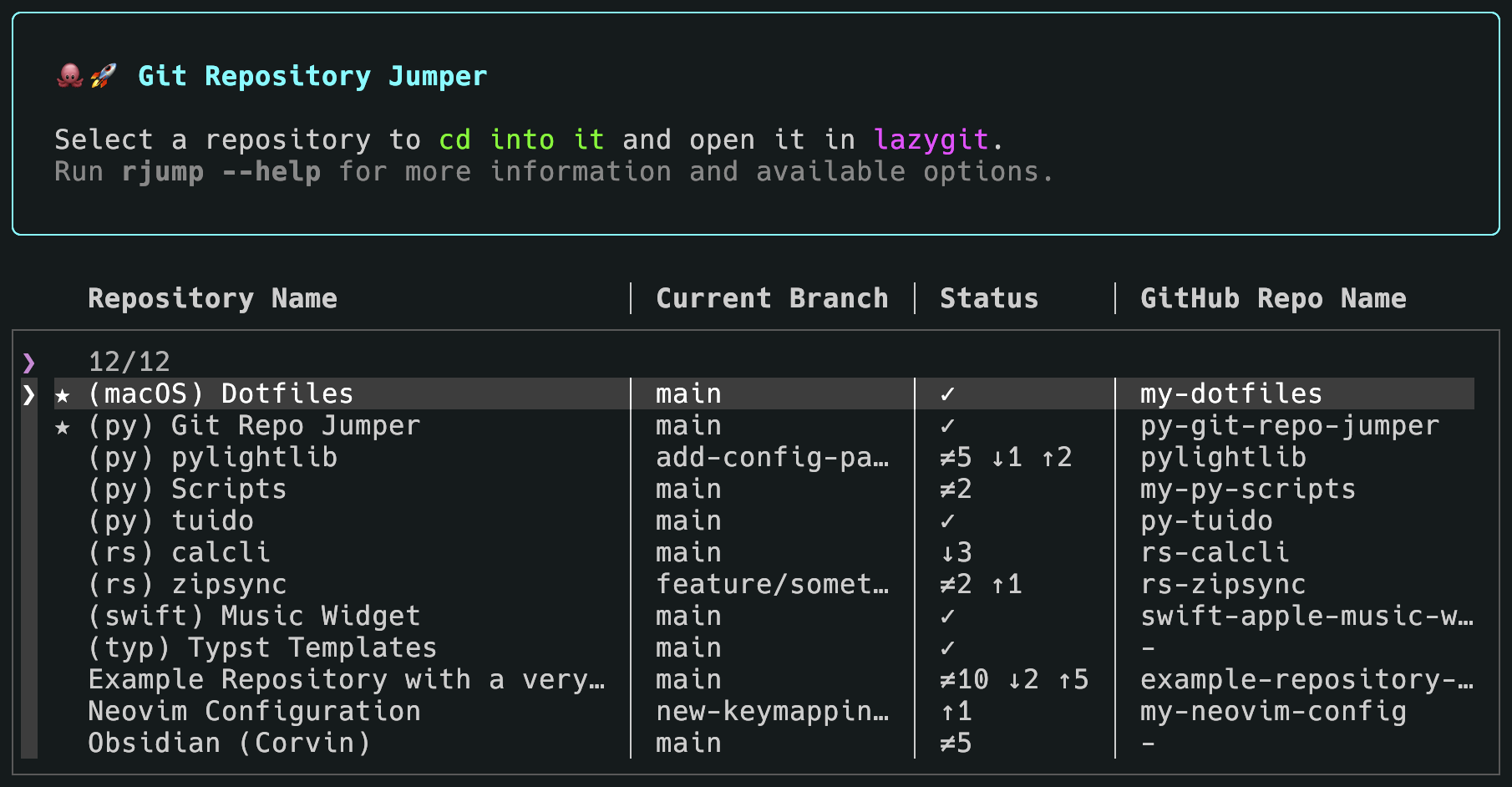
A fast and elegant terminal-based Git repository selector with fuzzy finding. Quickly navigate between your repositories and open them in your favorite Git TUI tool.



✨ Features
- 🔍 Fuzzy Finder – Type to filter repositories instantly across all fields
- 📊 Table Display – Clean table-like interface showing name, branch, status, GitHub repo and path
- 🎨 Beautiful UI – Rich-styled panels and headers with color-coded information
- ⚡ Git Status – Real-time status showing clean repos, changes and upstream differences (↓↑)
- ⏳ Progress Bar – Animated progress bar while loading git status of the repositories
- 🐙 GitHub Integration – Automatically extracts and displays GitHub repository names
- 🚨 Error Handling – Invalid repositories shown in a red panel before selection
- 📂 Auto-naming – Uses folder names if no explicit name is provided
- 🔧 Flexible – Works with lazygit, gitui, tig or any other Git TUI tool
- 📝 Shell Integration – Supports directory changing via
selected-repo.txt - 🏷️ Filtering – Hide repositories with
show: false
Planned features
- Favorite/Bookmarked Repositories
- Recent Repositories History
🚀 Installation
Prerequisites
- Python 3.10 or higher
- Git
- A Git TUI tool (recommended):
-
# macOS
brew install lazygit

# Linux (Debian/Ubuntu)
apt install lazygit
Install
Via pip
pip install git-repo-jumper
From Source
-
Clone this repository:
git clone https://github.com/cgroening/py-git-repo-jumper.git
cd py-git-repo-jumper
-
Install the package if you want the
rjumpcommand available globally:
uv pip install .
Alternatively, Git Repo Jumper can be run without installation, see Section Without Installation.
-
Create your
config.yaml: See Configuration -
(Optional) Set up shell integration (see Shell Integration)
⚙️ Configuration
Create a config.yaml file in ~/.config/git-repo-jumper/. Alternatively, you can place the configuration file at a location of a choice and pass the path with the --config option.
# Git program to use (lazygit, gitui, tig, gh, etc.)
git-program: lazygit

# Your GitHub username (optional - shortens remote repo names)
github-username: yourusername

# Column widths for the repository selector (fuzzy finder).
# The available width is first distributed to meet these minimum values.
# If the content of a column exceeds its configured width, the column
# is automatically expanded to fit if extra space is available.
repo-selector-column-widths:
  name: 30
  current_branch_name: 14
  status: 6
  github_repo_name: 20

# List of repositories
repos:
  # With explicit name
  - name: My Project
    path: ~/projects/my-project
    fav: true

  # Without name - uses folder name "dotfiles"
  - path: ~/dotfiles

  # Hide from list
  - name: Old Project
    path: ~/old-project
    show: false

  # iCloud/Obsidian vault example
  - name: Notes
    path: ~/Library/Mobile Documents/iCloud~md~obsidian/Documents/MyVault
Configuration Options
| Option | Type | Required | Description | Default |
|---|---|---|---|---|
git-program |
string | No | Git TUI tool to use | – |
github-username |
string | No | Your GitHub username (removes from display) | "" |
repo-selector-column-widths |
map | No | Column widths for the repository selector (fuzzy finder) | {} |
repos |
list | Yes | List of repository configurations | [] |
repos[].name |
string | No | Display name | folder name |
repos[].path |
string | Yes | Full path to repository | - |
repos[].show |
boolean | No | Whether to show in list | true |
repos[].fav |
boolean | No | Whether to stick to top | false |
📖 Usage
Basic Usage
# Run directly
rjump         # defaults to rjump select
rjump select

# Or with shell function (if configured)
rj
Without Installation
The package can also be run without installation from the project root:
python -m git_repo_jumper
Command Line Commands and Options
# Use a custom config file
rjump -C ~/my-repos.yaml
rjump --config ~/my-repos.yaml

# Save path of selected repo to selected-repo.txt only
# and do not open git tool like lazygit
rjump select -s
rjump select --save-only

# Fetch latest changes of remote repos
rjump select -f
rjump select --fetch

# Open with cached git info instead of fetching fresh info
rjump select -c
rjump select --cached

# Show the path of the configuration file
jump config-path
🐚 Shell Integration
Add a shell function to your ~/.zshrc or ~/.bashrc for easy access.
If you want to cd in to the selected repository after exiting the git program, add this to your shell function (make sure to change last_repo_file):
# ============================================================================ #
# rj - Git Repo Jumper shortcut
#
# Runs the Git Repo Jumper script and changes to the selected repository
# after the script is closed (= Lazygit was closed).
# ============================================================================ #
rj() {
    # Run the Git Repo Jumper script
    rjump "$@"

    # Change to cwd to the last selected repo
    local last_repo_file="/Users/<USERNAME>/Dotfiles/git-repo-jumper/selected-repo.txt"
    if [[ -f "$last_repo_file" ]]; then
        local target_dir=$(cat "$last_repo_file")
        if [[ -d "$target_dir" ]]; then
            cd "$target_dir" || return
            echo "Changed to: $(pwd)"
        else
            echo "Directory does not exist: $target_dir"
        fi
    else
        echo "Last repo file not found."
    fi
}

r() { rj "$@" }
rs() { rj select -s "$@" }
rf() { rj select -f "$@" }
rr() { rj select -c "$@" }
Then reload your shell:
source ~/.zshrc # or ~/.bashrc
Now simply run:
rj
🎯 Features in Detail
Fuzzy Finder
Type to filter repositories in real-time. Matches across:
- Repository names
- Branch names
- Git status
- GitHub repository names
- File paths
Example: Type "api" to instantly filter all repositories containing "api" in any field.
Git Status Indicators
| Icon | Meaning |
|---|---|
| ✓ | Clean repository (no uncommitted changes) |
| ≠ | Repository has uncommitted changes |
| ✗ | Invalid repository (not found or not a git repo) |
| ↓N | N commits behind upstream |
| ↑N | N commits ahead of upstream |
Error Display
Invalid repositories are shown in a red error panel before the selection interface:
- Path does not exist - Repository location not found
- Not a git repository - Valid path but no .git directory
- Timeout - Git commands took too long
This allows you to quickly identify and fix configuration issues.
GitHub Integration
The github-username config option shortens repository names for cleaner display:
Without username config:
yourusername/my-project  →  yourusername/my-project
yourusername/dotfiles    →  yourusername/dotfiles
With username configured:
yourusername/my-project  →  my-project
yourusername/dotfiles    →  Dotfiles
otherusername/repo       →  otherusername/repo  (unchanged)
Alphabetical Sorting
All repositories are sorted alphabetically by name (case-insensitive) for easy scanning.
Hidden Repositories
Use show: false to hide repositories from the list while keeping them in your config:
repos:
  - name: Active Project
    path: ~/projects/active

  - name: Archived Project
    path: ~/projects/archived
    show: false  # Won't appear in the list
📋 Requirements
- Python 3.10+
- InquirerPy >= 0.3.4
- PyYAML >= 6.0.0
- rich >= 13.0.0
📝 License
This project is licensed under the MIT License - see the LICENSE file for details.
🙏 Acknowledgments
- InquirerPy – Beautiful interactive prompts
- Rich – Rich text and beautiful formatting in the terminal
- lazygit – Amazing Git TUI
💡 Tips
- Press
Ctrl+Cto cancel at any time - The fuzzy finder searches across all visible columns
- Invalid repos are shown but not selectable
- Paths support
~for home directory expansion
🐛 Troubleshooting
Issue: "Config file not found"
- Solution: Create
config.yamlin~/.config/git-repo-jumper/or use--configflag
Issue: "No valid git repositories found"
- Solution: Check that paths in config.yaml are correct and point to git repositories
Issue: Git program not found
- Solution: Install the git tool (e.g.,
brew install lazygit) and set it in theconfig.yaml
Issue: Repository shows as invalid
- Solution: Verify the path exists and contains a
.gitdirectory
Release history Release notifications | RSS feed


Download files
Download the file for your platform. If you're not sure which to choose, learn more about installing packages.
Source Distribution
Built Distribution
Filter files by name, interpreter, ABI, and platform.
If you're not sure about the file name format, learn more about wheel file names.
Copy a direct link to the current filters
File details
Details for the file git_repo_jumper-0.1.2.tar.gz.
File metadata
- Download URL: git_repo_jumper-0.1.2.tar.gz
- Upload date:
- Size: 8.0 kB
- Tags: Source
- Uploaded using Trusted Publishing? No
- Uploaded via: uv/0.10.8 {"installer":{"name":"uv","version":"0.10.8","subcommand":["publish"]},"python":null,"implementation":{"name":null,"version":null},"distro":{"name":"macOS","version":null,"id":null,"libc":null},"system":{"name":null,"release":null},"cpu":null,"openssl_version":null,"setuptools_version":null,"rustc_version":null,"ci":null}
File hashes
| Algorithm | Hash digest | |
|---|---|---|
| SHA256 |
b4fa6f06990d6bf121c574a04df75a591708190b7dde0a192b482f441795c7da
|
|
| MD5 |
cde9b02557fec964a53074e6ec4198a8
|
|
| BLAKE2b-256 |
cecfab416983c513c42b10714c78dbfeec72a8e7b9229f08dac6886ebc559200
|
File details
Details for the file git_repo_jumper-0.1.2-py3-none-any.whl.
File metadata
- Download URL: git_repo_jumper-0.1.2-py3-none-any.whl
- Upload date:
- Size: 8.0 kB
- Tags: Python 3
- Uploaded using Trusted Publishing? No
- Uploaded via: uv/0.10.8 {"installer":{"name":"uv","version":"0.10.8","subcommand":["publish"]},"python":null,"implementation":{"name":null,"version":null},"distro":{"name":"macOS","version":null,"id":null,"libc":null},"system":{"name":null,"release":null},"cpu":null,"openssl_version":null,"setuptools_version":null,"rustc_version":null,"ci":null}
File hashes
| Algorithm | Hash digest | |
|---|---|---|
| SHA256 |
74e96e35edf088a8c759ae83b70c03137987b7132a69b03d00a12ce3d50f90d3
|
|
| MD5 |
7f1426bf44f7dcf211f7c780cb0b5989
|
|
| BLAKE2b-256 |
fdcd6ad4ae2416373a9646aed6cb5b27909393a04ac572a81395d932344fbce9
|






