
GIT SEARCH COMMAND





A simple tool to search the content in your GitLab project or GitHub repositories.
This project has been implemented for PERSONAL USE. If you want more advanced features like creating issue, pull request ... may be refer to use GLab or GitHub CLI
If this project is helpful for you, show your love ❤️ by putting a ⭐ on this project 😉.
Prerequisites
- Install Python3.7+.
- Create a personal access token on GitLab or GitHub.
Installation
python -m pip install --upgrade pip
python -m pip install git-search-command
Usage
Environment
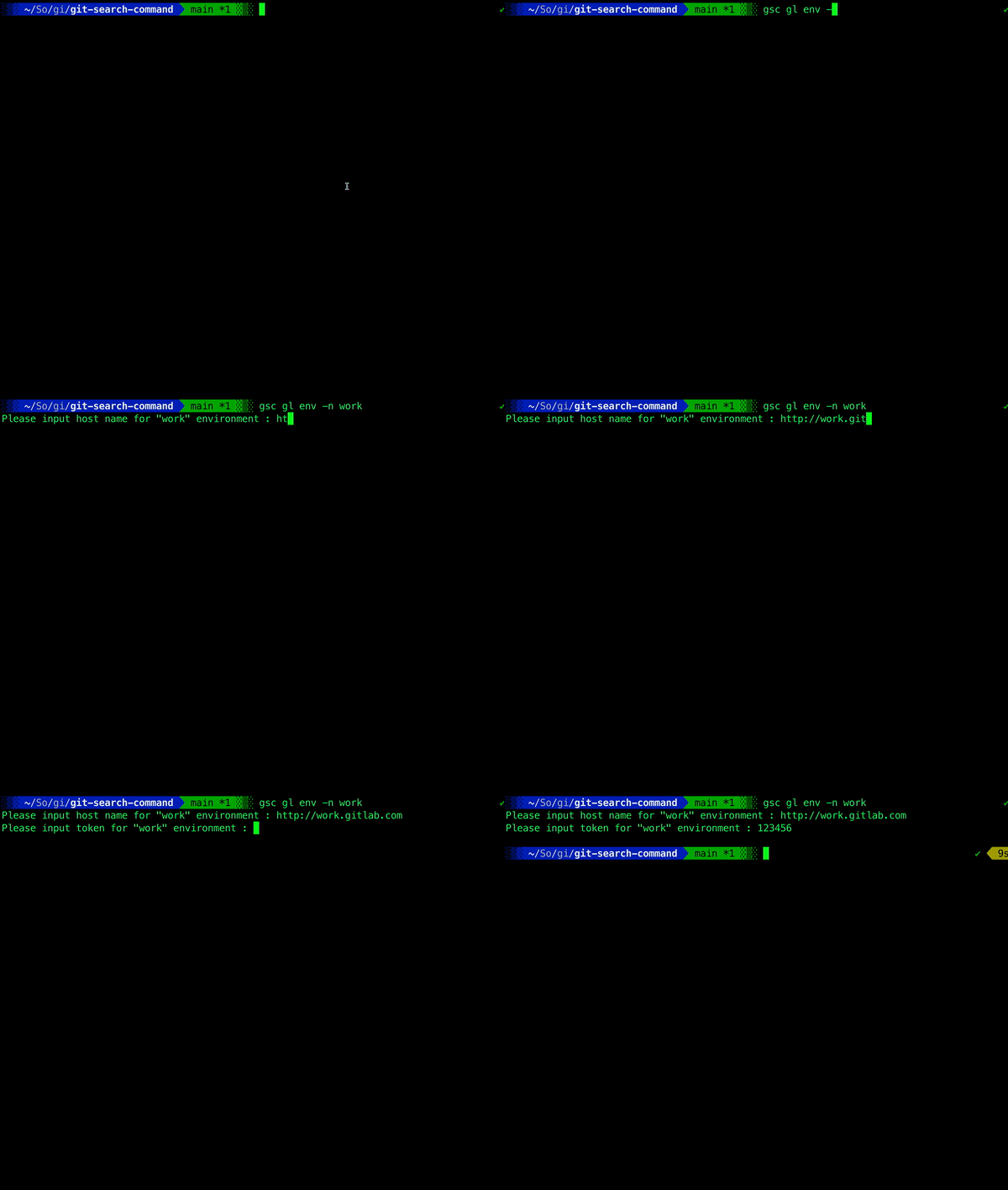
After finishing the installation you need to create new environment for searching
gsc gl env --new <environment_name>
Then input your host name and personal token as following
Search in GitLab
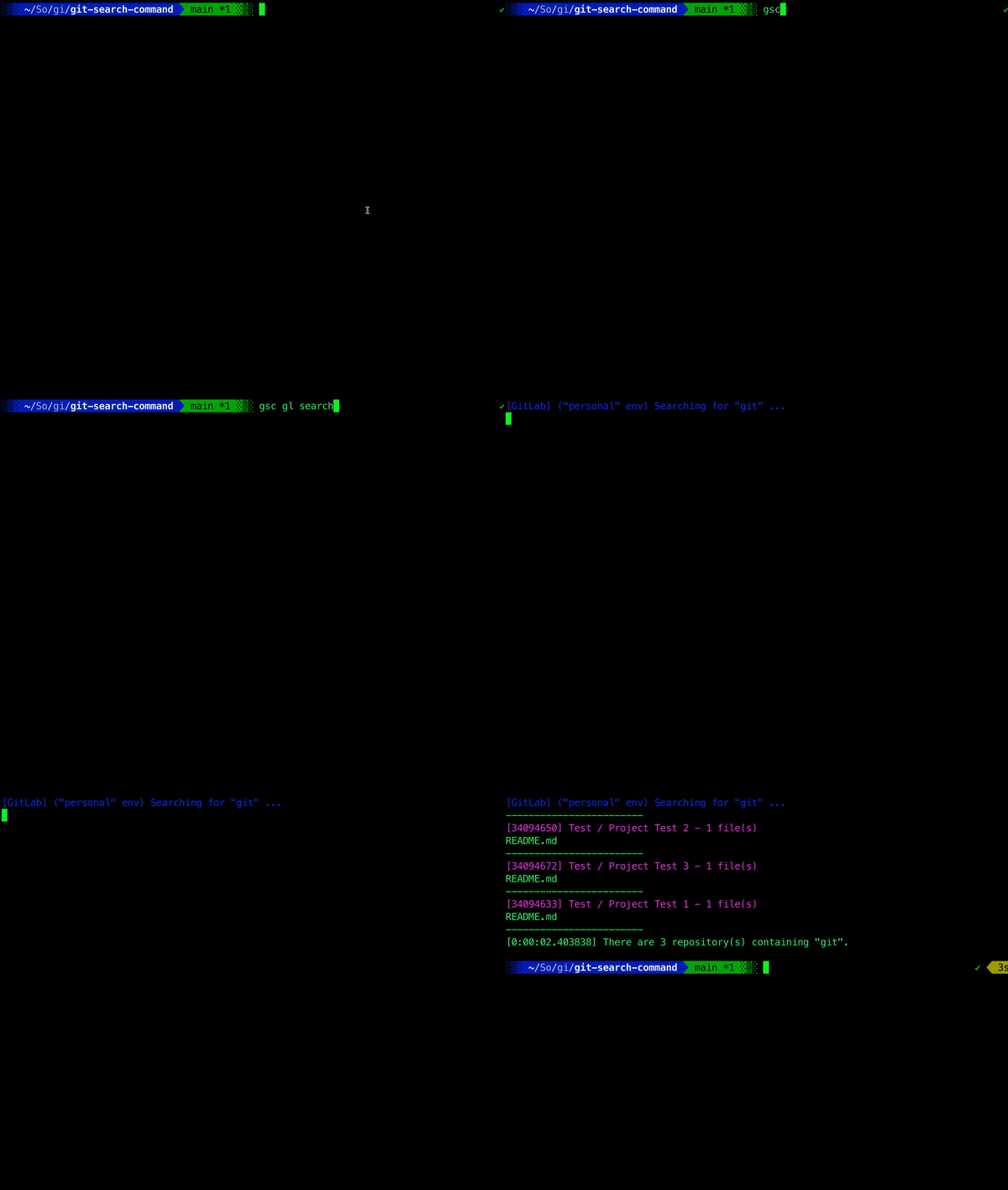
Default is to search all projects that you owned.
gsc gl search <keywork>
Search in a specific project
gsc gl search <keywork> --project <project_id>
Search in a specific group
gsc gl search <keywork> --group <group_id_or_group_path>
Search in GitHub
Default is to search all repositories that you owned, not fork repository.
gsc gh search <keywork>

Search in a specific repository
gsc gh search <keywork> --repository <repository_full_name>
See more
Read the wiki for the detail of gsc commands.
License
Copyright (C) 2022 James Nguyen

   Licensed under the Apache License, Version 2.0 (the "License");
   you may not use this file except in compliance with the License.
   You may obtain a copy of the License at

       http://www.apache.org/licenses/LICENSE-2.0

   Unless required by applicable law or agreed to in writing, software
   distributed under the License is distributed on an "AS IS" BASIS,
   WITHOUT WARRANTIES OR CONDITIONS OF ANY KIND, either express or implied.
   See the License for the specific language governing permissions and
   limitations under the License.
1 maintainer

Metadata
1 maintainer
Release files for git-search-command 2.1.2
For a detailed explanation of source distributions (sdists) and built distributions (wheels), please see the package formats documentation.
Source distribution (sdist)
| File | Size | Uploaded | Provenance | Actions |
|---|---|---|---|---|
| git_search_command-2.1.2.tar.gz | 22.6 kB | Without provenance | Details for git_search_command-2.1.2.tar.gz |
Built distribution (wheel)
| File | Interpreter | ABI | Platform | Actions Reset |
|---|---|---|---|---|
| git_search_command-2.1.2-py3-none-any.whl | Python 3 | none | any | Details for git_search_command-2.1.2-py3-none-any.whl |
Total release size: 56.8 kB
Release files / git_search_command-2.1.2.tar.gz
| Download URL | git_search_command-2.1.2.tar.gz |
|---|---|
| Size | 22.6 kB |
| Tags | Source |
|
SHA-256 checksum How to use checksums |
ecbfd5801da4ec6b025c54b1d39a5ca7a6886fcbfa4d4448e1cd39a0397076b5
|
|
BLAKE2b-256 checksum How to use checksums |
a323a60c08af1c1fd053419852b2a036cb942e0e28c650482b6fc2c0b180f50b
|
| Upload date | |
|
Uploaded using Trusted Publishing? What is trusted publishing? |
No |
| Uploaded via |
poetry/1.6.1 CPython/3.9.18 Linux/6.2.0-1014-azure
|
Release files / git_search_command-2.1.2-py3-none-any.whl
| Download URL | git_search_command-2.1.2-py3-none-any.whl |
|---|---|
| Size | 34.2 kB |
| Tags | Python 3 |
|
SHA-256 checksum How to use checksums |
70b497850a162a628a13187bc00de90f22690ebfe85ecc805c22d29f1d6b52de
|
|
BLAKE2b-256 checksum How to use checksums |
5fb7f4bd123fa6848b91f73143dfb6d93f9cd283f3a76e3b7f324188cad6f15e
|
| Upload date | |
|
Uploaded using Trusted Publishing? What is trusted publishing? |
No |
| Uploaded via |
poetry/1.6.1 CPython/3.9.18 Linux/6.2.0-1014-azure
|
Security for git-search-command 2.1.2
Provenance
Provenance describes where a file came from. On PyPI, provenance is shared via attestations, which provide a verifiable record of the build or publishing details. View details, limitations and caveats.
No provenance found
None of the files in this release were uploaded with provenance metadata.
A note on package security
PyPI is a repository for distributing packages, not a service for auditing them. While third-party security researchers and our staff do their best to detect and remove malicious packages, PyPI cannot guarantee the quality, security or suitability of any given package.
To learn more about protecting yourself from malicious actors, visit our package security documentation.














