
vidi
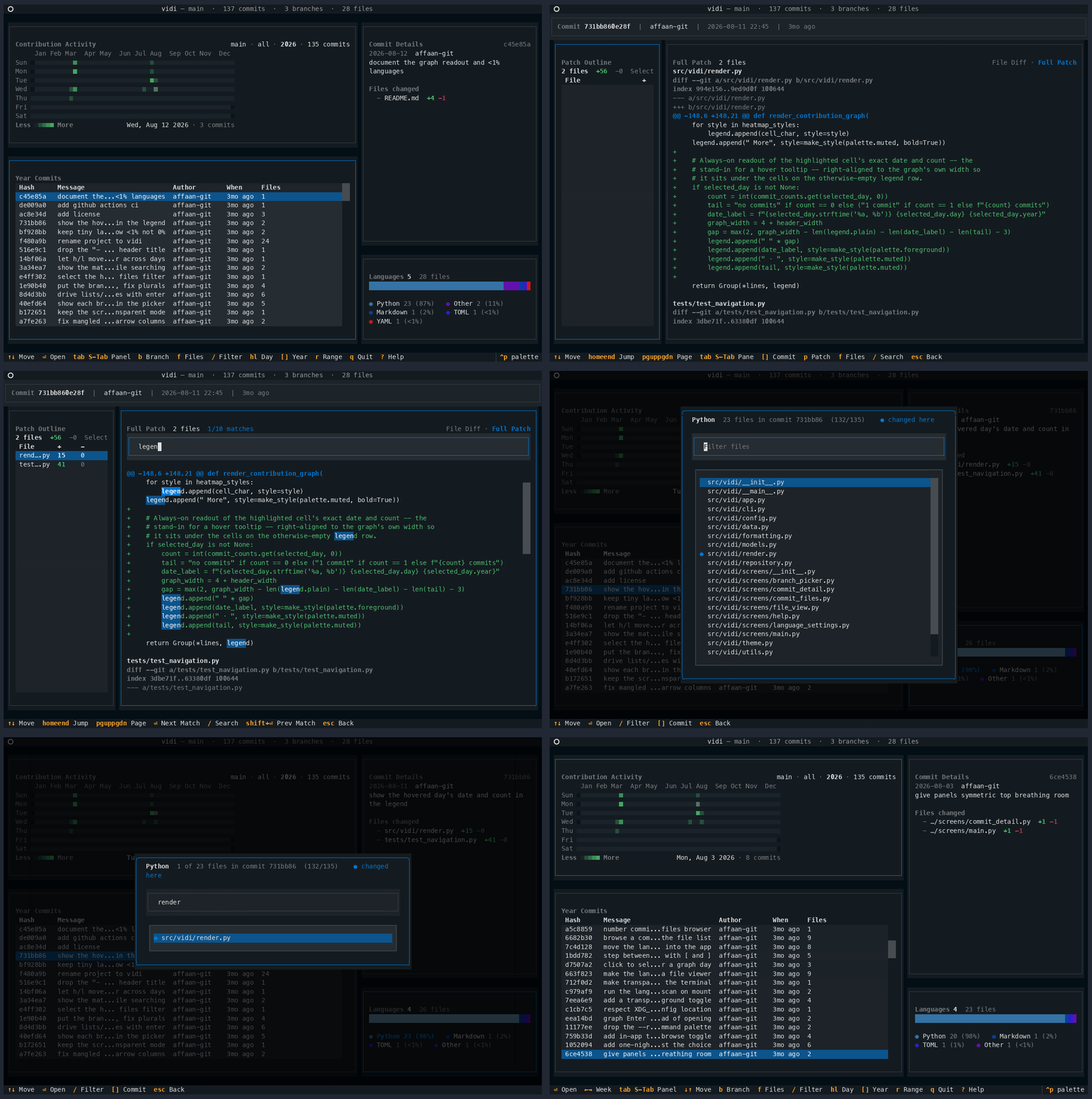
A read-only terminal viewer for a local Git repository.
Install
pipx install git-vidi # or uv tool install git-vidi or pip install git-vidi
Run
git view /path/to/repo # or vidi /path/to/repo
Or from anywhere inside a repo:
git view # or vidi
The same program also runs as git vidi.
Layout
+-----------------------------------+---------------------------+
| Contribution Activity             | Commit Details            |
|  (year heatmap, one cell per day) |  (author, message, files  |
|                                   |   changed for the current |
+-----------------------------------+   commit)                 |
| Year Commits                      |                           |
|  (commit table for the selected   +---------------------------+
|   branch, year and range)         | Languages                 |
|                                   |  (percentage bar and per- |
|                                   |   language breakdown)     |
+-----------------------------------+---------------------------+
Tab moves between the commit table, details panel, languages panel, and
graph. Selecting a day on the graph or a row in the commit table updates the
details panel. The commit table filter matches on message, author, hash, and
date.
Press Enter on a commit to open its diff, then [ and ] to step to the
previous or next commit. The languages panel shows the languages in the
highlighted commit's tree. Press Enter on a language to list its files at
that commit and Enter on a file to read it.
Press f from any panel or from the commit detail to browse the whole tree.
Use [ and ] in the file list to step between commits. Files changed in
the commit are marked with a dot. The branch picker shows how many commits each
branch is ahead of or behind the default branch (derived from origin/HEAD or
main/master).
Keys
Press ? in the app for the same reference.
Click to expand
Main screen
| Key | Action |
|---|---|
j / k or up / down |
Move within the focused panel |
tab / shift+tab |
Switch between panels |
enter |
Open the commit, or the highlighted language's files |
f |
Browse the highlighted commit's files |
/ |
Filter the commit table (esc clears) |
left / right |
Previous / next language, or back / forward a week on the graph |
h / l |
Select the older / newer active day |
[ / ] |
Step through years |
r |
Cycle the date range |
b |
Pick a branch |
? |
Show the key reference |
q |
Quit |
Commit detail
| Key | Action |
|---|---|
j / k or up / down |
Move within the focused pane |
tab / shift+tab |
Switch between panes |
[ / ] |
Previous / next commit |
p |
Toggle file diff and full patch |
f |
Browse this commit's files |
/ |
Filter the files list, or search the patch |
enter / shift+enter |
Next / previous patch match while searching |
n / N |
Next / previous patch match |
left / right |
Scroll the patch sideways when lines are not wrapped |
page up / page down |
Scroll by a page |
home / end |
Jump to the top or bottom |
drag / ctrl+c |
Select patch text with the mouse, then copy it |
esc / q |
Back (esc first closes the search) |
Branch picker
| Key | Action |
|---|---|
| type | Filter the branch list |
up / down |
Move the highlight |
enter |
Switch to the highlighted branch |
esc / q |
Cancel |
Commit files
| Key | Action |
|---|---|
j / k or up / down |
Move between files |
/ |
Filter the list (esc clears) |
[ / ] |
Previous / next commit |
enter |
Open the highlighted file |
esc / q |
Back |
File view
| Key | Action |
|---|---|
j / k or up / down |
Scroll (arrows scroll even while searching) |
/ |
Search in the file |
enter / shift+enter |
Next / previous match while searching |
n / N |
Next / previous match |
left / right |
Scroll sideways when lines are not wrapped |
[ / ] |
Previous / next file |
page up / page down |
Scroll by a page |
home / end |
Jump to the top or bottom |
drag / ctrl+c |
Select text with the mouse, then copy it |
esc / q |
Back (esc first closes the search) |
Settings
Apart from the path, everything is set inside the app from the command palette
(Ctrl+P). Settings are saved to ~/.config/vidi/config.json
(%APPDATA%\vidi\config.json on Windows) by default or
$XDG_CONFIG_HOME/vidi/config.json when set.
The command palette additionally exposes these settings:
- "Transparent background" uses the terminal's background and keeps the theme's borders, selection, and text.
- "Graph: commit table follows on Enter" makes moving over the graph wait for
Enterbefore it selects a commit. "Graph: commit table follows as you move" switches back to the default. - "Language settings" chooses whether languages are measured by bytes or file count, which languages to exclude, and which extra directories the scan skips.
- "Change theme" picks a theme. "Reset theme to default" switches back to the default.
- "Wrap lines in diffs" and "Wrap lines in file view" choose whether long lines wrap or scroll sideways. Diffs wrap by default.
Development
pip install -e ".[test]"
python -m pytest -q
License
vidi is free software under the GNU General Public License v3.0 or later. See LICENSE for the full text.
1 maintainer

Metadata
1 maintainer
Release files for git-vidi 0.1.0
For a detailed explanation of source distributions (sdists) and built distributions (wheels), please see the package formats documentation.
Source distribution (sdist)
| File | Size | Uploaded | Provenance | Actions |
|---|---|---|---|---|
| git_vidi-0.1.0.tar.gz | 98.9 kB | With provenance | Details for git_vidi-0.1.0.tar.gz |
Built distribution (wheel)
| File | Interpreter | ABI | Platform | Actions Reset |
|---|---|---|---|---|
| git_vidi-0.1.0-py3-none-any.whl | Python 3 | none | any | Details for git_vidi-0.1.0-py3-none-any.whl |
Total release size: 181.9 kB
Release files / git_vidi-0.1.0.tar.gz
| Download URL | git_vidi-0.1.0.tar.gz |
|---|---|
| Size | 98.9 kB |
| Tags | Source |
|
SHA-256 checksum How to use checksums |
b093bdcf0ca828de5313686f0cb83937c530993e1cd268a7ed2fef59dad1dd2c
|
|
BLAKE2b-256 checksum How to use checksums |
3646e2326177ebe94db7491f6e9c3476f436cb7406e4fa5b2d3d39fc2fc39926
|
| Upload date | |
|
Uploaded using Trusted Publishing? What is trusted publishing? |
Yes |
| Uploaded via |
twine/7.0.0 CPython/3.13.16
|
Provenance
Provenance describes where a file came from. On PyPI, provenance is shared via attestations, which provide a verifiable record of the build or publishing details. View details, limitations and caveats.


PyPI Publish Attestation
PyPI verified that this artifact, at this checksum, originated from the publisher listed below.
Signed by GitHub Actions, verified by PyPI on Nov 20, 2026.
Transparency logRelease files / git_vidi-0.1.0-py3-none-any.whl
| Download URL | git_vidi-0.1.0-py3-none-any.whl |
|---|---|
| Size | 83.0 kB |
| Tags | Python 3 |
|
SHA-256 checksum How to use checksums |
b15bfceb5ee9889b1e4ae463598b0683d8e15ec79449538b400634623131bb93
|
|
BLAKE2b-256 checksum How to use checksums |
9a4c932912e048954164dd1d32a45c4f8ea64e068c654508c2fe0688c9c44bff
|
| Upload date | |
|
Uploaded using Trusted Publishing? What is trusted publishing? |
Yes |
| Uploaded via |
twine/7.0.0 CPython/3.13.16
|
Provenance
Provenance describes where a file came from. On PyPI, provenance is shared via attestations, which provide a verifiable record of the build or publishing details. View details, limitations and caveats.
PyPI Publish Attestation
PyPI verified that this artifact, at this checksum, originated from the publisher listed below.
Signed by GitHub Actions, verified by PyPI on Nov 20, 2026.
Transparency logSecurity for git-vidi 0.1.0
Provenance
Provenance describes where a file came from. On PyPI, provenance is shared via attestations, which provide a verifiable record of the build or publishing details. View details, limitations and caveats.
Full provenance
Both files in this release have been uploaded with provenance metadata.
Attestation for git_vidi-0.1.0.tar.gz
PyPI Publish Attestation
PyPI verified that this artifact, at this checksum, originated from the publisher listed below.
Signed by GitHub Actions, verified by PyPI on Nov 20, 2026.
Transparency logA note on package security
PyPI is a repository for distributing packages, not a service for auditing them. While third-party security researchers and our staff do their best to detect and remove malicious packages, PyPI cannot guarantee the quality, security or suitability of any given package.
To learn more about protecting yourself from malicious actors, visit our package security documentation.













