
Git2Tweet
Turn your git commits into tweet drafts. You approve every one before it goes out.
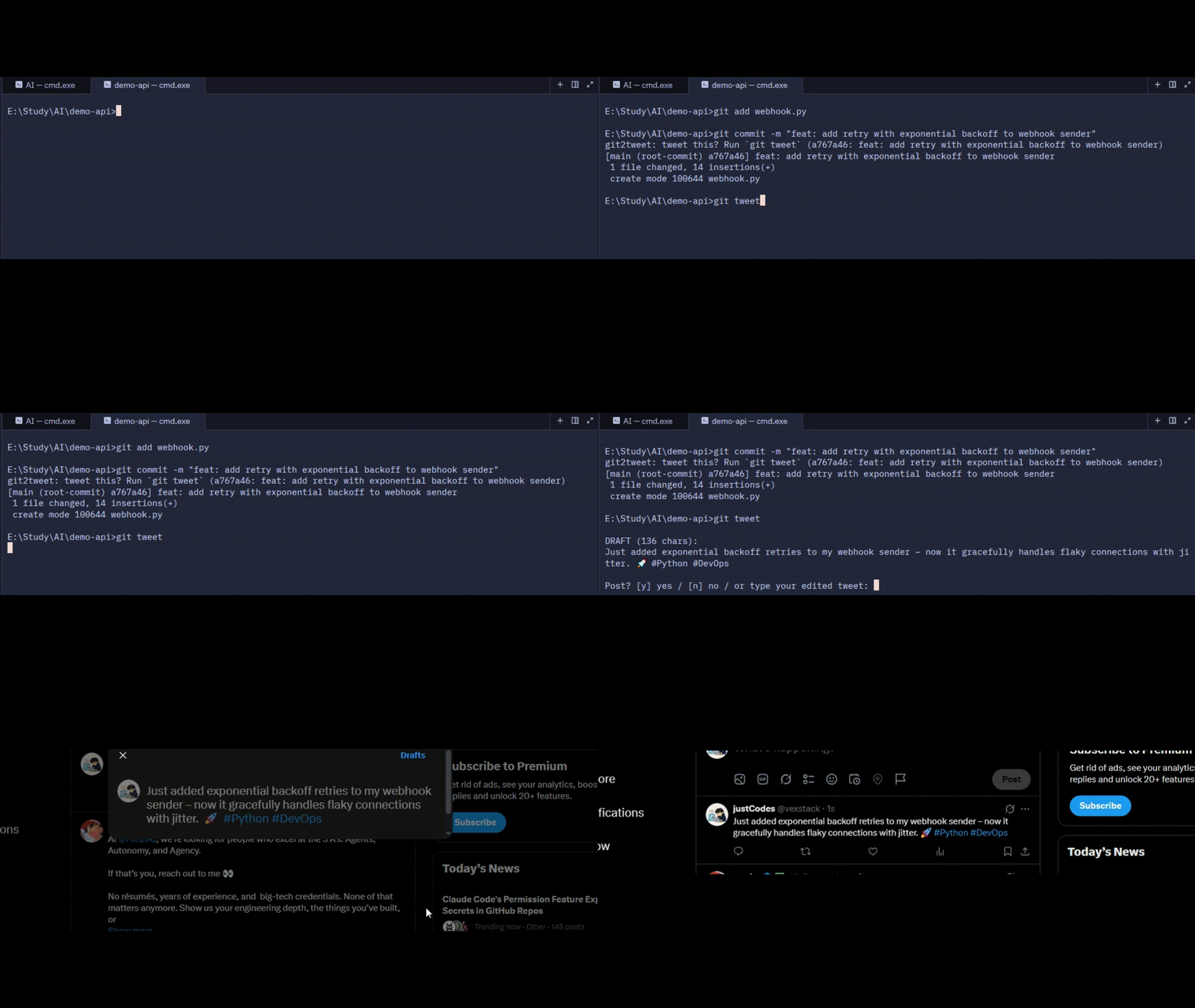
Install
pipx install git2tweet     # or: uv tool install git2tweet
git2tweet config           # pick a model provider, paste your API key (once)
Use it
git commit -m "feat: add retry with backoff to the webhook handler"
git tweet                  # drafts a tweet, you approve or edit, X opens prefilled
Want a reminder after every commit? Run git2tweet init once per repo.
| Command | What it does |
|---|---|
git tweet / g2t |
Draft a tweet for your latest commit |
git tweet <sha> |
Draft for a specific commit |
git tweet --force |
Draft again even if the commit was already handled |
git2tweet config |
Set provider, model and API key |
git2tweet init |
Install the post-commit reminder hook (--remove to undo) |
How it works
An agent (built with LangGraph) reads your commit and diff, decides if it's worth sharing, and drafts a tweet. Trivial commits (typos, formatting) are skipped. You then approve, edit, or reject it. Approved tweets open in X with the text prefilled, so you press Post yourself. Git2Tweet never holds your X credentials.
Privacy
- The commit message and diff are sent to the model provider you choose (Groq by default).
- Known secret patterns (API keys, tokens,
password=...) are redacted first. This is best effort, so don't rely on it for sensitive repos. - For fully local use, pick
ollamaingit2tweet config: nothing leaves your machine. - Git2Tweet sends no telemetry.
License
MIT
1 maintainer

Metadata
1 maintainer
Release files for git2tweet 0.1.0
For a detailed explanation of source distributions (sdists) and built distributions (wheels), please see the package formats documentation.
Source distribution (sdist)
| File | Size | Uploaded | Provenance | Actions |
|---|---|---|---|---|
| git2tweet-0.1.0.tar.gz | 7.5 kB | Without provenance | Details for git2tweet-0.1.0.tar.gz |
Built distribution (wheel)
| File | Interpreter | ABI | Platform | Actions Reset |
|---|---|---|---|---|
| git2tweet-0.1.0-py3-none-any.whl | Python 3 | none | any | Details for git2tweet-0.1.0-py3-none-any.whl |
Total release size: 17.3 kB
Release files / git2tweet-0.1.0.tar.gz
| Download URL | git2tweet-0.1.0.tar.gz |
|---|---|
| Size | 7.5 kB |
| Tags | Source |
|
SHA-256 checksum How to use checksums |
0cea77aaac34f22b075d40b75184ed0b0b2aed0a8ee6b6e3f8fd640fc25b65b6
|
|
BLAKE2b-256 checksum How to use checksums |
396b5c16f899869e36ed8ce0d96a51cf24cf744d0f138ff87907c72f6f151532
|
| Upload date | |
|
Uploaded using Trusted Publishing? What is trusted publishing? |
Yes |
| Uploaded via |
uv/0.13.7 {"installer":{"name":"uv","version":"0.13.7","subcommand":["publish"]},"python":null,"implementation":{"name":null,"version":null},"distro":{"name":"Ubuntu","version":"26.04","id":"resolute","libc":null},"system":{"name":null,"release":null},"cpu":null,"openssl_version":null,"setuptools_version":null,"rustc_version":null,"ci":true}
|
Release files / git2tweet-0.1.0-py3-none-any.whl
| Download URL | git2tweet-0.1.0-py3-none-any.whl |
|---|---|
| Size | 9.8 kB |
| Tags | Python 3 |
|
SHA-256 checksum How to use checksums |
5aa67756c4344f03ae10fe4ca8559cd3b621aeaadef7b76ec4b785d8a4f93785
|
|
BLAKE2b-256 checksum How to use checksums |
a59237436f98a879839b9de7f38344e86cb77832fe82907daddaac1bbb1bd6e4
|
| Upload date | |
|
Uploaded using Trusted Publishing? What is trusted publishing? |
Yes |
| Uploaded via |
uv/0.13.7 {"installer":{"name":"uv","version":"0.13.7","subcommand":["publish"]},"python":null,"implementation":{"name":null,"version":null},"distro":{"name":"Ubuntu","version":"26.04","id":"resolute","libc":null},"system":{"name":null,"release":null},"cpu":null,"openssl_version":null,"setuptools_version":null,"rustc_version":null,"ci":true}
|
Security for git2tweet 0.1.0
Provenance
Provenance describes where a file came from. On PyPI, provenance is shared via attestations, which provide a verifiable record of the build or publishing details. View details, limitations and caveats.
No provenance found
None of the files in this release were uploaded with provenance metadata.
A note on package security
PyPI is a repository for distributing packages, not a service for auditing them. While third-party security researchers and our staff do their best to detect and remove malicious packages, PyPI cannot guarantee the quality, security or suitability of any given package.
To learn more about protecting yourself from malicious actors, visit our package security documentation.













