
GitAI-CLI
An offline, privacy-first CLI tool that automatically generates structured Git commit messages using a local LLM via llama.cpp. No API keys required, no data leaves your machine.


Why GitAI? (Educational Purpose)
Starting out in software development requires absorbing dozens of industry best practices simultaneously. Adopting the Conventional Commits standard right from the beginning often causes friction and leads to wasted time staring at a blank terminal screen wondering how to phrase a change.
GitAI was built to act as an invisible mentor inside your console, specifically designed for developers looking to professionalize their daily workflow without losing focus on writing code.
The benefit of implementing this CLI is twofold:
- Immediate Impact (Professionalism): It resolves technical nomenclature in just a few seconds, ensuring a pristine, clean, and standardized Git history. This is ideal for making your portfolio stand out to recruiters reviewing your GitHub repositories.
- Passive Learning (Long-term): It works through imitation and consistency. By interactively auditing how the AI categorizes your syntax changes with precise tags (
feat,fix,refactor), a developer's brain naturally absorbs the pattern over time, learning how to structure correct commits organically.
Features
- 100% Local Ingestion: Uses
llama-cpp-pythonto run model inference completely offline via a background HTTP server onlocalhost:8089. - Conventional Commits: Enforces the standard
type: descriptionformat (e.g.,feat: add user authentication). - Diff-Aware Context: Inspects staged changes and file names to provide accurate context.
- Initial Commit Detection: Automatically detects the first commit of a repository and uses the README and file list as context instead of a diff.
- Smart Language Memory: Learns your language preference (English or Spanish) per repository using Git's native configuration system (
gitai.lang), avoiding repetitive prompts. - Windows & UTF-8 Native: Fully hardened against character encoding issues (
ñ, acentos,¿) when generating or editing messages in Windows consoles.
How it works
- On first use, run
gitai initto download the AI model (~4.7 GB). - At the start of each work session, run
gitai startinside your repo. This loads the model into RAM as a background daemon and asks for your language preference if not already set. - After staging changes, run
gitai. It feeds the diff (or initial commit context) into the model and proposes a commit message. - At the end of your session, run
gitai outto stop the daemon and free RAM.
Interactive Help & Documentation Access
GitAI CLI features a native, robust command-line validation and help module. If you ever need a quick reminder of the available architecture commands, explicit routing links, or want to report a technical issue, you can invoke the user manual directly from your shell.
Run any of the following equivalent commands:
gitai help
# or using standard POSIX flags
gitai -h
gitai --help
Real-World Benchmarks & Reference Metrics
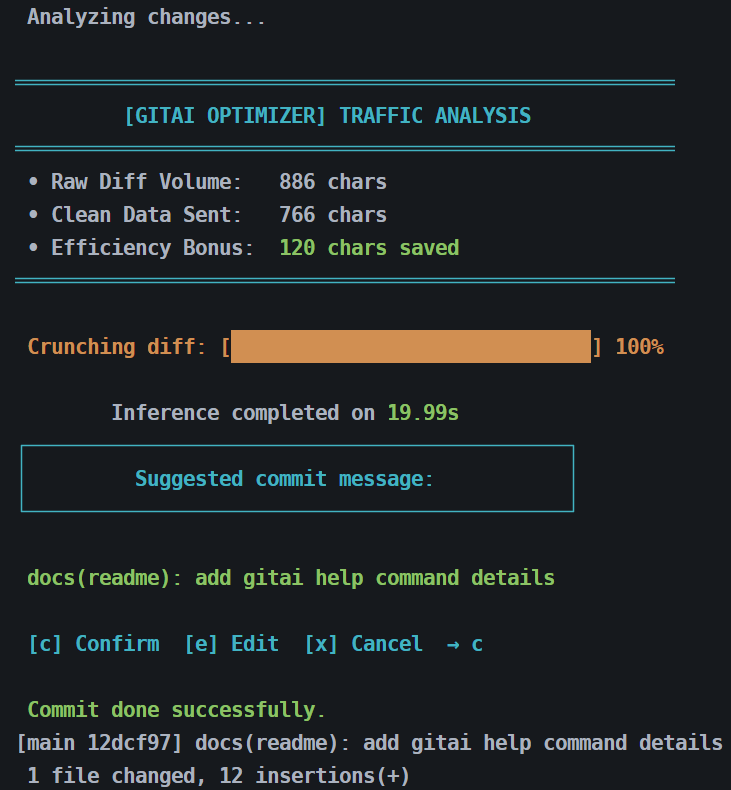
The following metrics are estimates based on empirical testing. Actual execution times are non-linear and may vary depending on current CPU background load...
Project structure
GitAI-CLI/
├── assets/
├── gitai/
│   ├── __init__.py
│   ├── config.py        ← model path, download logic, language config
│   ├── main.py          ← CLI logic, user interaction
│   └── llm_client.py   ← daemon management and inference via HTTP
├── pyproject.toml       ← package definition and dependencies
└── README.md
Installation (for Python developers)
First, install pipx if you don't have it:
pip install pipx
python -m pipx ensurepath
After running
ensurepath, restart your terminal.
Then install gitai globally:
pipx install --force .
Setup (one time)
Download the AI model (~4.7 GB). This only needs to be done once:
gitai init
The model (
Qwen2.5-Coder-7B-Instruct-Q4_K_M.gguf) is stored in%LOCALAPPDATA%\gitai\models.
Usage
Start a work session
Run this once per session inside your repository. Loads the model into RAM and sets the language for the repo if not already configured:
gitai start
Generate a commit message
git add .
gitai
End a work session
Stops the background daemon and frees RAM:
gitai out
Command reference
| Command | Description |
|---|---|
gitai init |
Downloads the AI model (first time only) |
gitai start |
Loads the model into RAM, sets repo language |
gitai |
Generates and commits staged changes |
gitai out |
Stops the background daemon, frees RAM |
Commit types used
| Type | When to use |
|---|---|
| feat | New feature |
| fix | Bug fix |
| docs | Documentation changes |
| style | Formatting, no logic change |
| refactor | Code refactor |
| test | Adding or fixing tests |
| chore | Build, dependencies, config |
| perf | Performance improvement |
| ci | CI/CD changes |
| build | Build system changes |
Requirements
- Python 3.10+
- Git installed
- ~4.7 GB disk space for the model
Performance & Efficiency
Commit message generation runs 100% locally and entirely on your CPU. No external APIs, no data leaks, and no heavy CUDA/ROCm GPU dependencies required.
Because inference happens directly on your processor, generation times are non-linear and scale based on your hardware architecture (specifically CPU single-core speed and RAM bandwidth), as well as the complexity of the git diff.
Real-World Benchmarks & Reference Metrics (Qwen 2.5 Coder 7B - Q4_K_M)
The following metrics are estimates based on empirical testing. Actual execution times are non-linear and may vary depending on current CPU background load and system memory availability.
Based on extensive stress-testing on standard consumer hardware (e.g., Intel i7 7th Gen with 16GB DDR4 @ 2400MHz), you can expect the following operational ranges.
| Hardware Profile | Context Size | Estimated Time * | Commit Accuracy |
|---|---|---|---|
| Modern Desktop / Laptop (Ryzen 5/7, Core i5/i7 11th+ Gen, DDR5) |
Small to Large Diffs | ~8 – 20 seconds | ~90% |
| Older / Standard Hardware (Legacy Intel i7, DDR4 @ 2400MHz) |
Small to Medium Diffs | ~20 – 40 seconds | ~90% |
| Stress Test / Massive Changes (Legacy Hardware + Dense Diffs) |
Large Multi-file Diffs | ~40 – 70 seconds | ~85% |
Note on Performance: Times are heavily bound to RAM clock speed and single-core efficiency. A dense, multi-file diff analyzed on legacy hardware might occasionally touch the upper boundary of the stress test zone. However, GitAI's built-in traffic manager ensures payloads remain strictly bounded to keep local execution controlled and predictable.
Predictable Execution Cap: GitAI features a built-in traffic management engine. By enforcing a hard limit on filtered context sizes, the CLI prevents the LLM from entering runaway processing loops. Even during massive codebase refactors, the input payload is strictly constrained to ensure a reliable, bounded local user experience without ever freezing your terminal.
The GitAI Smart Token Optimization
Why are these times so consistent? GitAI does not just dump raw data into the LLM. It includes a custom pre-processing pipeline that strips out compiler noise, binary files, white spaces, and structural brackets before sending the payload.
- Linear vs. Deductive Processing: Testing proved that sending a complete, clean code block up to 2500 characters is significantly faster than truncating it too early. By providing the model with full, clean context, the LLM processes the data linearly instead of wasting CPU cycles trying to "guess" missing code structures. This balance cuts down processing overhead by up to 40 seconds on older machines while boosting commit accuracy to a staggering 85%.
Dependencies
| Package | Purpose |
|---|---|
| llama-cpp-python | Run the local AI model as an HTTP server |
| httpx | Download the model and communicate with the daemon |
| psutil | Stop the background daemon (gitai out) |
| colorama | Handle cross-platform terminal text colorization and visual hierarchy |
Privacy & Security
GitAI is designed with a strict privacy-first architecture:
- 100% Local Execution: All prompt processing and commit analysis run entirely on your local CPU/GPU using
llama.cppbindings. - Zero Telemetry: The CLI collects no analytics, logs, or usage metrics.
- Air-Gapped Friendly: Once the GGUF model is downloaded, no internet connection is required to generate commits or run commands.
- No Code Exposure: Your repository diffs and code never leave your machine or hit external APIs.
Uninstallation
To completely remove GitAI and delete the downloaded local model weights (~4.7 GB):
# 1. Delete the local model cache
Remove-Item -Recurse -Force "$env:LOCALAPPDATA\gitai"   # Windows

# 2. Uninstall the package
pipx uninstall gitai-local    # If installed via pipx (README instructions)
# or
pip uninstall gitai-local     # If installed via standard pip (PyPI default)
License
This project is licensed under the MIT License. See the LICENSE file for details.
Developed by Pablo Salinas - PyBloSoft © 2026
1 maintainer

Metadata
1 maintainer
Release files for gitai-local 1.3.1
For a detailed explanation of source distributions (sdists) and built distributions (wheels), please see the package formats documentation.
Source distribution (sdist)
| File | Size | Uploaded | Provenance | Actions |
|---|---|---|---|---|
| gitai_local-1.3.1.tar.gz | 21.8 kB | Without provenance | Details for gitai_local-1.3.1.tar.gz |
Built distribution (wheel)
| File | Interpreter | ABI | Platform | Actions Reset |
|---|---|---|---|---|
| gitai_local-1.3.1-py3-none-any.whl | Python 3 | none | any | Details for gitai_local-1.3.1-py3-none-any.whl |
Total release size: 41.0 kB
Release files / gitai_local-1.3.1.tar.gz
| Download URL | gitai_local-1.3.1.tar.gz |
|---|---|
| Size | 21.8 kB |
| Tags | Source |
|
SHA-256 checksum How to use checksums |
be47d5e93c33ed18a5b0a7cb0ed4130f51201f447574839c33bc24794055c878
|
|
BLAKE2b-256 checksum How to use checksums |
ec12b60165b2414cdfb50058db5f4492b0239c2997a38e713f964a1b679e9995
|
| Upload date | |
|
Uploaded using Trusted Publishing? What is trusted publishing? |
No |
| Uploaded via |
twine/6.2.0 CPython/3.11.6
|
Release files / gitai_local-1.3.1-py3-none-any.whl
| Download URL | gitai_local-1.3.1-py3-none-any.whl |
|---|---|
| Size | 19.1 kB |
| Tags | Python 3 |
|
SHA-256 checksum How to use checksums |
d53dabf9f929e6dd3a6e3894e2de4f71a3c1e7c38195e36ef11909429d337876
|
|
BLAKE2b-256 checksum How to use checksums |
fa171ace2b6dfb945ff0864e836e9c52d209101c9e50fd562bf70a275dd29072
|
| Upload date | |
|
Uploaded using Trusted Publishing? What is trusted publishing? |
No |
| Uploaded via |
twine/6.2.0 CPython/3.11.6
|
Security for gitai-local 1.3.1
Provenance
Provenance describes where a file came from. On PyPI, provenance is shared via attestations, which provide a verifiable record of the build or publishing details. View details, limitations and caveats.
No provenance found
None of the files in this release were uploaded with provenance metadata.
A note on package security
PyPI is a repository for distributing packages, not a service for auditing them. While third-party security researchers and our staff do their best to detect and remove malicious packages, PyPI cannot guarantee the quality, security or suitability of any given package.
To learn more about protecting yourself from malicious actors, visit our package security documentation.














