
Your daily developer standup - powered by Git history

Project description
gitbriefly 🧠


Your daily developer standup — powered by your Git history.
⚡ The Problem
Every day at standup:
“What did I actually do yesterday?”
You open Git, scroll commits, and still feel unsure.
⚡ Quick Demo
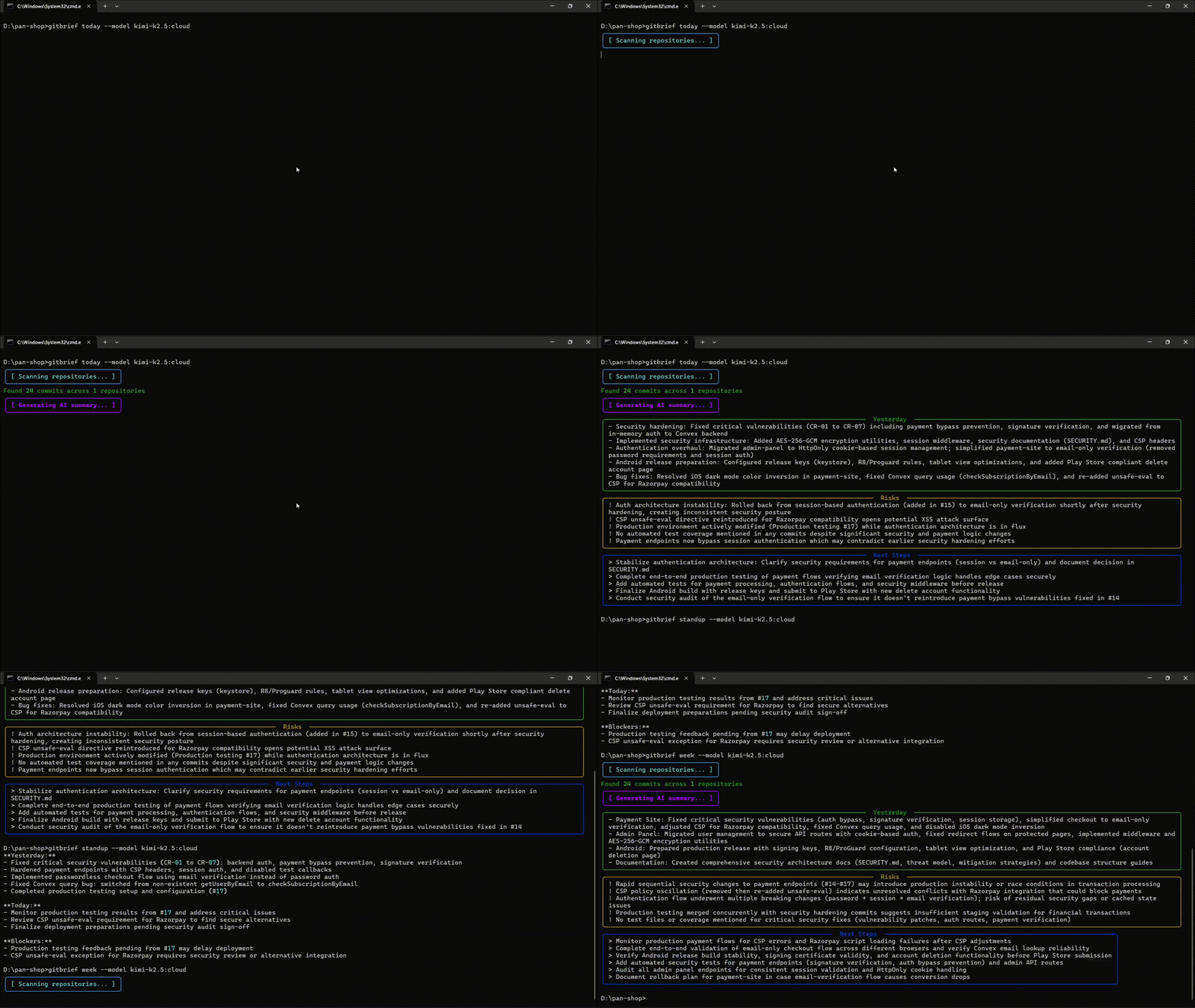
$ pip install gitbriefly
$ gitbriefly standup
**Yesterday:**
- Enhanced AI output quality
- Added deduplication and truncation

**Today:**
- Continue development

**Blockers:**
- None
Your standup ready in seconds.
🚀 Install
From PyPI (recommended)
pip install gitbriefly
With OpenAI support
pip install gitbriefly[openai]
With Anthropic support
pip install gitbriefly[anthropic]
From source
pip install -e .
Prerequisite: Ollama must be installed and running.
ollama serve
ollama pull llama3
🧪 Usage
# Today's summary (last 7 days)
gitbriefly today

# Weekly summary (last 7 days)
gitbriefly week

# Generate standup message (viral feature!)
gitbriefly standup

# Diagnose issues
gitbriefly doctor

# Commit statistics
gitbriefly stats
gitbriefly stats --days 30

# View past summaries
gitbriefly history
gitbriefly history --days 14

# Scan a specific repository
gitbriefly today --path /path/to/repo

# Scan multiple repositories
gitbriefly week --path /path/to/repos

# Filter by author
gitbriefly today --author yourname

# Filter by branch
gitbriefly today --branch main

# Custom date range
gitbriefly today --since 2024-01-01 --until 2024-01-07

# Days to look back (default: 7)
gitbriefly today --days-ago 14

# Limit commits processed
gitbriefly today --max-commits 50

# Use different AI model
gitbriefly today --model mistral

# Use OpenAI instead of Ollama
gitbriefly today --provider openai --model gpt-3.5-turbo

# Use Anthropic
gitbriefly today --provider anthropic --model claude-3-haiku-20240307

# Stream AI response (Ollama only)
gitbriefly today --stream

# Export to markdown file
gitbriefly today --export report.md

# Export as JSON for scripting
gitbriefly today --json
gitbriefly standup --json

# Show raw commits without AI
gitbriefly today --no-ai
⚙️ Configuration
Create ~/.gitbriefly.toml to set defaults:
path = "/path/to/repos"
model = "llama3"
provider = "ollama"
timeout = 120
📁 Options
| Option | Alias | Description | Default |
|---|---|---|---|
--path |
-p |
Path to Git repo or directory | . |
--model |
-m |
AI model to use | auto-detect |
--provider |
- | AI provider: ollama, openai, anthropic |
ollama |
--days-ago |
- | Days to look back | 7 |
--max-commits |
- | Max commits to process | 100 |
--no-ai |
- | Skip AI, show raw commits | false |
--json |
-j |
Output as JSON | false |
--stream |
- | Stream AI response (Ollama) | false |
--export |
-e |
Export to file | - |
--since |
- | Start date (ISO format) | - |
--until |
- | End date (ISO format) | - |
--author |
- | Filter by author | - |
--branch |
-b |
Filter by branch | - |
🗂️ Commands
| Command | Description |
|---|---|
today |
Daily summary (last 7 days, for standups) |
week |
Weekly summary (last 7 days) |
standup |
Yesterday/Today/Blockers format |
stats |
Commit statistics |
history |
Past summaries |
doctor |
Diagnose issues & check setup |
version |
Show version |
🧠 Why this exists
Developers forget context. Git stores history but not understanding.
gitbriefly turns commits into insights.
"I built this because I kept forgetting what I worked on the day before. Now I just run
gitbrieflyand know exactly what to continue working on."
🔧 Development
# Clone the repo
git clone https://github.com/Akshat190/gitbriefly.git
cd gitbriefly

# Install in development mode
pip install -e .

# Run tests
pytest

# Run linting
ruff check gitbriefly/

# Run CLI
python -m gitbriefly.cli today --path .
python -m gitbriefly.cli stats
🤝 Contributing
PRs welcome! See CONTRIBUTING.md for details.
📝 License
MIT License - see LICENSE
⭐ Star this repo if it saved you time
Made with ❤️ for developers


Download files
Download the file for your platform. If you're not sure which to choose, learn more about installing packages.
Source Distribution
Built Distribution
Filter files by name, interpreter, ABI, and platform.
If you're not sure about the file name format, learn more about wheel file names.
Copy a direct link to the current filters
File details
Details for the file gitbriefly-0.1.1.tar.gz.
File metadata
- Download URL: gitbriefly-0.1.1.tar.gz
- Upload date:
- Size: 2.5 MB
- Tags: Source
- Uploaded using Trusted Publishing? No
- Uploaded via: twine/6.2.0 CPython/3.14.0
File hashes
| Algorithm | Hash digest | |
|---|---|---|
| SHA256 |
263816af73862154b179dcc4a76abf82f9d3c4682ab4baadb9cbb587c0128ec1
|
|
| MD5 |
23191637f8a795ff008c1739eaf2f87f
|
|
| BLAKE2b-256 |
c83a74a72bdac0532df805508d12def78af93f6edd2e53fbc6f98d710d5b1564
|
File details
Details for the file gitbriefly-0.1.1-py3-none-any.whl.
File metadata
- Download URL: gitbriefly-0.1.1-py3-none-any.whl
- Upload date:
- Size: 30.3 kB
- Tags: Python 3
- Uploaded using Trusted Publishing? No
- Uploaded via: twine/6.2.0 CPython/3.14.0
File hashes
| Algorithm | Hash digest | |
|---|---|---|
| SHA256 |
4b706fae73b2994554acf5d37450dbc32d3ecc556e1f2b2295df5417321a33ca
|
|
| MD5 |
45ed39b4ba2c0b8592daabdf9d83cd5c
|
|
| BLAKE2b-256 |
b367ff9af41bf01bb64fc3072a48d1e42ba4f2549575f9ef4efe1e3678c0d7f0
|






