
Visualize when git commits were made in a repository in a calendar-like format.

Project description
Gitcal


A python script to visualize when git commits were made in a repository in a calendar-like format.
Examples
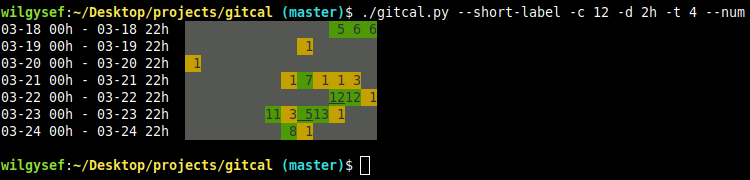
Display the number of commits in 2 hour blocks in 12 columns. A block with at least 4 commits is colored in green:
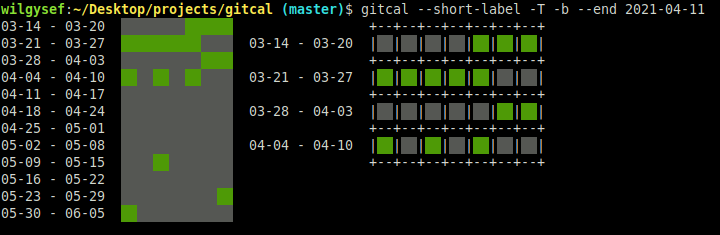
An example of displaying two tables side-by-side, one with a border and different date range:
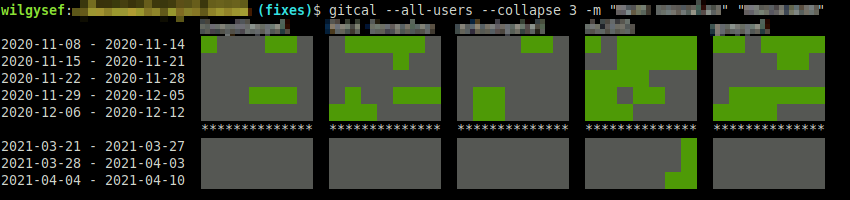
Compare commits with other members of a collaborative project:
Installation
pip install gitcal
Displaying Multiple tables
gitcal uses the -T/--table argument to display multiple tables.
A table is created based on the arguments on each side of -T, where the command below is used to create multiple tables:
gitcal -T -n "My Commits" --num --no-label -f "<my username>" -t 4 -T -n "Partner 1" -f "<partner 1>" -f "<also partner 1>"
#     ^   ^_______________________table 2________________________^    ^______________________table 3______________________^
#     |
# table 1
A sample result of the above command (below describes each table):
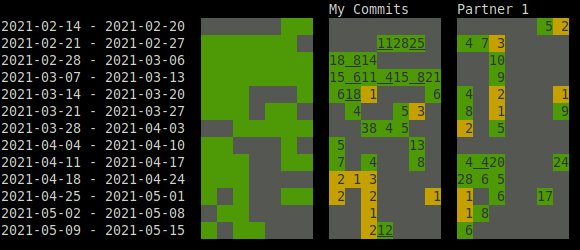
Table 1
Since there are no arguments to the left of the first -T, the default table with all the daily commits is displayed per week.
Table 2
To the right side of the first -T, we:
- set the table name with
-n - turn on commit counts with
--num(underlines are used to distinguish number entries since there is no spacing on borderless tables) - turn off labels with
--no-labelsince the labels from the first table can be used instead - filter for one user with
-f - set the color threshold
-tto 4 commits
Table 3
The second -T separates the second and third table options.
Note how table 3 only explicitly sets the table name and user filter, but the settings from the second table are carried over to the third table as well.
Most, but not all, settings are carried over between tables so they do not have to be repeated.
Release history Release notifications | RSS feed


Download files
Download the file for your platform. If you're not sure which to choose, learn more about installing packages.
Source Distribution
Built Distribution
Filter files by name, interpreter, ABI, and platform.
If you're not sure about the file name format, learn more about wheel file names.
Copy a direct link to the current filters
File details
Details for the file gitcal-0.0.2.tar.gz.
File metadata
- Download URL: gitcal-0.0.2.tar.gz
- Upload date:
- Size: 11.7 kB
- Tags: Source
- Uploaded using Trusted Publishing? No
- Uploaded via: twine/3.4.2 importlib_metadata/4.6.3 pkginfo/1.7.1 requests/2.22.0 requests-toolbelt/0.9.1 tqdm/4.62.0 CPython/3.8.10
File hashes
| Algorithm | Hash digest | |
|---|---|---|
| SHA256 |
36d10af3f3bef4e844c864aa069dbc20427fbabfa8c8d054af26caea3f7becdc
|
|
| MD5 |
5870083feef47becd0707a4ac8d6cc78
|
|
| BLAKE2b-256 |
432ee55d7b4fe70ad03690b3dd4546363401790782714afda3b56e2d1a85f2ee
|
File details
Details for the file gitcal-0.0.2-py3-none-any.whl.
File metadata
- Download URL: gitcal-0.0.2-py3-none-any.whl
- Upload date:
- Size: 11.8 kB
- Tags: Python 3
- Uploaded using Trusted Publishing? No
- Uploaded via: twine/3.4.2 importlib_metadata/4.6.3 pkginfo/1.7.1 requests/2.22.0 requests-toolbelt/0.9.1 tqdm/4.62.0 CPython/3.8.10
File hashes
| Algorithm | Hash digest | |
|---|---|---|
| SHA256 |
1b691312b0e3bcc34f924952376f72d40c18e7711d7ad67d0a57b2e8b10fa5e0
|
|
| MD5 |
ababd050f109f5a4fc22a32d1426804c
|
|
| BLAKE2b-256 |
d117f997ede97fbf4a2a7b5160b7782375d49a925b0258dc46147db560a060df
|






