








Gito is an open-source AI code reviewer that works with any language model provider. It detects issues in GitHub pull requests or local codebase changes—instantly, reliably, and without vendor lock-in.
Get consistent, thorough code reviews in seconds—no waiting for human availability.
📋 Table of Contents
- Why Gito?
- Perfect For
- Supported Platforms & Integrations
- Security & Privacy
- Quickstart
- Configuration
- Guides & Reference
- Known Limitations
- Development Setup
- Contributing
- License
✨ Why Gito?
- [⚡] Lightning Fast: Get detailed code reviews in seconds, not days—powered by parallelized LLM processing
- [🔧] Vendor Agnostic: Works with any language model provider (OpenAI, Anthropic, Google, local models, etc.)
- [🔒] Private & Secure: Your code goes directly to your chosen LLM inference provider or local model—no intermediary servers
- [🌐] Universal: Supports all major programming languages and frameworks
- [🔍] Comprehensive Analysis: Detect issues across security, performance, maintainability, best practices, and much more
- [📈] Consistent Quality: Never tired, never biased—consistent review quality every time
- [🚀] Easy Integration: Automatically reviews pull requests via CI/CD workflows (GitHub Actions, etc), posts results as PR comments, and reacts to maintainer comments
- [🎛️] Infinitely Flexible: Adapt to any project's standards—configure review rules, severity levels, and focus areas, build custom workflows
🎯 Perfect For
- Solo developers who want expert-level code review without the wait
- Teams looking to catch issues before human review
- Open source projects maintaining high code quality at scale
- CI/CD pipelines requiring automated quality gates
✨ See code review in action ✨
🌐 Supported Platforms & Integrations
🧩 Git Platforms
| Platform | Status |
|---|---|
| GitHub | ✅ Supported |
| GitLab | 🧪 Supported (Beta) |
| Bitbucket | 🛠️ Planned |
| Local / CLI | ✅ Supported |
ℹ️ Gito ships ready-to-use CI/CD workflows for these platforms, with full support for triggering actions via PR comments, automatic review posting, and PR lifecycle integration.
Not on this list? Gito works anywhere—via custom CI/CD pipelines or directly from the CLI.
🤖 LLM Providers / Runtimes
| Provider / Runtime | Status |
|---|---|
OpenAI-compatible APIs Mistral, xAI, Azure, Amazon Bedrock, OpenRouter, Fireworks, and many more |
✅ Supported |
| Anthropic API | ✅ Supported |
| Google API | ✅ Supported |
Local LLM ServicesOllama, vLLM, llama.cpp, SGLang, LM Studio, etc. |
✅ Supported |
| Embedded Inference using PyTorch / Transformers or custom python inference function |
✅ Supported |
Working on top of CLI-based LLM Tools / Coding Agent CLIs Claude Code, Gemini CLI, etc. |
✅ Supported |
🗂️ Issue Trackers
| Tool | Status | Documentation |
|---|---|---|
| Jira | ✅ Supported | Atlassian Jira Integration ↗ |
| Linear | ✅ Supported | Linear Integration ↗ |
🚀 More platforms and integrations are coming — Gito is built to grow with your stack.
🔒 Security & Privacy
Gito keeps your source code private by design: it is designed as a stateless, client-side tool with a strict zero-retention policy.
- No middleman: Source code is transmitted directly from your environment (CI/CD runner or local machine) to your explicitly configured LLM provider. If you use a local model, your code never leaves your network. We never see your code.
- No data collection: Your code isn't stored, logged, or retained by Gito.
- Fully auditable: 100% open source. Verify every line yourself.
🚀 Quickstart
1. Review Pull Requests via GitHub Actions
Create a .github/workflows/gito-code-review.yml file with the following content:
name: "Gito: AI Code Review"
on:
  pull_request:
    types: [opened, synchronize, reopened]
  workflow_dispatch:
    inputs:
      pr_number:
        description: "Pull Request number"
        required: true
jobs:
  review:
    runs-on: ubuntu-latest
    permissions: { contents: read, pull-requests: write } # 'write' for leaving the summary comment
    steps:
    - uses: actions/checkout@v7
      with: { fetch-depth: 0 }
    - name: Set up Python
      uses: actions/setup-python@v6
      with: { python-version: "3.13" }
    - name: Install AI Code Review tool
      run: pip install gito.bot~=4.5
    - name: Run AI code analysis
      env:
        LLM_API_KEY: ${{ secrets.LLM_API_KEY }}
        LLM_API_TYPE: openai
        MODEL: "gpt-5.5"
        GITHUB_TOKEN: ${{ secrets.GITHUB_TOKEN }}
        PR_NUMBER_FROM_WORKFLOW_DISPATCH: ${{ github.event.inputs.pr_number }}
      run: |
        gito --verbose review
        gito github-comment --token ${{ secrets.GITHUB_TOKEN }}
    - uses: actions/upload-artifact@v7
      with:
        name: ai-code-review-results
        path: |
          code-review-report.md
          code-review-report.json
⚠️ Make sure to add
LLM_API_KEYto your repository's GitHub secrets.
💪 Done!
PRs to your repository will now receive AI code reviews automatically. ✨
See GitHub Setup Guide for more details.
Alternatively, install Gito locally and run gito deploy from your repository root.
The deployment wizard will guide you through setting up AI-powered code reviews and automatically generate or update the required workflow files. GitHub Actions and GitLab CI are both supported.
For GitLab, see the GitLab Setup Guide, or refer to the GitLab workflow templates for manual configuration.
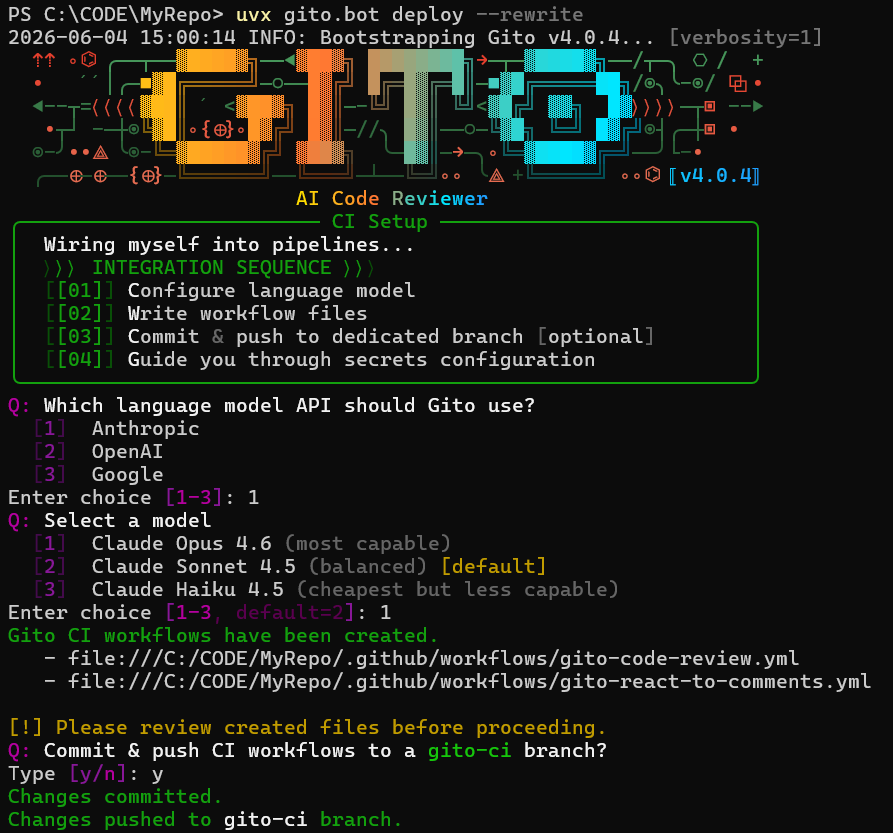
2. Running Code Analysis Locally
2.1 Install Gito locally
Note: If you use uvx, you can skip this step.
When using commands likeuvx gito.bot setup,uvx gito.bot review, uvx will install everything required on demand.
Option 1: Install gito.bot using pip.
Prerequisites:
Run the following command to install the latest stable release from PyPI:
pip install gito.bot
Troubleshooting:
pip may also be available via CLI aspip3depending on your Python installation.
To install from repository source / specific branch:
pip install git+https://github.com/Nayjest/Gito.git@<branch-or-tag>
Option 2: Windows Standalone Installer
Download the latest Windows installer from Releases.
The installer includes:
- Standalone executable (no Python required)
- Automatic PATH configuration
- Start Menu shortcuts
- Easy uninstallation
2.2 Configure LLM connection
The following command will perform one-time setup using an interactive wizard.
You will be prompted to enter LLM configuration details (API type, API key, etc).
Configuration will be saved to ~/.gito/.env.
gito setup
Alternatively, if you have uvx installed, you can run the setup command via uvx:
uvx gito.bot setup
Troubleshooting:
On some systems,gitocommand may not become available immediately after installation.
Try restarting your terminal or runningpython -m gitoinstead.
2.3 Perform your first AI code review locally
Step 1: Navigate to your repository root directory.
Step 2: Switch to the branch you want to review.
Step 3: Run the following command:
gito review
Note: This will analyze the current branch against the repository main branch by default.
Files that are not staged for commit will be ignored.
Seegito --helpfor more options.
Reviewing remote repository
gito remote git@github.com:owner/repo.git <FEATURE_BRANCH>..<MAIN_BRANCH>
Use interactive help for details:
gito remote --help
🔧 Configuration
Gito uses a two-layer configuration model:
| Scope | Location | Purpose |
|---|---|---|
| Environment | ~/.gito/.env or OS environment variables |
LLM provider, model, API keys, concurrency |
| Project | <repo>/.gito/config.toml |
Review behavior, prompts, templates, integrations |
Note: Environment configuration defines external resources and credentials — it's machine-specific and never committed to version control. Project configuration defines review behavior and can be shared across your team.
Environment Configuration
Environment settings control LLM inference, API Keys and apply system-wide.
Gito uses ai-microcore for vendor-agnostic LLM access. All settings are configured via OS environment variables or .env files.
Default location: ~/.gito/.env
(Created automatically via gito setup)
Example
# ~/.gito/.env
LLM_API_TYPE=openai
LLM_API_KEY=sk-...
LLM_API_BASE=https://api.openai.com/v1/
MODEL=gpt-5.5
MAX_CONCURRENT_TASKS=20
For all supported options, see the ai-microcore configuration guide.
CI/CD Environments
In CI workflows, configure LLM settings via workflow environment variables. Use your platform's secrets management (GitHub Secrets, GitLab CI Variables) for API keys.
Project Configuration
Gito supports per-repository customization through a .gito/config.toml file placed at the root of your project. This allows you to tailor code review behavior to your specific codebase, coding standards, and workflow requirements.
Configuration Inheritance Model
Project settings follow a layered override model:
Bundled Defaults (config.toml) → Project Config (<your-repo>/.gito/config.toml)
Any values defined in your project's .gito/config.toml are merged on top of the built-in defaults. You only need to specify the settings you want to change—everything else falls back to sensible defaults.
To create a complete, editable copy of the bundled defaults in the current repository, run:
gito populate-project-config
The command creates .gito/config.toml and refuses to replace an existing project configuration (pass --force to overwrite it).
Note that a full copy pins every setting to the current Gito version: prompts and templates improved in future releases will no longer reach your project. If you only need a few tweaks, keep the config minimal and let the rest fall back to the defaults.
Common Customizations
- Review prompts — Tailor AI instructions, review criteria, and quality thresholds
- Output templates — Customize report format for GitHub comments and CLI
- Post-processing — Python snippets to filter or transform detected issues
- Bot behavior — Mention triggers, retries, comment handling
- Pipeline integrations — Jira, Linear, etc.
Explore the bundled config.toml for the complete list of available options.
Example
# .gito/config.toml
mention_triggers = ["gito", "/check"]
collapse_previous_code_review_comments = true

# Files to provide as context
aux_files = [
    'documentation/command_line_reference.md'
]

exclude_files = [
    'poetry.lock',
]

[prompt_vars]
# Custom instructions injected into the system prompts
awards = ""  # Disable awards
requirements = """
- All public functions must have docstrings.
"""
For detailed guidance, see the 📖 Configuration Cookbook.
📚 Guides & Reference
For more detailed information, check out these articles:
- Command Line Reference
- Configuration Cookbook
- GitHub Setup Guide
- GitLab Setup Guide
- Integrations
- Documentation generation with Gito
- Troubleshooting
Or browse all documentation in the /documentation directory.
🚧 Known Limitations
Gito cannot modify files inside .github/workflows when reacting to GitHub PR comments (e.g., "Gito fix issue 2").
This is a GitHub security restriction that prevents workflows from modifying other workflow files using the default GITHUB_TOKEN.
While using a Personal Access Token (PAT) with the workflow scope would bypass this limitation, it is not recommended as a workaround.
PATs have broader permissions, longer lifespans, and are tied to individual user accounts, making them less secure than the default GITHUB_TOKEN for CI/CD pipelines.
💻 Development Setup
Clone the repository and navigate to it:
git clone https://github.com/Nayjest/Gito.git
cd Gito

Install dependencies:
make install
Note: If
makeis not available on your system, you can run the underlying command directly:
pip install -e ".[dev]"
See the Makefile for all available commands.
Format code and check style:
make black
make cs
Run tests:
pytest
🤝 Contributing
Looking for a specific feature or having trouble?
Contributions are welcome! ❤️
See CONTRIBUTING.md for details.
📝 License
Licensed under the MIT License.
© 2025–2026 Vitalii Stepanenko
1 maintainer

Metadata
1 maintainer
Release files for github-code-review 4.5.0
For a detailed explanation of source distributions (sdists) and built distributions (wheels), please see the package formats documentation.
Source distribution (sdist)
| File | Size | Uploaded | |
|---|---|---|---|
| github_code_review-4.5.0.tar.gz | 76.6 kB | Details |
Built distribution (wheel)
| File | Interpreter | ABI | Platform | Reset |
|---|---|---|---|---|
| github_code_review-4.5.0-py3-none-any.whl | Python 3 | none | any | Details |
Total release size: 170.7 kB
Release files / github_code_review-4.5.0.tar.gz
| Download URL | github_code_review-4.5.0.tar.gz |
|---|---|
| Size | 76.6 kB |
| Tags | Source |
|
SHA-256 checksum How to use checksums |
abe8be055c1e13885cf518343ce6a83d0eab68862587100eff2c6a411fb345fe
|
|
BLAKE2b-256 checksum How to use checksums |
b8fa67906d7c5b857531b0597b38308662d3d0ba654038a7cfbfc3337a5cea26
|
| Upload date | |
|
Uploaded using Trusted Publishing? What is trusted publishing? |
No |
| Uploaded via |
twine/7.0.0 CPython/3.11.16
|
Release files / github_code_review-4.5.0-py3-none-any.whl
| Download URL | github_code_review-4.5.0-py3-none-any.whl |
|---|---|
| Size | 94.1 kB |
| Tags | Python 3 |
|
SHA-256 checksum How to use checksums |
5a274e2011fa9792c268feb2d0c40c9496832c36c304f8f6c7fc42c813d8c16f
|
|
BLAKE2b-256 checksum How to use checksums |
acf393550ec3645a33aa37d7ea0df344805ee599ffd8c974ed453b07e47372b6
|
| Upload date | |
|
Uploaded using Trusted Publishing? What is trusted publishing? |
No |
| Uploaded via |
twine/7.0.0 CPython/3.11.16
|














