




github-deploy
Using polyrepo's to manage projects ?
This can introduce a number challenges one of which is maintaining consistency across multiple repositories, for files like shared configurations without introducing git submodules or mono repositories which requires a more complex deployment configuration.
For example adding a github action or maintaing a consistent pull request template accross your organization.
Solution
github-deploy makes maintaining such configurations as easy as a single command.
Alias : gh-deploy
Installation
pip install github-deploy
Setup
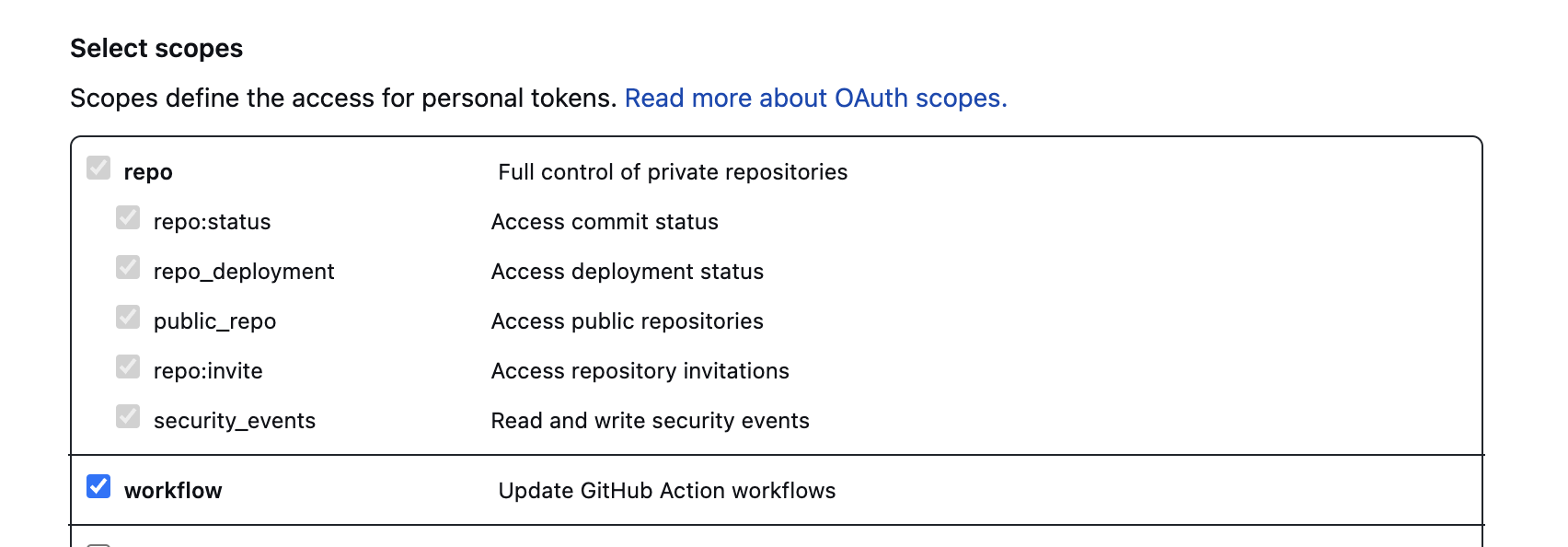
A Personal Access Token which can be created using this guide
Required Scopes
The required scopes are repo and workflow
Usage
Upload files to github
gh-deploy upload --org [org] --token [PAT_TOKEN] --dest [LOCATION TO UPLOAD FILE] --source [SOURCE FILE LOCATION]
Example:
gh-deploy upload --org tj-actions --token [PAT_TOKEN] --dest '.github/workflows/auto-approve.yml' --source auto-approve.yml
NOTE:
auto-approve.ymlis located on your local system.
Deleting files on github
gh-deploy delete --org [org] --token [PAT_TOKEN] --dest [LOCATION TO DELETE]
Example:
gh-deploy delete --org tj-actions --token [PAT_TOKEN] --dest '.github/auto-approve.yml'
COMMAND
gh-deploy --help
Usage: gh-deploy [OPTIONS] COMMAND [ARGS]...

  Deploy changes to multiple github repositories using a single command.

Options:
  --help  Show this message and exit.

Commands:
  delete  Delete a file in all repositories owned by an organization/user.
  upload  Upload a file to all repositories owned by an organization/user.
gh-deploy upload --help
Usage: gh-deploy upload [OPTIONS]

  Upload a file to all repositories owned by an organization/user.

Options:
  --org TEXT                    The github organization.
  --token TEXT                  Personal Access token with read and write
                                access to org.

  --source PATH                 Source file.
  --dest TEXT                   Destination path.
  --overwrite / --no-overwrite  Overwrite existing files.
  --private / --no-private      Upload files to private repositories.
  --help                        Show this message and exit.
gh-deploy delete --help
Usage: gh-deploy delete [OPTIONS]

  Delete a file in all repositories owned by an organization/user.

Options:
  --org TEXT    The github organization.
  --token TEXT  Personal Access token with read and write access to org.
  --dest TEXT   Destination path to delete.
  --help        Show this message and exit.
Resources
1 maintainer

Metadata
1 maintainer
Release files for github-deploy 1.2.0
For a detailed explanation of source distributions (sdists) and built distributions (wheels), please see the package formats documentation.
Source distribution (sdist)
| File | Size | Uploaded | Provenance | |
|---|---|---|---|---|
| github-deploy-1.2.0.tar.gz | 19.0 kB | Without provenance | Details |
Built distribution (wheel)
| File | Interpreter | ABI | Platform | Reset |
|---|---|---|---|---|
| github_deploy-1.2.0-py3-none-any.whl | Python 3 | none | any | Details |
Total release size: 41.1 kB
Release files / github-deploy-1.2.0.tar.gz
| Download URL | github-deploy-1.2.0.tar.gz |
|---|---|
| Size | 19.0 kB |
| Tags | Source |
|
SHA-256 checksum How to use checksums |
b7d049ef3955252a12a585d5edbdb108994941cd34c3a3cf440e9484861bc05f
|
|
BLAKE2b-256 checksum How to use checksums |
583901befc6bb599fc4c5229931501d3311f2fe3c6eeab4bc16c145f186518fe
|
| Upload date | |
|
Uploaded using Trusted Publishing? What is trusted publishing? |
No |
| Uploaded via |
twine/4.0.2 CPython/3.7.17
|
Release files / github_deploy-1.2.0-py3-none-any.whl
| Download URL | github_deploy-1.2.0-py3-none-any.whl |
|---|---|
| Size | 22.1 kB |
| Tags | Python 3 |
|
SHA-256 checksum How to use checksums |
f72a9f9957c80ed93c8070e082808d6c634c09837d1132b7265517006bab2d36
|
|
BLAKE2b-256 checksum How to use checksums |
82ad352aeec32c497840b3478e5c7a13e2e1f88178537e6da5768cb0fcdf5c48
|
| Upload date | |
|
Uploaded using Trusted Publishing? What is trusted publishing? |
No |
| Uploaded via |
twine/4.0.2 CPython/3.7.17
|
Security for github-deploy 1.2.0
Provenance
Provenance describes where a file came from. On PyPI, provenance is shared via attestations, which provide a verifiable record of the build or publishing details. View details, limitations and caveats.
No provenance found
None of the files in this release were uploaded with provenance metadata.
A note on package security
PyPI is a repository for distributing packages, not a service for auditing them. While third-party security researchers and our staff do their best to detect and remove malicious packages, PyPI cannot guarantee the quality, security or suitability of any given package.
To learn more about protecting yourself from malicious actors, visit our package security documentation.














