
GitHub Desktop Notifier


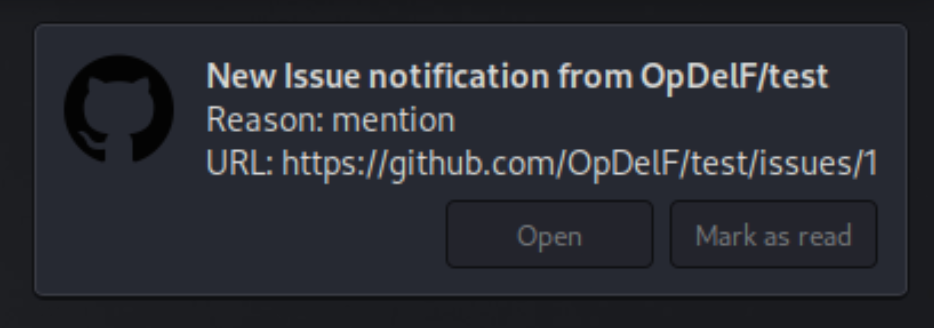
GitHub Desktop Notifier is an easy-to-use Python script that sends you a desktop notification whenever you receive a notification on GitHub. Stay updated with your GitHub activities without constantly checking your email or GitHub dashboard. Get instant desktop notifications for new issues, pull requests, comments, and more.
Features
- Real-time Notifications: Receive instant desktop alerts for new GitHub activities.
- Interactive Actions: Open notifications in your browser or mark them as read directly from the notification popup.
- Supports All Notification Types: Get notifications for issues, pull requests, comments, and more.
- Easy to Use: Simply run the script and authenticate with GitHub via browser to start receiving notifications, no need to create GitHub API tokens.
Preview
Getting Started
Prerequisites
Before you begin, ensure you have the following installed:
- Python 3: The script is written in Python and requires Python 3 to run.
- libnotify-bin: Enables desktop notifications on Linux systems.
- GitHub CLI (
gh): Allows the script to interact with GitHub. - Pipx: Used to install Python packages globally.
Installation
- Install required packages on Debian/Ubuntu:
sudo apt update
sudo apt install -y python3 libnotify-bin gh pipx
- Install GitHub Desktop Notifier:
pipx install github-desktop-notifier
Usage
Using GitHub Desktop Notifier is simple. Just run the following command in your terminal:
github-notifier
Command-Line Options
You can customize the behavior of the notifier using the following command-line options:
$ github-notifier --help
usage: github-notifier [-h] [--refresh-rate REFRESH_RATE] [--timeout TIMEOUT]
                       [--urgency {low,normal,critical}] [--icon-path ICON_PATH]

GitHub Desktop Notifier

options:
  -h, --help            show this help message and exit
  --refresh-rate REFRESH_RATE
                        Interval in seconds to check for new notifications (default:
                        10)
  --timeout TIMEOUT     Timeout in seconds for the notification (default: 15).
                        Ignored if urgency is 'critical'.
  --urgency {low,normal,critical}
                        Urgency level of the notification: 'low', 'normal', or
                        'critical' (default: critical)
  --icon-path ICON_PATH
                        Path to the icon to display in the notification (default:
                        /path/to/github-logo.png)
- If you haven't authenticated with
gh(GitHub CLI), you'll be prompted to do so. Follow the instructions to authenticate via your web browser. - After authenticating, the script will run in the background and send you desktop notifications for new GitHub activities.
That's it! You'll now receive desktop notifications for new GitHub activities. Click on the notification buttons to open the notification in your browser or mark it as read.
License
This project is licensed under the MIT License - see the LICENSE file for details.
1 maintainer

Metadata
1 maintainer
Release files for github-desktop-notifier 1.0.2
For a detailed explanation of source distributions (sdists) and built distributions (wheels), please see the package formats documentation.
Source distribution (sdist)
| File | Size | Uploaded | Provenance | Actions |
|---|---|---|---|---|
| github_desktop_notifier-1.0.2.tar.gz | 6.5 kB | Without provenance | Details for github_desktop_notifier-1.0.2.tar.gz |
Built distribution (wheel)
| File | Interpreter | ABI | Platform | Actions Reset |
|---|---|---|---|---|
| github_desktop_notifier-1.0.2-py3-none-any.whl | Python 3 | none | any | Details for github_desktop_notifier-1.0.2-py3-none-any.whl |
Total release size: 14.1 kB
Release files / github_desktop_notifier-1.0.2.tar.gz
| Download URL | github_desktop_notifier-1.0.2.tar.gz |
|---|---|
| Size | 6.5 kB |
| Tags | Source |
|
SHA-256 checksum How to use checksums |
97607e64f295fae6dd7f241e2436f503bc18eb79b5ea4309aa449d7fbcfb357b
|
|
BLAKE2b-256 checksum How to use checksums |
31a2ba69b5a06f89b4b0782ffcee248b6121cbec6760978b9c1698195c1239c9
|
| Upload date | |
|
Uploaded using Trusted Publishing? What is trusted publishing? |
No |
| Uploaded via |
twine/5.1.1 CPython/3.12.7
|
Release files / github_desktop_notifier-1.0.2-py3-none-any.whl
| Download URL | github_desktop_notifier-1.0.2-py3-none-any.whl |
|---|---|
| Size | 7.6 kB |
| Tags | Python 3 |
|
SHA-256 checksum How to use checksums |
d5c4d02a3648baa7b57c17446581fdbc7c8938a440a4bc8ade7842da0f202525
|
|
BLAKE2b-256 checksum How to use checksums |
a8942f1e80a5dc66839fb3951401bc9d674e9165ebf1e8a1e1909e29d2a94880
|
| Upload date | |
|
Uploaded using Trusted Publishing? What is trusted publishing? |
No |
| Uploaded via |
twine/5.1.1 CPython/3.12.7
|
Security for github-desktop-notifier 1.0.2
Provenance
Provenance describes where a file came from. On PyPI, provenance is shared via attestations, which provide a verifiable record of the build or publishing details. View details, limitations and caveats.
No provenance found
None of the files in this release were uploaded with provenance metadata.
A note on package security
PyPI is a repository for distributing packages, not a service for auditing them. While third-party security researchers and our staff do their best to detect and remove malicious packages, PyPI cannot guarantee the quality, security or suitability of any given package.
To learn more about protecting yourself from malicious actors, visit our package security documentation.














