
Generate development metrics using github data for your project.


Project description
github-metrics
About
A script for getting your team PRs metrics.
Running
The run command takes the following arguments:
--metric: The reference for the metric you'd like to calculate. If no metric is provided, it will calculate all metrics available.
--start-date: The metric start date. Date in format YYYY-mm-dd
--end-date: The metric cutoff date. Date in format YYYY-mm-dd
--exclude-authors: Will exclude all PRs created by the listed authors. This argument must list usernames separated by a comma. Example: --exclude_authors=pantoja,github_username,other_username
--filter-authors: Will take into consideration only the PRs created by the authors in this list. This argument must list usernames separated by a comma. Example: --exclude_authors=pantoja,github_username,other_username
--include-hotfixes: Will include all hotfixes in the metric calculation. By default, this value is false.
--exclude-weekends: Will exclude weekend time from time metrics (time to merge, time to open, time to review).
[All]
github_metrics --start-date=2021-03-22 --end-date=2021-03-24
Time To Merge
github_metrics --metric=ttm --start-date=2021-03-22 --end-date=2021-03-24
Time to Review
github_metrics --metric=ttr --start-date=2020-11-10 --end-date=2020-11-18
Time to Open
github_metrics --metric=tto --start-date=2020-11-10 --end-date=2020-11-18
Open to Merge Time
github_metrics --metric=otm --start-date=2020-11-10 --end-date=2020-11-18
Merge Rate
github_metrics --metric=mr --start-date=2021-03-22 --end-date=2021-03-24
Pull Request Size
github_metrics --metric=pr_size --start-date=2020-11-10 --end-date=2020-11-18
Hotfixes count
github_metrics --metric=hotfixes_count --start-date=2020-11-10 --end-date=2020-11-18
Metrics available
-
Time To Merge (ttm): The Time to Merge metric calculates time between the first commit of a given branch, and the merge action of it's pull request.
-
Time To Review (ttr): It calculates the time a PR waited for, or has been waiting for the first review since the PR opened.
-
Time To Open (tto): The time elapsed between a user's first commit to a branch and opening a pull request for that branch.
-
Open To Merge Time (otm): Returns statistics related to the time between opening and merging a pull request.
-
Merge Rate (mr): It measures the total number of merged pull requests to the total number of developers active in this time period (number of merged PRS / dev). A value closer to 1 indicates that each developer is merging a PR. a higher number indicates more merged PRs than devs, and vice versa.
-
Pull Request Size (pr_size): It generates metrics related to the number of lines added and deleted in a PR. The output will generate metrics related to the sum of different lines in a pr (lines added + lines deleted), and the addition rate metric (lines addes / lines deleted). In the latter case, a higher the rate number means more lines are being added than deleted.
-
Hotfixes Count (hotfixes_count): The number of hotfixes in the period.
Installing the project
- Install using
pip install github-metrics - Setup settings variable by running
github_metrics --setup. You'll be asked to give following information:
Github username: Your github account login
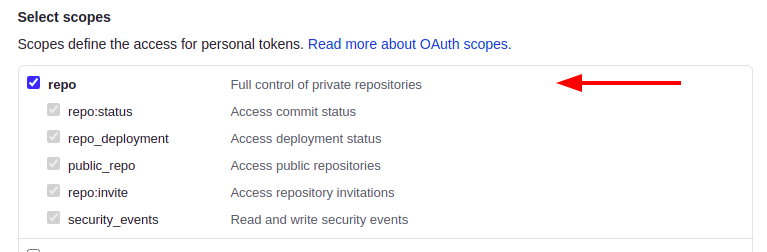
Enter a github token: An access token generated with your github account. More information accessible through this guide. The lib requires full repo access for it to work
Name of the organization: The name of the organization where the repository is located
Repository name: The repository name of the project of your choice
NOTE: Running the --setup flag will overwrite the existing enviroment settings.
Project setup
Dependencies setup
- Create a virtual enviroment
virtualenv venv - Install dependencies with
pip install --editable .
Setup with docker
- Run the command with
docker-compose run app {}. e.g.docker-compose run app github_metrics --metric=ttm --start-date=2021-03-22 --end-date=2021-03-24
Project variables setup
- Create a .env file by copying from .env.example with
cp .env.example .env - Fill settings variables:
REPOSITORY_NAME: The name of the repository
ORG_NAME: The name of the organization
GITHUB_LOGIN: Your github account username
GITHUB_TOKEN: The access token generated with your github account.
Release Process
For maintainers only:
-
Run
bump2version <minor|major|patch>to update the version number (pick one of the options)- Version number on
github_metrics/__init__.pyandsetup.pywill be updated automatically - You can specify the
--new_versionflag in case you wish to manually set the newest version (if not provided, it will be done automatically based on the chosen option)
- Version number on


Download files
Download the file for your platform. If you're not sure which to choose, learn more about installing packages.
Source Distribution
Built Distribution
Filter files by name, interpreter, ABI, and platform.
If you're not sure about the file name format, learn more about wheel file names.
Copy a direct link to the current filters
File details
Details for the file github_metrics-0.0.10.tar.gz.
File metadata
- Download URL: github_metrics-0.0.10.tar.gz
- Upload date:
- Size: 13.0 kB
- Tags: Source
- Uploaded using Trusted Publishing? No
- Uploaded via: twine/3.4.2 importlib_metadata/4.6.3 pkginfo/1.7.1 requests/2.22.0 requests-toolbelt/0.9.1 tqdm/4.62.0 CPython/3.8.10
File hashes
| Algorithm | Hash digest | |
|---|---|---|
| SHA256 |
36aef51f9e48d78b60b122f4068e768d72b2b4d9767c246e2add2dd84120da00
|
|
| MD5 |
b44811f0a962b207f39b90928af96efe
|
|
| BLAKE2b-256 |
7dfcf886cf5edbc8e3409e68a3c54c18f8a6846f8743456495a4119381cfa2c1
|
File details
Details for the file github_metrics-0.0.10-py2.py3-none-any.whl.
File metadata
- Download URL: github_metrics-0.0.10-py2.py3-none-any.whl
- Upload date:
- Size: 16.0 kB
- Tags: Python 2, Python 3
- Uploaded using Trusted Publishing? No
- Uploaded via: twine/3.4.2 importlib_metadata/4.6.3 pkginfo/1.7.1 requests/2.22.0 requests-toolbelt/0.9.1 tqdm/4.62.0 CPython/3.8.10
File hashes
| Algorithm | Hash digest | |
|---|---|---|
| SHA256 |
99ba7954924b30696bbe0044970e6619ec984da57f2221a606b03c4f8034949c
|
|
| MD5 |
3698e3d7b018a06b7ddb9691c00facc1
|
|
| BLAKE2b-256 |
976b48e9543be876b7e8fb7423614d171d97e34ce89a24998420d04702e55f16
|






