
github-ssh-key v1.0.0
GitHub ssh key manager. Console utility for creating, getting, testing, using public ssh keys for GitHub.







Supported:
- Linux: All.
- Termux (Android).
Images:
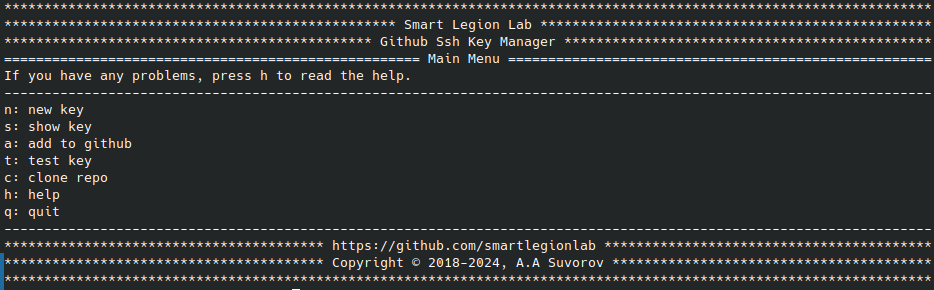
Description:
github-ssh-key - GitHub ssh key manager. Console utility for creating, getting, testing, using public ssh keys for GitHub.
Possibilities:
- Convenient interactive menu.
- Generating ssh keys for GitHub.
- Output ssh key to the console.
- Adding ssh key to GitHub.
- Checking the ssh key, testing the connection.
- Interactive menu for working with the utility.
- Interactive menu for help.
- Launch the default browser with a page for adding ssh key on GitHub.
- Cloning private repositories via ssh.
- Running individual commands.
⚠️ Disclaimer
By using this software, you agree to the full disclaimer terms.
Summary: Software provided "AS IS" without warranty. You assume all risks.
Full legal disclaimer: See DISCLAIMER.md
Help:
Install and use:
Install:
pip install github-ssh-key
github-ssh-key
Use:
To access GitHub over ssh, you should run some sequence of actions.
- Install openssh;
- Generate new ssh keys;
- Copy the public key;
- Add your public key to GitHub;
- Check the connection;
This utility provides you with these capabilities.
Adding a key to your GitHub account involves several steps:
- Generating new ssh key.
- Install openssh, or make sure you have it installed with the ssh command.
- During the generation process, enter your email that you use when working with GitHub.
- Do not change the default file name.
- Don't set a passphrase if you don't want to enter it every time.
- Copying ssh key.
- Highlight and completely copy your ssh key.
- Adding ssh key to your GitHub account.
- Highlight and completely copy your ssh key.
- Add your ssh key to your GitHub account.
- Testing the ssh key (Testing the connection).
- For a successful connection, you had to follow these steps:
- Generate ssh key.
- Highlight and completely copy your ssh key.
- Add ssh key to your GitHub account.
- If you did everything correctly, you will see a personalized greeting.
- For a successful connection, you had to follow these steps:
Also, directly from the interactive menu, you can clone your private repository using ssh.
To get help with commands, use:
github-ssh-key [command] -h
github-ssh-key new -h
github-ssh-key show -h
github-ssh-key add -h
github-ssh-key test -h
github-ssh-key clone -h
github-ssh-key help -h
Commands:
github-ssh-key [command] [args]
- run
github-ssh-key run - new
github-ssh-key new -e [your email] - show
github-ssh-key show - add
github-ssh-key add - test
github-ssh-key test - clone
github-ssh-key clone -l [GitHub login] -n [repo name]
Variant 1:
- Go to the project folder
python setup.py installgithub-ssh-key
Variant 2:
- Install python
- Go to the project folder
pip install -r requirements.txtpython github-ssh-key.py
License
Copyright (©) 2026, Alexander Suvorov
1 maintainer

Metadata
1 maintainer
Release files for github-ssh-key 1.0.0
For a detailed explanation of source distributions (sdists) and built distributions (wheels), please see the package formats documentation.
Source distribution (sdist)
| File | Size | Uploaded | |
|---|---|---|---|
| github_ssh_key-1.0.0.tar.gz | 7.6 kB | Details |
Built distribution (wheel)
| File | Interpreter | ABI | Platform | Reset |
|---|---|---|---|---|
| github_ssh_key-1.0.0-py3-none-any.whl | Python 3 | none | any | Details |
Total release size: 16.0 kB
Release files / github_ssh_key-1.0.0.tar.gz
| Download URL | github_ssh_key-1.0.0.tar.gz |
|---|---|
| Size | 7.6 kB |
| Tags | Source |
|
SHA-256 checksum How to use checksums |
e40f5cf81a280bd1b15b84b691252766520919d0eefa0e94bc6d6e9bfc8c68ce
|
|
BLAKE2b-256 checksum How to use checksums |
36e42eba4c140bae96f9124b0a41600e5eb8f5b5f35cd72b6476a04e7dcbd918
|
| Upload date | |
|
Uploaded using Trusted Publishing? What is trusted publishing? |
No |
| Uploaded via |
twine/6.2.0 CPython/3.14.3
|
Release files / github_ssh_key-1.0.0-py3-none-any.whl
| Download URL | github_ssh_key-1.0.0-py3-none-any.whl |
|---|---|
| Size | 8.4 kB |
| Tags | Python 3 |
|
SHA-256 checksum How to use checksums |
acd1a0d81bcabfe9684e4be432e0f906be962ddbbb6d7e8302d738c28ac4af5e
|
|
BLAKE2b-256 checksum How to use checksums |
dc382fac9945f1eb945e529e127840a0510cbf3da11d78b4bc56e028204ee598
|
| Upload date | |
|
Uploaded using Trusted Publishing? What is trusted publishing? |
No |
| Uploaded via |
twine/6.2.0 CPython/3.14.3
|














