
githubtakeout
Backup and archive Git Repos and Gists from GitHub
- Copyright (c) 2015-2026 Corey Goldberg
| Development | GitHub |
| License | MIT |
| Releases |

|
| Supported Python Versions |

|
About:
githubtakeout is a data export tool for backing up and archiving Git
repositories hosted on GitHub. It clones a user's repos and creates an archive
of each.
It supports public/private repos and public/secret gists. By default, it
doesn't save commit history or branches (.git directory), or Gist
repositories (both can be enabled with command line options).
When you run the program, archives of your repos will be saved in a directory
named backups inside your current working directory, unless a different
location is specified using the --dir option.
Archives are saved in compressed zip format (.zip) by default. You can also
save as tarballs (.tar.gz) using the --format=tar option, or skip archiving
using the --format=none option.
If a repo with history exists from a previous run, it will pull new changes.
Otherwise, it will clone the repo. Use the --keep if you don't want repos
deleted after an archive is created.
Requirements:
- Python 3.12+
- Git 1.7+
Installation:
Install from PyPI:
pip install githubtakeout
Authentication:
By default, githubtakeout will only retrieve an account's public repos. To
access private repos and secret gists, you need to authenticate.
First, you must create a
personal access token
on Github (either a fine-grained or classic personal access token). Once you
have a token, you can set the GITHUB_TOKEN environment variable:
$ export GITHUB_TOKEN=<access token>
You can also set this in an .env file in the current directory. It should
contain:
GITHUB_TOKEN=<access token>
If you prefer to be prompted for your token each time you run the program, use
the --token argument.
CLI Options:
$ githubtakeout --help
usage: githubtakeout [-h] [--dir DIR] [--pattern PATTERN] [--skip_pattern PATTERN]
                     [--format {tar,zip,none}] [--gists] [--history]
                     [--skip_forks] [--keep] [--list] [--token]
                     username

positional arguments:
  username                 github username

options:
  -h, --help               show this help message and exit
  --dir DIR                output directory (default: .)
  --pattern PATTERN        regex matching repo names to include
  --skip_pattern PATTERN   regex matching repo names to skip
  --format {tar,zip,none}  archive format (default: zip)
  --gists                  include gists
  --history                include commit history and branches (.git directory)
  --skip_forks             skip repos that are forks
  --keep                   keep repos after archiving
  --list                   list repos only
  --token                  prompt for auth token
Screenshot:
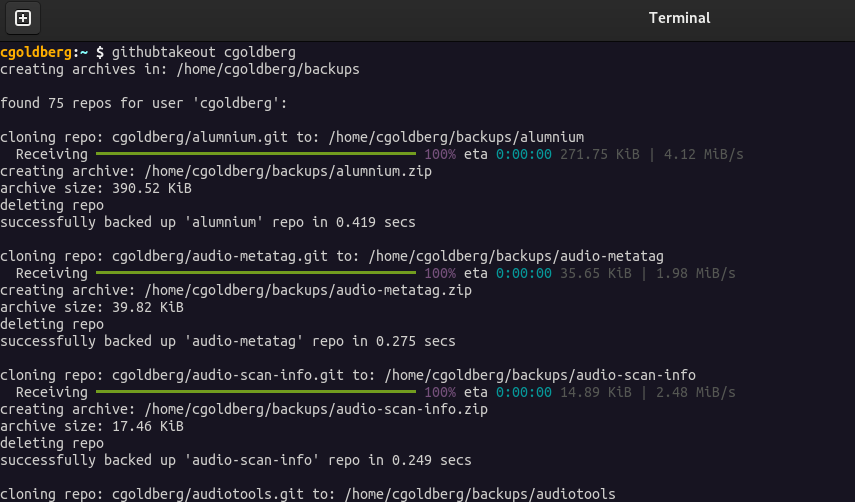
Usage Examples:
Install from PyPI with pipx, Run:
pipx install githubtakeout
githubtakeout <github username>
Clone Repo, Create/Activate Virtual Environment, Install from Source, Run:
git clone git@github.com:cgoldberg/githubtakeout.git
cd ./githubtakeout
python3 -m venv venv
source venv/bin/activate
pip install .
githubtakeout <github username>
1 maintainer

Download files
Download the file for your platform. If you're not sure which to choose, learn more about installing packages.
Source Distribution
Built Distribution
Filter files by name, interpreter, ABI, and platform.
If you're not sure about the file name format, learn more about wheel file names.
Copy a direct link to the current filters
File details
Details for the file githubtakeout-0.1.26.tar.gz.
File metadata
- Download URL: githubtakeout-0.1.26.tar.gz
- Upload date:
- Size: 9.2 kB
- Tags: Source
- Uploaded using Trusted Publishing? No
- Uploaded via:
twine/7.0.0 CPython/3.14.6
File hashes
| Algorithm | Hash digest | |
|---|---|---|
| SHA256 |
de982e1623d13b3aa36dac3575d1ca35de833921100116a2efed23c7fa1895b4
|
|
| MD5 |
86046c1abb7e1b2af6b3438b01ed0f98
|
|
| BLAKE2b-256 |
003d2dfacb494a0274ce8f7df4ea13a264a9a2613c3efb0aeab9d27b22c3996f
|
File details
Details for the file githubtakeout-0.1.26-py3-none-any.whl.
File metadata
- Download URL: githubtakeout-0.1.26-py3-none-any.whl
- Upload date:
- Size: 8.7 kB
- Tags: Python 3
- Uploaded using Trusted Publishing? No
- Uploaded via:
twine/7.0.0 CPython/3.14.6
File hashes
| Algorithm | Hash digest | |
|---|---|---|
| SHA256 |
823f305b3534f8ae0b82400a82a7025168291247253cd271b21aacfc87930764
|
|
| MD5 |
ba5156c3c1200c6bfe8d9777d04b799f
|
|
| BLAKE2b-256 |
05d4e9eb8f47def9aff6cf121613f7c2448fd1837aa76261e4873392a6b69b55
|







