






GitlabHarvester is a lightweight tool built to install in a minute and show impact fast. It searches every repository of a GitLab instance for keywords and secrets through the API, without cloning, including GitLab CE, which has no instance-wide code search.
- Red team engagements. One token, the whole instance: credentials, internal hosts and pivots hiding in the code. Loud and fast or low and slow, your call: rate limits, jitter and User-Agent rotation keep the noise and the signature under control. Captured several accounts' tokens? Hand them all to one run and beat a per-user rate limit.
- Penetration tests. Instance-wide discovery of credentials, tokens and keys as part of the assessment.
- Blue teams and security research. Secret hunting and hygiene audits: a quick first look, full baselines, regular re-scans of recent activity, deduplicated reports, and a history of runs in the log file.
- Developers, analysts and architects. Not for secrets, but for code: fast search across a large codebase, even on GitLab CE.

Install
pipx install gitlab-harvester # or: pip install gitlab-harvester
Requires Python 3.10+ and a GitLab token with the read_api scope.
Quick start
Search one term in the default branch of every project:
export GITLAB_TOKEN='your-token-here'
gitlab-harvester -u https://gitlab.example.com -t "$GITLAB_TOKEN" -s password
The first run builds a project index (<host>_project_index.jsonl), and later runs reuse it.
Hits are written to a JSONL session file as they are found: a link to the file and line,
and the lines around the match. Read them with jq:
jq -r 'select(.result) | .result.project_search_result[].branch_search_result[] | .url, .data' results/*.jsonl
With --download-files every file with hits is saved whole: read the full document, or
run a secret scanner over the files offline, e.g.
trufflehog filesystem results/password/files --no-verification
(details).
Lists of terms, specific files only, saving the files with hits, all branches and forks, fresh findings only, resuming, parallel requests and rate limits, deduplicated reports, config files: docs/USE_CASES.md.
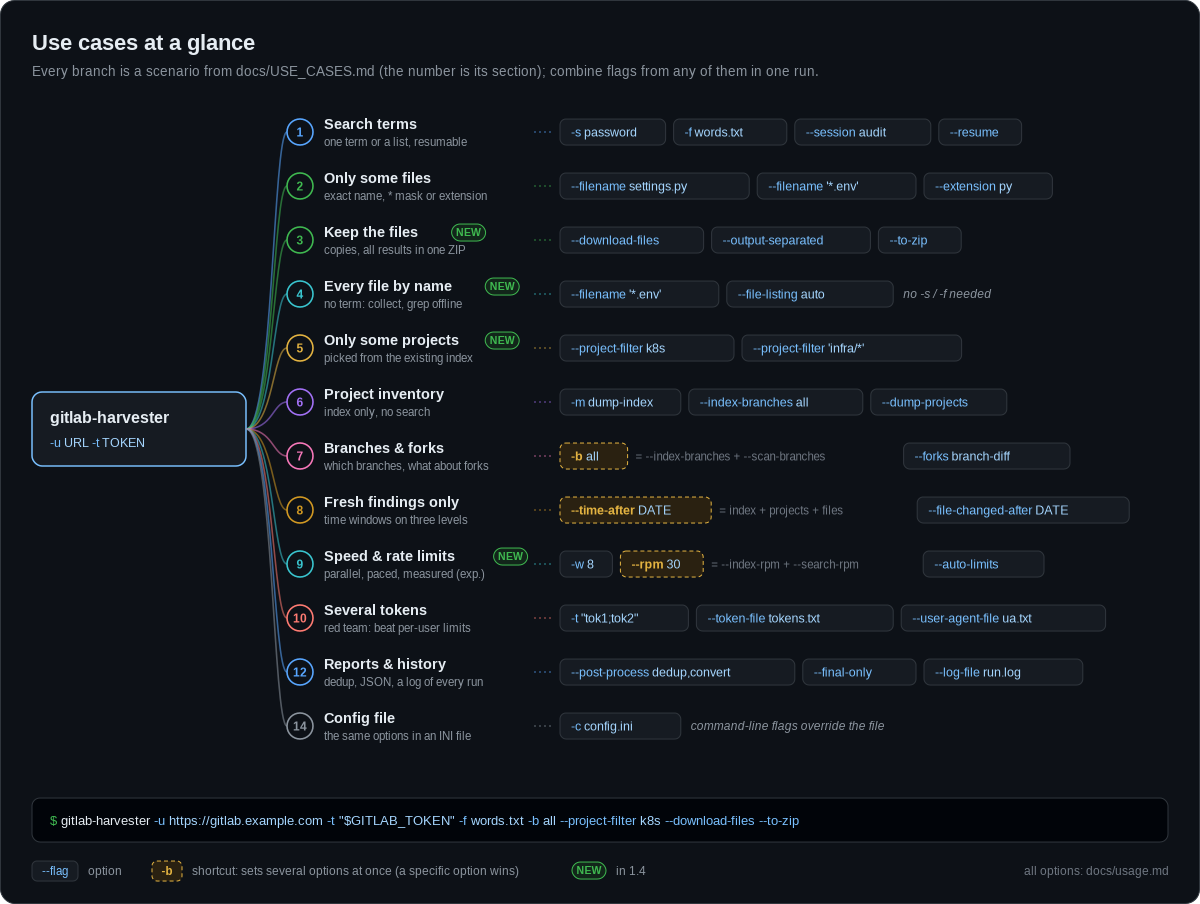
Common options
| Option | Purpose |
|---|---|
-b, --branches default|all|N |
branches to index and search |
--forks include|skip|branch-diff|all-branches |
how forks are handled |
--time-after DATE, --time-before DATE |
limit the index, its projects and the files with hits to a time window |
--started-from 2024-06-01 |
search only indexed projects with activity since the date |
--project-filter k8s,infra/* |
search only the indexed projects whose path matches (substring or mask) |
--filename '*.env', --extension py |
search only files with this name (exact, or a mask with *) or extension; without a term, collect every such file |
--download-files, --download-max-size 10M |
save every file with hits to <term>/files/ for offline analysis |
-t "tok1;tok2", --token-file FILE |
several tokens run in parallel, each with its own workers and rate-limit budget |
-w, --workers N |
parallel API requests per token, for instances without rate limits |
--rpm N, --index-rpm N, --search-rpm N |
requests per minute per worker: all, non-search, search |
-m find-limits, --auto-limits |
experimental: measure the API rate limits and get --workers/--*-rpm for them; during a search, propose lower limits after HTTP 429 |
--jitter 0.01-0.05 |
random delay before every request (seconds, or 10ms-50ms) |
-A STRING, --user-agent-file FILE |
fixed User-Agent, or a random one from the file for every request |
-m dump-index, --dump-projects |
build or rebuild the project index |
--session NAME, --resume |
name a session and continue it later |
--post-process dedup,convert, --final-only |
deduplicate and convert the session right after the search |
--to-zip |
pack the run's results (session, term files, downloaded files) into <session>.zip |
-c, --config FILE |
read options from an INI file (config.example.ini) |
See docs/usage.md for every option, branch and fork strategies, and the output formats, and docs/USE_CASES.md for typical scenarios.
Not a secret scanner
GitlabHarvester is not an alternative to TruffleHog
or Gitleaks. It doesn't detect secrets by their
patterns or entropy, and it doesn't verify them. It is a targeted search for words across
a GitLab instance: you choose what to look for (password, an internal host name, a
project codename), and it finds where that word is, in every project and branch, through
GitLab's own search API.
That is where it came from: an engagement on a real corporate GitLab of about 30,000 projects, with no code search across the instance. Cloning everything wasn't an option, and the question was "where does this word appear?".
It works well together with secret scanners:
-
Find the files worth scanning. On a huge instance, narrow the search down to the projects and files of interest first, then point a scanner at those instead of at everything.
-
Scan what was found.
--download-filessaves every file with hits to the disk, and a scanner reads them offline:gitlab-harvester -u https://gitlab.example.com -t "$GITLAB_TOKEN" -s password --download-files trufflehog filesystem results/password/files --no-verification gitleaks dir results/password/files
Without a term,
--filename '*.env' --download-filescollects every.envfile of the instance for them.--no-verificationkeeps TruffleHog from sending the secrets it finds to their providers to check them.
Development
git clone https://github.com/Cur1iosity/GitlabHarvester.git && cd GitlabHarvester
pip install -r requirements-dev.txt -e .
pytest
The tests and local runs use a bundled Fake GitLab API, so they need no real instance:
python -m fakegitlab
gitlab-harvester -u http://127.0.0.1:8080 -t dev-token -s password -b all
Details: docs/testing.md, docs/architecture.md. Debian/Kali packaging readiness: docs/packaging.md.
License
MIT. Use it only on GitLab instances you are authorized to work with: your own, your organization's, or those within the scope of an agreed engagement.
1 maintainer

Metadata
1 maintainer
Release files for gitlab-harvester 1.4.4
For a detailed explanation of source distributions (sdists) and built distributions (wheels), please see the package formats documentation.
Source distribution (sdist)
| File | Size | Uploaded | Provenance | Actions |
|---|---|---|---|---|
| gitlab_harvester-1.4.4.tar.gz | 139.1 kB | With provenance | Details for gitlab_harvester-1.4.4.tar.gz |
Built distribution (wheel)
| File | Interpreter | ABI | Platform | Actions Reset |
|---|---|---|---|---|
| gitlab_harvester-1.4.4-py3-none-any.whl | Python 3 | none | any | Details for gitlab_harvester-1.4.4-py3-none-any.whl |
Total release size: 310.7 kB
Release files / gitlab_harvester-1.4.4.tar.gz
| Download URL | gitlab_harvester-1.4.4.tar.gz |
|---|---|
| Size | 139.1 kB |
| Tags | Source |
|
SHA-256 checksum How to use checksums |
901f1549548435fda14c546841e369e44c197ef8ee148f6bef9a0aacedd79cc1
|
|
BLAKE2b-256 checksum How to use checksums |
1012cbea10152cc52467edc1ee0d39850fa2cdf332d6de4c958ebe17514bbfd6
|
| Upload date | |
|
Uploaded using Trusted Publishing? What is trusted publishing? |
Yes |
| Uploaded via |
twine/7.0.0 CPython/3.13.16
|
Provenance
Provenance describes where a file came from. On PyPI, provenance is shared via attestations, which provide a verifiable record of the build or publishing details. View details, limitations and caveats.


PyPI Publish Attestation
PyPI verified that this artifact, at this checksum, originated from the publisher listed below.
Signed by GitHub Actions, verified by PyPI on Nov 17, 2026.
Transparency logRelease files / gitlab_harvester-1.4.4-py3-none-any.whl
| Download URL | gitlab_harvester-1.4.4-py3-none-any.whl |
|---|---|
| Size | 171.6 kB |
| Tags | Python 3 |
|
SHA-256 checksum How to use checksums |
28b82c6ef0b2ea19328fe79a596ad4c8b1f82cdf9f0b01e7f1e8959fa8fafa91
|
|
BLAKE2b-256 checksum How to use checksums |
3c92fc73c545951983595aee707d874574cb59a5c5c46920c19f6669910e5af5
|
| Upload date | |
|
Uploaded using Trusted Publishing? What is trusted publishing? |
Yes |
| Uploaded via |
twine/7.0.0 CPython/3.13.16
|
Provenance
Provenance describes where a file came from. On PyPI, provenance is shared via attestations, which provide a verifiable record of the build or publishing details. View details, limitations and caveats.
PyPI Publish Attestation
PyPI verified that this artifact, at this checksum, originated from the publisher listed below.
Signed by GitHub Actions, verified by PyPI on Nov 17, 2026.
Transparency logSecurity for gitlab-harvester 1.4.4
Provenance
Provenance describes where a file came from. On PyPI, provenance is shared via attestations, which provide a verifiable record of the build or publishing details. View details, limitations and caveats.
Full provenance
Both files in this release have been uploaded with provenance metadata.
Attestation for gitlab_harvester-1.4.4.tar.gz
PyPI Publish Attestation
PyPI verified that this artifact, at this checksum, originated from the publisher listed below.
Signed by GitHub Actions, verified by PyPI on Nov 17, 2026.
Transparency logA note on package security
PyPI is a repository for distributing packages, not a service for auditing them. While third-party security researchers and our staff do their best to detect and remove malicious packages, PyPI cannot guarantee the quality, security or suitability of any given package.
To learn more about protecting yourself from malicious actors, visit our package security documentation.














