
GitLab ML CLI
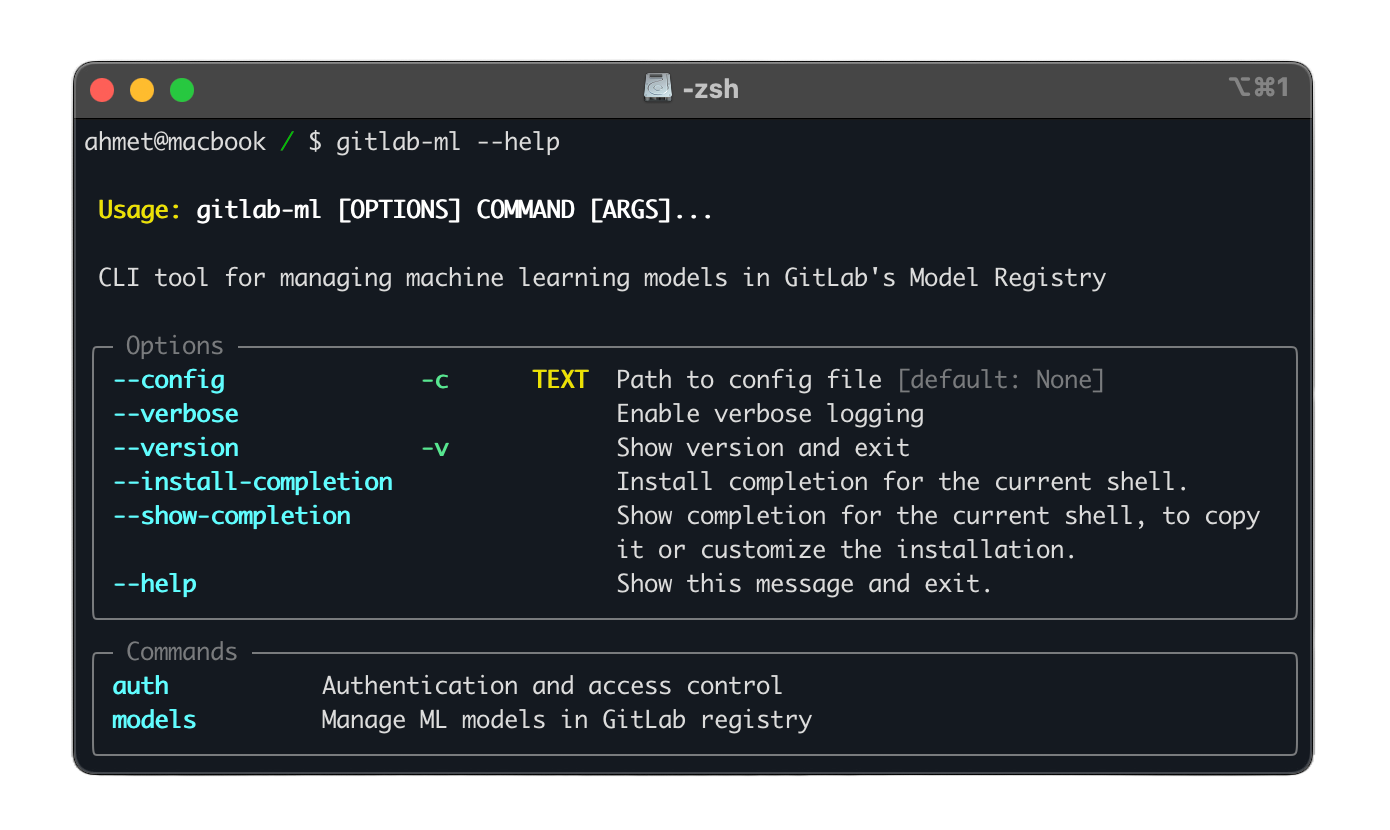



A command-line interface tool for managing machine learning models in GitLab's Model Registry. This tool provides a seamless experience for ML teams to version, track, and deploy their models using GitLab's infrastructure.
Features
- Model Registry Management:
- Create, delete, and list models
- Manage model metadata and tags
- Track model lineage and dependencies
- Model Versioning:
- Upload new model versions with semantic versioning
- Download specific versions for deployment
- Access Control:
- GitLab authentication and authorization
Installation
Using pip
pip install gitlab-ml
Using Poetry
poetry add gitlab-ml
From Source
git clone https://github.com/ahmetoner/gitlab-ml.git
cd gitlab-ml
poetry install
Configuration
Configuration File
Create a configuration file at ~/.config/gitlab-ml/config.yml:
gitlab:
  # GitLab instance URL
  url: "https://gitlab.com"

  # Personal access token with api scope
  token: "your-personal-access-token"

  # Default project for model registry
  default_project: "group/project"
Environment Variables
Alternative to config file, you can use environment variables:
# Required settings
export GITLAB_ML_TOKEN="your-personal-access-token"
export GITLAB_ML_URL="https://gitlab.com"
export GITLAB_ML_PROJECT="group/project"
Usage
Model Management
# List all models with different output formats
gitlab-ml models list
gitlab-ml models list --format json
gitlab-ml models list --format yaml

# Create a new model
gitlab-ml models create my-model \
    --description "My ML model"

# Delete a model (with confirmation)
gitlab-ml models delete my-model

# Force delete without confirmation
gitlab-ml models delete my-model --force
Version Management
# Upload a new model version
gitlab-ml models upload my-model 1.0.0 ./model.pkl

# Upload a directory of model artifacts
gitlab-ml models upload my-model 1.0.0 ./model_dir

# Download a specific version
gitlab-ml models download my-model 1.0.0 \
    --output ./models/
Development
-
Clone the repository:
git clone https://github.com/ahmetoner/gitlab-ml.git
cd gitlab-ml
-
Install development dependencies:
poetry install --with dev
-
Activate virtual environment:
poetry shell -
Run tests:
# Run all tests
poetry run pytest

# Run with coverage
poetry run pytest --cov=gitlab_ml

# Run specific test file
poetry run pytest tests/test_models.py
-
Code formatting and linting:
# Format code
poetry run black .
poetry run isort .

# Run linters
poetry run mypy .
poetry run ruff .
Troubleshooting
Common Issues
-
Authentication Errors
Error: GitLab authentication failed- Verify your token has the correct permissions (api scope)
- Check if token is expired
- Ensure GitLab URL is correct
-
Project Access
Error: Project not found or no access- Verify project path is correct
- Check if you have sufficient permissions
- Ensure project exists and is accessible
-
Upload Failures
Error: Failed to upload model version- Check file permissions
- Verify disk space
- Ensure version follows semver format
API Documentation
Python API
from pathlib import Path
from gitlab_ml.api.client import get_gitlab_client, GitLabClient
from gitlab_ml.api.models import ModelRegistry

# Initialize client with custom URL and token
client = GitLabClient(
    url="https://gitlab.com",
    token="glpat-xxxxxxxxxxxx",
    default_project="group/project"
)
registry = ModelRegistry(client)

# Or use environment variables
import os
os.environ["GITLAB_ML_URL"] = "https://gitlab.com"
os.environ["GITLAB_ML_TOKEN"] = "glpat-xxxxxxxxxxxx"
os.environ["GITLAB_ML_PROJECT"] = "group/project"
client = get_gitlab_client()
registry = ModelRegistry(client)

# List models
models = registry.list_models()

# Upload model
registry.upload_version(
    model_name="my-model",
    version="1.0.0",
    path=Path("./model.pkl")
)

# Download model
registry.download_version(
    model_name="ml-model-new",
    version="1.2.2",
    output_dir=Path("./downloaded_model")
)
REST API Integration
The CLI integrates with GitLab's REST and GraphQL APIs. For custom integrations, refer to:
Contributing
We welcome contributions! Please follow these steps:
- Fork the repository
- Create a feature branch
- Make your changes
- Run tests and linting
- Submit a merge request
License
This project is licensed under the MIT License - see the LICENSE file for details.
1 maintainer

Metadata
1 maintainer
Release files for gitlab-ml 0.5.0
For a detailed explanation of source distributions (sdists) and built distributions (wheels), please see the package formats documentation.
Source distribution (sdist)
| File | Size | Uploaded | |
|---|---|---|---|
| gitlab_ml-0.5.0.tar.gz | 15.6 kB | Details |
Built distribution (wheel)
| File | Interpreter | ABI | Platform | Reset |
|---|---|---|---|---|
| gitlab_ml-0.5.0-py3-none-any.whl | Python 3 | none | any | Details |
Total release size: 33.5 kB
Release files / gitlab_ml-0.5.0.tar.gz
| Download URL | gitlab_ml-0.5.0.tar.gz |
|---|---|
| Size | 15.6 kB |
| Tags | Source |
|
SHA-256 checksum How to use checksums |
795942726fd1709a84604c355d9895362f548c2ed986165187f8d265c52d8fac
|
|
BLAKE2b-256 checksum How to use checksums |
d3a7af351bdff7b5521035f77d1976ed8b4133df1e4933608a8c528f92fb886a
|
| Upload date | |
|
Uploaded using Trusted Publishing? What is trusted publishing? |
No |
| Uploaded via |
poetry/2.1.1 CPython/3.9.21 Linux/6.8.0-1021-azure
|
Release files / gitlab_ml-0.5.0-py3-none-any.whl
| Download URL | gitlab_ml-0.5.0-py3-none-any.whl |
|---|---|
| Size | 17.9 kB |
| Tags | Python 3 |
|
SHA-256 checksum How to use checksums |
8e1789cd1a98a50ad4c8990143f14d88a9ece2af73a368f3c06f2fb57d8a2584
|
|
BLAKE2b-256 checksum How to use checksums |
1453bfeaba66a7fa7d54ed0e10af3100437c65a5b9d2b665c6beb6cb33530f50
|
| Upload date | |
|
Uploaded using Trusted Publishing? What is trusted publishing? |
No |
| Uploaded via |
poetry/2.1.1 CPython/3.9.21 Linux/6.8.0-1021-azure
|














