
CLI tool for managing machine learning models in GitLab's Model Registry

Project description
GitLab ML CLI
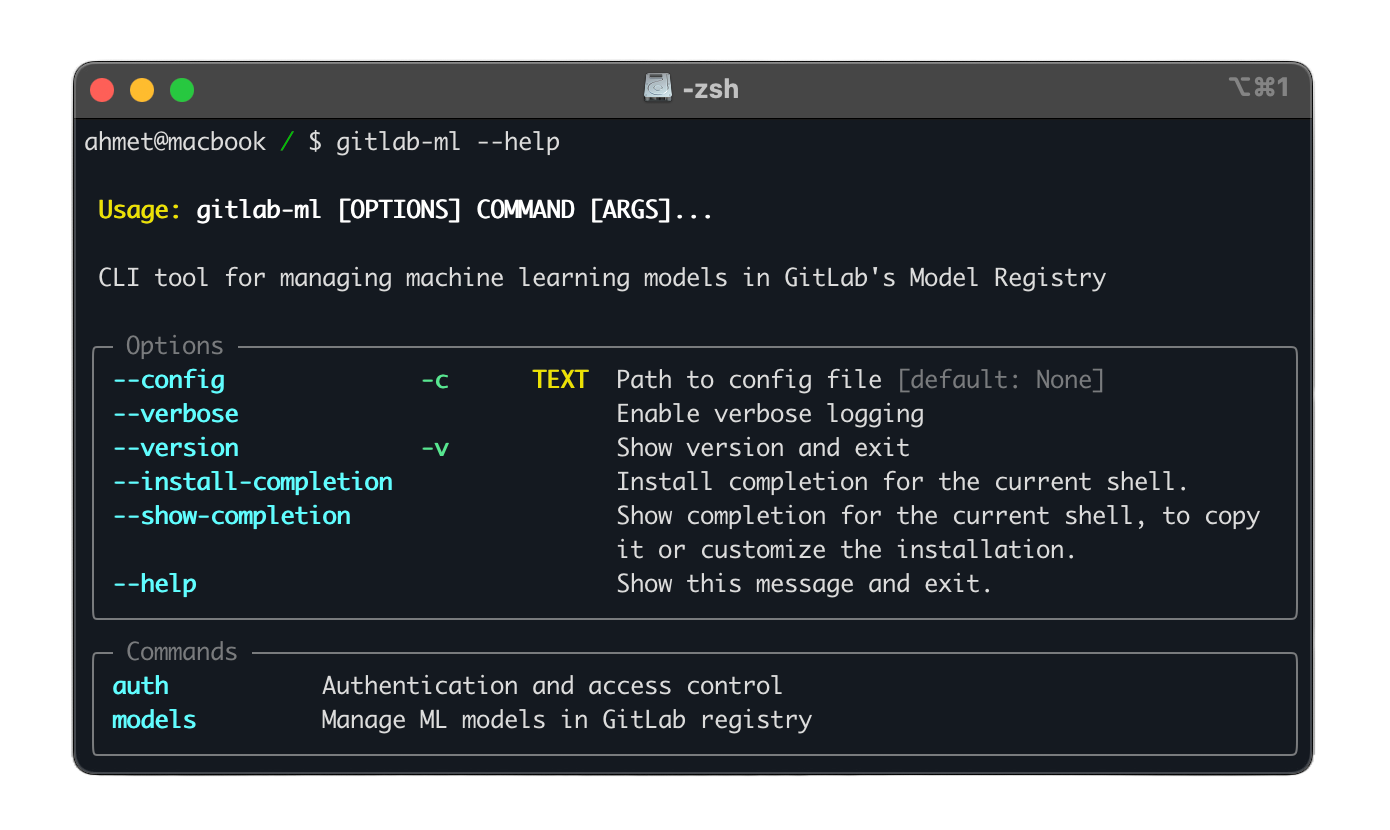



A command-line interface tool for managing machine learning models in GitLab's Model Registry. This tool provides a seamless experience for ML teams to version, track, and deploy their models using GitLab's infrastructure.
Features
- Model Registry Management:
- Create, delete, and list models
- Manage model metadata and tags
- Track model lineage and dependencies
- Model Versioning:
- Upload new model versions with semantic versioning
- Download specific versions for deployment
- Access Control:
- GitLab authentication and authorization
Installation
Using pip
pip install gitlab-ml
Using Poetry
poetry add gitlab-ml
From Source
git clone https://github.com/ahmetoner/gitlab-ml.git
cd gitlab-ml
poetry install
Configuration
Configuration File
Create a configuration file at ~/.config/gitlab-ml/config.yml:
gitlab:
  # GitLab instance URL
  url: "https://gitlab.com"

  # Personal access token with api scope
  token: "your-personal-access-token"

  # Default project for model registry
  default_project: "group/project"
Environment Variables
Alternative to config file, you can use environment variables:
# Required settings
export GITLAB_ML_TOKEN="your-personal-access-token"
export GITLAB_ML_URL="https://gitlab.com"
export GITLAB_ML_PROJECT="group/project"
Usage
Model Management
# List all models with different output formats
gitlab-ml models list
gitlab-ml models list --format json
gitlab-ml models list --format yaml

# Create a new model
gitlab-ml models create my-model \
    --description "My ML model"

# Delete a model (with confirmation)
gitlab-ml models delete my-model

# Force delete without confirmation
gitlab-ml models delete my-model --force
Version Management
# Upload a new model version
gitlab-ml models upload my-model 1.0.0 ./model.pkl

# Upload a directory of model artifacts
gitlab-ml models upload my-model 1.0.0 ./model_dir

# Download a specific version
gitlab-ml models download my-model 1.0.0 \
    --output ./models/
Development
-
Clone the repository:
git clone https://github.com/ahmetoner/gitlab-ml.git
cd gitlab-ml
-
Install development dependencies:
poetry install --with dev
-
Activate virtual environment:
poetry shell -
Run tests:
# Run all tests
poetry run pytest

# Run with coverage
poetry run pytest --cov=gitlab_ml

# Run specific test file
poetry run pytest tests/test_models.py
-
Code formatting and linting:
# Format code
poetry run black .
poetry run isort .

# Run linters
poetry run mypy .
poetry run ruff .
Troubleshooting
Common Issues
-
Authentication Errors
Error: GitLab authentication failed- Verify your token has the correct permissions (api scope)
- Check if token is expired
- Ensure GitLab URL is correct
-
Project Access
Error: Project not found or no access- Verify project path is correct
- Check if you have sufficient permissions
- Ensure project exists and is accessible
-
Upload Failures
Error: Failed to upload model version- Check file permissions
- Verify disk space
- Ensure version follows semver format
API Documentation
Python API
from pathlib import Path
from gitlab_ml.api.client import get_gitlab_client, GitLabClient
from gitlab_ml.api.models import ModelRegistry

# Initialize client with custom URL and token
client = GitLabClient(
    url="https://gitlab.com",
    token="glpat-xxxxxxxxxxxx",
    default_project="group/project"
)
registry = ModelRegistry(client)

# Or use environment variables
import os
os.environ["GITLAB_ML_URL"] = "https://gitlab.com"
os.environ["GITLAB_ML_TOKEN"] = "glpat-xxxxxxxxxxxx"
os.environ["GITLAB_ML_PROJECT"] = "group/project"
client = get_gitlab_client()
registry = ModelRegistry(client)

# List models
models = registry.list_models()

# Upload model
registry.upload_version(
    model_name="my-model",
    version="1.0.0",
    path=Path("./model.pkl")
)

# Download model
registry.download_version(
    model_name="ml-model-new",
    version="1.2.2",
    output_dir=Path("./downloaded_model")
)
REST API Integration
The CLI integrates with GitLab's REST and GraphQL APIs. For custom integrations, refer to:
Contributing
We welcome contributions! Please follow these steps:
- Fork the repository
- Create a feature branch
- Make your changes
- Run tests and linting
- Submit a merge request
License
This project is licensed under the MIT License - see the LICENSE file for details.
Release history Release notifications | RSS feed


Download files
Download the file for your platform. If you're not sure which to choose, learn more about installing packages.
Source Distribution
Built Distribution
Filter files by name, interpreter, ABI, and platform.
If you're not sure about the file name format, learn more about wheel file names.
Copy a direct link to the current filters
File details
Details for the file gitlab_ml-0.5.0.tar.gz.
File metadata
- Download URL: gitlab_ml-0.5.0.tar.gz
- Upload date:
- Size: 15.6 kB
- Tags: Source
- Uploaded using Trusted Publishing? No
- Uploaded via: poetry/2.1.1 CPython/3.9.21 Linux/6.8.0-1021-azure
File hashes
| Algorithm | Hash digest | |
|---|---|---|
| SHA256 |
795942726fd1709a84604c355d9895362f548c2ed986165187f8d265c52d8fac
|
|
| MD5 |
c2df0930adb8b8562c1fd592389488ae
|
|
| BLAKE2b-256 |
d3a7af351bdff7b5521035f77d1976ed8b4133df1e4933608a8c528f92fb886a
|
File details
Details for the file gitlab_ml-0.5.0-py3-none-any.whl.
File metadata
- Download URL: gitlab_ml-0.5.0-py3-none-any.whl
- Upload date:
- Size: 17.9 kB
- Tags: Python 3
- Uploaded using Trusted Publishing? No
- Uploaded via: poetry/2.1.1 CPython/3.9.21 Linux/6.8.0-1021-azure
File hashes
| Algorithm | Hash digest | |
|---|---|---|
| SHA256 |
8e1789cd1a98a50ad4c8990143f14d88a9ece2af73a368f3c06f2fb57d8a2584
|
|
| MD5 |
f36d4aa170f5e79b1dcc30a7390b3d16
|
|
| BLAKE2b-256 |
1453bfeaba66a7fa7d54ed0e10af3100437c65a5b9d2b665c6beb6cb33530f50
|






