
Gitlab-stats






Get to the gitlab API and generates a report based on the pipeline builds. Creates a report for the pipelines of the last two weeks. (On the assumption that there are less than 100 push per 2 weeks)
Installation
Install via pip using:
pip install gitlab_statsLocal install with pip3:
pip3 install -e .In order to make it work:
Create a GITLAB_TOKEN env variable with your access token.
Get the project ID
For the script to work, you will need to get the project ID of your gitlab project. It is a unique ID that is used by the gitlab REST API to store your project information.
Get it in [your project] > Settings > General > General project settings
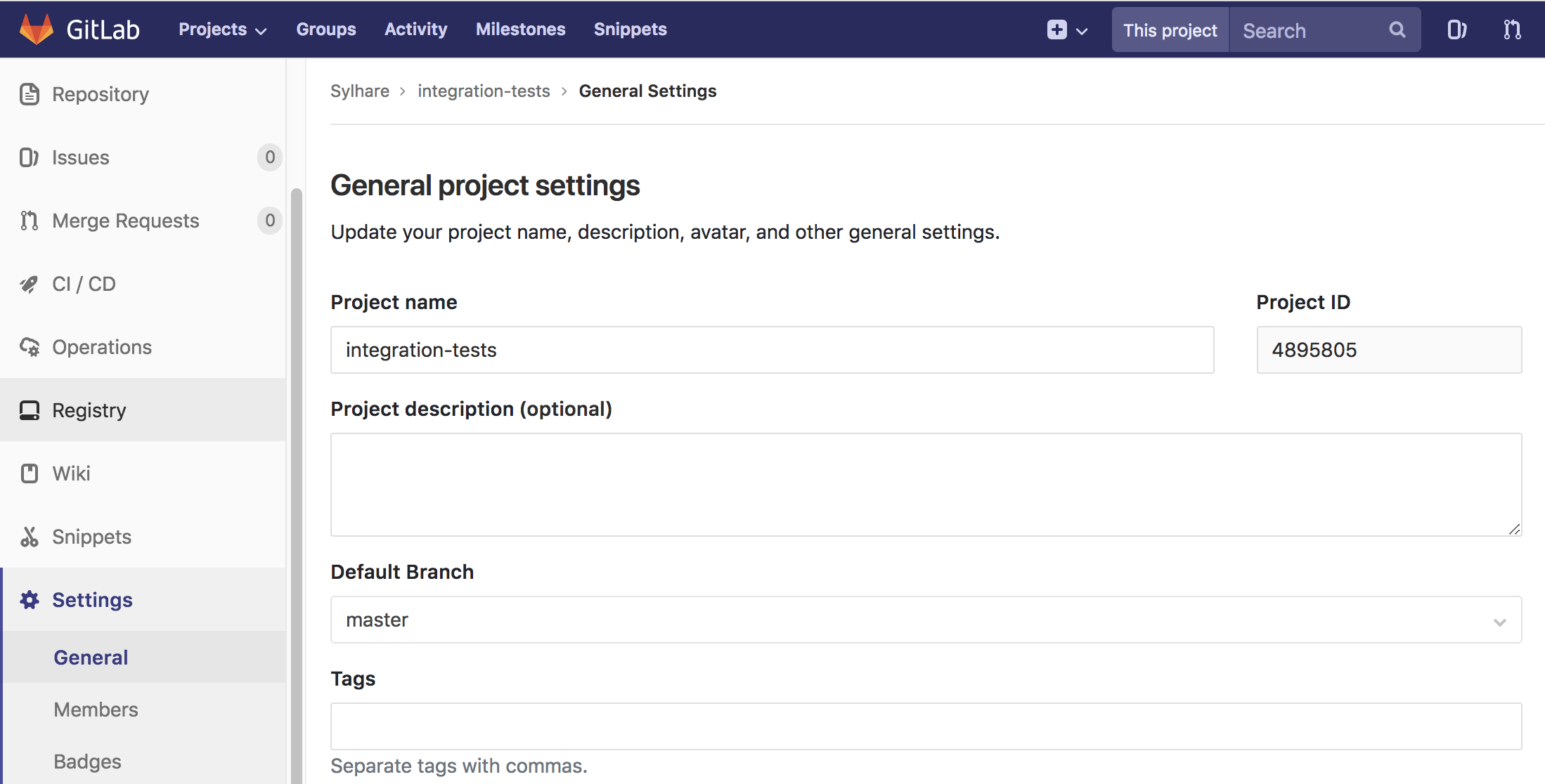
General project settings
How to use
When installed you should be able to run it like that:
gitlab_stats <id> -u <your gitlab url> -p <your proxy>Here is the help when gitlab_stats -h:
usage: gitlab_stats [-h] [-r] [-u URL] [-p PROXY] id

gitlab_stats: Generate a report from gitlab's pipeline metrics

positional arguments:
  id                    Put the id of the gitlab project

optional arguments:
  -h, --help                show this help message and exit
  -r, --report              Generate a csv report
  -u URL, --url URL         Put the url of your gitlab instance if different from
                            https://gitlab.com
  -p PROXY, --proxy PROXY   Add the url of your proxy like
                            'http://my.proxy.url:8083'
You can save proxy with HTTP_PROXY or gitlab url with GITLAB_URL.
Docker
To build the docker use:
docker build -t gitlab_stats . --build-arg token="your token" --build-arg proxy="your proxy" --build-arg gitlab="gitlab url"To run the docker use:
# Having set the token, the proxy and the url when building it:
docker run -it exec gitlab_stats bash gitlab_stats project_id
Important Note:
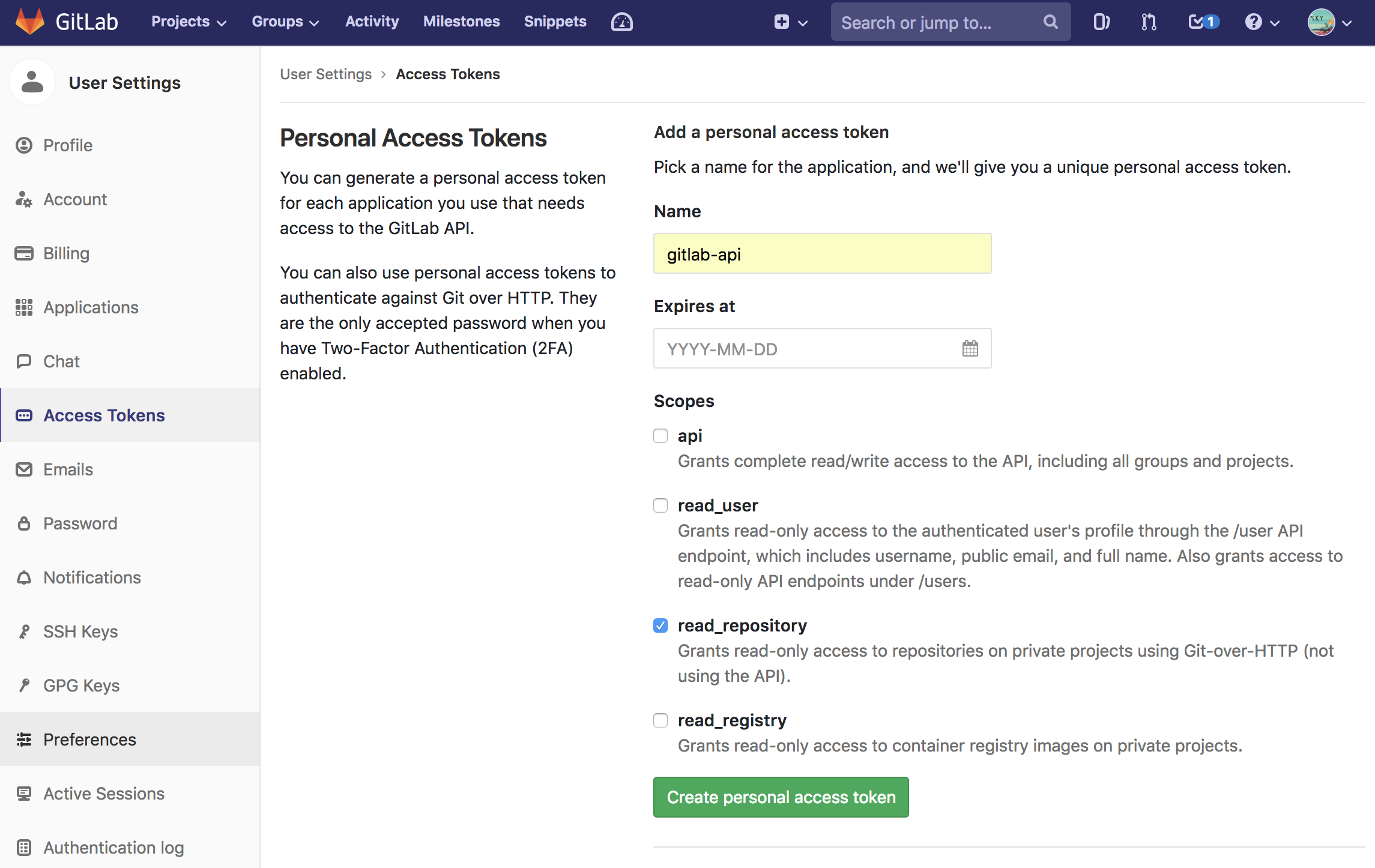
You will need an access token set up as an environment variable to reach your gitlab.
To get an access token based on your personal credentials go to your gitlab server [Account] -> [Settings] -> [Access Tokens]
General project settings
Then give it a name and click Create personal access token.
Save this token somewhere safe then in bash:
export GITLAB_TOKEN=<token>1 maintainer

Release files for gitlab-stats 1.2.1
For a detailed explanation of source distributions (sdists) and built distributions (wheels), please see the package formats documentation.
Source distribution (sdist)
| File | Size | Uploaded | |
|---|---|---|---|
| gitlab_stats-1.2.1.tar.gz | 22.4 kB | Details |
Built distribution (wheel)
| File | Interpreter | ABI | Platform | Reset |
|---|---|---|---|---|
| gitlab_stats-1.2.1-py3-none-any.whl | Python 3 | none | any | Details |
Total release size: 66.2 kB
Release files / gitlab_stats-1.2.1.tar.gz
| Download URL | gitlab_stats-1.2.1.tar.gz |
|---|---|
| Size | 22.4 kB |
| Tags | Source |
|
SHA-256 checksum How to use checksums |
a0f575ed57fbab9a6144e0c5507702451f5556edd753cf8cdf4e7ad5dd2bf305
|
|
BLAKE2b-256 checksum How to use checksums |
8b8a1860d432538e240e89b9ffa1d1ca0e07193f809d6c1b0103074ded3d70af
|
| Upload date | |
|
Uploaded using Trusted Publishing? What is trusted publishing? |
No |
| Uploaded via |
twine/3.1.1 pkginfo/1.5.0.1 requests/2.22.0 setuptools/41.6.0 requests-toolbelt/0.9.1 tqdm/4.39.0 CPython/3.7.5
|
Release files / gitlab_stats-1.2.1-py3-none-any.whl
| Download URL | gitlab_stats-1.2.1-py3-none-any.whl |
|---|---|
| Size | 43.8 kB |
| Tags | Python 3 |
|
SHA-256 checksum How to use checksums |
1b12f7e6019512ef86d7eb136639869c710fe1d4cd8351344bab23cd76cd2632
|
|
BLAKE2b-256 checksum How to use checksums |
f0028e0aee8af4c6bcf907322329412daf5c6386ad644c5d8783b6f95ae64c79
|
| Upload date | |
|
Uploaded using Trusted Publishing? What is trusted publishing? |
No |
| Uploaded via |
twine/3.1.1 pkginfo/1.5.0.1 requests/2.22.0 setuptools/41.6.0 requests-toolbelt/0.9.1 tqdm/4.39.0 CPython/3.7.5
|














