
gitlane
A free, open-source Git client that runs in your browser. Commit, push, pull, see the commit graph, manage branches and stashes — in a clean local web app, with one command.
Features
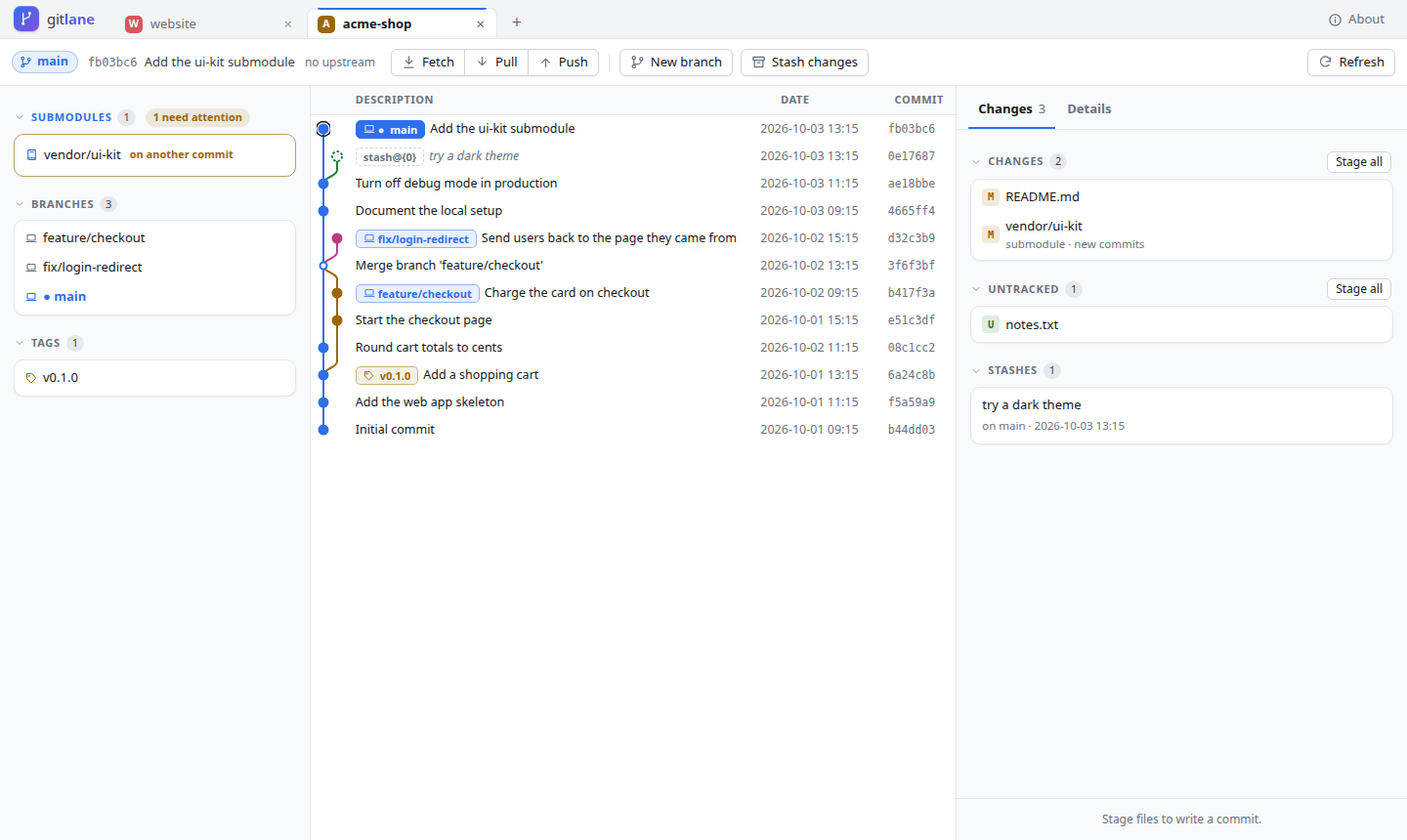
- Changes — see changed, staged and untracked files; stage, unstage or discard whole files; commit with a summary and description
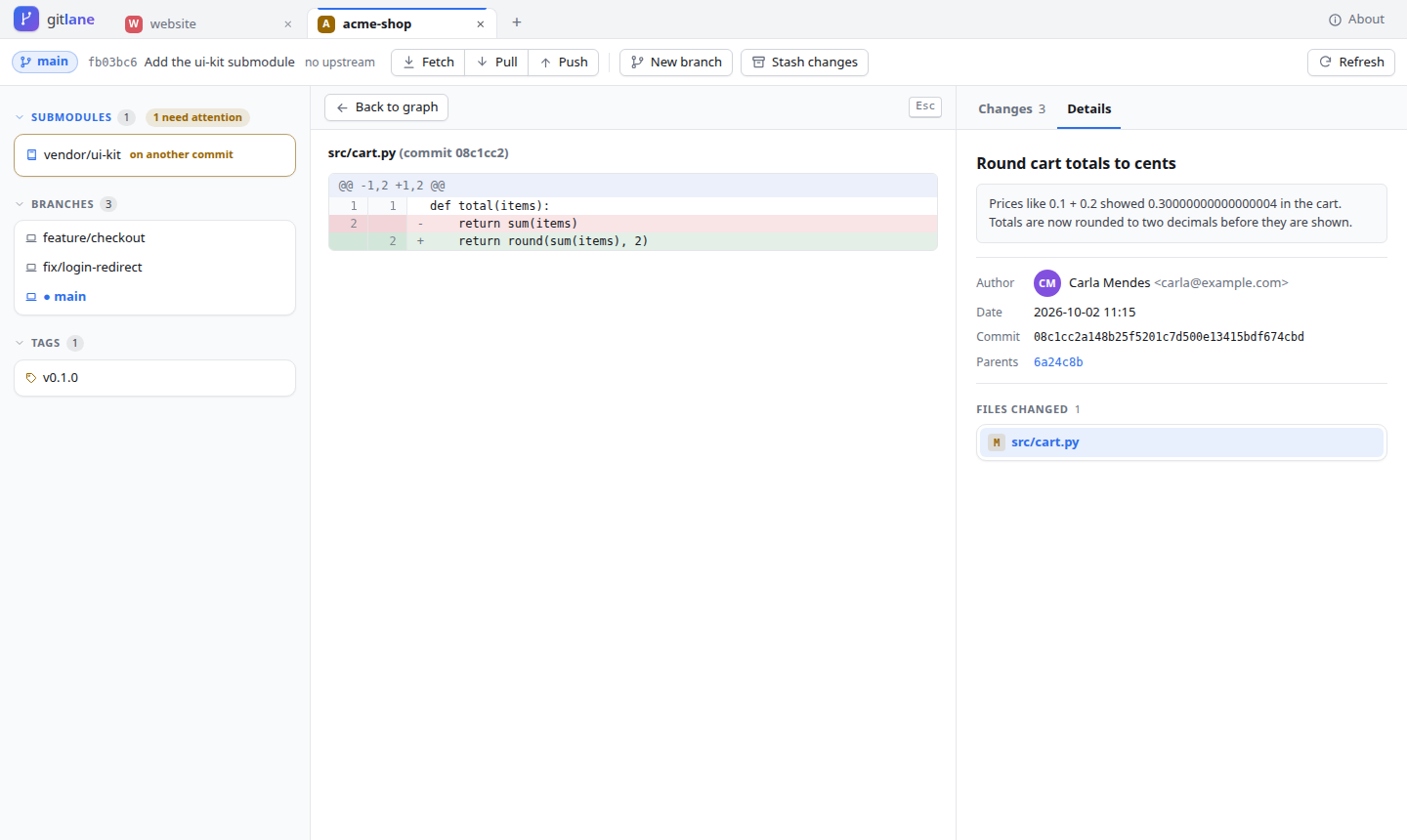
- Diffs — for your working files and any commit, opened in place of the graph, with before/after previews for images
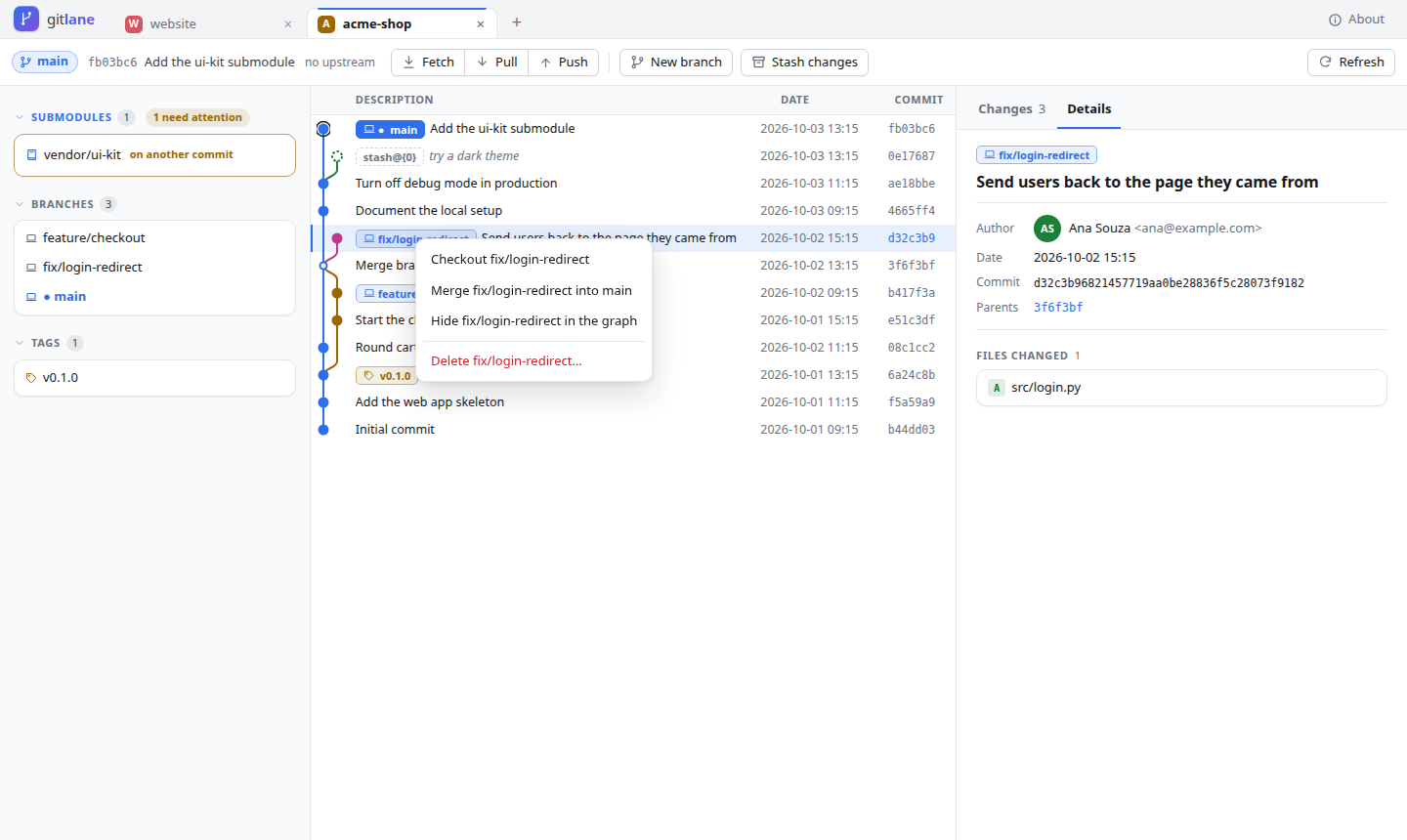
- Commit graph — all branches with colored lanes, branch/tag labels and your stashes; fast on repositories with tens of thousands of commits
- Right-click menus — checkout, create a branch, cherry-pick, revert, reset (soft / mixed / hard), merge, delete branches (also on the remote)
- Sync — fetch, pull, push, and force push that always uses
--force-with-lease - Submodules — see which are out of date or not set up, what changed (commits added or removed), set them up or move them back, and open one in its own tab
- Hide branches — keep the graph focused: hide a branch (or all remote branches) and show it again any time
- Tags — create (lightweight or with a message), push, delete here or on the remote
- Stash — save (including untracked files), apply, pop, drop, and look inside a stash
- Merge conflicts — see the conflicted files, then abort or mark resolved and commit
- Tabs — several repositories at once; open more with your system's Choose folder window, recent repos or the built-in folder browser
- Safe by default — dangerous actions ask first; runs only on your computer (see Security)
- Light and dark theme (follows your system)
Install
You need Python 3.10+ and Git 2.23+ (most systems already have both).
The recommended way is pipx or uv. They install gitlane in its own environment, so it never conflicts with your other Python projects:
pipx install gitlane
# or
uv tool install gitlane
Just want to try it, without installing anything? With uv:
uvx gitlane
Don't have pipx or uv yet?
| System | Install pipx |
|---|---|
| Ubuntu / Debian | sudo apt install pipx && pipx ensurepath |
| Fedora | sudo dnf install pipx && pipx ensurepath |
| macOS | brew install pipx && pipx ensurepath |
| Windows | py -m pip install --user pipx then py -m pipx ensurepath |
Open a new terminal afterwards so the gitlane command is found.
Install the latest development version from GitHub
pipx install git+https://github.com/gustavojoseleite/gitlane
Uninstall: pipx uninstall gitlane (or uv tool uninstall gitlane). Your remembered tabs stay in
gitlane's settings folder (see Usage); delete that folder too if you want them gone.
Updating
Already have gitlane installed? Update it with the same tool you installed it with:
| Installed with | Update with |
|---|---|
| pipx | pipx upgrade gitlane |
| uv | uv tool upgrade gitlane |
uvx gitlane |
nothing to do — uvx gitlane@latest always runs the newest version |
| pip (in a virtual environment) | pip install --upgrade gitlane |
| from GitHub | pipx install --force git+https://github.com/gustavojoseleite/gitlane |
Then:
- Stop gitlane if it is running (Ctrl+C in its terminal) and start it again. A running gitlane keeps the old version until it restarts; reload the browser tab after it starts.
- Check the version:
gitlane --version(or About in the top-right corner of the page).
Updating keeps your open tabs, recent repos and hidden branches. See what changed in each version in CHANGELOG.md.
Problems updating?
- "gitlane is already at the latest version" but it isn't: PyPI can take a few minutes to show a new
release. Try again later, or install an exact version:
pipx install --force gitlane==X.Y.Z. - Go back to an older version:
pipx install --force gitlane==0.2.0(any version listed on PyPI). pipx: command not found: you installed gitlane another way — use the matching row of the table above.- Still the old version after updating: make sure you stopped the old gitlane. Run
which gitlane(where gitlaneon Windows) to see which copy your terminal starts.
Usage
gitlane                      # inside a repository: open it
gitlane ~/dev/my-project     # open a specific repository
gitlane                      # anywhere else: reopen your tabs, or pick a repository
gitlane starts a small server on your computer and opens it in your browser. Keep the terminal
open while you use it; press Ctrl+C to stop. Use + next to the tabs to open more
repositories. Open tabs and recent repos are remembered (in ~/.config/gitlane/, or
%APPDATA%\gitlane on Windows).
| Option | What it does |
|---|---|
--port 8000 |
use a fixed port (default: a free one) |
--no-browser |
only print the link, don't open the browser |
--install-launcher |
add gitlane to your app menu (Linux) |
--remove-launcher |
remove it from the app menu |
--version |
show the version |
Keyboard: ↑ ↓ move through commits · Enter open · R refresh · Ctrl+Enter commit ·
Esc close menus and dialogs. Drag the dividers between panels to resize them (double-click to reset).
Push and pull: logging in
gitlane uses your own Git setup and never asks for or stores passwords. If git push works in
your terminal without typing a password, it works in gitlane too.
- SSH remotes (
git@github.com:you/repo.git) — recommended. Set up an SSH key once: GitHub guide. - HTTPS remotes (
https://github.com/you/repo.git) — need a credential helper, for examplegh auth setup-git(GitHub CLI) or Git Credential Manager. Or switch the remote to SSH:git remote set-url origin git@github.com:you/repo.git
Security
gitlane is a local app, but a web server on your computer still needs care:
- It listens only on
127.0.0.1— other computers can't reach it. - Every start creates a secret token in the link; without it every request is refused. The token is then kept in a cookie that other websites can't use.
- It rejects requests from other websites (Origin and Host checks, which also block DNS rebinding).
- Changes are only made with
POSTrequests; dangerous actions ask you first. - Image previews are served so that an SVG from a repository can never run scripts.
Found a security problem? Please open an issue without the details first, and we'll find a private way to talk.
Contributing
Bug reports, ideas and pull requests are welcome! See CONTRIBUTING.md for how to set up the project, run the tests and send a change.
License
MIT © 2026 Gustavo Leite — free to use, change and share, including for commercial work.
gitlane includes htmx (Zero-Clause BSD license).
1 maintainer

Metadata
1 maintainer
Release files for gitlane 0.3.0
For a detailed explanation of source distributions (sdists) and built distributions (wheels), please see the package formats documentation.
Source distribution (sdist)
| File | Size | Uploaded | Provenance | Actions |
|---|---|---|---|---|
| gitlane-0.3.0.tar.gz | 131.0 kB | With provenance | Details for gitlane-0.3.0.tar.gz |
Built distribution (wheel)
| File | Interpreter | ABI | Platform | Actions Reset |
|---|---|---|---|---|
| gitlane-0.3.0-py3-none-any.whl | Python 3 | none | any | Details for gitlane-0.3.0-py3-none-any.whl |
Total release size: 227.4 kB
Release files / gitlane-0.3.0.tar.gz
| Download URL | gitlane-0.3.0.tar.gz |
|---|---|
| Size | 131.0 kB |
| Tags | Source |
|
SHA-256 checksum How to use checksums |
7e62edf10cef983b7b009951d2d58e6b4e2f4e72d48634f6e2eec093b169ed92
|
|
BLAKE2b-256 checksum How to use checksums |
2ce2298f865ddd065ecb3532aaf4b28816225b6c14f06945174aab7855c3192b
|
| Upload date | |
|
Uploaded using Trusted Publishing? What is trusted publishing? |
Yes |
| Uploaded via |
twine/7.0.0 CPython/3.13.16
|
Provenance
Provenance describes where a file came from. On PyPI, provenance is shared via attestations, which provide a verifiable record of the build or publishing details. View details, limitations and caveats.


PyPI Publish Attestation
PyPI verified that this artifact, at this checksum, originated from the publisher listed below.
Signed by GitHub Actions, verified by PyPI on Nov 4, 2026.
Transparency logRelease files / gitlane-0.3.0-py3-none-any.whl
| Download URL | gitlane-0.3.0-py3-none-any.whl |
|---|---|
| Size | 96.4 kB |
| Tags | Python 3 |
|
SHA-256 checksum How to use checksums |
80802cb6aee4f10700af8d305b008864f0dddfc31dcd37b6296a11e510a9ea08
|
|
BLAKE2b-256 checksum How to use checksums |
d554c0f713f71f977fcf5663734c40490d45e0f2fe38af6b686c56683422e953
|
| Upload date | |
|
Uploaded using Trusted Publishing? What is trusted publishing? |
Yes |
| Uploaded via |
twine/7.0.0 CPython/3.13.16
|
Provenance
Provenance describes where a file came from. On PyPI, provenance is shared via attestations, which provide a verifiable record of the build or publishing details. View details, limitations and caveats.
PyPI Publish Attestation
PyPI verified that this artifact, at this checksum, originated from the publisher listed below.
Signed by GitHub Actions, verified by PyPI on Nov 4, 2026.
Transparency logSecurity for gitlane 0.3.0
Provenance
Provenance describes where a file came from. On PyPI, provenance is shared via attestations, which provide a verifiable record of the build or publishing details. View details, limitations and caveats.
Full provenance
Both files in this release have been uploaded with provenance metadata.
Attestation for gitlane-0.3.0.tar.gz
PyPI Publish Attestation
PyPI verified that this artifact, at this checksum, originated from the publisher listed below.
Signed by GitHub Actions, verified by PyPI on Nov 4, 2026.
Transparency logA note on package security
PyPI is a repository for distributing packages, not a service for auditing them. While third-party security researchers and our staff do their best to detect and remove malicious packages, PyPI cannot guarantee the quality, security or suitability of any given package.
To learn more about protecting yourself from malicious actors, visit our package security documentation.














