
Generate git actions without interrupting your coding flow.
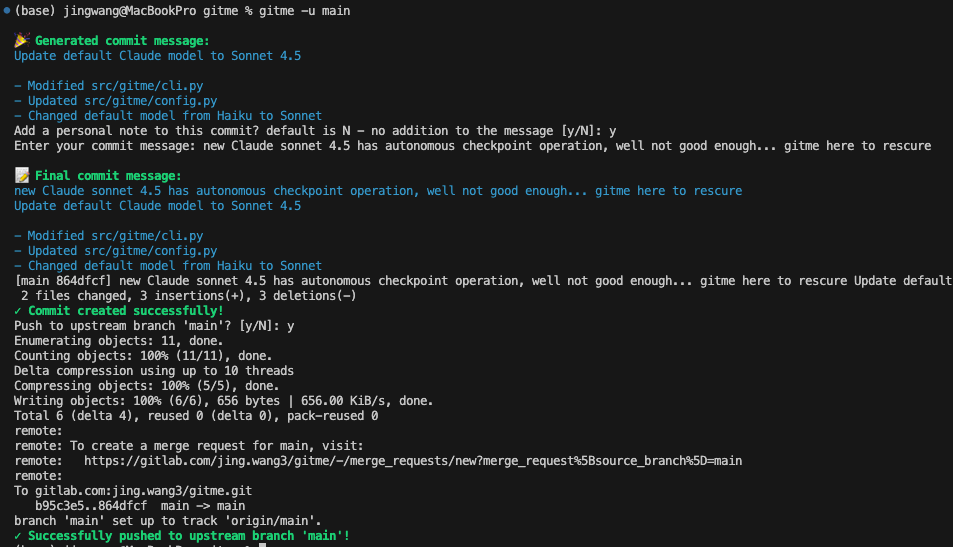
git add . && git commit -am "ugh... I vide all the way, what did I do? what do I even say here?" && git push -u origin dev
⬇️
gitme -u <your-remote-branch>
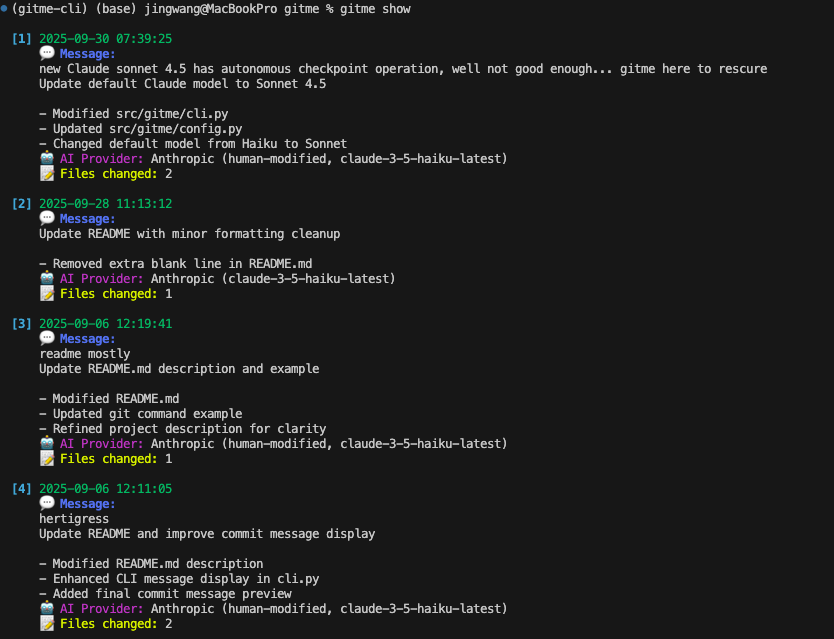
gitme show
Prerequisites
- Python 3.8+
- At least one AI provider API key:
- Anthropic API key for Claude models, default is
claude-haiku-4-5 - OpenAI API key for GPT models,
openaiPython package for OpenAI support, default isgpt-4o-mini
- Anthropic API key for Claude models, default is
- Git, all gitme commands must be run from within a git repository directory. If you're not in a git repository, you'll see an error message prompting you to initialize a git repository with
git init.
Features
- Analyzes git diffs to generate contextually relevant commit messages
- Detects untracked files and prompts to add them
- Supports staged changes only or all modified files
- Streamline your git workflow: add files, commit and push to upstream branch with user confirmation on every step, extremely lightweight and fast.
- User input: Option to edit and then confirm the messages before committing
- Multiple AI Providers: Choose between Anthropic or OpenAI, default is Anthropic
- Model options for both providers
- File changes and commit message history for logging, search and review at local
- Repository-specific message storage
Installation
Install from PyPI:
pip install gitme-cli --upgrade
Or install directly from GitHub:
pip install git+https://github.com/wangjing0/gitme.git
Or develop locally:
git clone https://github.com/wangjing0/gitme.git
cd gitme
pip install -e .
AI Provider Setup
Choose one or both providers:
For Anthropic Claude (default):
export ANTHROPIC_API_KEY="your-anthropic-api-key-here"
For OpenAI GPT (Optional):
export OPENAI_API_KEY="your-openai-api-key-here"
Basic Usage
# Generate message for staged changes (default - uses Anthropic Claude)
gitme

# Generate message for all changes
gitme -a

# Generate message and commit
gitme -c

# Generate message and commit and push to remote branch
gitme -u <remote-branch>
# Use OpenAI instead of Anthropic (default)
gitme -p openai

# Use OpenAI with specific model
gitme -p openai -m gpt-4o

# Use Anthropic with specific model
gitme -m claude-3-5-haiku-latest

# Combine with other options
gitme -p openai -c  # Use OpenAI and commit
Message history and modified files
# Show previous messages (includes provider/model info)
gitme show

# Show last 5 messages
gitme show -n 5

# Show from all repositories
gitme show -r

# Clear history
gitme show --clear
Enhanced Message History Display:
[1] 2025-09-30 07:48:32
    💬 Message:
    Update default AI model to Claude Sonnet 4

    - Modified README.md
    🤖 AI Provider: Anthropic (claude-sonnet-4-5)
    📝 Files changed: 1

[2] 2025-09-30 07:45:54
    💬 Message:
    Update documentation images and references

    - Modified README.md
    - Added images/gitmecommit.png
    - Added images/gitmeshow.png
    - Cleaned up src/gitme/cli.py
    🤖 AI Provider: Anthropic (claude-sonnet-4-5)
    📝 Files changed: 4
Options
Generate Options
-s, --staged: Analyze only staged changes-a, --all: Analyze all changes (staged and unstaged)-p, --provider: Choose AI provider (anthropicoropenai, default: anthropic)-m, --model: Model to use (provider-specific)-c, --commit: Create commit with generated message (usesgit commit -a -m "auto-generated message")-u, --upstream:Analyze all changes and create commit and push to upstream branch (specify branch name)
Show Options
-n, --limit: Number of messages to show-r, --all-repos: Show messages from all repositories--clear: Clear message history
Available Models
Anthropic Claude:
claude-haiku-4-5(default)claude-sonnet-4-5claude-3-5-haiku-latest
OpenAI GPT:
gpt-4o-mini(default when using OpenAI)gpt-4ogpt-4
Privacy & Security Notice
⚠️ Important: When using gitme or gitme generate, your code changes will be sent to the selected AI provider (Anthropic Claude or OpenAI GPT) for processing. The tool does NOT send your entire codebase - only the diff contents of changed files.
Please exercise caution when using this tool:
- Avoid using it with repositories containing sensitive information, credentials, or proprietary code
- Review your changes before running the command to ensure no sensitive data is included
- Consider using
.gitignoreto exclude sensitive files from git tracking - Be aware that different providers have different data handling policies
- Both Anthropic and OpenAI have their own privacy policies and data retention practices
New Release
chmod +x release.sh && ./release.sh <version>
then upload to PyPI
twine upload dist/*
Roadmap
- User feedback on the generated message and modify accordingly
- Add a way to add custom prompt to the AI provider
- add features: search messages and return commit_id, rewind to a previous commit, redo the commit message, etc.
- Local models with Ollama support
Contributing
Contributions are welcome! Please feel free to submit a pull request. ❤️ @wangjing0
License
MIT
1 maintainer

Metadata
1 maintainer
Release files for gitme-cli 0.9.1
For a detailed explanation of source distributions (sdists) and built distributions (wheels), please see the package formats documentation.
Source distribution (sdist)
| File | Size | Uploaded | Provenance | |
|---|---|---|---|---|
| gitme_cli-0.9.1.tar.gz | 254.5 kB | Without provenance | Details |
Built distribution (wheel)
| File | Interpreter | ABI | Platform | Reset |
|---|---|---|---|---|
| gitme_cli-0.9.1-py3-none-any.whl | Python 3 | none | any | Details |
Total release size: 266.9 kB
Release files / gitme_cli-0.9.1.tar.gz
| Download URL | gitme_cli-0.9.1.tar.gz |
|---|---|
| Size | 254.5 kB |
| Tags | Source |
|
SHA-256 checksum How to use checksums |
65404cc6709a9fd4361ffce34dc48c6d899dd6206626cf486ea98c90efcc4202
|
|
BLAKE2b-256 checksum How to use checksums |
5ddb6db66ed36e0f6f20db3375a2117e880ff54ae2759b7848db4e4265f56fea
|
| Upload date | |
|
Uploaded using Trusted Publishing? What is trusted publishing? |
No |
| Uploaded via |
twine/6.1.0 CPython/3.9.13
|
Release files / gitme_cli-0.9.1-py3-none-any.whl
| Download URL | gitme_cli-0.9.1-py3-none-any.whl |
|---|---|
| Size | 12.4 kB |
| Tags | Python 3 |
|
SHA-256 checksum How to use checksums |
ee08630dd8ee1a2151d30099cfa318e5a4029f4a2d473c18430ecd6d635a1812
|
|
BLAKE2b-256 checksum How to use checksums |
b54691f747411c622084ff2207e0a86d08fd0660720aa0c1e59d47f3aa059de2
|
| Upload date | |
|
Uploaded using Trusted Publishing? What is trusted publishing? |
No |
| Uploaded via |
twine/6.1.0 CPython/3.9.13
|
Security for gitme-cli 0.9.1
Provenance
Provenance describes where a file came from. On PyPI, provenance is shared via attestations, which provide a verifiable record of the build or publishing details. View details, limitations and caveats.
No provenance found
None of the files in this release were uploaded with provenance metadata.
A note on package security
PyPI is a repository for distributing packages, not a service for auditing them. While third-party security researchers and our staff do their best to detect and remove malicious packages, PyPI cannot guarantee the quality, security or suitability of any given package.
To learn more about protecting yourself from malicious actors, visit our package security documentation.














