

gitmole
A toolkit for digging into any cloned git repository: who works on it, where the risk is, how old the code is, whether the repo itself is healthy, and whether anything sensitive was ever committed.
Free. Any Stack. Local. Offline. Deterministic. Fast.
- Free. MIT licence, no paid tier, no account, no token. A local clone needs no credentials, and a public
owner/repois cloned with plain git. Yourghlogin is only used for private repositories and forowner/*, and only when you ask for them. The tools it runs are open source too. - Any stack. It reads what every repository has: the git log, git blame and the files themselves.
- Local & Offline. Everything runs against a clone on your machine. Nothing is uploaded, nothing phones home; the vulnerability database is a copy you download once.
- Deterministic. No AI at runtime. Every finding is a plain rule over counts you can recompute by hand. The JSON export carries each finding's rule, the numbers it fired on and, where a rule rests on a paper, the citation. The same commit gives the same bytes: gitmole's own CI runs it twice on every commit, compares the exports and attests the report.
Install
# macOS, or Linux with Homebrew: gitmole and the five tools it runs
brew tap antvinni/gitmole https://github.com/antvinni/gitmole
brew trust antvinni/gitmole
brew install gitmole

# anywhere else: scc, git-sizer, betterleaks, jscpd and osv-scanner on your PATH, then
pipx install gitmole
Linux package names, the release binaries, --plots and the pip caveats:
docs/install.md.
Usage
gitmole .                              # the clone you are in
gitmole /path/to/clone                 # any local clone
gitmole owner/repo                     # clones into a temp dir first, with gh or plain git
gitmole 'owner/*'                      # every non-archived repo of a user or org, one summary table

gitmole . --markdown report.md         # the same report as a Markdown document
gitmole . --json report.json           # every table, the watch list and the findings
gitmole . --fail-on warning            # exit 3 if any finding is a warning or worse
gitmole . --risk main --risk-threshold 10  # exit 3 if the files changed since main hold over 10% of the risk
gitmole . --sarif gitmole.sarif        # the findings for GitHub code scanning or GitLab
gitmole . --sbom sbom.cdx.json         # a CycloneDX SBOM of every package the lock files pin
gitmole . --compare last.json          # what changed since an earlier --json export
gitmole analysis-repo --no-run --hook  # a coding agent's edit hook: history's view of the files it just touched
gitmole . --since 2y --full            # the current team, every row and column
gitmole --clean                        # list what gitmole left behind, delete on a yes
A CI job that runs gitmole . --fail-on critical --markdown - >> "$GITHUB_STEP_SUMMARY"
blocks on secrets in source files and still posts the report. The same
scoring wires into Claude Code, Cursor, Gemini CLI and pre-commit as a hook
that exits 2 over a threshold. Every option:
docs/cli.md.
What you get
Reports on repositories you know, each at a pinned commit, published as gitmole wrote them:
| Repository | Commit | Commits | Lines | gitmole run |
|---|---|---|---|---|
| curl | 540ee5b5 |
39,758 | 247,179 | 59 s |
| django | 8cbdd4a8 |
34,933 | 431,749 | 135 s |
| react | 2b19aecd |
21,703 | 681,078 | 157 s |
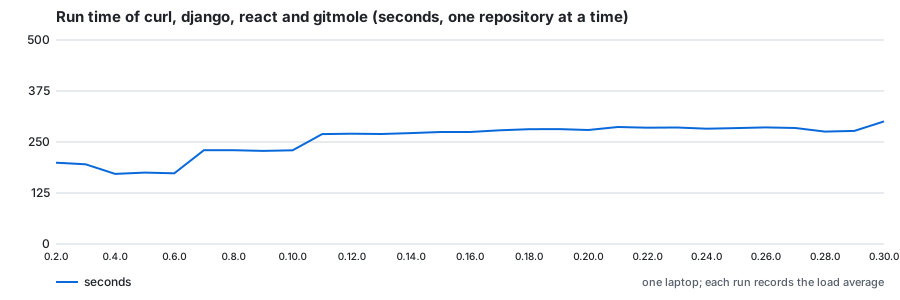
Run times are one gitmole CLONE with every default step, on a MacBook Pro (M4, 16 GB).
Evolution
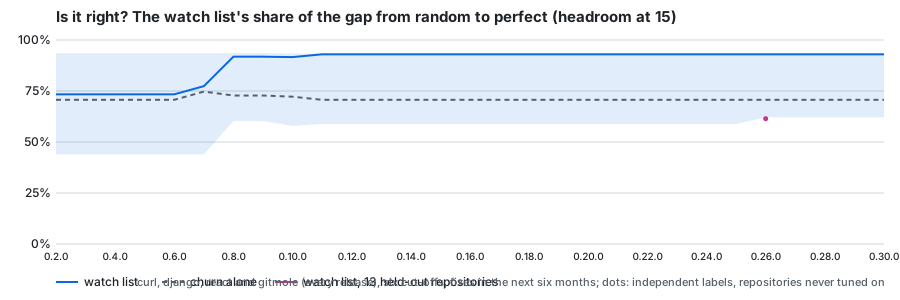
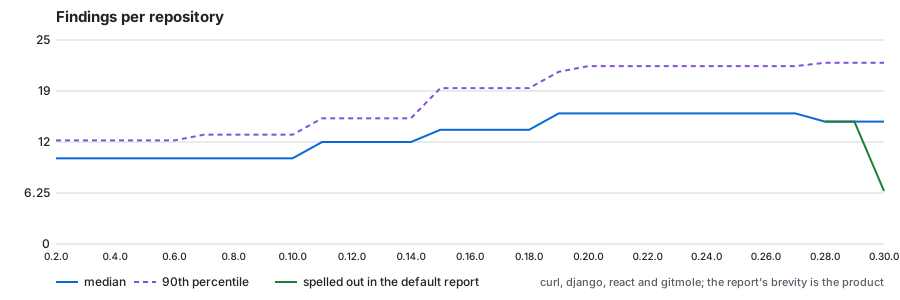
Every release is run from its own source over the same pinned repositories and scored by the same yardstick, so the graphs show what each release changed (measurement.md says how). On the three development repositories, revisions × lines of code (from 0.8.0) closed most of the gap between random and perfect, and later releases added findings rather than accuracy. On thirteen Apache repositories held out from tuning, the current release closes 61% of that gap and draws with churn alone, so the development numbers are the optimistic end.
The watch list is churn weighted by size. At the top it names about as many soon-to-be-fixed files as churn alone, and it orders the whole pool better, but per line read it finds fewer. A recency-weighted variant won on the development repositories and drew on the held-out ones, so it was not shipped (validation.md):
Every release's numbers, the other graphs and what they show: measurement-history.md.
The tool set
One tool per question; together they cover what a single command can tell you about a clone.
| Question | Tool | Install |
|---|---|---|
| What is this repo, at a glance; who commits, when, how much churn | gitmole itself, from the git log | built in |
| How big is the codebase, per language | scc | brew |
| Is the repo itself healthy (huge blobs, deep trees) | git-sizer | brew |
| Where is the risk: hotspots, coupling, ownership | gitmole's own change analysis over git log --numstat |
built in |
| How old is the surviving code, per year and author | gitmole's own blame pass (one git blame per file at HEAD) |
built in |
| Code-age and survival plots over time | git-of-theseus | pip, opt-in with --plots |
| Per-function complexity, length, parameters | lizard | pip, installed with gitmole; tracked code files only |
| Which blocks of code appear more than once | jscpd | brew |
| Have secrets ever been committed | betterleaks | brew |
| Do the dependencies have known vulnerabilities | osv-scanner, offline against a local copy of the OSV database | brew, plus a one-time database download |
| How deeply nested is the code, what did the authors flag, what imports what | tree-sitter grammars for eleven languages | pip, opt-in with gitmole[structure] |
Why these and not others: docs/tools.md.
Docs
- Install: macOS, Linux, pipx, the check, pinned releases.
- Command line: every option, portfolio mode, exports and CI gates, big repositories.
- The report and the output files: what each section and each file means.
- Example reports: curl, django and react at pinned commits, regenerated by
bin/render-examples. - Validation: the watch list against other ways of ranking the same files at six cut-offs on three repositories.
- Measurement and its history: how a release is judged better, and every release judged.
- Why these tools: the rationale, what was left out, licences.
- References: the research and tools gitmole's rules are built on.
- Development: setup, tests, releases, code layout.
- Contributing: bugs, ideas, pull requests, security reports.
Safety
- Everything is offline except the optional clone step, which uses your existing gh auth. None of the tools send data anywhere; osv-scanner runs against a local copy of its database that you download once, and gitmole never downloads it for you.
- Remote targets are cloned into a fresh temp directory that is removed when
the run ends. Local clones are only read. The secrets scan reads every
branch; everything else describes the branch that is checked out.
gitmole --cleanlists every directory gitmole created and deletes them after a y/N question. - Secret values never reach the output directory. betterleaks reports to gitmole in memory, and gitmole stores a short keyed hash in place of the value, the matched text and the commit message. The key is random, made for that one report and never saved.
License
MIT. gitmole runs the tools it wraps as separate processes and bundles none of them; their licences are listed in docs/tools.md.
1 maintainer

Release files for gitmole 0.29.0
For a detailed explanation of source distributions (sdists) and built distributions (wheels), please see the package formats documentation.
Source distribution (sdist)
| File | Size | Uploaded | |
|---|---|---|---|
| gitmole-0.29.0.tar.gz | 361.0 kB | Details |
Built distribution (wheel)
| File | Interpreter | ABI | Platform | Reset |
|---|---|---|---|---|
| gitmole-0.29.0-py3-none-any.whl | Python 3 | none | any | Details |
Total release size: 580.7 kB
Release files / gitmole-0.29.0.tar.gz
| Download URL | gitmole-0.29.0.tar.gz |
|---|---|
| Size | 361.0 kB |
| Tags | Source |
|
SHA-256 checksum How to use checksums |
d8d30f202333c40c8d65fb218556026e184b0a62f1079b01130eeaddd4654786
|
|
BLAKE2b-256 checksum How to use checksums |
2c320dc0b38edd25c639fbe4ea556e9099240d34f082da6a4f4daae2222e37ce
|
| Upload date | |
|
Uploaded using Trusted Publishing? What is trusted publishing? |
Yes |
| Uploaded via |
twine/7.0.0 CPython/3.13.14
|
Provenance
Provenance describes where a file came from. On PyPI, provenance is shared via attestations, which provide a verifiable record of the build or publishing details. View details, limitations and caveats.


PyPI Publish Attestation
PyPI verified that this artifact, at this checksum, originated from the publisher listed below.
Signed by GitHub Actions, verified by PyPI on Sep 19, 2026.
Transparency logRelease files / gitmole-0.29.0-py3-none-any.whl
| Download URL | gitmole-0.29.0-py3-none-any.whl |
|---|---|
| Size | 219.7 kB |
| Tags | Python 3 |
|
SHA-256 checksum How to use checksums |
ee30b03cfef3426e95b81307a45da012b0f056ec195002a40fb31bdd2d7a39d5
|
|
BLAKE2b-256 checksum How to use checksums |
a63e052b5c928b5fc20e7d36c378d1b953a7dc86dea89db19be4e69b39a55a62
|
| Upload date | |
|
Uploaded using Trusted Publishing? What is trusted publishing? |
Yes |
| Uploaded via |
twine/7.0.0 CPython/3.13.14
|
Provenance
Provenance describes where a file came from. On PyPI, provenance is shared via attestations, which provide a verifiable record of the build or publishing details. View details, limitations and caveats.
PyPI Publish Attestation
PyPI verified that this artifact, at this checksum, originated from the publisher listed below.
Signed by GitHub Actions, verified by PyPI on Sep 19, 2026.
Transparency log













