
GitPilot
Your autopilot for GitHub repositories - clone, install, and run with a single command.




🧠 Overview
GitPilot is a cross-platform, intelligent command-line tool that automates the entire process of exploring and running GitHub repositories.
It’s an interactive assistant that:
- 🔍 Lists all public repositories of a given GitHub user
- 🧩 Detects supported operating systems (Windows / Linux) based on README contents
- ⚙️ Clones or downloads repositories automatically
- 📦 Installs dependencies from
requirements.txt - 🚀 Detects and executes runnable files (
.py,.sh,.ps1,.bat)
Designed and built by @cyb2rS2c
Version: 3.0
🖥️ Features
| Feature | Description |
|---|---|
| 🔗 Repo Fetcher | Lists all public GitHub repositories for a specified username |
| 🧠 OS Detection | Analyzes README content to infer Windows/Linux compatibility |
| ⚙️ Smart Cloning | Uses git clone or ZIP fallback automatically |
| 📦 Auto Installer | Installs dependencies from all detected requirements.txt |
| 🚀 Runner | Automatically locates and executes runnable project files |
| 🧭 Interactive UI | Navigate repositories via an arrow-key menu |
| 💡 Cross-Platform | Works seamlessly on both Windows and Linux |
⚙️ Installation
Prerequisites
- 🐍 Python 3.8+
pippackage manager- Optional:
git(for faster cloning)
Clone this Repository
- Clone this repository: (windows)
curl -o GitPilot-main.zip https://github.com/cyb2rS2c/GitPilot/archive/refs/heads/main.zip
Expand-Archive -Force  .\GitPilot-main.zip
cd GitPilot-main/GitPilot-main
- Install dependencies in venv using cmd (Recommended):
python -m venv myvenv
./myvenv/Scripts/activate.bat
pip install -r requirements.txt
- Clone this repository: (Linux):
git clone https://github.com/cyb2rS2c/GitPilot.git
cd GitPilot
- Install dependencies in venv using Terminal (Recommended):
python -m venv myvenv
source myvenv/bin/activate
pip install -r requirements.txt
🚀 Usage
Run the main script directly:
python gitpilot.py
Advanced Installer (Skip the steps above - visit my GitHub)
Note: If you prefer installing directly from GitHub without pip, use the one-line installers:
For Windows:
Run the .bat file via CMD or using GUI:
curl https://raw.githubusercontent.com/cyb2rS2c/GitPilot/refs/heads/main/gitpilot.bat -o gitpilot.bat&&gitpilot.bat
For Linux:
Run the .sh file using Terminal:
wget https://raw.githubusercontent.com/cyb2rS2c/GitPilot/refs/heads/main/gitpilot.sh;sudo chmod +x gitpilot.sh;./gitpilot.sh
Interactive Flow
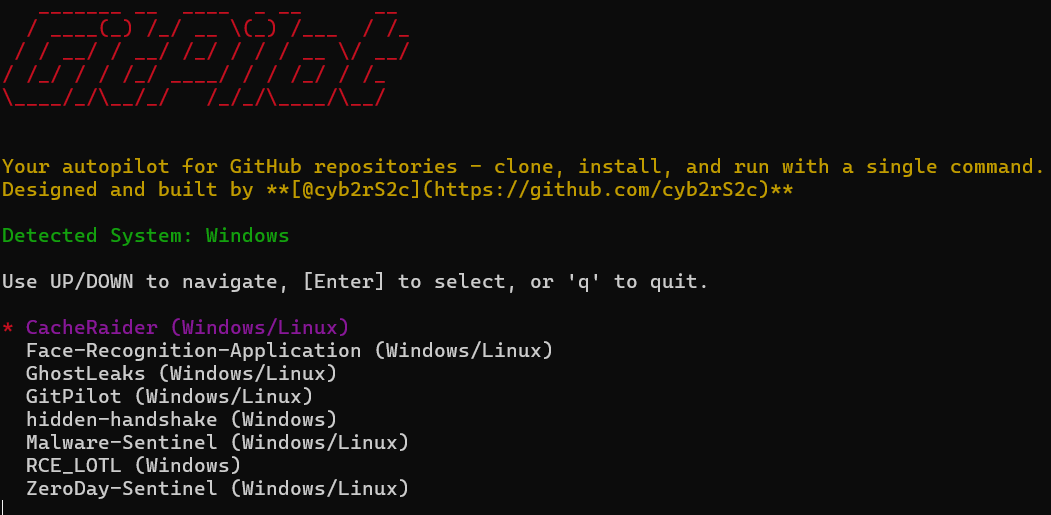
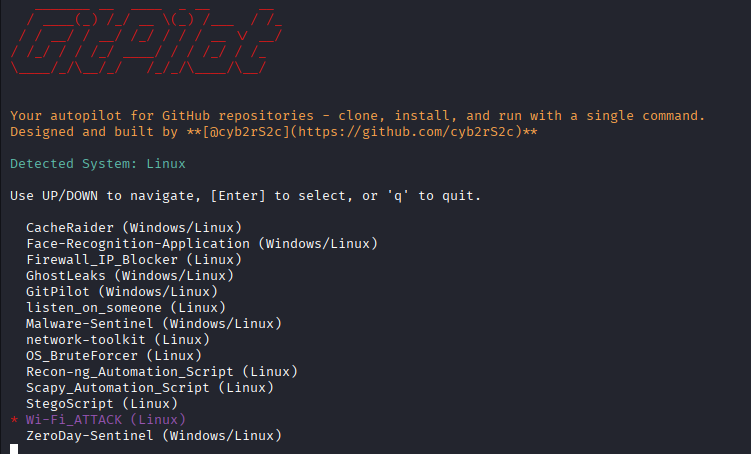
- The tool detects your OS (Windows/Linux).
- Lists all your public repositories on GitHub.
- You navigate with ↑/↓ and press Enter to select one.
- GitPilot clones (or downloads) the repository.
- It installs dependencies automatically.
- Finally, it runs any runnable files found in the repo.
Screenshots
📝 Author
cyb2rS2c - GitHub Profile
License
This project is licensed under the MIT License - see the LICENSE file for details.
Disclaimer
The software is provided "as is", without warranty of any kind, express or implied, including but not limited to the warranties of merchantability, fitness for a particular purpose, and noninfringement. In no event shall the authors or copyright holders be liable for any claim, damages, or other liability, whether in an action of contract, tort, or otherwise, arising from, out of, or in connection with the software or the use or other dealings in the software.
1 maintainer

Metadata
1 maintainer
Release files for gitpilot-cli 3.0.1
For a detailed explanation of source distributions (sdists) and built distributions (wheels), please see the package formats documentation.
Source distribution (sdist)
| File | Size | Uploaded | |
|---|---|---|---|
| gitpilot_cli-3.0.1.tar.gz | 9.3 kB | Details |
Built distribution (wheel)
| File | Interpreter | ABI | Platform | Reset |
|---|---|---|---|---|
| gitpilot_cli-3.0.1-py3-none-any.whl | Python 3 | none | any | Details |
Total release size: 17.3 kB
Release files / gitpilot_cli-3.0.1.tar.gz
| Download URL | gitpilot_cli-3.0.1.tar.gz |
|---|---|
| Size | 9.3 kB |
| Tags | Source |
|
SHA-256 checksum How to use checksums |
7703b788d31a4626e5c146cc8f3548aac798c2072423b49211452394a932b369
|
|
BLAKE2b-256 checksum How to use checksums |
d8873481629c1be85570bf2dcf212915e4acda69d5be003c0f04701080ae1c55
|
| Upload date | |
|
Uploaded using Trusted Publishing? What is trusted publishing? |
No |
| Uploaded via |
twine/6.2.0 CPython/3.13.7
|
Release files / gitpilot_cli-3.0.1-py3-none-any.whl
| Download URL | gitpilot_cli-3.0.1-py3-none-any.whl |
|---|---|
| Size | 8.0 kB |
| Tags | Python 3 |
|
SHA-256 checksum How to use checksums |
861f180671e007e55eb20499e580f9771f1aece53c2b4f434d5ea1372430b4d1
|
|
BLAKE2b-256 checksum How to use checksums |
09bd09adcaad9a75d939b7b8bd835f686720eaa8c9dfef078418734451c2f1ab
|
| Upload date | |
|
Uploaded using Trusted Publishing? What is trusted publishing? |
No |
| Uploaded via |
twine/6.2.0 CPython/3.13.7
|













