
⚡ GitPulse — Git Repo Dashboard TUI
A developer-focused terminal dashboard that scans a root directory for all local Git repositories and displays live status, recent commits, diffs, and branch management — all from the terminal.
Built with Python, Textual, Rich, and GitPython.
Why GitPulse?
A lot of development happens late at night, and not everyone commits or pushes their changes right away. With "vibe coding" becoming so popular, many people now juggle several projects at once — and that makes it genuinely hard to keep track of every local repository.
GitPulse exists to solve exactly that. It gives you a single dashboard for all your local repos, so at a glance you can see what's committed but not yet pushed, what's changed but not yet committed, the number of modified files, the current branch, the last commit, and everything else about the state of each local Git repository.
Screenshots
Demo — GitPulse in action
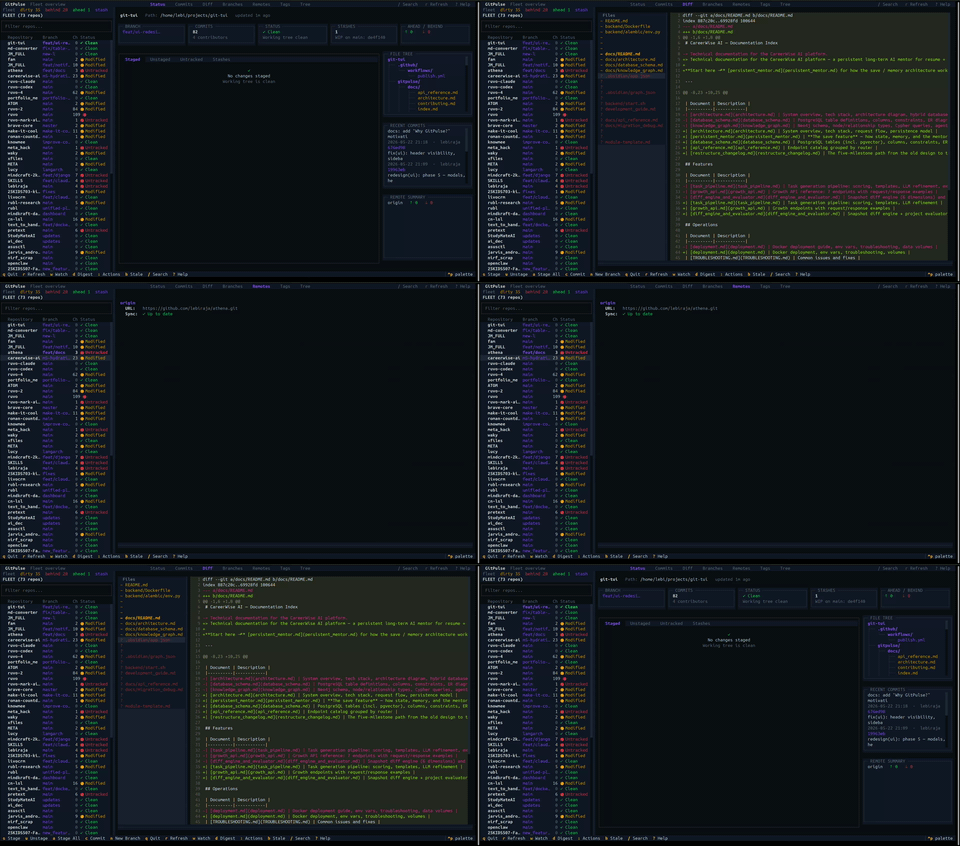
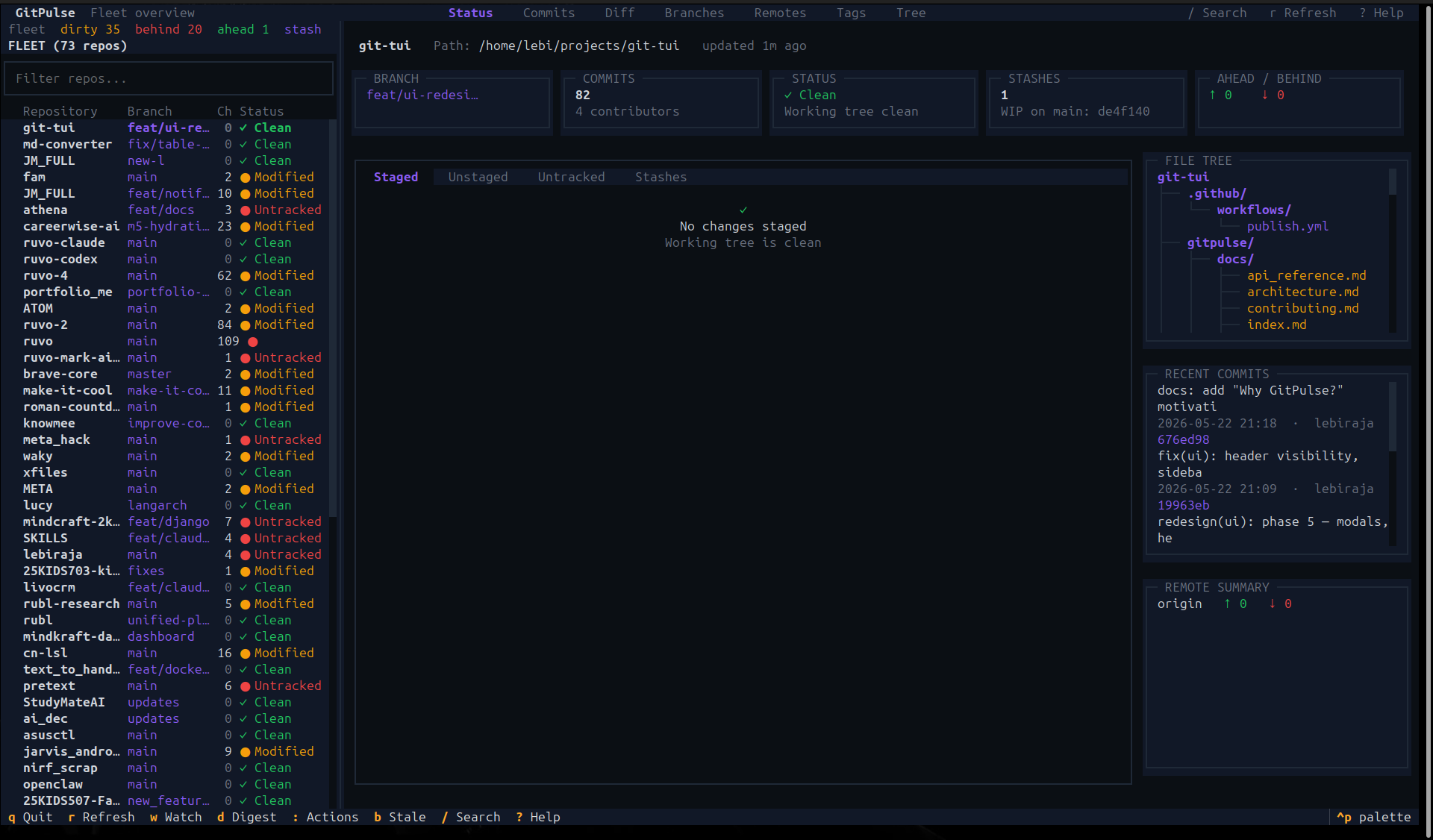
Status tab — repo summary cards, staged/unstaged/untracked/stash workspace, and the file tree / recent commits / remote summary side panels
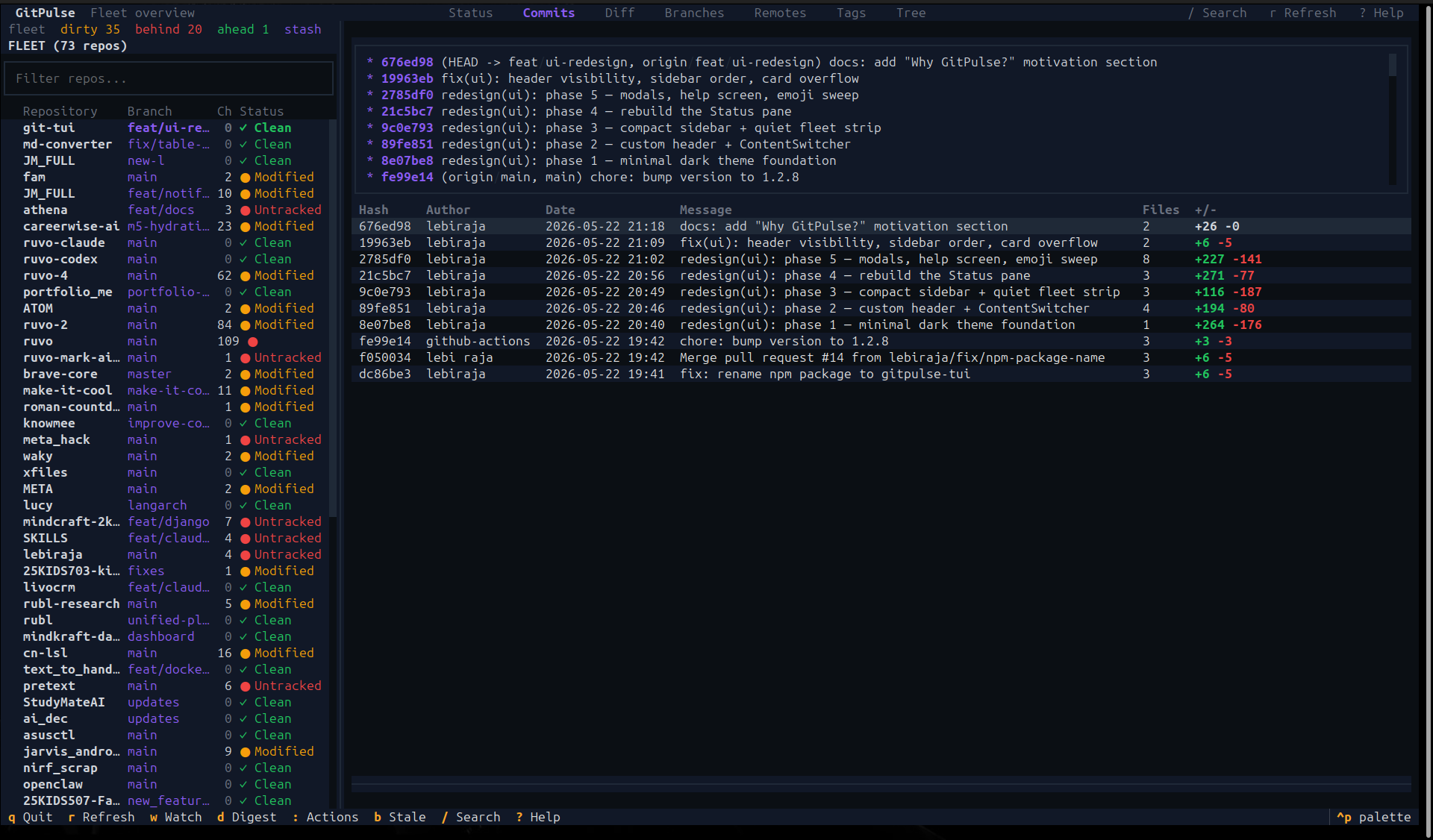
Commits tab — last N commits with color-coded insertions/deletions
Installation
The easiest way to install GitPulse is via PyPI using pip or pipx:
pip install gitpulse-tui
(We recommend using pipx install gitpulse-tui to install it in an isolated environment)
Install via npm
GitPulse is also available as an npm package. The npm package is a thin launcher — it bootstraps an isolated Python environment and runs the same Python application (no logic is duplicated):
npm install -g gitpulse-tui
The CLI command is still gitpulse once installed.
This requires Python 3.10+ on your system; the wrapper handles the rest.
See npm/README.md for details and troubleshooting.
Install from source
If you prefer to install from source or want to contribute to the project:
git clone https://github.com/lebiraja/gitpulse.git
cd gitpulse
./install.sh
The installer:
- Checks your Python version (3.10+ required)
- Creates a virtual environment automatically
- Installs all dependencies
- Adds the
gitpulsecommand to your shell (~/.zshrc/~/.bashrc)
Then reload your shell:
source ~/.zshrc # or source ~/.bashrc
Usage
gitpulse                           # scan the current directory (or scan.roots from config)
gitpulse --root /path/to/repos     # scan a custom directory
gitpulse --commits 20              # show 20 commits per repo (default: 10)
gitpulse --no-watch                # disable live watch mode
gitpulse --config path/to.toml     # use a custom config file
gitpulse --version                 # print version

# Activity digest (prints markdown, no TUI):
gitpulse digest --since 7d                 # last 7 days
gitpulse digest --since 2024-01-01         # since a date
gitpulse digest --author you@example.com   # filter by author
For scripts and coding agents
Non-interactive subcommands emit machine-readable fleet state on stdout, so an agent can answer "which of my repos have unpushed work?" in a single call:
gitpulse scan --json                     # full fleet state as one JSON document
gitpulse scan --json --dirty             # only repos with uncommitted changes
gitpulse scan --json --ahead             # only repos with unpushed commits
gitpulse scan --ndjson                   # one JSON object per line
gitpulse context                         # Markdown context pack for an LLM prompt
The JSON envelope carries a schema_version, ISO-8601 UTC timestamps
alongside raw epochs, and an errors array. Repos that could not be read are
marked "status": "unreadable" with "readable": false — never silently
reported as clean.
GitPulse is also importable as a library. gitpulse.api never imports Textual:
from gitpulse.api import scan_fleet

unpushed = [r for r in scan_fleet("~/Projects") if r.ahead > 0]
Features
- Multi-repo dashboard — Scans a directory tree and lists every local Git repo, sorted by most recent activity
- Compact fleet sidebar — Each repo as a single row: name, branch, change count, and status (
✓ Clean/● Modified/● Untracked) - Fleet status strip — Cross-repo counters (dirty, behind, ahead, stashes, stale branches); click one to filter the list
- Live watch mode — Polls the filesystem and auto-refreshes repos as they change, without blocking the UI
- Search & filter — Press
/to filter repos by name instantly - Multi-select & bulk actions — Select repos with
Space, then runfetch/pull/push/gc/prune/cleanacross all of them from the command palette (:) - Activity digest — A markdown standup summary of your commits across all repos for a time window (
d, or--digeston the CLI) - Stale-branch cleanup — Find and bulk-delete merged / WIP / old branches across every repo (
b) - Seven content tabs:
- Status — Summary cards (branch, commits, status, stashes, ahead/behind), a staged/unstaged/untracked/stash workspace, and file-tree / recent-commits / remote-summary side panels. Stage, unstage, commit and stash inline.
- Commits — ASCII commit graph + last N commits with color-coded
+green/-reddiff stats - Diff — Per-file picker with syntax-highlighted staged & unstaged changes
- Branches — All local branches; switch, create, or delete
- Remotes — Remote URLs with ahead/behind sync status; fetch / pull / push
- Tags — Recent tags with date and tagger info
- Tree — File hierarchy of all tracked files, with file preview
Keybindings
Press ? inside the app for the full cheat sheet.
| Key | Action |
|---|---|
↑ / ↓ or j / k |
Navigate the repo list |
[ / ] |
Previous / next tab |
/ |
Search / filter repos |
Space / * |
Toggle multi-select / select all |
r |
Refresh — rescan all repos |
w |
Toggle watch mode |
d |
Activity digest |
: |
Bulk action palette |
b |
Stale-branch cleanup |
e |
Error log |
? |
Help |
q |
Quit |
s / u / a |
Stage / unstage / stage-all (Status tab) |
c |
Commit staged changes |
n |
New branch |
z / Z |
Create / pop stash |
Enter |
Switch branch · view commit diff · preview file |
f / p / P |
Fetch / pull / push (Remotes tab) |
Requirements
- Python 3.10+
- Linux / macOS
Documentation
See docs/ for full developer documentation:
1 maintainer

Metadata
1 maintainer
Release files for gitpulse-tui 1.2.15
For a detailed explanation of source distributions (sdists) and built distributions (wheels), please see the package formats documentation.
Source distribution (sdist)
| File | Size | Uploaded | |
|---|---|---|---|
| gitpulse_tui-1.2.15.tar.gz | 94.2 kB | Details |
Built distribution (wheel)
| File | Interpreter | ABI | Platform | Reset |
|---|---|---|---|---|
| gitpulse_tui-1.2.15-py3-none-any.whl | Python 3 | none | any | Details |
Total release size: 186.0 kB
Release files / gitpulse_tui-1.2.15.tar.gz
| Download URL | gitpulse_tui-1.2.15.tar.gz |
|---|---|
| Size | 94.2 kB |
| Tags | Source |
|
SHA-256 checksum How to use checksums |
0750989ef51d71d7f56b9cc6a426e0877dc46ff27e23c508b007e1bd82b74184
|
|
BLAKE2b-256 checksum How to use checksums |
c8dde100d68a3244514a30e41df13144a2cf6455d7b86ff5da62d9f480344227
|
| Upload date | |
|
Uploaded using Trusted Publishing? What is trusted publishing? |
No |
| Uploaded via |
twine/7.0.0 CPython/3.13.14
|
Release files / gitpulse_tui-1.2.15-py3-none-any.whl
| Download URL | gitpulse_tui-1.2.15-py3-none-any.whl |
|---|---|
| Size | 91.7 kB |
| Tags | Python 3 |
|
SHA-256 checksum How to use checksums |
38874ca70eed0077cfe5853878a6cf72fad9871586ba3fe6b8a3f9843a2962db
|
|
BLAKE2b-256 checksum How to use checksums |
5ec85cab300ef755f50e1064d315ce75e36eff194aad9dea1c7a84bf423a9777
|
| Upload date | |
|
Uploaded using Trusted Publishing? What is trusted publishing? |
No |
| Uploaded via |
twine/7.0.0 CPython/3.13.14
|














