
GitPulse
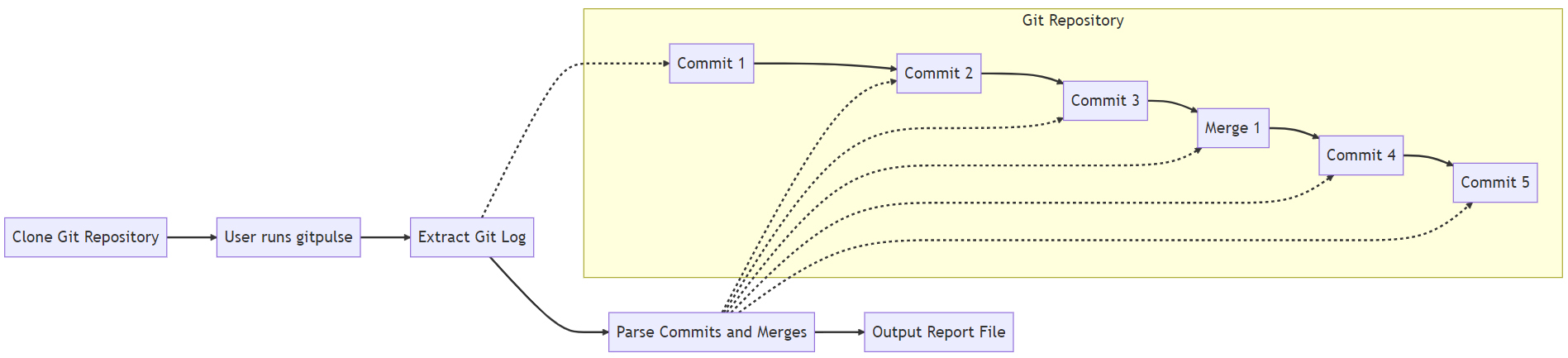
GitPulse is a Python-based command-line tool that generates an HTML report summarizing Git log data for a software development project. It provides insights into the number of commits and merges for each developer who has contributed to the project.
Installation
To install GitPulse, you can use pip. Open a terminal window and enter the following command in adminstrator mode:
pip install gitpulse
Usage
GitPulse can be run from the command line using the gitpulse command in the the Git repository.
Here is the basic syntax for using GitPulse:
gitpulse
On success there will be clean exit to console. The generated report will be saved in the current directory with name gitpulse_report.html.
Benefits
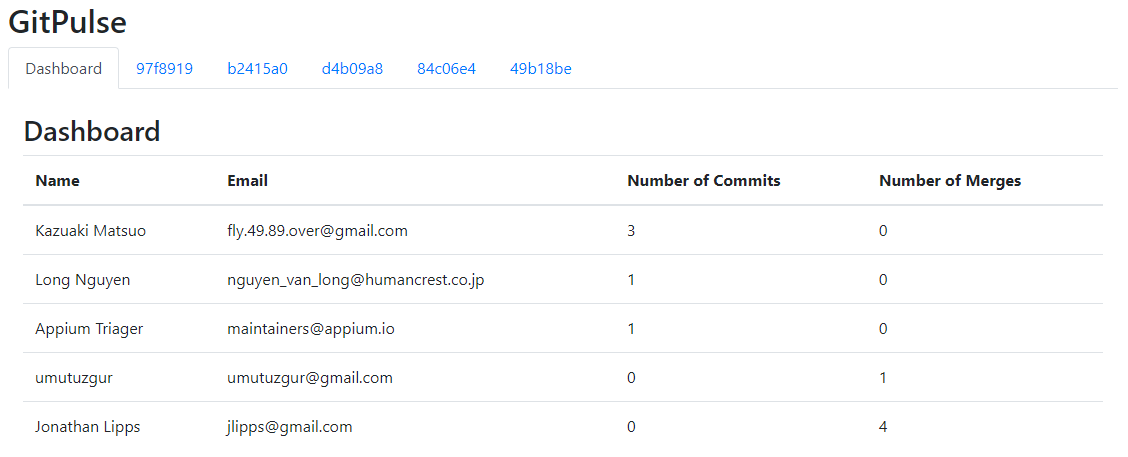
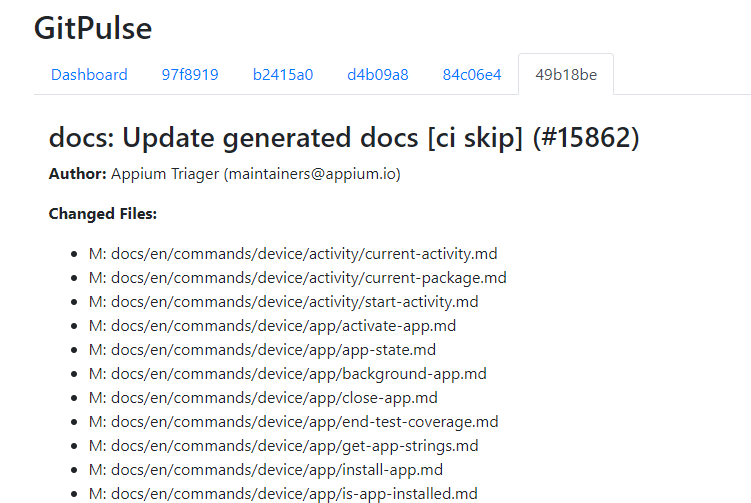
The following are some benefits of using GitPulse:
-
Quick and easy analysis: GitPulse provides a quick and easy way to analyze Git logs data and gain insights into the number of commits and merges for each developer who has contributed to the project. This can help project managers and developers to identify trends, patterns, and areas for improvement.
-
Customizable report: GitPulse generates an HTML report that can be customized to meet the specific needs of the project. Developers can modify the report template to include additional data points or to change the report format as needed.
-
Saves time and effort: GitPulse saves time and effort by automating the process of analyzing Git logs data. Rather than manually analyzing the logs, developers can use GitPulse to generate a report quickly and easily.
Integrating with CI/CD Pipeline
Integrating GitPulse into the CI/CD pipeline can provide valuable insights into the development process and help identify areas for improvement. By running GitPulse as part of the pipeline, developers can continuously monitor the activity of their team members and track changes in the development process over time. This can help to identify potential issues early on and make timely adjustments as needed.
Data-Driven Decision-Making
GitPulse provides objective data on the activity of individual developers, which can help to inform decisions related to knowledge retention and team composition. By using the reports generated by GitPulse, team members can better understand each other's strengths and weaknesses and work together more effectively.
Contributing
Contributions to GitPulse are always welcome! If you find a bug or have an idea for a new feature, please open an issue on the GitHub repository. If you would like to contribute code, please fork the repository and submit a pull request.
License
This project is licensed under the MIT License - see the LICENSE file for details.
1 maintainer

Metadata
1 maintainer
Release files for gitpulse 1.2
For a detailed explanation of source distributions (sdists) and built distributions (wheels), please see the package formats documentation.
Source distribution (sdist)
| File | Size | Uploaded | |
|---|---|---|---|
| gitpulse-1.2.tar.gz | 5.9 kB | Details |
Built distribution (wheel)
| File | Interpreter | ABI | Platform | Reset |
|---|---|---|---|---|
| gitpulse-1.2-py3-none-any.whl | Python 3 | none | any | Details |
Total release size: 13.9 kB
Release files / gitpulse-1.2.tar.gz
| Download URL | gitpulse-1.2.tar.gz |
|---|---|
| Size | 5.9 kB |
| Tags | Source |
|
SHA-256 checksum How to use checksums |
e35a815fb01250df1759993218573e528da87a59513abaa6a16e66c830305ecf
|
|
BLAKE2b-256 checksum How to use checksums |
45876fff6c7df418f9cb38da50bd96079fe8f5b61c594a3247455cc07acddbf9
|
| Upload date | |
|
Uploaded using Trusted Publishing? What is trusted publishing? |
No |
| Uploaded via |
twine/4.0.2 CPython/3.9.16
|
Release files / gitpulse-1.2-py3-none-any.whl
| Download URL | gitpulse-1.2-py3-none-any.whl |
|---|---|
| Size | 8.1 kB |
| Tags | Python 3 |
|
SHA-256 checksum How to use checksums |
ce910fb01ce1af74b12e40f90e8e94df7b371a4e343ce9ad21d84875695c49ac
|
|
BLAKE2b-256 checksum How to use checksums |
81ee4ebb44918b171d9c8ed4ccb2f5ed5fb8c142833e5e6018dd2d692c249257
|
| Upload date | |
|
Uploaded using Trusted Publishing? What is trusted publishing? |
No |
| Uploaded via |
twine/4.0.2 CPython/3.9.16
|














