

Let your AI assistant read your own GIU student portal (portal.giu-uni.de) and CMS
(cms.giu-uni.de). Ask things like "what's my schedule tomorrow?", "how am I doing in
Databases?", "summarise this week's lecture slides" or "download all OS lab manuals".
It works with any AI app that supports local MCP servers: Claude Code, Claude Desktop, Cursor, VS Code (Copilot agent mode), Windsurf, Gemini CLI, OpenAI Codex CLI, LM Studio and others.

Other AI apps: uvx giu-mcp login · setup guide


Unofficial. This is a student project, not made or endorsed by GIU. It reads the same pages you see in your browser, signed in as you.
Free for personal and non-commercial use. If you share it or build on it, keep the credit line. Commercial use needs permission first. See License.
Your account and your data stay with you
- Every student runs their own copy on their own computer with their own GIU username and password. Nobody else, including whoever shared this with you, ever sees your password or your data.
- Your password is kept in secure storage, never a plain file: the Claude Desktop
extension uses the app's secure storage, and
giu-mcp loginuses your operating system's credential store (Windows Credential Manager / macOS Keychain / Linux Secret Service). - Your password is only ever sent to
portal.giu-uni.deandcms.giu-uni.de. Every redirect is checked first, so it is never sent anywhere else. - Read-only. It never submits anything: no registration, evaluations, excuses, uploads or payments. The only thing it writes is files you ask it to download, saved to your own Downloads folder.
Install
Claude Desktop: no terminal
-
Download giu-mcp.mcpb (always the newest version).
-
In Claude Desktop, open Settings → Desktop app → Extensions → Advanced settings, click Install extension, and pick the file you downloaded.
Double-clicking the file only works on some installs. On Windows, the Microsoft Store version of Claude doesn't register
.mcpbfiles, so Windows will say it has no app to open it. -
Fill in your GIU username and password, the same ones you use on the portal, then click Save and enable the extension.
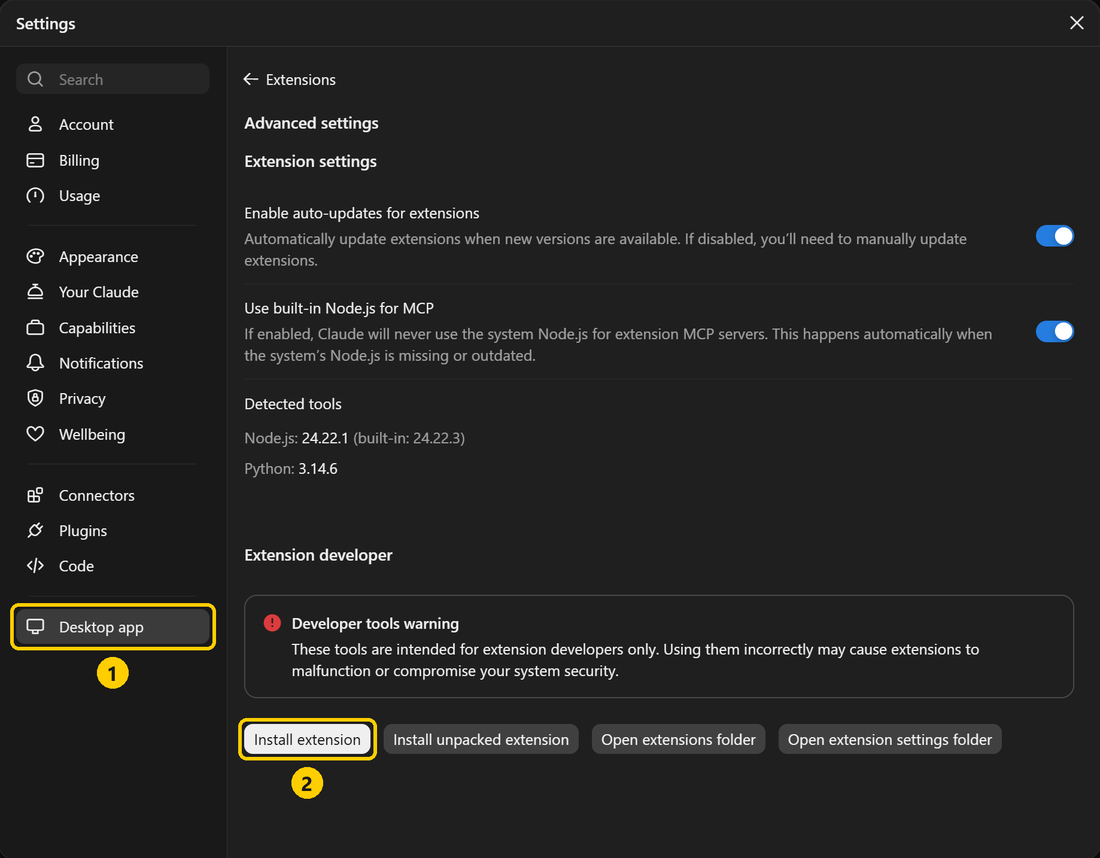
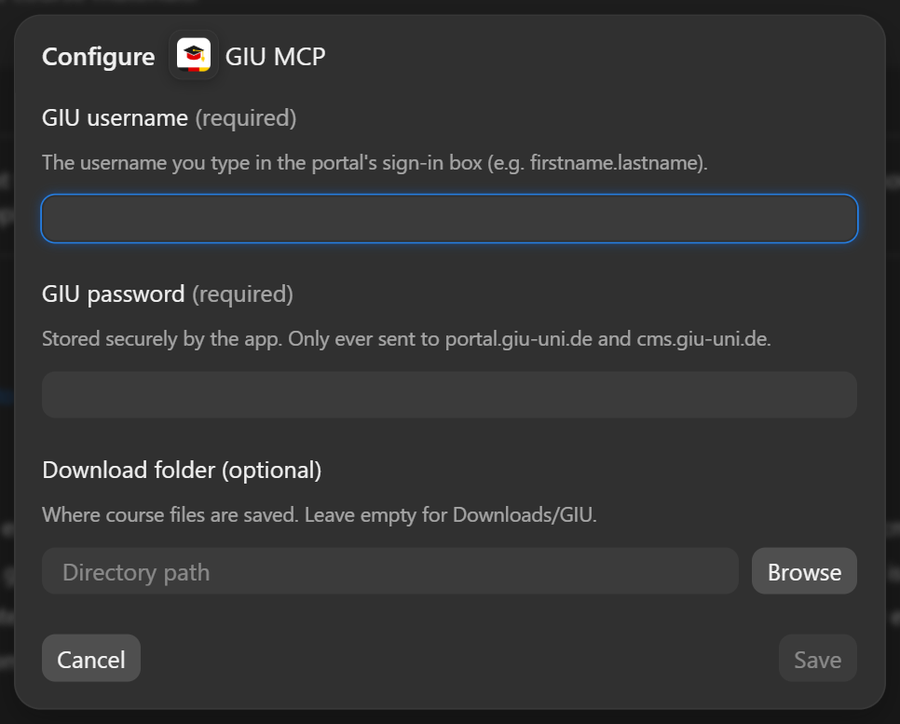
That's it: you don't need to install Python or anything else first. The very first start takes a few seconds while Claude Desktop sets it up. To change your password later, go to Settings → Desktop app → Extensions → GIU MCP → Configure.
Any other AI app (Claude Code, Cursor, VS Code, …)
You need uv. It also installs Python for you, so nothing else is required. Install it once:
# Windows (macOS/Linux: curl -LsSf https://astral.sh/uv/install.sh | sh)
powershell -ExecutionPolicy ByPass -c "irm https://astral.sh/uv/install.ps1 | iex"
Then, in a new terminal (about 2 minutes):
uvx giu-mcp login     # asks for your GIU username + password, checks them, saves them securely
uvx giu-mcp status    # optional: confirms the portal and CMS both work
uvx giu-mcp config    # prints the exact snippet for your AI app
uvx downloads giu-mcp from PyPI and runs it; there
is no separate install step. Use the same username and password as the browser sign-in
box on the portal. To get a newer version later, run uvx --refresh giu-mcp --version
and restart your AI app.
Prefer a permanent install?
uv tool install giu-mcp(orpipx install giu-mcp), then usegiu-mcp login/giu-mcp configwithout theuvx.
Then add the server to your app with the snippet config printed:
- Claude Code: run the printed
claude mcp add giu …command once. - Claude Desktop: Settings → Developer → Edit Config, paste the
"giu"entry inside"mcpServers", then restart Claude Desktop. - Cursor / Windsurf / Gemini CLI / most others: the same
"mcpServers"JSON in that app's MCP config file. - VS Code:
uvx giu-mcp config vscode. Codex CLI:uvx giu-mcp config codex.
Restart the app, and the GIU tools will show up. To switch accounts, run
uvx giu-mcp login again. To remove yours, run uvx giu-mcp logout.
What it can do
| Tool | What it returns |
|---|---|
giu_profile |
Name, student ID, username, faculty, major |
portal_schedule |
Your weekly timetable (day → period → course, room, group, type) |
portal_group_schedule |
Timetable of any study group (empty = list groups) |
portal_grades |
This semester's midterm % per course + every quiz/assignment score |
portal_previous_grades |
The same for a past season (empty = list seasons) |
portal_transcript |
Final grades, hours and cumulative GPA, by semester |
portal_attendance |
Absence warning levels, attended/absent counts, every session |
portal_exam_seats |
Exam date, time, hall and seat |
cms_courses |
Your CMS courses (current or all seasons) |
cms_course_content |
Course announcement + weekly items (slides, assignments, videos) |
cms_whats_new |
Unopened content per course and the latest posts |
cms_notifications |
Recent CMS notifications |
cms_read_file |
Text of a course PDF / PPTX / DOCX so the AI can summarise or quiz you |
cms_download |
Save course files to ~/Downloads/GIU/<course>/<week>/ |
Courses can be named loosely: "INCS101", "databases", "German".
Ready-made prompts
In apps that support MCP prompts, these show up as commands you can pick from a menu.
In Claude Desktop they're in the + menu; in Claude Code, type /mcp__giu__ and pick
one.
| Prompt | What it does |
|---|---|
weekly_briefing |
Classes, deadlines, new CMS content, grades, absence warnings and exams in one summary |
whats_due |
Every upcoming deadline, quiz and exam across your courses, as a dated table |
quiz_me |
Quizzes you one question at a time on a lecture or topic (course, optional topic) |
summarize_lecture |
Main ideas, definitions, an example and self-check questions (course, optional lecture) |
exam_prep |
A day-by-day study plan for a course's exam (course, optional exam_date) |
In apps without prompt menus, just ask in your own words, e.g. "quiz me on the latest Databases lecture".
Settings
All optional. Set them as environment variables, or in a .env file in the config
folder (uvx giu-mcp status shows where that is).
| Variable | Meaning |
|---|---|
GIU_USERNAME, GIU_PASSWORD |
Use these instead of the account saved by giu-mcp login |
GIU_DOMAIN |
Windows domain, only if sign-in fails without it |
GIU_DOWNLOAD_DIR |
Where cms_download saves files (default ~/Downloads/GIU) |
GIU_TIMEOUT |
Request timeout in seconds (default 45) |
Troubleshooting
- "No GIU account is set up": run
uvx giu-mcp loginin a terminal. With the Claude Desktop extension, fill in Settings → Desktop app → Extensions → GIU MCP → Configure instead. - "GIU rejected the username/password": your password probably changed. Update it
in Settings → Desktop app → Extensions → GIU MCP → Configure (extension) or run
uvx giu-mcp loginagain. - A tool returns a "Portal message": that page is closed on the portal right now (for example, outside its registration or evaluation window).
- Tools disappeared after an update: restart the AI app.
Reporting problems
If a tool breaks or shows wrong data, GIU probably changed that page. Open an issue saying which tool and what went wrong. Don't paste your password, grades or other personal data into the issue.
For developers
git clone https://github.com/Youssef-Hany-codes/GIU-MCP
cd GIU-MCP
python -m venv .venv
.venv\Scripts\python.exe -m pip install -e .
.venv\Scripts\giu-mcp.exe login
.venv\Scripts\python.exe scripts\smoke_test.py    # calls every tool for your account
giu_mcp/client.py: onerequestssession with NTLM auth. Redirects are followed by hand so each hop is host-checked before the handshake. It also replays ASP.NET WebForms postbacks for the "choose a course / season / year" dropdowns. The portal only sets up its session onceHome.aspxloads, so the client opens that page first.giu_mcp/portal.py,giu_mcp/cms.py: HTML scrapers for each page.giu_mcp/server.py: the MCP tools (Python MCP SDK 2.x, stdio transport).giu_mcp/credentials.py,giu_mcp/config.py,giu_mcp/cli.py: per-user account storage and thegiu-mcpcommand.scripts/discover.py: a read-only crawler that saves your pages to.discovery/(git-ignored, it holds personal data), for fixing scrapers when GIU changes a page.scripts/smoke_test.py: calls every tool against the live sites for whichever account is signed in. It picks courses and seasons from that account, so it works for anyone.giu_mcp/prompts.py: the ready-made prompts.
Building the Claude Desktop extension
.venv\Scripts\python.exe -m pip install uv          # also needs Node.js, for the packer
.venv\Scripts\python.exe scripts\build_extension.py  # -> dist\giu-mcp-<version>.mcpb
The extension uses the MCPB uv server type: Claude Desktop installs Python and the
locked dependencies itself, so one .mcpb file works on Windows, macOS and Linux.
scripts/build_extension.py copies only an allow-list of files (never .env or
.discovery/). It also generates manifest.json, including the tool and prompt lists,
from the server itself, so the manifest can't drift from the code.
Logo
The logo files live in assets/ (SVG and PNG; colours #1A1A1A, #DD0000,
#FFCE00). scripts/make_brand_assets.py regenerates the extension icon, the MCP
server icon and assets/social-preview.png from them. Run it again after changing the
logo, then rebuild the extension.
License
PolyForm Noncommercial 1.0.0. In plain words (the license text is what counts):
-
You can use, copy, modify and share it for any non-commercial purpose: personal use, study, student clubs, schools and universities.
-
You must give credit. Anyone you pass it on to, changed or not, must also get the license terms and this line:
Required Notice: Copyright (c) 2026 Youssef-Hany-codes (https://github.com/Youssef-Hany-codes/GIU-MCP) -
You need permission for any commercial use, such as selling it, putting it in a paid product or service, or using it at a company. Ask through GitHub.
1 maintainer

Metadata
1 maintainer
Release files for giu-mcp 0.2.0
For a detailed explanation of source distributions (sdists) and built distributions (wheels), please see the package formats documentation.
Source distribution (sdist)
| File | Size | Uploaded | Provenance | Actions |
|---|---|---|---|---|
| giu_mcp-0.2.0.tar.gz | 45.1 kB | With provenance | Details for giu_mcp-0.2.0.tar.gz |
Built distribution (wheel)
| File | Interpreter | ABI | Platform | Actions Reset |
|---|---|---|---|---|
| giu_mcp-0.2.0-py3-none-any.whl | Python 3 | none | any | Details for giu_mcp-0.2.0-py3-none-any.whl |
Total release size: 88.0 kB
Release files / giu_mcp-0.2.0.tar.gz
| Download URL | giu_mcp-0.2.0.tar.gz |
|---|---|
| Size | 45.1 kB |
| Tags | Source |
|
SHA-256 checksum How to use checksums |
1b2bf7c128834108bad2ffe66d692015f35ab112cc7330ef4482dc626722d947
|
|
BLAKE2b-256 checksum How to use checksums |
69349108c1774a779f1e68901aca68d4808fe997bee60da9d7b1e3af7163b8b2
|
| Upload date | |
|
Uploaded using Trusted Publishing? What is trusted publishing? |
Yes |
| Uploaded via |
twine/7.0.0 CPython/3.13.16
|
Provenance
Provenance describes where a file came from. On PyPI, provenance is shared via attestations, which provide a verifiable record of the build or publishing details. View details, limitations and caveats.


PyPI Publish Attestation
PyPI verified that this artifact, at this checksum, originated from the publisher listed below.
Signed by GitHub Actions, verified by PyPI on Nov 27, 2026.
Transparency logRelease files / giu_mcp-0.2.0-py3-none-any.whl
| Download URL | giu_mcp-0.2.0-py3-none-any.whl |
|---|---|
| Size | 42.8 kB |
| Tags | Python 3 |
|
SHA-256 checksum How to use checksums |
4f942a693b788dc58d4066f564b96473eb3023757cdeb4a5c86daad625568567
|
|
BLAKE2b-256 checksum How to use checksums |
bc46c4e53a495d0ac661664bce3abdfe871b058bf14aa96ec6b1e670bb331767
|
| Upload date | |
|
Uploaded using Trusted Publishing? What is trusted publishing? |
Yes |
| Uploaded via |
twine/7.0.0 CPython/3.13.16
|
Provenance
Provenance describes where a file came from. On PyPI, provenance is shared via attestations, which provide a verifiable record of the build or publishing details. View details, limitations and caveats.
PyPI Publish Attestation
PyPI verified that this artifact, at this checksum, originated from the publisher listed below.
Signed by GitHub Actions, verified by PyPI on Nov 27, 2026.
Transparency logSecurity for giu-mcp 0.2.0
Provenance
Provenance describes where a file came from. On PyPI, provenance is shared via attestations, which provide a verifiable record of the build or publishing details. View details, limitations and caveats.
Full provenance
Both files in this release have been uploaded with provenance metadata.
Attestation for giu_mcp-0.2.0.tar.gz
PyPI Publish Attestation
PyPI verified that this artifact, at this checksum, originated from the publisher listed below.
Signed by GitHub Actions, verified by PyPI on Nov 27, 2026.
Transparency logA note on package security
PyPI is a repository for distributing packages, not a service for auditing them. While third-party security researchers and our staff do their best to detect and remove malicious packages, PyPI cannot guarantee the quality, security or suitability of any given package.
To learn more about protecting yourself from malicious actors, visit our package security documentation.














