

glacier
glacier is a python CLI building library for minimalists.







Installation
pip install glacier
Quick start
You only have to call glacier against the entrypoint function.
from glacier import glacier


def main(name: str, verbose: bool = False) -> None:
    pass


if __name__ == '__main__':
    glacier(main)
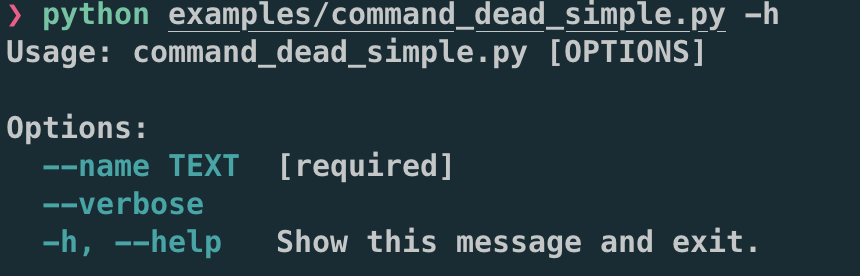
Then, you can see help 🍰.
Basic Usage
CLI without subcommand
If you just call glacier to a function, it will invoke it as stand-alone CLI
(like the example in Quick start).
CLI with subcommands
You can easily construct CLI with subcommands in the following two ways.
Pass a list of functions
from glacier import glacier


def run(name: str, verbose: bool = False) -> None:
    """ Run """
    pass


def build(name: str, verbose: bool = False) -> None:
    """ Build """
    pass


def test(name: str, verbose: bool = False) -> None:
    """ Test """
    return


if __name__ == '__main__':
    glacier([run, build, test])
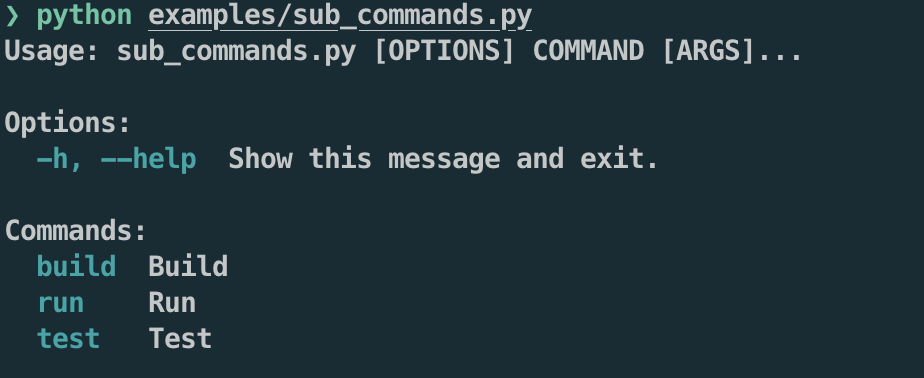
If you passes a lift of function, glacier constructs the CLI with subcommands whose names are the same as the declared function names.
In this example, the subcommans will be run, build, and test.
Pass a dictionary of functions
You can easily give the different name as the subcommand name from any declared name of the function. Just give a dictionary (key will be a subcommand name).
from glacier import glacier


def f1(name: str, verbose: bool = False) -> None:
    pass


def f2(name: str, verbose: bool = False) -> None:
    pass


def f3(name: str, verbose: bool = False) -> None:
    pass


if __name__ == '__main__':
    glacier({
        'run': f1,
        'build': f2,
        'test': f3,
    })
This works exactly the same as the previous example.
This interface makes it very easy to build a simple CLI tool from an existing project.
Async entrypoint support
You sometimes want your async function to be a CLI entrypoint.
Only you have to do is just passing the async function as if it were sync function.
The example below combine two async functions and a sync function into CLI with nested subcommand structure.
from glacier import glacier


async def main() -> None:
    return


def sub_1() -> None:
    return


async def sub_2() -> None:
    return


if __name__ == '__main__':
    glacier({
        'main': main,
        'sub': [
            sub_1,
            sub_2,
        ],
    })
Positional argument
If the name of function argument is underscore-prefiexed, it is understood as positional argument.
from glacier import glacier


def all_positional(_a: str, _b: str, _c: str) -> None:
    print(_a)
    print(_b)
    print(_c)


if __name__ == '__main__':
    glacier(all_positional)
The above example is invoked as follows
<command_name> <value of a> <value of b> <value of c>
Options
All other (non-underscore-prefixed) arguments are understood as options.
from glacier import glacier


def all_options(a: str, b: str, c: str) -> None:
    print(a)
    print(b)
    print(c)


if __name__ == '__main__':
    glacier(all_options)
The above example is invoked as follows
<command_name> --a <value of a> --b <value of b> --c <value of c>
Default value for optional argument
If you set the default value for function argument, it also defines the default value for CLI option.
from glacier import glacier


def default(verbose: bool = False) -> None:
    print(verbose)


if __name__ == '__main__':
    glacier(default)
The above example is invoked as follows
<command_name> # Just call without flag (`False` will be printed)
or
<command_name> --verbose # Call with flag (`True` will be printed)
Help with docstring
Help message for options or command itself can be provided with python docstring.
Following style of doctrings are supported
The functions with docstring below will produce the exact the same help message with fed into glacier.
(You don't need to specify which docstring style is used 😄)
Google Style
def main_google(
    _path: str,
    name: str,
    verbose: bool = False,
) -> None:
    """
    This is my simple entry point of CLI.

    Args:
        _path: Positional argument representing the target file path.
        name: Name of this operation.
        verbose: Verbose output will be shown if set.
    """
    print(_path)
    print(name)
    print(verbose)
    return
Numpy Style
def main_numpy(
    _path: str,
    name: str,
    verbose: bool = False,
) -> None:
    """
    This is my simple entry point of CLI.

    Parameters
    ----------
    _path: str
        Positional argument representing the target file path.
    name: str
        Name of this operation.
    verbose: bool
        Verbose output will be shown if set.
    """
    print(_path)
    print(name)
    print(verbose)
    return
reStructuredText Style
def main_restructured_text(
    _path: str,
    name: str,
    verbose: bool = False,
) -> None:
    """
    This is my simple entry point of CLI.

    :param _path: Positional argument representing the target file path.
    :param name: Name of this operation.
    :param verbose: Verbose output will be shown if set.
    """
    print(_path)
    print(name)
    print(verbose)
    return
Supported types
- int
- str
- bool
- Enum
- List[int]
- List[str]
Note
🍎 Philosophy
-
This library is made for building CLI quickly especially for personal use, so the features provided by it is not rich.
-
If you want to build really user-friend CLI or that in production, I suggest that you use click (actually glacier uses it internally), or other full-stack CLI builing libraries.
🚧 Warnings
- Please note that any destructive change (backward incompatible) can be done without any announcement.
- This plugin is in a very early stage of development. Feel free to report problems or submit feature requests in Issues.
Related works
- google/python-fire: Python Fire is a library for automatically generating command line interfaces (CLIs) from absolutely any Python object.
- tiangolo/typer: Typer, build great CLIs. Easy to code. Based on Python type hints.
LICENSE
MIT
1 maintainer

Metadata
1 maintainer
Release files for glacier 0.4.6
For a detailed explanation of source distributions (sdists) and built distributions (wheels), please see the package formats documentation.
Source distribution (sdist)
| File | Size | Uploaded | |
|---|---|---|---|
| glacier-0.4.6.tar.gz | 9.4 kB | Details |
Built distribution (wheel)
| File | Interpreter | ABI | Platform | Reset |
|---|---|---|---|---|
| glacier-0.4.6-py3-none-any.whl | Python 3 | none | any | Details |
Total release size: 23.2 kB
Release files / glacier-0.4.6.tar.gz
| Download URL | glacier-0.4.6.tar.gz |
|---|---|
| Size | 9.4 kB |
| Tags | Source |
|
SHA-256 checksum How to use checksums |
2e25f7a5ea73cf824303426fc35dec4c84a60075f2f467d4fe8bf910534dbedd
|
|
BLAKE2b-256 checksum How to use checksums |
276116ad9bdfb8e37198bd04526c30f1ec5d5a0808cb9279e1bc3f07510f8590
|
| Upload date | |
|
Uploaded using Trusted Publishing? What is trusted publishing? |
No |
| Uploaded via |
twine/6.2.0 CPython/3.9.25
|
Release files / glacier-0.4.6-py3-none-any.whl
| Download URL | glacier-0.4.6-py3-none-any.whl |
|---|---|
| Size | 13.9 kB |
| Tags | Python 3 |
|
SHA-256 checksum How to use checksums |
ccdee41ffceb5425f8c3e24622e0c514efaaca25a309407651790d578a4f2b8e
|
|
BLAKE2b-256 checksum How to use checksums |
fe6263acde497736ae365067f2a3f2a5ae68d99bb63b11644869d9a03d4476ab
|
| Upload date | |
|
Uploaded using Trusted Publishing? What is trusted publishing? |
No |
| Uploaded via |
twine/6.2.0 CPython/3.9.25
|














