
The flight recorder for AI agents. Trace, visualize, and share your agent runs in 60 seconds.
Verified details
These details have been verified by PyPIProject links
GitHub Statistics
Maintainers

Project description
GlassPipe — The Flight Recorder for AI Agents
See what your AI agent actually did. Share the trace in one click.




pip install glasspipe
The problem
You built an AI agent. It takes 47 seconds and costs $3 per run. You have no idea why.
The logs look like soup. You add print statements. You still don't know. You're flying blind.
GlassPipe fixes this in 60 seconds.
How it works
Add one decorator:
from glasspipe import trace

@trace
def my_agent(question):
    # your existing code, completely untouched
    return answer
Run your agent. Then:
glasspipe dashboard
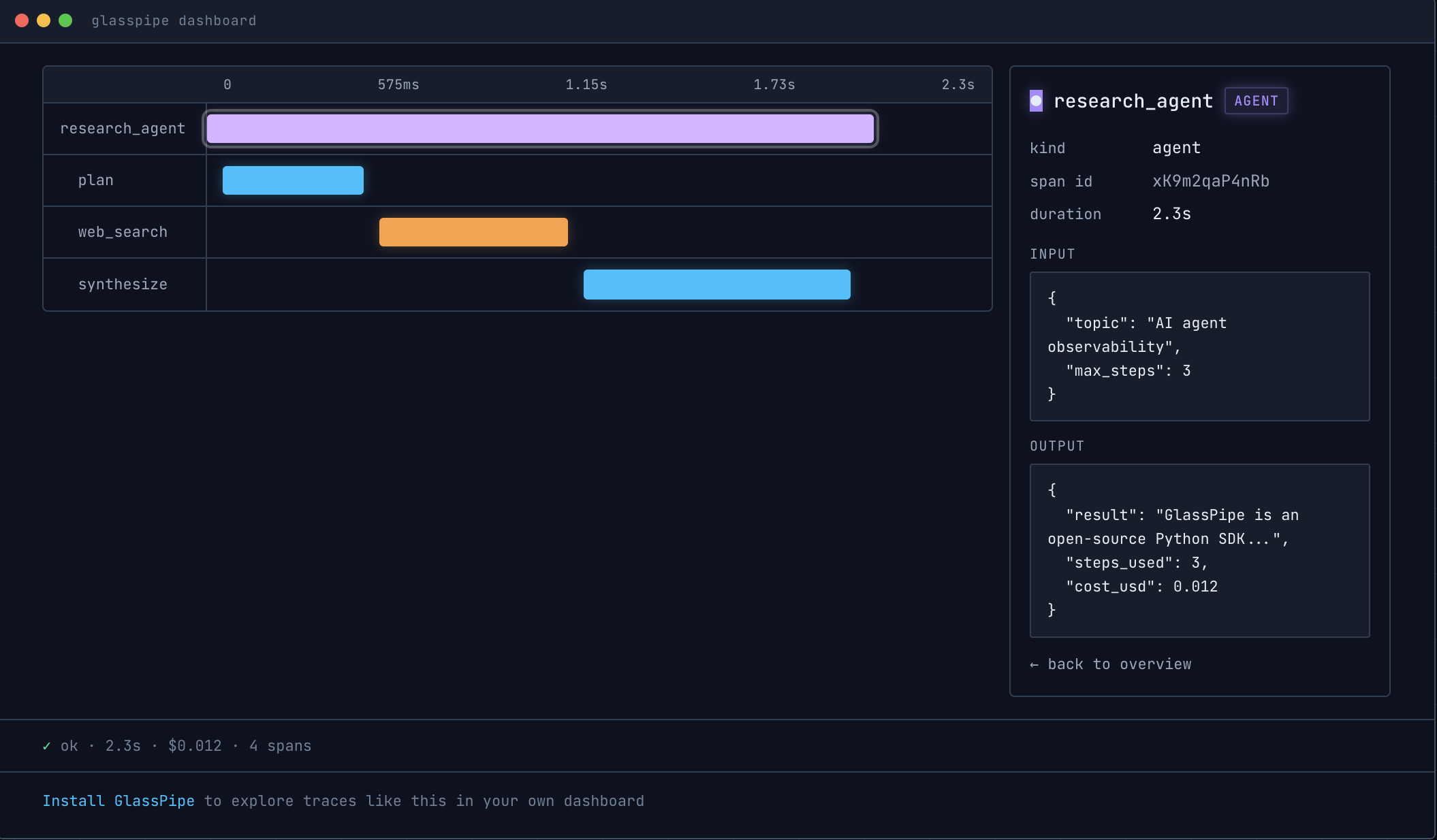
Every LLM call, every tool, every step — captured and laid out as a visual timeline. Click any span to see exactly what went in and what came out. Share the whole trace with one click.
No agent handy? Seed realistic sample traces and explore:
glasspipe demo && glasspipe dashboard
What you get:
- Waterfall timeline — every span with duration, offset, and a click-through inspector
- Cost & token tracking — per-call and per-run, with live cost ticker for in-flight runs
- Run diffing — select two runs, see exactly which steps appeared, vanished, or slowed down
- Agent versions — tag runs with
@trace(version="v1.3.0"), filter the run list by version - Anomaly watch — flags suspected tool loops, cost spikes, and runaway step counts while a run is live
- Trace replay — replay a run's waterfall in real time
- One-click sharing — mandatory redaction preview, then a public link; no account, ever
Install
pip install glasspipe
Requires Python 3.10+. No account. No API key. No configuration.
Quickstart
from glasspipe import trace, span

@trace
def research_agent(topic):
    # Manual spans for your own steps
    with span("plan", kind="custom") as s:
        plan = f"I will research: {topic}"
        s.record(input={"topic": topic}, output={"plan": plan})

    # Tool calls
    with span("web_search", kind="tool") as s:
        results = ["Result 1", "Result 2"]
        s.record(input={"query": topic}, output={"results": results})

    return results

research_agent("AI agent observability")
Then open the dashboard:
glasspipe dashboard
Your trace is waiting at http://localhost:3000.
Auto-instrumentation
GlassPipe automatically records every OpenAI and Anthropic call — no extra code needed:
import openai
from glasspipe import trace

@trace
def my_agent(question):
    # This call is automatically captured — model, tokens, cost, latency
    response = openai.chat.completions.create(
        model="gpt-4o",
        messages=[{"role": "user", "content": question}]
    )
    return response.choices[0].message.content
What gets captured automatically:
- Model name
- Prompt and completion tokens
- Cost in USD
- Latency
- Full input and output
Sharing a trace
In the dashboard, click Share on any run.
A preview modal shows you exactly what will be made public. GlassPipe scans for secrets — API keys, tokens, emails, JWTs, credit cards — and auto-redacts every match before anything leaves your machine. Review the redacted preview, then confirm.
You get a link like:
https://glasspipe.dev/t/7sq3QX
Anyone can open it — try that one, it's live. No account, ever. Traces expire after 30 days, and sharing gives you a delete token to revoke a trace early:
curl -X DELETE "https://glasspipe.dev/v1/trace/<id>?token=<delete-token>"
Privacy guarantees:
- Redaction happens on your machine, before upload. The server never sees the original data.
- The dashboard's share flow always routes through the redacted preview.
- Custom redaction patterns: set
GLASSPIPE_REDACT_PATTERNSas a JSON dict in your environment. - Shared traces are public but unlisted — accessible only by direct link.
[ EXAMPLES ] Examples
Live shared traces (no install needed):
- Competitive Intel Agent — 8 spans: plan → analyze competitors → synthesize → draft brief → review
- Support Agent — 4 spans: classify → fetch → draft → review
Working examples in the /examples folder:
python examples/hello.py                    # minimal — two spans
python examples/research_agent.py           # 3 spans: plan, search, synthesize
python examples/customer_support.py         # 4 spans: classify, fetch, draft, review
python examples/competitive_intel_agent.py  # 8 spans with realistic token/cost data
All of the above run without an API key. There's also a before/after pair
(live_customer_support_agent_*.py) showing a real OpenAI-backed agent with
and without instrumentation — those two need OPENAI_API_KEY.
Or skip the files entirely: glasspipe demo seeds four sample runs, including
a failing one and two versions of the same agent so you can try run comparison
and version filtering.
[ COMPARE ] GlassPipe vs Langfuse vs LangSmith
Honest comparison. Pick the right tool for the job.
| GlassPipe | Langfuse | LangSmith | |
|---|---|---|---|
| Install time | ~60 seconds | ~20 minutes | ~20 minutes |
| Account required | Never | Yes | Yes |
| Public share in one click | Yes | No | No |
| Local dashboard | Yes | No | No |
| Team workspaces | No | Yes | Yes |
| Production monitoring | No | Yes | Yes |
| Async support | No | Yes | Yes |
| Price | Free, OSS | Free tier + paid | Free tier + paid |
[ LIMITS ] What v1 doesn't do
We'd rather you know now than discover it ten minutes in. v1 is intentionally minimal. It does not:
- Support async Python (sync only — coming in v1.5)
- Capture streaming responses (final results only)
- Auto-instrument LangChain (raw OpenAI and Anthropic SDKs only)
- Support languages other than Python
- Provide team accounts, alerting, or production monitoring
If you need any of these today, use Langfuse, LangSmith, or Arize Phoenix. They're genuinely great tools.
[ DEV ] Built with
Python 3.10+ · Flask · HTMX · SQLite · SQLAlchemy
Hosted share service: Railway + Postgres
[ LIC ] License
MIT. Free forever. See LICENSE.
[ CTRB ] Contributing
Issues and PRs welcome. This is v1 — there's plenty to improve.
Built by Yonatan Michelson · glasspipe.dev
Project details
Verified details
These details have been verified by PyPIProject links
GitHub Statistics
Maintainers
Release history Release notifications | RSS feed


Download files
Download the file for your platform. If you're not sure which to choose, learn more about installing packages.
Source Distribution
Built Distribution
Filter files by name, interpreter, ABI, and platform.
If you're not sure about the file name format, learn more about wheel file names.
Copy a direct link to the current filters
File details
Details for the file glasspipe-0.2.0.tar.gz.
File metadata
- Download URL: glasspipe-0.2.0.tar.gz
- Upload date:
- Size: 991.9 kB
- Tags: Source
- Uploaded using Trusted Publishing? Yes
- Uploaded via: twine/6.1.0 CPython/3.13.12
File hashes
| Algorithm | Hash digest | |
|---|---|---|
| SHA256 |
c48e3346e0835346cf7edc6b44ac5c290cf149cdb6206dc8a200a745080f6755
|
|
| MD5 |
1badc8b51ca060ceef09135997e45d5a
|
|
| BLAKE2b-256 |
7b7be4a1250ad4545481bc8a703db73660f421c514c147f4a37ff6a1682dd071
|
Provenance
The following attestation bundles were made for glasspipe-0.2.0.tar.gz:
Publisher:
publish.yml on glasspipe/glasspipe
-
Statement:
-
Statement type:
https://in-toto.io/Statement/v1 -
Predicate type:
https://docs.pypi.org/attestations/publish/v1 -
Subject name:
glasspipe-0.2.0.tar.gz -
Subject digest:
c48e3346e0835346cf7edc6b44ac5c290cf149cdb6206dc8a200a745080f6755 - Sigstore transparency entry: 2101878119
- Sigstore integration time:
-
Permalink:
glasspipe/glasspipe@f3dc929c1a294ba06a817ab4022eed354c911107 -
Branch / Tag:
refs/tags/v0.2.0 - Owner: https://github.com/glasspipe
-
Access:
public
-
Token Issuer:
https://token.actions.githubusercontent.com -
Runner Environment:
github-hosted -
Publication workflow:
publish.yml@f3dc929c1a294ba06a817ab4022eed354c911107 -
Trigger Event:
release
-
Statement type:
File details
Details for the file glasspipe-0.2.0-py3-none-any.whl.
File metadata
- Download URL: glasspipe-0.2.0-py3-none-any.whl
- Upload date:
- Size: 999.8 kB
- Tags: Python 3
- Uploaded using Trusted Publishing? Yes
- Uploaded via: twine/6.1.0 CPython/3.13.12
File hashes
| Algorithm | Hash digest | |
|---|---|---|
| SHA256 |
7890c6b82933a809b58ed443810ec4146997eb9e7ed5aaa799055128092da166
|
|
| MD5 |
579df44fda305b629ec57ef056103c28
|
|
| BLAKE2b-256 |
24c09cb0119e118199ed1546c8acc8a9590e439a3c5b8d5bb45b08196f7f9f09
|
Provenance
The following attestation bundles were made for glasspipe-0.2.0-py3-none-any.whl:
Publisher:
publish.yml on glasspipe/glasspipe
-
Statement:
-
Statement type:
https://in-toto.io/Statement/v1 -
Predicate type:
https://docs.pypi.org/attestations/publish/v1 -
Subject name:
glasspipe-0.2.0-py3-none-any.whl -
Subject digest:
7890c6b82933a809b58ed443810ec4146997eb9e7ed5aaa799055128092da166 - Sigstore transparency entry: 2101878459
- Sigstore integration time:
-
Permalink:
glasspipe/glasspipe@f3dc929c1a294ba06a817ab4022eed354c911107 -
Branch / Tag:
refs/tags/v0.2.0 - Owner: https://github.com/glasspipe
-
Access:
public
-
Token Issuer:
https://token.actions.githubusercontent.com -
Runner Environment:
github-hosted -
Publication workflow:
publish.yml@f3dc929c1a294ba06a817ab4022eed354c911107 -
Trigger Event:
release
-
Statement type:






