







glinkfix

Google Drive Link Fixer
Notes (please read)
-
Google periodically changes how Drive links are handled, which can affect tools like glinkfix. Direct downloading and embedding Google Drive links is unsupported behavior as far as Google is concerned. As of January 2024, Google made a significant change that broke some links created with this tool. glinkfix now accepts current Drive file link formats such as
usp=drive_link, but future Google changes may break link handling again. -
Viewing links that point to animated GIFs may appear as static images.
-
In the v2 update, in addition to displaying the fixed link on the screen, glinkfix will also attempt to copy the fixed link to the clipboard. Copying to the clipboard only works for desktop operating systems, not server environments. Even without automatic copying, link fixing will still work and the results will be displayed on the screen, regardless of where you run it. glinkfix uses the pyperclip library, and automatic copying to the clipboard should work seamlessly on Windows and macOS. If you're running Linux and links are not automatically copied to the clipboard, refer to this note from the pyperclip documentation.
-
glinkfix is tested on Linux, macOS, and Windows in continuous integration. Clipboard behavior still depends on the local desktop or server environment.
Installation
The preferred way to install glinkfix is with pipx:
pipx install glinkfix
You can also install glinkfix as a tool with uv:
uv tool install glinkfix
Alternatively, you can create a separate virtual environment and install it the traditional way:
pip3 install glinkfix
If you just need a quick one-time link fix and don't want to commit to a full installation, use:
pipx run glinkfix -h
and follow the directions to run it again with the option you want.
Purpose and Usage
When you share files with Google Drive, the sharing link you get is
intended primarily for accessing the content through a web browser.
glinkfix supports Google Drive file links such as
https://drive.google.com/file/d/<file-id>/view?usp=drive_link,
.../preview, and bare /file/d/<file-id> links. If you want to use a
Google Drive file sharing link to embed an image in a document (e.g. in
a Markdown or HTML file), or you want to directly download a file pointed
to by a Google Drive sharing link using something like curl or wget
in Linux, the link needs to be adjusted ("fixed") for these purposes.
It's not especially hard to repackage the link, but it can be tedious. You have to copy the link to a text editor, carve it up manually, and reassemble it. If you've got a lot of links to deal with, the process gets repetitive. This tool is designed to remove that tedium.
Note: The images below demonstrate Google Drive sharing links and their "fixed" equivalents.
Start by getting a sharing link to a file on Google Drive. Make sure it's set up for public access (Anyone with the link):
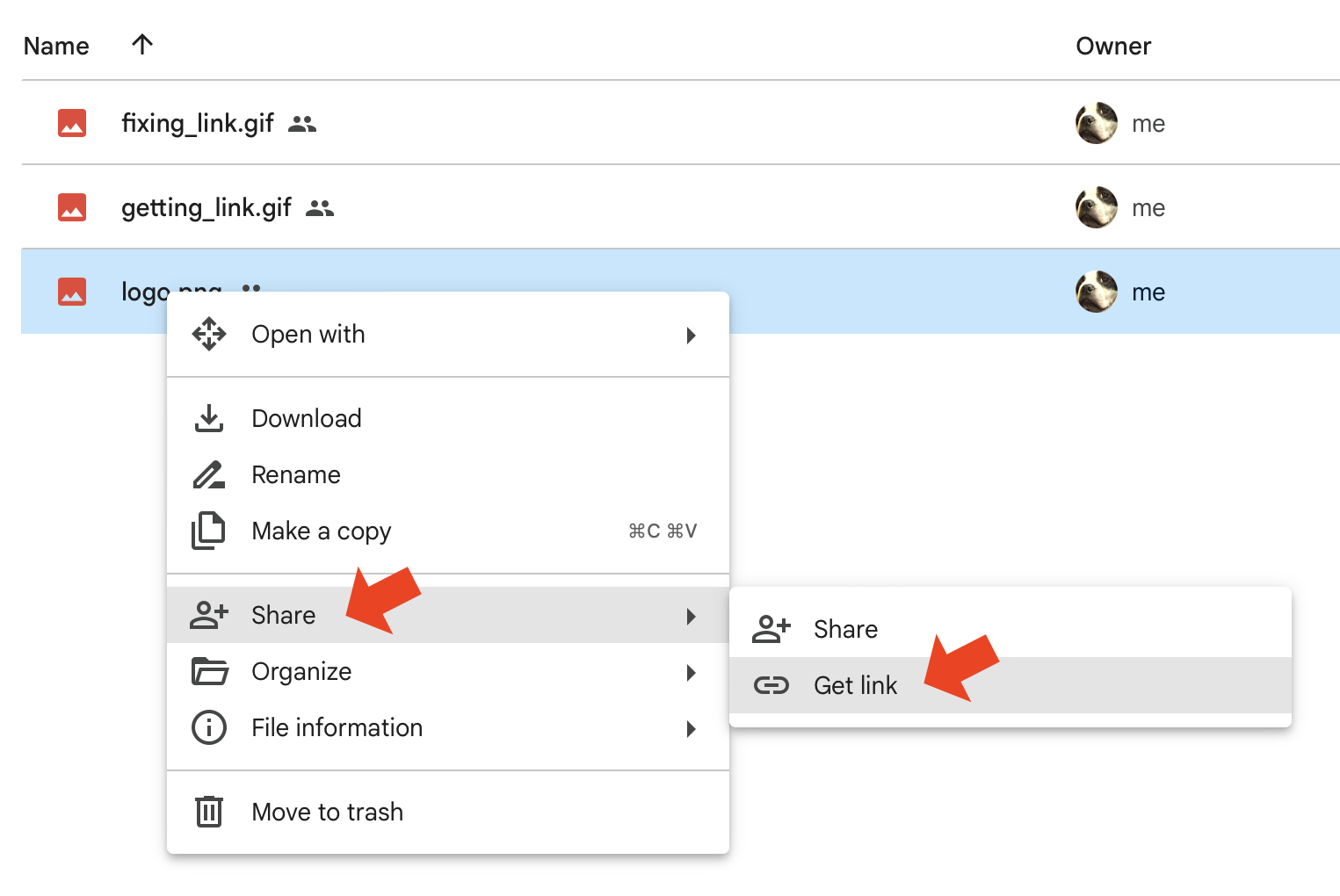
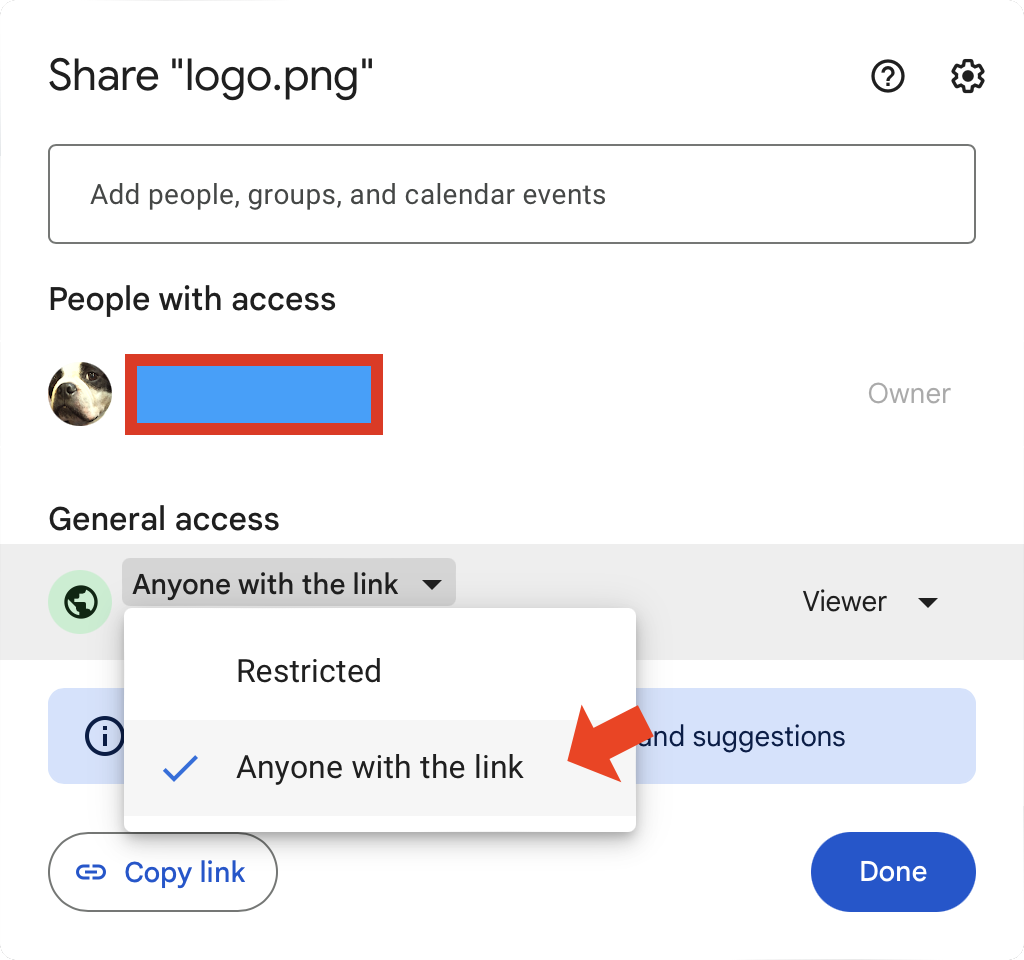
Now run glinkfix with the sharing link:
glinkfix "https://drive.google.com/file/d/<file-id>/view?usp=drive_link"
By default, glinkfix creates an embeddable link, prints the result, and attempts to copy the fixed link to the clipboard. To create a direct-download link instead, use:
glinkfix --download "https://drive.google.com/file/d/<file-id>/view?usp=drive_link"
For shell scripts, use --quiet to print only the converted URL:
glinkfix --quiet "https://drive.google.com/file/d/<file-id>/view?usp=drive_link"
To print the normal output without copying to the clipboard, use:
glinkfix --no-copy "https://drive.google.com/file/d/<file-id>/view?usp=drive_link"
If you run glinkfix without a URL, it prompts for one interactively.
Press Ctrl-C at the prompt to exit cleanly.
To display the help menu, run: glinkfix -h
usage: glinkfix [-h] [-d] [--no-copy] [--quiet] [-v] [url]

Convert a Google Drive file sharing link into a link suitable for
embedding in a document, such as an image in Markdown or HTML, or for
direct download, such as with curl. glinkfix accepts current Drive file
link formats such as usp=drive_link and uses Python's standard-library
URL parser for lightweight, dependency-minimal processing. Google Drive
links used this way have a single-file size limit of 40 MB.

positional arguments:
  url             Google Drive file sharing link to convert. If omitted,
                  prompt for one.

options:
  -h, --help      show this help message and exit
  -d, --download  Create a direct-download link instead of the default
                  embeddable link.
  --no-copy       Do not copy the converted link to the clipboard.
  --quiet         Print only the converted link and skip clipboard copying.
  -v, --version   show program's version number and exit
Usage Notes
- There is a 40 MB size limit for a single file when using Google Drive sharing links directly for viewing or downloading. Individual files larger than 40 MB will not render or download properly. This limit is a function of how Google Drive works and is not related to glinkfix.
- When creating a download link for use with
curl, make sure to usecurl's-Loption to allow for redirects. - glinkfix supports current Google Drive file sharing links, including
usp=drive_link,usp=drivesdk,usp=sharing, andusp=share_link. - glinkfix supports links that use Google's resource key security feature and preserves the resource key in fixed links.
- glinkfix supports Drive file links only. It does not convert Google Drive folder links or native Google Docs, Sheets, or Slides editor links.
- The link parser uses Python's standard-library URL parsing tools for lightweight, dependency-minimal processing. New dependencies are acceptable when they provide a clear correctness, performance, or maintainability benefit.
Development and releases
Pull-request titles use Conventional Commits. User-visible types are feat,
change, deprecate, remove, fix, security, perf, deploy, docs,
revert, and dependency-scoped build(deps...) or chore(deps...).
Routine build, chore, ci, refactor, style, and test changes are
hidden from release notes unless marked as breaking with !.
Preview pending user-visible entries with:
just changelog
Prepare a release from a clean branch with a canonical version such as
2.2.3, 2.2.3b1, or 2.2.3rc1:
just bump 2.2.3
just check
just build
git add CHANGELOG.md changelogs pyproject.toml uv.lock
git commit -m "chore(release): prepare for 2.2.3"
just bump requires at least one user-visible change. A release-preparation
chore(release) commit is hidden and does not satisfy that requirement.
After merging the release-preparation commit, update local main and run
just tag-release. It pushes one annotated v<version> tag. Prereleases
publish to TestPyPI and create GitHub prereleases; stable releases publish to
PyPI and create stable GitHub Releases. Only successful stable releases move
the mutable latest tag.
The release workflow uses PyPI Trusted Publishing. Before the first release,
configure pending publishers for this repository in TestPyPI and PyPI using
the release.yml workflow and the testpypi and pypi GitHub environments.
Allow the workflow to force-update the mutable latest tag; do not attach a
GitHub Release to that tag.
Dependabot checks direct Python and GitHub Actions dependencies weekly. It groups eligible Python minor and patch updates, and automatically enables squash auto-merge only for Dependabot-authored direct minor or patch updates without maintainer changes. Major and otherwise ineligible updates require manual review.
License
This project is licensed under the MIT License. See the LICENSE file for details.
Acknowledgements
This project uses the pyperclip library, an external dependency licensed under the BSD 3-Clause License. See the pyperclip project for license details.
1 maintainer

Metadata
1 maintainer
Release files for glinkfix 2.2.4
For a detailed explanation of source distributions (sdists) and built distributions (wheels), please see the package formats documentation.
Source distribution (sdist)
| File | Size | Uploaded | |
|---|---|---|---|
| glinkfix-2.2.4.tar.gz | 707.7 kB | Details |
Built distribution (wheel)
| File | Interpreter | ABI | Platform | Reset |
|---|---|---|---|---|
| glinkfix-2.2.4-py3-none-any.whl | Python 3 | none | any | Details |
Total release size: 717.2 kB
Release files / glinkfix-2.2.4.tar.gz
| Download URL | glinkfix-2.2.4.tar.gz |
|---|---|
| Size | 707.7 kB |
| Tags | Source |
|
SHA-256 checksum How to use checksums |
9c53347f85c521c7ce1a170f0e830740d6bbbf22b21cda31ec1411836354cd39
|
|
BLAKE2b-256 checksum How to use checksums |
92812b06e5daef053337562cc5b6bb80e9593904949705305da04034e621fe30
|
| Upload date | |
|
Uploaded using Trusted Publishing? What is trusted publishing? |
Yes |
| Uploaded via |
twine/7.0.0 CPython/3.13.14
|
Provenance
Provenance describes where a file came from. On PyPI, provenance is shared via attestations, which provide a verifiable record of the build or publishing details. View details, limitations and caveats.


PyPI Publish Attestation
PyPI verified that this artifact, at this checksum, originated from the publisher listed below.
Signed by GitHub Actions, verified by PyPI on Sep 12, 2026.
Transparency logRelease files / glinkfix-2.2.4-py3-none-any.whl
| Download URL | glinkfix-2.2.4-py3-none-any.whl |
|---|---|
| Size | 9.5 kB |
| Tags | Python 3 |
|
SHA-256 checksum How to use checksums |
b6d881c24898cad22ea3c70e07f0a268810557ae50e8a8d23fd861e31ab6de42
|
|
BLAKE2b-256 checksum How to use checksums |
43dc622f8631a572648d35e569e250e6fb7273063dded099b5568feca34f47f8
|
| Upload date | |
|
Uploaded using Trusted Publishing? What is trusted publishing? |
Yes |
| Uploaded via |
twine/7.0.0 CPython/3.13.14
|
Provenance
Provenance describes where a file came from. On PyPI, provenance is shared via attestations, which provide a verifiable record of the build or publishing details. View details, limitations and caveats.
PyPI Publish Attestation
PyPI verified that this artifact, at this checksum, originated from the publisher listed below.
Signed by GitHub Actions, verified by PyPI on Sep 12, 2026.
Transparency log













