
No project description provided

Project description
G-LSMEI: GPU-Accelerated Least-Square Matching Refiner for Epipolar Image Pairs




A project of the sub-pixel Least-Square Matching Refining Algorithm for Epipolar-Rectified Stereo Image Pairs in window-size areas. The classic algorithm is proposed by Ackermann in DIGITAL IMAGE CORRELATION: PERFORMANCE AND POTENTIAL APPLICATION IN PHOTOGRAMMETRY (1984), where the correspondence search reduces to a one-dimensional problem along epipolar lines, enabling both fast convergence and high accuracy.
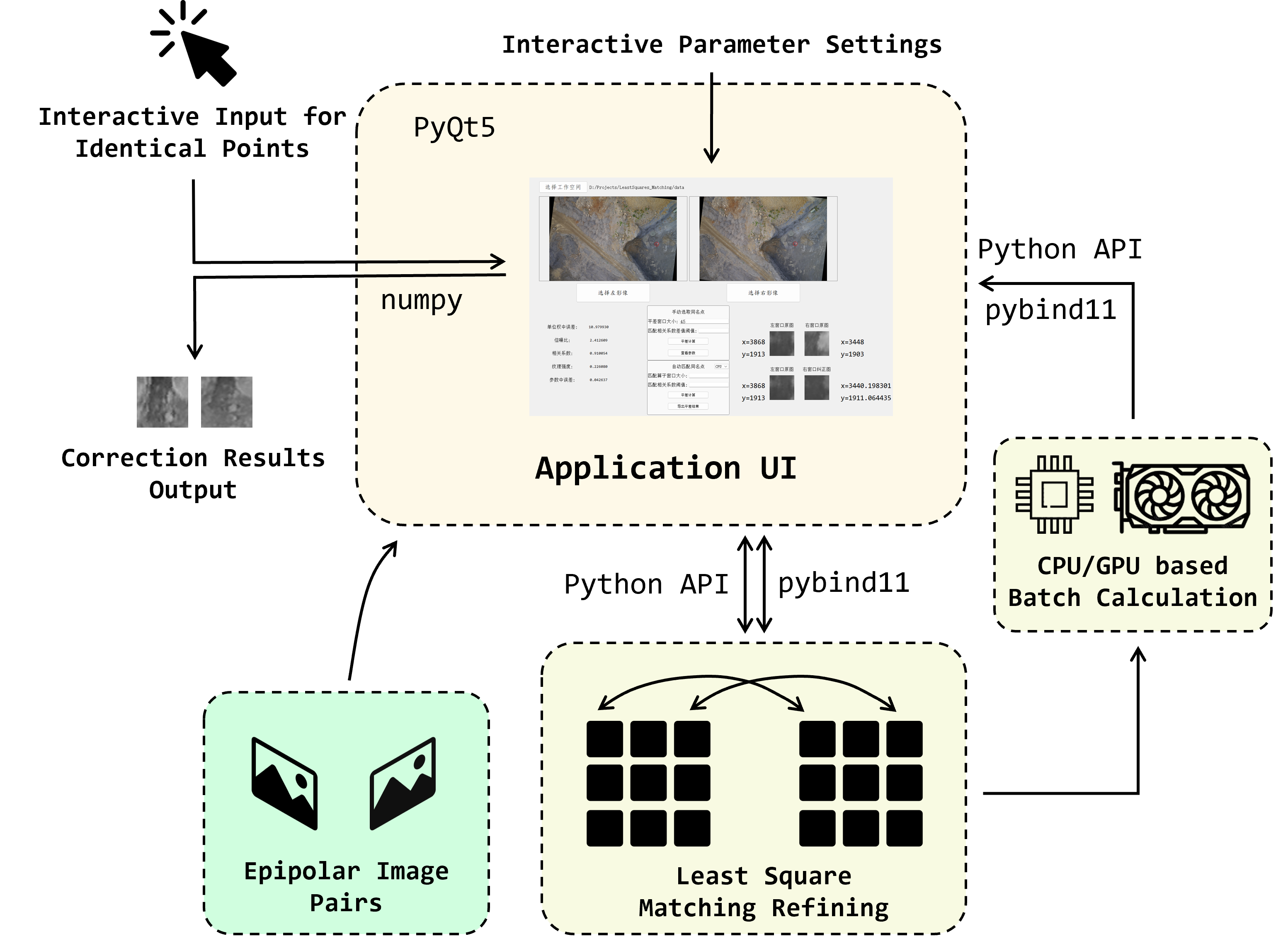
We provide the source code in C++ and a Python API library built upon it. A PyQt Demo Application and the CUDA-based GPU-accelerated version is also provided.
Up to now we have successfully tested the C++ and Python on Windows 10 and Windows 11.
Contributors: Haojun Tang, Jiahao Zhou
Acknowledgements: Thanks to the guidance of Yunsheng Zhang from Central South University.

About the Project
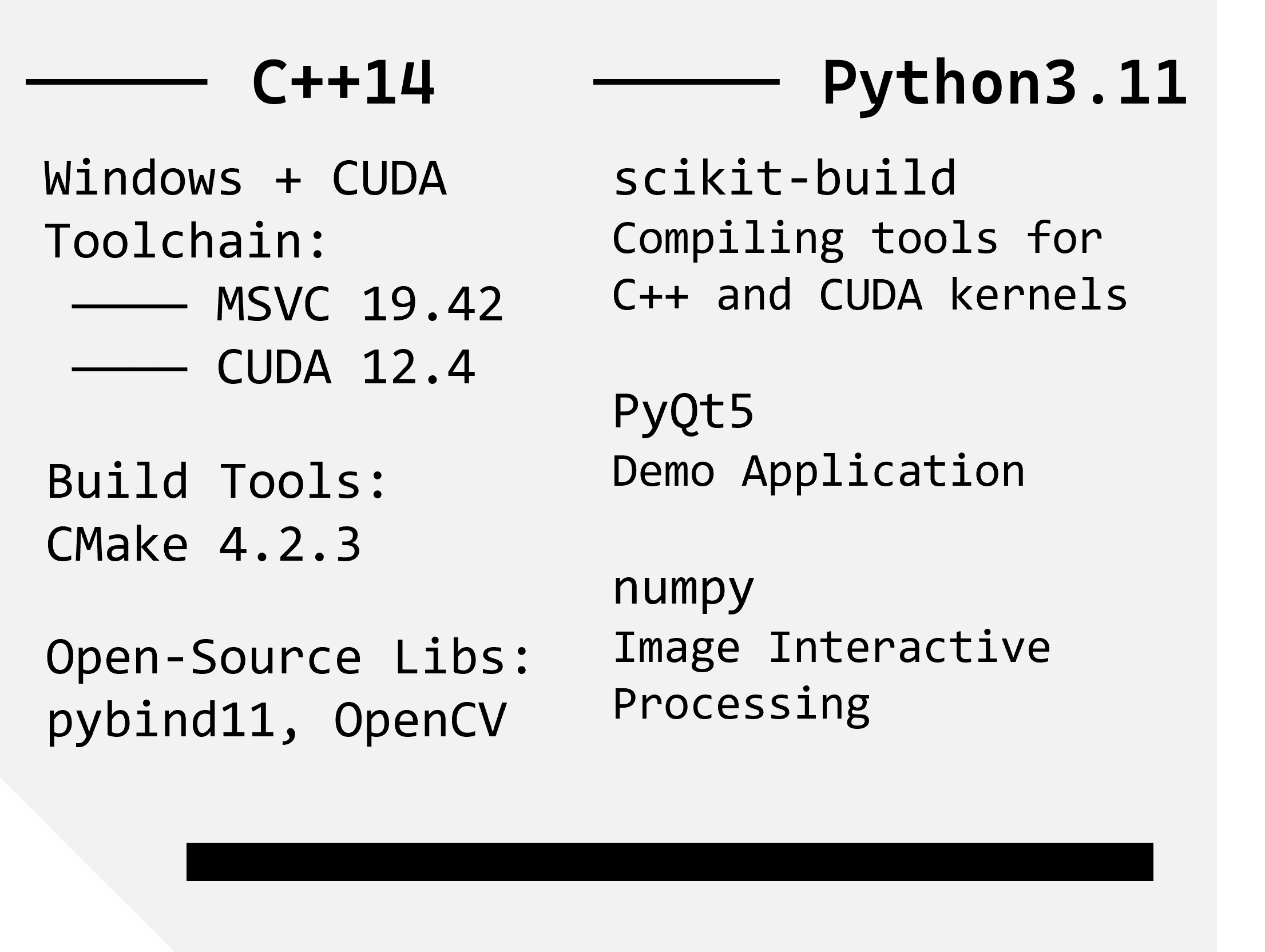
Environment
Application Structure
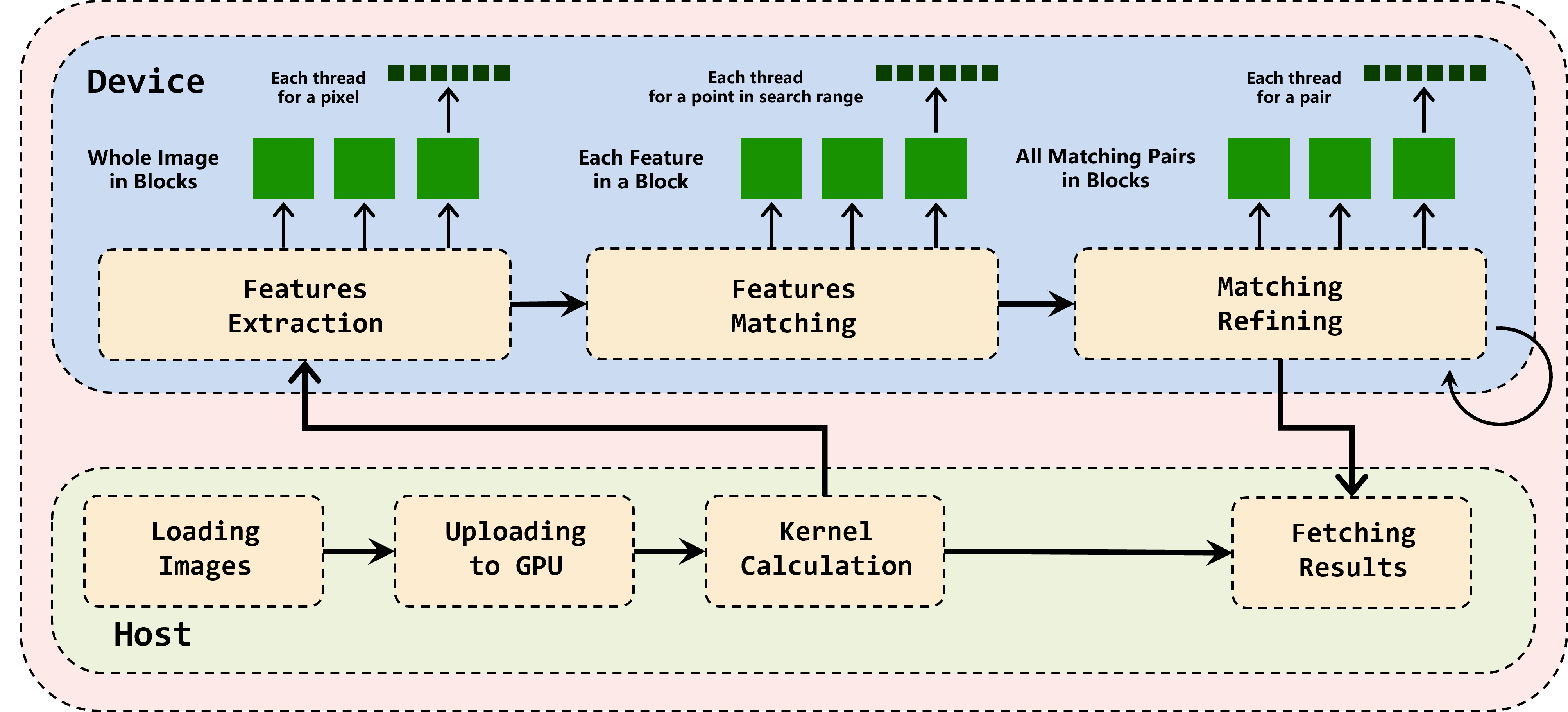
CUDA Executions
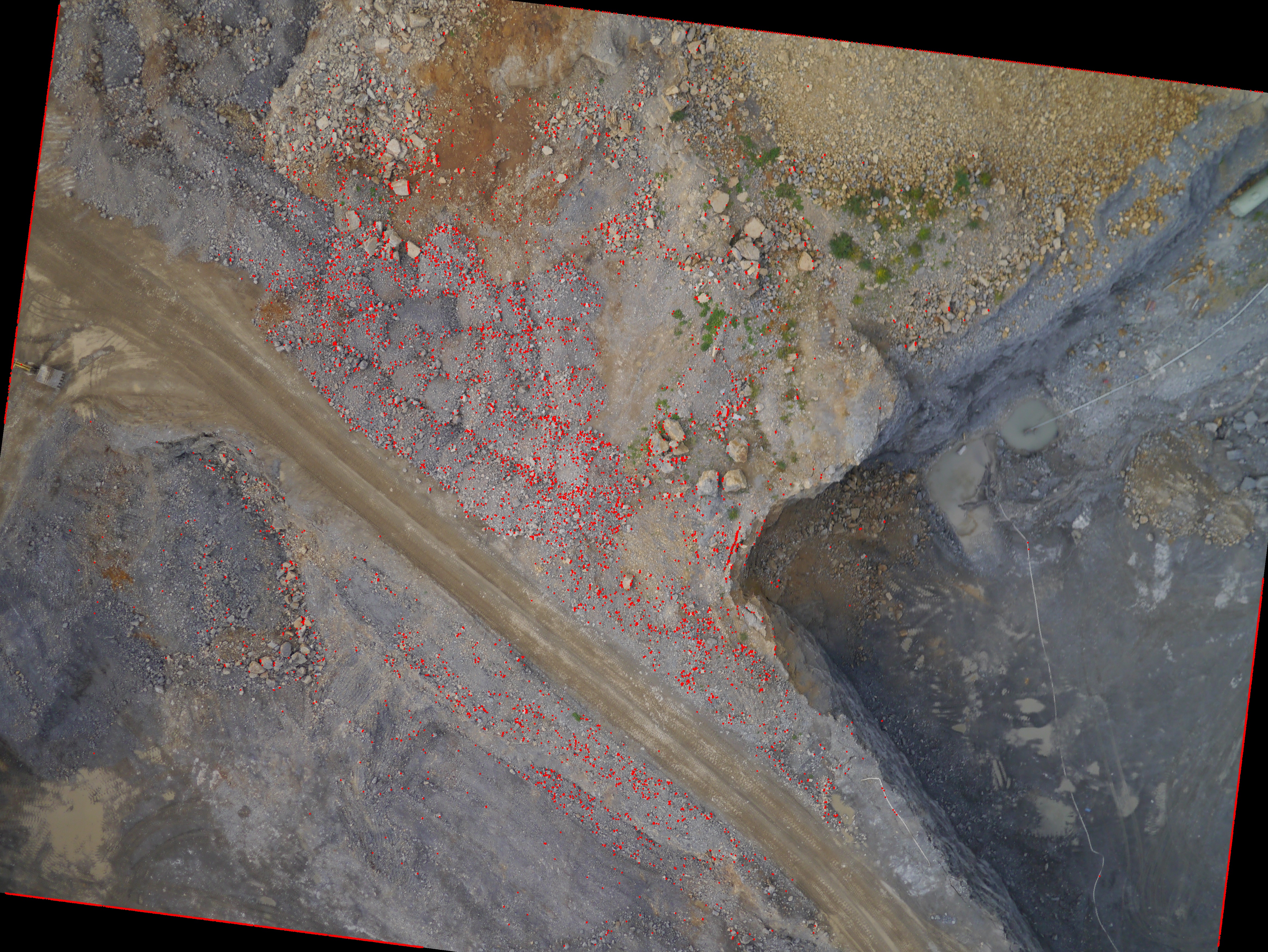
Some Results
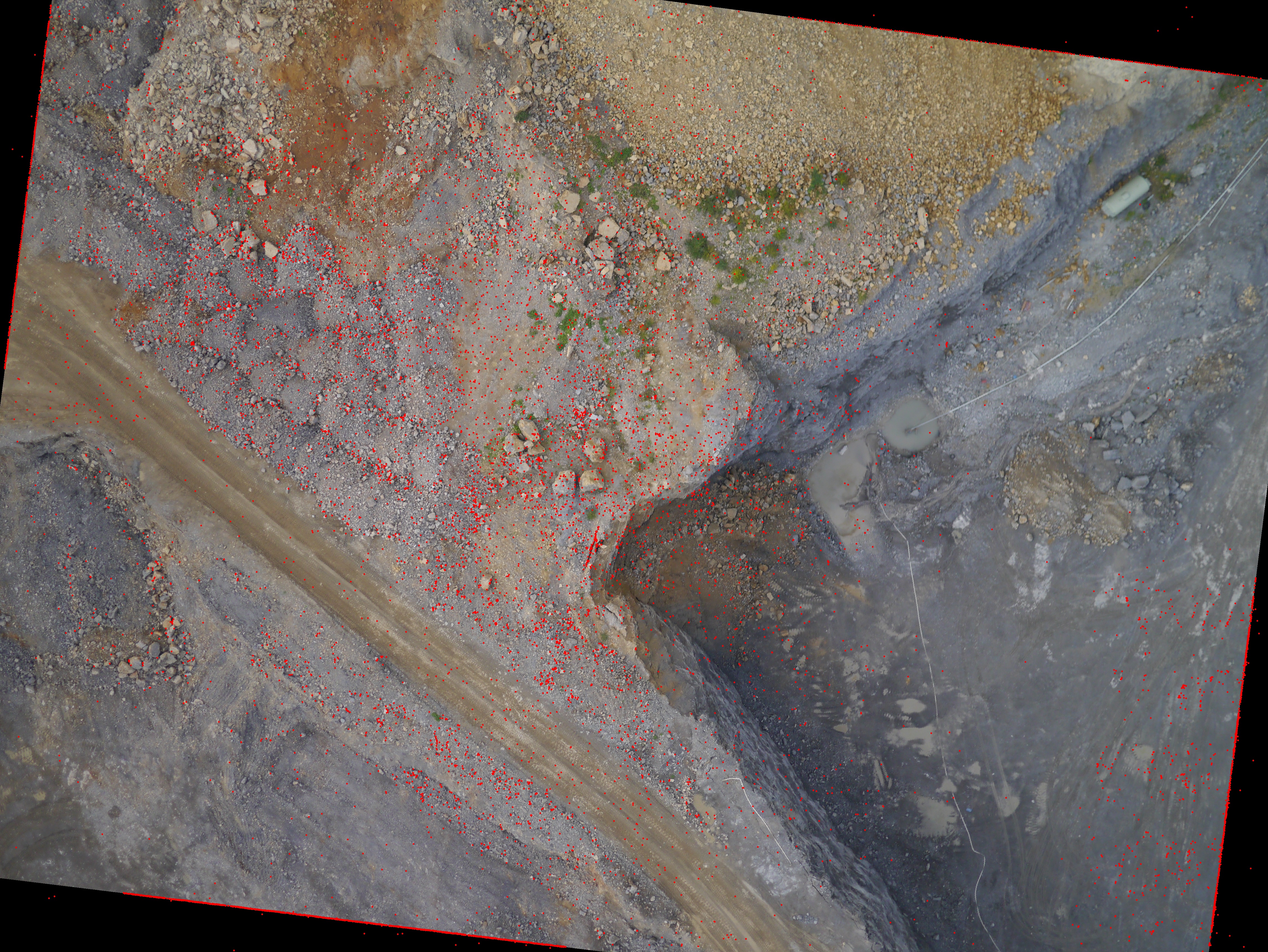
Matching Results
| Left Image | Right Image |
|---|---|
 |
 |
Time Costs
| Setups | CPU | GPU |
|---|---|---|
| Time (sec) | 332.27 | 0.621 |
Improved by 500+ times in our GPU implementation!
Core Algorithm tested in C++ (only CPU-based)
Prerequisites
MSVC (Visual Studio 2022, with C++ CMake tools), CMake ≥ 3.20, and the source code:
git clone https://github.com/DonaldTrump-coder/G-LSMEI --recursive
Build for the Code
In the project directory, run the following commands:
mkdir build
cd build
cmake .. -G "Visual Studio 17 2022"
cmake --build . --config Release
.\Release\leastsquares_matching.exe
The output is from the main function in core\src\test.cpp
Use the C++ source code for testing the algorithm.
Image Matching Application Deployment (CPU and GPU support)
Prerequisites
You also need MSVC and CMake, conda (or any Python environment), as well as nvcc for CUDA (Already successfully tested on CUDA 12.4). Install them and start to build!
1. Install the Requirement Packages for Python
In the project directory, run
conda create -n matching python=3.11
conda activate matching
pip install -r requirements.txt
2. Build the C++ and CUDA Source for Python Application
cd python
python setup.py bdist_wheel
python -m pip install (Get-ChildItem dist\glsmei-*.whl).FullName --force-reinstall
cd ..
Then the installation of glsmei is done.
3. Use the Application in Python
run
python main.py
API Reference
Installation from pip (If your Python and CUDA environment is supported): pip install glsmei
Verify installation: python -c "import lsmatching; print(lsmatching.__version__)"
Matching in CPU
Matching(left_image_path: str, right_image_path: str)
| APIs | Params | Returns | Description |
|---|---|---|---|
set_params(windowsize, d_corr_threshold) |
int=15, float=0.04 |
— | Set template window size and correlation change threshold |
set_matching_params(windowsize, corr_threshold) |
int=3, float=0.7 |
— | Set initial matching parameters |
set_centers(x1, y1, x2, y2) |
int × 4 |
— | Set initial conjugate points on left/right images |
calculate() |
— | — | Run single-point least-squares matching |
get_left_window() |
— | np.ndarray |
Get the left image matching window |
get_right_window() |
— | np.ndarray |
Get the right image matching window |
get_matched_points(savepath) |
str |
— | Export matching results |
get_matched_x() |
— | float |
Matched point x-coordinate |
get_matched_y() |
— | float |
Matched point y-coordinate |
get_delta0() |
— | float |
Standard error of unit weight |
get_deltag() |
— | float |
Standard error of window |
get_deltax() |
— | float |
Standard error of parameters |
get_SNR() |
— | float |
SNR |
get_h0() / get_h1() |
— | float |
Radiometric distortion parameters |
get_a0() / get_a1() / get_a2() |
— | float |
Affine parameters (left → right, x-direction) |
get_b0() / get_b1() / get_b2() |
— | float |
Affine parameters (left → right, y-direction) |
gpu_device_count() |
— | int |
Number of available GPUs |
Matching in GPU
batch_adjust_gpu(window_size=15, d_corr=0.04, max_iter=20, matching_wsize=3, corr_threshold=0.7, savepath=None)
GPU batch pipeline: Feature Extraction → Correlation Matching → Least-Squares Refinement
| Parameter | Type | Default | Description |
|---|---|---|---|
window_size |
int |
15 | Least-squares refinement template window size |
d_corr |
float |
0.04 | Correlation change threshold (convergence criterion) |
max_iter |
int |
20 | Maximum iteration count |
matching_wsize |
int |
3 | Initial correlation matching template window size |
corr_threshold |
float |
0.7 | Initial matching correlation threshold |
savepath |
str |
None |
Output save path |
License
This project is licensed under the Apache License 2.0. See LICENSE details.
Citation
If you use our work or our data in your research, please cite:
@misc{Tang2025GLSMEI,
  title        = {G-LSMEI: GPU-Accelerated Least-Square Matching Refiner for Epipolar Image Pairs},
  author       = {Haojun Tang and Jiahao Zhou},
  year         = {2025},
  howpublished = {\url{https://github.com/DonaldTrump-coder/LeastSquares_Matching}},
  note         = {Version 1.0.2. Apache License 2.0}
}
Release history Release notifications | RSS feed


Download files
Download the file for your platform. If you're not sure which to choose, learn more about installing packages.
Source Distribution
Built Distribution
Filter files by name, interpreter, ABI, and platform.
If you're not sure about the file name format, learn more about wheel file names.
Copy a direct link to the current filters
File details
Details for the file glsmei-1.0.4.tar.gz.
File metadata
- Download URL: glsmei-1.0.4.tar.gz
- Upload date:
- Size: 4.7 MB
- Tags: Source
- Uploaded using Trusted Publishing? No
- Uploaded via: twine/6.2.0 CPython/3.11.15
File hashes
| Algorithm | Hash digest | |
|---|---|---|
| SHA256 |
655d85ef1d1126e3cde7fd65aa7667a776b2493005a9e2e95460a57d7171a00b
|
|
| MD5 |
f2495a28ec3641ab347d631f653ed831
|
|
| BLAKE2b-256 |
03ddc68c0a36b32c8e19e92e1eb9696d0515dcc4c15b0e45e8f900dfaaa8cf61
|
File details
Details for the file glsmei-1.0.4-cp311-cp311-win_amd64.whl.
File metadata
- Download URL: glsmei-1.0.4-cp311-cp311-win_amd64.whl
- Upload date:
- Size: 9.4 MB
- Tags: CPython 3.11, Windows x86-64
- Uploaded using Trusted Publishing? No
- Uploaded via: twine/6.2.0 CPython/3.11.15
File hashes
| Algorithm | Hash digest | |
|---|---|---|
| SHA256 |
023d72293acfe07771a70f1bab3fb664b388a7d0c509a5ef8a191c4f1b264225
|
|
| MD5 |
3e31ce94b4929ddfc072cc4067d1a578
|
|
| BLAKE2b-256 |
812a10bb33ebaa0a401cb0a01f3959c8c9c33f6e2e36ec2824ab12fede7e97e2
|






