
No project description provided

Project description
glue-ar
This package is an experimental plugin for glue that allows exporting augmented reality (AR) figures out of the 3D scatter and volume viewers from glue-vispy-viewers. Currently this ability is exposed via viewer tools that save a 3D file representing the current view. Currently supported file formats include glTF/glB and USD.
Installation
This package is pip-installable:
pip install glue-ar
Installation requires Node.js to be installed on your system, as we currently use JavaScript packages for performing Draco and Meshopt compression. (Having Node installed is all that you need - the npm/JS management relevant for the package is all handled by the package build process).
Viewer tools
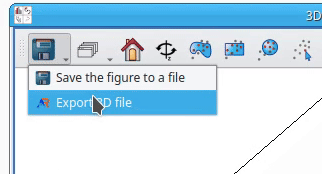
In the Qt desktop application, the AR export tool is exposed in the toolbar as subtools of the "save" meta-tool, and can be accessed from its dropdown menu.
In glue-jupyter, the AR export tool is a top-level toolbar tool:

Sharing figures
model-viewer
If glTF is selected as the output file format, an HTML file is exported in addition to the glTF. This HTML file provides a display of the exported figure using the model-viewer web component. This model-viewer page provides a THREE.js-powered glTF viewer that, on an Android or iOS device, allows viewing the glTF file using the hardware AR capability. Additionally, this exported HTML has no additional dependencies and can be served using static file hosting.
glTF compression
The files exported by glue-ar can, in their original form, be quite large. In order to mitigate this problem for glTF files, glue-ar allows using
Draco compression via the gltf-pipeline package, or
Meshopt via the gltfpack package.
These compression methods allow for a considerable reduction in file size (often an order of magnitude or more),
and files compression by both methods can be read by model-viewer.
CoSpaces
Another popular option for sharing 3D files in augmented reality is CoSpaces, which allows viewing 3D files in a browser or on a mobile device via a dedicated app. The CoSpaces app allows viewing figures in AR on a flat surface directly, or using the Merge Cube to allow for a more tangible AR experience.
CoSpaces supports the glTF file format, so the outputs of glue-ar can be used in CoSpaces without modification. It is our aim to eventually allow automatic CoSpaces upload, but for now sharing your AR figures to CoSpaces requires some manual steps (as well as a CoSpaces account).
To create a scene with your newly-exported figure, do the following:
- Go to the CoSpaces website and log in to your account
- On the left side menu, navigate to "CoSpaces"
- Click the "Create CoSpace" button
- Select the environment you want:
- 3D environment > Empty scene for tabletop AR
- MERGE Cube > Empty scene to use the MERGE Cube (note that creating a MERGE Cube requires a plan addon)
- In the bottom left corner, select Upload > 3D models, then press the Upload button to the right
- Select your 3D model
- Note that CoSpaces currently does not support the extensions needed for Draco or Meshopt compression
- Done!


Download files
Download the file for your platform. If you're not sure which to choose, learn more about installing packages.
Source Distribution
Built Distribution
Filter files by name, interpreter, ABI, and platform.
If you're not sure about the file name format, learn more about wheel file names.
Copy a direct link to the current filters
File details
Details for the file glue_ar-0.4.tar.gz.
File metadata
- Download URL: glue_ar-0.4.tar.gz
- Upload date:
- Size: 57.5 MB
- Tags: Source
- Uploaded using Trusted Publishing? No
- Uploaded via: twine/6.0.1 CPython/3.11.11
File hashes
| Algorithm | Hash digest | |
|---|---|---|
| SHA256 |
df1590c2ec11893953561fee0ebfe181f5e5d0027c10f9c4f619172c2e0ed5de
|
|
| MD5 |
27de309f8729831957fbb8f168a573fb
|
|
| BLAKE2b-256 |
99fdd898aa3669ae361d683bf8e3ddf153386b8508368d9dea4b3349c7f52616
|
File details
Details for the file glue_ar-0.4-py3-none-any.whl.
File metadata
- Download URL: glue_ar-0.4-py3-none-any.whl
- Upload date:
- Size: 62.1 MB
- Tags: Python 3
- Uploaded using Trusted Publishing? No
- Uploaded via: twine/6.0.1 CPython/3.11.11
File hashes
| Algorithm | Hash digest | |
|---|---|---|
| SHA256 |
afc7b1152eb62c6544b32341f17f53e36c696a541b0c482aa89ae25006527b74
|
|
| MD5 |
802d1c2a45326e4ea68625d42565577e
|
|
| BLAKE2b-256 |
9805fd65ff232826426d6f9ba22071de6cb8f557e8423c7c8a171a0594139896
|






