
A fast geometry manipulation and creation library written in Rust, wrapped in python

Project description
GMAC


A fast geometry manipulation and creation library made in rust, with a convenient python interface, and very few dependencies. Primary features include:
- Create primitives
- Deform geometries using RBF and FFD
- Transform geometries (or selection just a selection of nodes)
- Large range of selection and transformation tools
- Convenient python interface (gmac_py)
- Import/export vtk-type files and stl files (ASCII only currently)
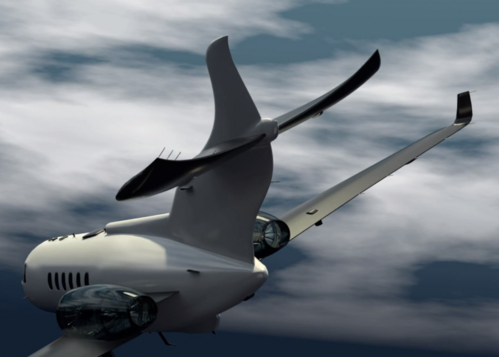
Here's a demonstration of a plane tail deformed using the Free Form deformer (FFD):
| Variation 1 | Variation 2 |
|---|---|
 |
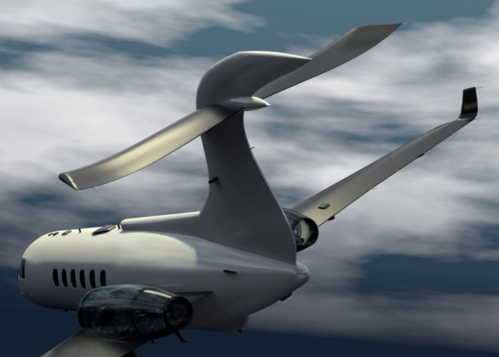 |
Both plane tail variations were created using the Gmac Free Form deformer (FFD).
Add to your rust project
Add the following to your Cargo.toml:
[dependencies]
gmac = "0.1.6"
If you want to use RBF with larger datasets, it is recommended to use the openblas or intel-mkl feature:
[dependencies]
gmac = { version = "0.1.6", features = ["intel-mkl"] } # or openblas
Make sure you have the required dependencies installed for the features you choose. For openblas openssl is required.
Examples in Rust
Deforming with Free Form Deformer (FFD)
Heres a demonstration of deformation using the FreeFormDeformer:
use gmac::core::{
    primitives::generate_box,
    transformation::{build_transformation_matrix, transform_node},
};
use gmac::io::{stl::write_stl, vtk::write_vtu};
use gmac::morph::{ffd::FreeFormDeformer, design_block::DesignBlock};

fn main() -> Result<(), Box<dyn std::error::Error>> {
    // Create a simple box geometry or import one
    let mut geometry = generate_box(
        [1.0, 1.0, 1.0],  // Dimensions (length, width, height)
        [0.0, 0.0, 0.0],  // Center coordinates
        [0.0, 0.0, 0.0],  // Rotation angles (degrees)
        [5, 5, 5],        // Number of elements in each direction
    );

    // Alternative: Load geometry from an STL file
    // let mut geometry = Mesh::from_stl_ascii("path_to_stl")?;

    // Create a design block (control lattice) for FFD
    let design_block = DesignBlock::new(
        [0.8, 1.2, 1.2],  // Dimensions of the control lattice
        [0.2, 0.0, 0.0],  // Center offset
        [0.0, 0.0, 0.0],  // Rotation angles (degrees)
        [2, 2, 2],        // Control points in each direction
    );

    // Select which control points will be free to move during
    // deformation, the second parameter specifies the number of
    // fixed layers of control points at the boundaries
    let free_design_ids = design_block
        .select_free_design_nodes(&geometry, Some(2))?;

    // Create a transformation matrix
    let transform_matrix = build_transformation_matrix(
        [0.25, 0.0, 0.0],   // Translation vector (x, y, z)
        [45.0, 0.0, 0.0],   // Rotation angles (degrees)
        [1.0, 1.5, 1.5],    // Scaling factors (x, y, z)
    );

    // Create a copy of the original control points to modify
    let mut deformed_design_nodes = design_block.nodes.clone();

    // Apply the transformation to each free control point
    free_design_ids.iter().for_each(|&id| {
        transform_node(
            &mut deformed_design_nodes[id], // Control points
            &transform_matrix,              // Transformation
            &[0.2, 0., 0.],                 // Origin or pivot point
        )
    });

    // Create a Free-Form Deformer with the original design block
    let ffd = FreeFormDeformer::new(design_block);

    // Apply the deformation to the original geometry
    geometry.nodes = ffd.deform(&geometry.nodes, &deformed_design_nodes)?;

    // Save the deformed geometry as a VTK file for visualization
    write_vtu(&geometry.nodes, &geometry.cells, Some("deformed.vtu"))?;

    // Save the final deformed geometry as an STL file
    write_stl(&geometry.nodes, &geometry.cells, Some("deformed.stl"))?;

    Ok(())
}
| Original control points | Deformed control points |
|---|---|
 |
 |
Deforming with Radial Basis Functions (RBF)
Using the RbfDeformer is very similar to using the FFD, but instead of using a design block (control lattice), you use a set of control points:
use gmac::core::{
    clusters::generate_block_cluster, transformation::transform_node,
    primitives::generate_box, transformation::build_transformation_matrix,
    selection::select_nodes_in_plane_direction,
};
use gmac::io::{stl::write_stl, vtk::write_vtp};
use gmac::morph::rbf::RbfDeformer;

fn main() -> Result<(), Box<dyn std::error::Error>> {
    // Create or import geometry as before ...

    // Create a set of control points
    let original_control_points = generate_block_cluster(
        [1.2, 1.2, 1.2], // Lengths of block
        [0.0, 0.0, 0.0], // Center of block
        [0.0, 0.0, 0.0], // No rotation
        [2, 2, 2],       // 2x2x2 grid of control points
    );

    // Select control points that lie in a plane defined
    // by an origin point and normal vector
    let target_control_point_ids = select_nodes_in_plane_direction(
        &original_control_points,
        [0.3, 0.0, 0.0], // A point in the plane
        [1.0, 0.0, 0.0], // Normal vector (x-axis here)
    );

    // Apply transformation to the selected control points
    let transform_matrix = build_transformation_matrix(
        [1.0, 0.0, 0.0],   // Move 1 unit in x-direction
        [45.0, 0.0, 0.0],  // Rotate 45 degrees around x-axis
        [1.0, 0.75, 0.75], // Scale y and z dimensions to 75%
    );

    // Apply the transformation to each selected control point
    let mut deformed_control_points = original_control_points.clone();
    for &id in &target_control_point_ids {
        let mut point = deformed_control_points[id];
        transform_node(
            &mut point,
            &transform_matrix,
            &[0.0, 0.0, 0.0], // Origin point
        );
        deformed_control_points[id] = point;
    }

    // Create an RBF deformer with the control point configurations
    let rbf = RbfDeformer::new(
        original_control_points,
        deformed_control_points,
        Some("gaussian"), // Type of RBF kernel
        Some(1.0),        // Shape parameter for the RBF kernel
    )?;

    // Apply the RBF deformation to the original box geometry
    geometry.nodes = rbf.deform(&geometry.nodes)?;

    // Save the final deformed geometry as an STL file
    write_stl(&geometry.nodes, &geometry.cells, Some("deformed.stl"))?;

    Ok(())
}
Here you can see the original control points and mesh, as well as the deformed control points and mesh:
| Original control points | Deformed control points |
|---|---|
 |
 |
Examples in Python
Using GMAC to deform a box
Heres a simple demonstration of using the Free Form Deformer (FFD) to deform a generated box (or an imported STL file).
mport gmac
import gmac.morph as morph
import gmac.io as io
import numpy as np

# Create a simple box geometry
geometry = gmac.generate_box(
    [1.0, 1.0, 1.0],  # Dimensions (length, width, height)
    [0.0, 0.0, 0.0],  # Center coordinates
    [0.0, 0.0, 0.0],  # Rotation angles (degrees)
    [5, 5, 5]         # Number of divisions in each direction
)

# Or import one from stl
# geometry = gmac.Mesh.from_stl_ascii("path_to_stl")

# Create a design block (control lattice) for FFD
design_block = morph.DesignBlock(
    [0.8, 1.2, 1.2],  # Dimensions of the control lattice
    [0.2, 0.0, 0.0],  # Center offset
    [0.0, 0.0, 0.0],  # Rotation angles (degrees)
    [2, 2, 2]         # Number of control points in each direction
)

# Select which control points will be free to move
free_design_ids = design_block.select_free_design_nodes(geometry, 2)

# Create a transformation matrix
transformation_matrix = gmac.build_transformation_matrix(
    [0.25, 0.0, 0.0],   # Translation vector (x, y, z)
    [45.0, 0.0, 0.0],   # Rotation angles (degrees)
    [1.0, 1.5, 1.5]     # Scaling factors (x, y, z)
)

# Transform only the free control points
deformed_design_nodes = np.array(design_block.nodes)
deformed_design_nodes[free_design_ids] = gmac.transform_nodes(
    deformed_design_nodes[free_design_ids],
    transformation_matrix,
    [0.2, 0., 0.],
)

# Save the deformed control points for visualization
io.write_vtp(deformed_design_nodes, "deformed_design_nodes.vtp")

# Create a Free-Form Deformer with the original design block
ffd = morph.FreeFormDeformer(design_block)

# Apply the deformation to the original geometry
geometry.nodes = ffd.deform(geometry.nodes, deformed_design_nodes)

# Save the final deformed geometry as an STL file
io.write_stl(geometry.nodes, geometry.cells, "deformed_geometry.stl")
For Radial Basis Function (RBF) deformation, see the RbfDeformer example in examples.
Build python from source
These instructions assume that Python3 and Cargo are installed on your system. To set up this project, follow these steps:
- Clone the repository:
git clone https://github.com/alexlovric/gmac.git
cd gmac/gmac_py
- Create a virtual environment and install build system:
python3 -m venv .venv
source .venv/bin/activate # In windows /Scripts/activate
python3 -m pip install -r requirements.txt
- Build the release binary:
maturin develop --release
- Build the python wheel:
maturin build --release
References
The gmac_morph is heavily influenced by PyGEM (https://github.com/mathLab/PyGeM), and the following
Sieger, Menzel, Botsch. On Shape Deformation Techniques for Simulation-based Design Optimization. SEMA SIMAI Springer Series, 2015.
Lombardi, Parolini, Quarteroni, Rozza. Numerical Simulation of Sailing Boats: Dynamics, FSI, and Shape Optimization. Springer Optimization and Its Applications, 2012.


Download files
Download the file for your platform. If you're not sure which to choose, learn more about installing packages.
Source Distributions
Built Distributions
Filter files by name, interpreter, ABI, and platform.
If you're not sure about the file name format, learn more about wheel file names.
Copy a direct link to the current filters
File details
Details for the file gmac-0.1.6-cp38-abi3-win_amd64.whl.
File metadata
- Download URL: gmac-0.1.6-cp38-abi3-win_amd64.whl
- Upload date:
- Size: 249.2 kB
- Tags: CPython 3.8+, Windows x86-64
- Uploaded using Trusted Publishing? No
- Uploaded via: maturin/1.9.0
File hashes
| Algorithm | Hash digest | |
|---|---|---|
| SHA256 |
86b0477567e6d17d66351806705ace4e4f88b83d1fe23e778343f2a5d400b0ea
|
|
| MD5 |
f7a6131049b796937425f719734bd2d1
|
|
| BLAKE2b-256 |
0f9de337d336170a8c8dc221291f67588edbe95a6ec19db9665a3bfa7a8e567e
|
File details
Details for the file gmac-0.1.6-cp38-abi3-manylinux_2_34_x86_64.whl.
File metadata
- Download URL: gmac-0.1.6-cp38-abi3-manylinux_2_34_x86_64.whl
- Upload date:
- Size: 343.4 kB
- Tags: CPython 3.8+, manylinux: glibc 2.34+ x86-64
- Uploaded using Trusted Publishing? No
- Uploaded via: maturin/1.9.0
File hashes
| Algorithm | Hash digest | |
|---|---|---|
| SHA256 |
447534ed5bc6420a0785dc1d6c0b6671f1ab1e5b8e9cddbdbab1fcc525c0504f
|
|
| MD5 |
dd8845f440dfbdc62f5bebcad391c786
|
|
| BLAKE2b-256 |
b40b7f91bb6e43059a54930255055372acc89e2766f90a072bed1ce15ddca839
|
File details
Details for the file gmac-0.1.6-cp38-abi3-macosx_11_0_arm64.whl.
File metadata
- Download URL: gmac-0.1.6-cp38-abi3-macosx_11_0_arm64.whl
- Upload date:
- Size: 300.6 kB
- Tags: CPython 3.8+, macOS 11.0+ ARM64
- Uploaded using Trusted Publishing? No
- Uploaded via: maturin/1.9.0
File hashes
| Algorithm | Hash digest | |
|---|---|---|
| SHA256 |
c839bc53ebb04e8947aa26d7afc1ab2ded79e82ecc93a15ba131e6759d490bbc
|
|
| MD5 |
2a3dea88b854ceb7b4a3a4e161daf921
|
|
| BLAKE2b-256 |
97a1ecda5003cb2fe03688e9045636a95df3a96940debb929d92399e1baa0a82
|






