
Gmailsorter - Similarity based email sorting for Google Mail



Update
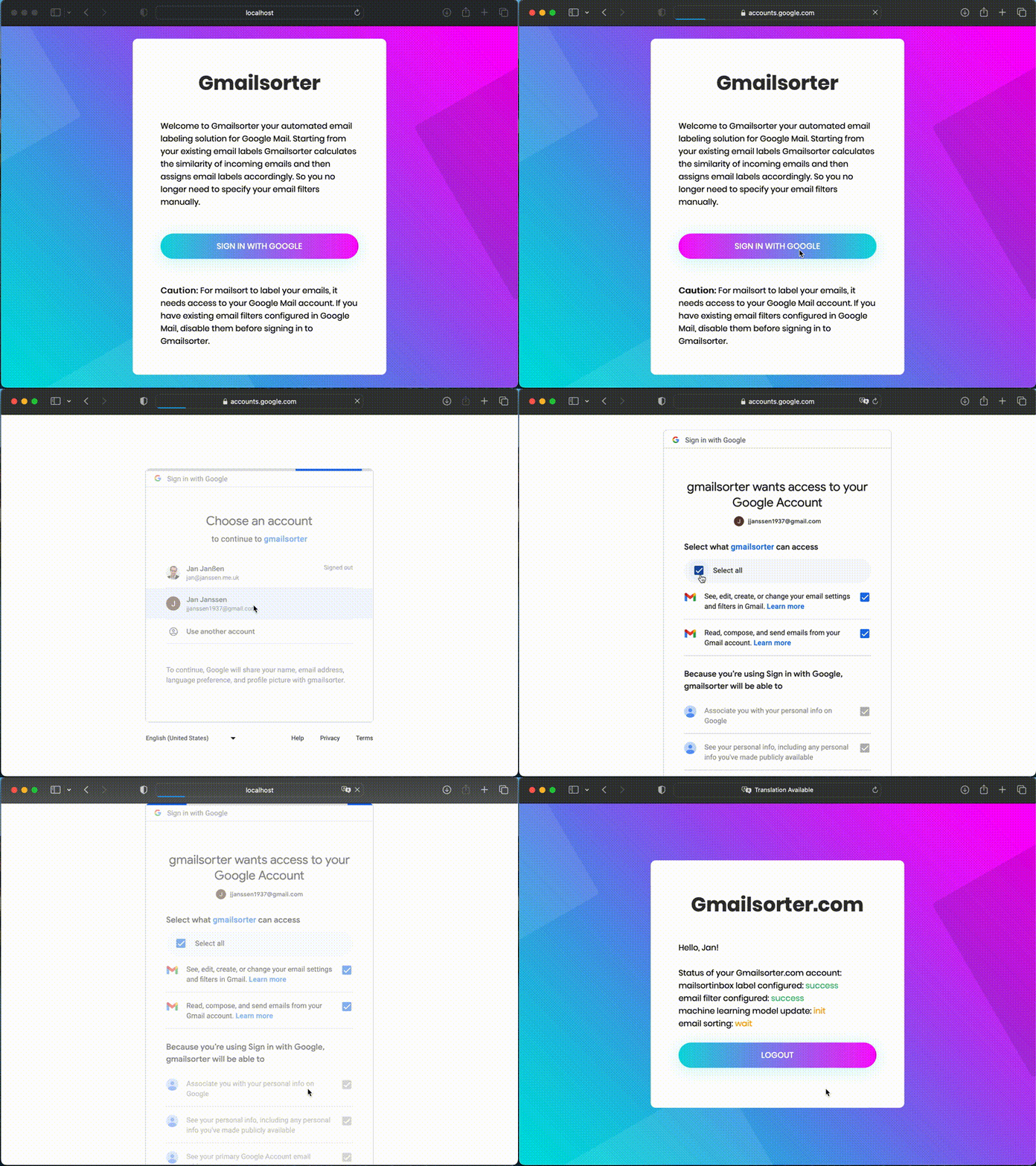
gmailsorter.com web service launched as private beta - request access now:
Motivation
In 2020 there were 306.4 billion e-mails sent and received daily. This number is estimated to increase by 4% yearly, resulting in over 376.4 billion e-mails by 2025 . While email as medium for internal communication in large enterprises is slowly replaced by instant messaging solutions and business communication platforms, these solutions fail to address the primary challenge, namely the communication between employees from different companies. So addressing the stress and productivity lost resulting from interruptions caused by the increase of daily emails is the motivation for the development of gmailsorter.
Features
As a first step gmailsorter creates a barrier between you and your email. Just like a personal guardian it blocks emails from your inbox and filters them into categories, so you can read the emails you care about when you have time and no longer have them interrupt your work. Second in contrast to other automated solutions, gmailsorter is designed to seamlessly integrate into your existing workflow:
- Gmailsorter is a server-side application, so you can continue using your favorite email client. In addition, the Gmailsorter user interface is minimalistic so you can configure it once and then forget about it.
- Gmailsorter adopts the email labels you suggest and filters your emails accordingly. It is based on the believe that the structure how you sort your ideas, documents and emails is very personal and you know what works best for you.
- Gmailsorter learns from your reactions. When you disagree with a suggested email label and modify it, Gmailsorter takes this feedback into account for the next suggestions.
So you can think about gmailsorter like a virtual assistant. It learns how you want your emails to be sorted based on their similarity to previous emails you assigned to the same label. All the communication with gmailsorter is handled via your Google Mail account. Following there simple steps:
- Gmailsorter takes your new emails and moves them from your inbox to its inbox.
- Afterwards Gmailsorter compares who sent the email, who else received it and which thread and labels it is associated with to your previously sorted emails, and based on that predicts the email label for the new email.
- If you agree with this suggestion you do have to do anything. But if you disagree with the suggestion, you can simply change the email label, on the one hand this overwrites the suggestion from Gmailsorter and on the other hand Gmailsorter takes your modification into account when it retrains its model for making suggestions.
To learn more about Gmailsorter please have a look at the documentation below.
Documentation
License
gmailsorter is released under the BSD license https://github.com/jan-janssen/gmailsorter/blob/main/LICENSE .
1 maintainer

Metadata
1 maintainer
Release files for gmailsorter 0.1.12
For a detailed explanation of source distributions (sdists) and built distributions (wheels), please see the package formats documentation.
Source distribution (sdist)
| File | Size | Uploaded | |
|---|---|---|---|
| gmailsorter-0.1.12.tar.gz | 1.4 MB | Details |
Built distribution (wheel)
| File | Interpreter | ABI | Platform | Reset |
|---|---|---|---|---|
| gmailsorter-0.1.12-py3-none-any.whl | Python 3 | none | any | Details |
Total release size: 2.7 MB
Release files / gmailsorter-0.1.12.tar.gz
| Download URL | gmailsorter-0.1.12.tar.gz |
|---|---|
| Size | 1.4 MB |
| Tags | Source |
|
SHA-256 checksum How to use checksums |
a18b80f8e616923d138603a6d840215cc4aac13726b4f458b62b7de21c6d8739
|
|
BLAKE2b-256 checksum How to use checksums |
3f0ba3a06613729fee523b85494712ac4bb392689bedbdd5166d7d433f0c88bb
|
| Upload date | |
|
Uploaded using Trusted Publishing? What is trusted publishing? |
Yes |
| Uploaded via |
twine/7.0.0 CPython/3.13.14
|
Provenance
Provenance describes where a file came from. On PyPI, provenance is shared via attestations, which provide a verifiable record of the build or publishing details. View details, limitations and caveats.


PyPI Publish Attestation
PyPI verified that this artifact, at this checksum, originated from the publisher listed below.
Signed by GitHub Actions, verified by PyPI on Aug 9, 2026.
Transparency logRelease files / gmailsorter-0.1.12-py3-none-any.whl
| Download URL | gmailsorter-0.1.12-py3-none-any.whl |
|---|---|
| Size | 1.4 MB |
| Tags | Python 3 |
|
SHA-256 checksum How to use checksums |
6e13a95dbf92251babd0e1c595976eaf2a5601d99206d31e2323ff14938ee994
|
|
BLAKE2b-256 checksum How to use checksums |
f7c9ef419dd8ddda774f4ae3e08699ddc5f1f070a82d12ff54cdd53f3a04f54f
|
| Upload date | |
|
Uploaded using Trusted Publishing? What is trusted publishing? |
Yes |
| Uploaded via |
twine/7.0.0 CPython/3.13.14
|
Provenance
Provenance describes where a file came from. On PyPI, provenance is shared via attestations, which provide a verifiable record of the build or publishing details. View details, limitations and caveats.
PyPI Publish Attestation
PyPI verified that this artifact, at this checksum, originated from the publisher listed below.
Signed by GitHub Actions, verified by PyPI on Aug 9, 2026.
Transparency log













