




The fastest way to run GGUF models on Apple Silicon.
gmlx is a local inference platform. Chat with an open model in the terminal or your browser, serve it over OpenAI and Anthropic compatible APIs, connect a coding agent to it, talk to it by voice, and fine-tune it with LoRA.
It runs the community's K-quant and IQ-quant GGUF files exactly as published, on Metal kernels from mlx-kquant for Apple's MLX. On the same file it prefills faster than llama.cpp, and with speculative decoding on both engines it decodes faster too. The gap is widest at the long contexts that coding agents use. A mixture-of-experts model bigger than RAM still runs, by streaming its experts from disk.
Quickstart
gmlx needs an Apple Silicon Mac with macOS 26.2 or newer. Install it with Homebrew:
brew install asher/gmlx/gmlx
The example model below, Qwen3.8-27B UD-Q6_K, is a 20.5 GB download and suits a Mac with 64 GB of memory. A model needs about its file size in memory, plus room for the conversation. On a smaller Mac, pick a model from Choosing a model first.
gmlx init --models-dir ~/models
gmlx pull hf:unsloth/Qwen3.8-27B-GGUF/Qwen3.8-27B-UD-Q6_K.gguf
gmlx run  qwen3.8-27b-ud-q6 --prompt "Explain entropy in one paragraph."
gmlx chat qwen3.8-27b-ud-q6
gmlx serve

curl localhost:8080/v1/chat/completions -d \
  '{"model": "qwen3.8-27b-ud-q6", "messages": [{"role": "user", "content": "hi"}]}'
gmlx launch pi --model qwen3.8-27b-ud-q6
gmlx init writes the configuration file, and pull downloads the model
and adds it under the id qwen3.8-27b-ud-q6. serve starts the server in
the background on port 8080, and launch connects the pi coding agent to
it. Install pi first with npm install -g @earendil-works/pi-coding-agent,
or add --container to run it in an Apple container with pi installed.
Without Homebrew, install with uv: uv tool install "gmlx[all]", plus
brew install ffmpeg for voice. To use gmlx from your own Python
environment, pip install "gmlx[all]". Both commands install every optional
feature.
Installation covers each
route, upgrading and
removing gmlx.
Any GGUF file also runs, chats and serves by its path, with no configuration file:
gmlx chat Qwen3-4B-Q4_K_M.gguf

The recording runs at true speed, with a 27B model in a local server.
What you get
- A terminal chat with markdown, sessions, images and each family's recommended sampling. See Chat.
- Remote checks before you download:
gmlx validatetells you whether a file will load and fit. See the CLI reference. - One server for OpenAI Chat Completions, OpenAI Responses and Anthropic Messages, with tools, structured output and vision. See the HTTP API.
- Coding agents and chat apps set up in one command, on the Mac or in an Apple container that sees only your project. See Agents and chat apps.
- Voice chat with a wake phrase, and an assistant with tools and memory. See Voice chat and Assistant.
- Embeddings, rerank, speech-to-text and text-to-speech on the same server, for a local RAG and voice stack. See Speech, embeddings and rerank.
- Image generation from Z-Image, Qwen-Image 2.1 and Krea 2 Turbo GGUFs, on the command line, on the OpenAI image routes and in ComfyUI. It needs an M3 chip or newer. See Image generation.
- A decision API at
/v1/systemonethat returns a probability for each answer to yes-or-no, choice and score questions about a text. See Structured decisions. - LoRA training on the quantized model, and distillation from a larger model. See LoRA adapters.
- A menu bar app that shows the loaded models and controls the server. See Menu bar app.
Performance
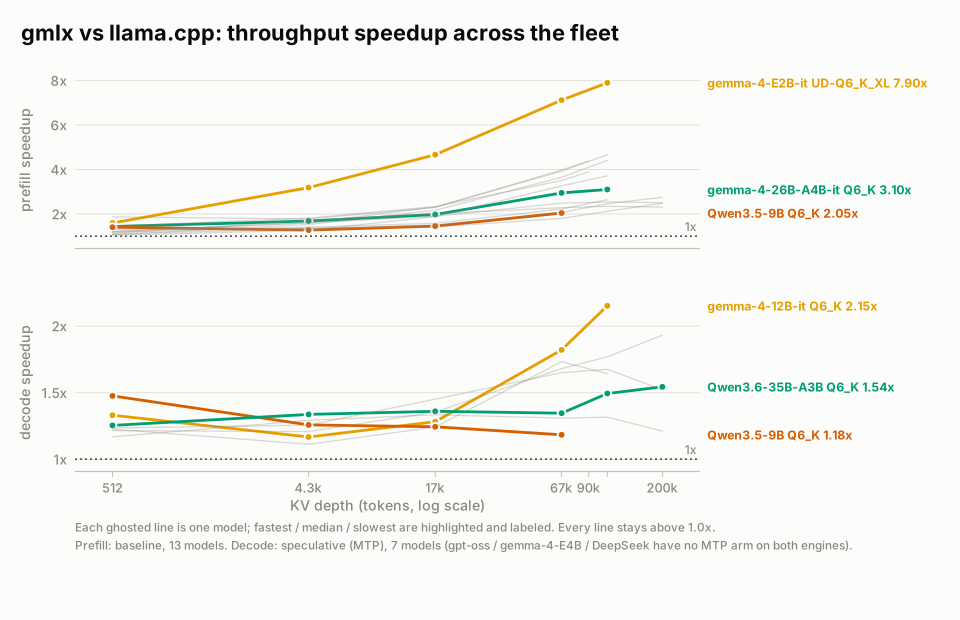
Higher is faster. Depth is the number of tokens already in the context. See Benchmarks for each model.
On an M5 Max, gmlx prefills faster than llama.cpp on every benchmarked model
at every depth. With speculative decoding on both engines, it decodes faster
too. Measure your own Mac with gmlx run model.gguf --bench 128,512,2048.
Speculative decoding, the prompt cache and KV cache quantization are described in Performance tuning. A one-minute video shows one server going from a single chat to four concurrent streams and back.
Supported architectures
- Llama, Mistral, Phi-3, SmolLM3, Seed-OSS and ERNIE-4.5
- Qwen 2 through 3.8, dense and MoE, with the hybrid attention families
- Gemma 1 through 4, except the 3n variant, whose GGUFs are broken upstream
- DeepSeek V3, R1, V4-Flash and V4.1-Flash
- GLM 4 through 5.3, Kimi-K3, MiniMax M2 and M3, and gpt-oss
- Hunyuan, Hy3, HY4 and Muse Glimmer
- Granite, Nemotron-H and Falcon-H1
Each family's output is checked against llama.cpp at 16k context. The coverage table lists the caveats. All K-quant, IQ-quant and legacy types load, plus MXFP4, NVFP4 and the ternary types, and vision models load with their projector.
Python API
from gmlx import load_model, generate

model, config, tokenizer = load_model("model.gguf")
print(generate(model, tokenizer, "Explain entropy.", max_tokens=128))
See the Python API.
Documentation
The documentation site covers the latest release, with navigation and search. Good places to start:
- Installation: Homebrew, uv and pip, and upgrading.
- Quickstart: A first model, and choosing one for your Mac.
- Configuration: Every key of
gmlx.yaml. - Agents and chat apps: Connecting coding agents and chat apps.
- HTTP API: The OpenAI and Anthropic endpoints.
- CLI reference: Every command and flag.
- Troubleshooting: Common errors and their fixes.
- All documentation: Every guide and reference page.
Contributing
Pull requests are welcome. Dev setup and the rules are in the contributing guide, the test tiers in Testing, and the runtime's design in Internals.
Acknowledgments
gmlx builds on llama.cpp and ggml for the GGUF format and the K-quant reference implementations, MLX and mlx-lm for the runtime and model implementations, and mlx-vlm for the server app, generation step loop and vision towers. gmlx carries mlx-lm and mlx-vlm in its package, under their licenses. Speech uses mlx-whisper for speech-to-text and mlx-audio for text-to-speech.
License
gmlx is released under the Business Source License 1.1, which is source-available but not open source. You may use, modify and run gmlx for your own purposes, including commercial work, and you may redistribute unmodified copies free of charge. You may not sell gmlx or a derivative of it, incorporate either into a commercial product or service, or offer either to others as a hosted service. Each released version converts to the Apache License 2.0 four years after its release, and downloaded model weights have their own licenses.
The files listed in
LICENSE-MIT are MIT
licensed and have an SPDX header saying so. The ComfyUI node pack in
gmlx/comfyui_pack is licensed under the Apache License 2.0, with its own
LICENSE file. Vendored third-party code is
documented in
the third-party notices.
1 maintainer

Metadata
1 maintainer
Release files for gmlx 0.5.0
For a detailed explanation of source distributions (sdists) and built distributions (wheels), please see the package formats documentation.
Source distribution (sdist)
| File | Size | Uploaded | |
|---|---|---|---|
| gmlx-0.5.0.tar.gz | 21.9 MB | Details |
Built distribution (wheel)
| File | Interpreter | ABI | Platform | Reset |
|---|---|---|---|---|
| gmlx-0.5.0-py3-none-any.whl | Python 3 | none | any | Details |
Total release size: 32.1 MB
Release files / gmlx-0.5.0.tar.gz
| Download URL | gmlx-0.5.0.tar.gz |
|---|---|
| Size | 21.9 MB |
| Tags | Source |
|
SHA-256 checksum How to use checksums |
924d6afa068a4ba63174c9c74bccdb189ab7ef31fd856fd9cc3729dc781eae95
|
|
BLAKE2b-256 checksum How to use checksums |
d150a7ba22883c3256989c019a95cb37ca8d5b5460d5abb28b16d6d9e67db626
|
| Upload date | |
|
Uploaded using Trusted Publishing? What is trusted publishing? |
Yes |
| Uploaded via |
twine/7.0.0 CPython/3.13.14
|
Provenance
Provenance describes where a file came from. On PyPI, provenance is shared via attestations, which provide a verifiable record of the build or publishing details. View details, limitations and caveats.


PyPI Publish Attestation
PyPI verified that this artifact, at this checksum, originated from the publisher listed below.
Signed by GitHub Actions, verified by PyPI on Oct 12, 2026.
Transparency logRelease files / gmlx-0.5.0-py3-none-any.whl
| Download URL | gmlx-0.5.0-py3-none-any.whl |
|---|---|
| Size | 10.2 MB |
| Tags | Python 3 |
|
SHA-256 checksum How to use checksums |
069a3c4c111637b806892c6369465f97d8f8ca103f4b06a36b77129180a8bef5
|
|
BLAKE2b-256 checksum How to use checksums |
9ae00f9af7071256111b3f5fa55da75cbb90200694cc3f1ba1211edd0a8e8f32
|
| Upload date | |
|
Uploaded using Trusted Publishing? What is trusted publishing? |
Yes |
| Uploaded via |
twine/7.0.0 CPython/3.13.14
|
Provenance
Provenance describes where a file came from. On PyPI, provenance is shared via attestations, which provide a verifiable record of the build or publishing details. View details, limitations and caveats.
PyPI Publish Attestation
PyPI verified that this artifact, at this checksum, originated from the publisher listed below.
Signed by GitHub Actions, verified by PyPI on Oct 12, 2026.
Transparency log













