
Monitorix Gemini-Frontend
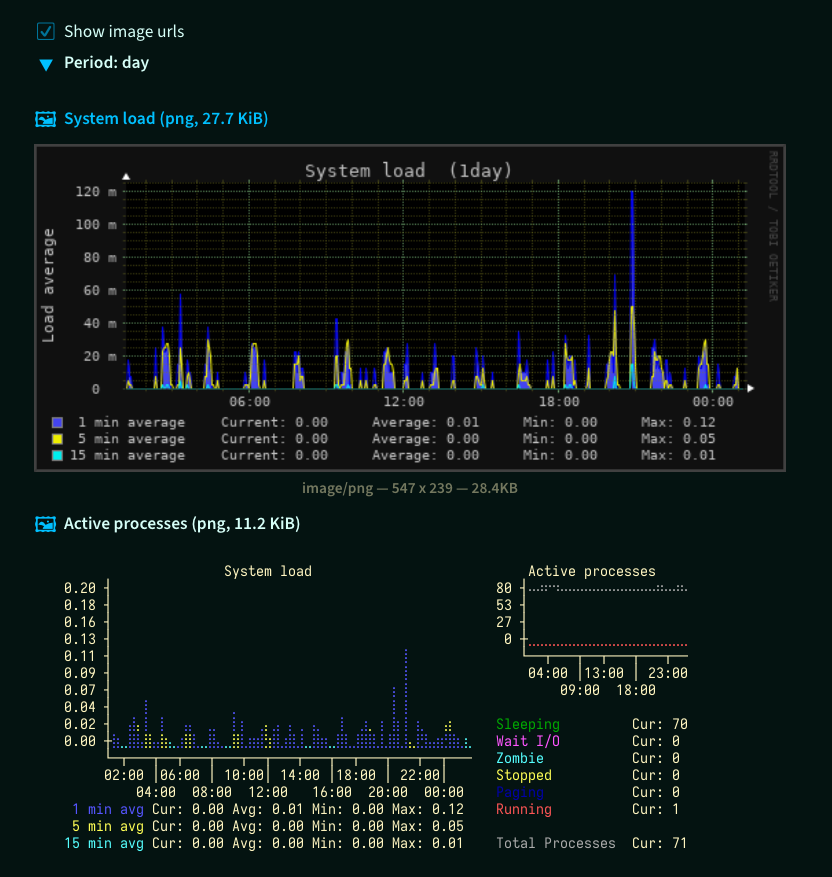
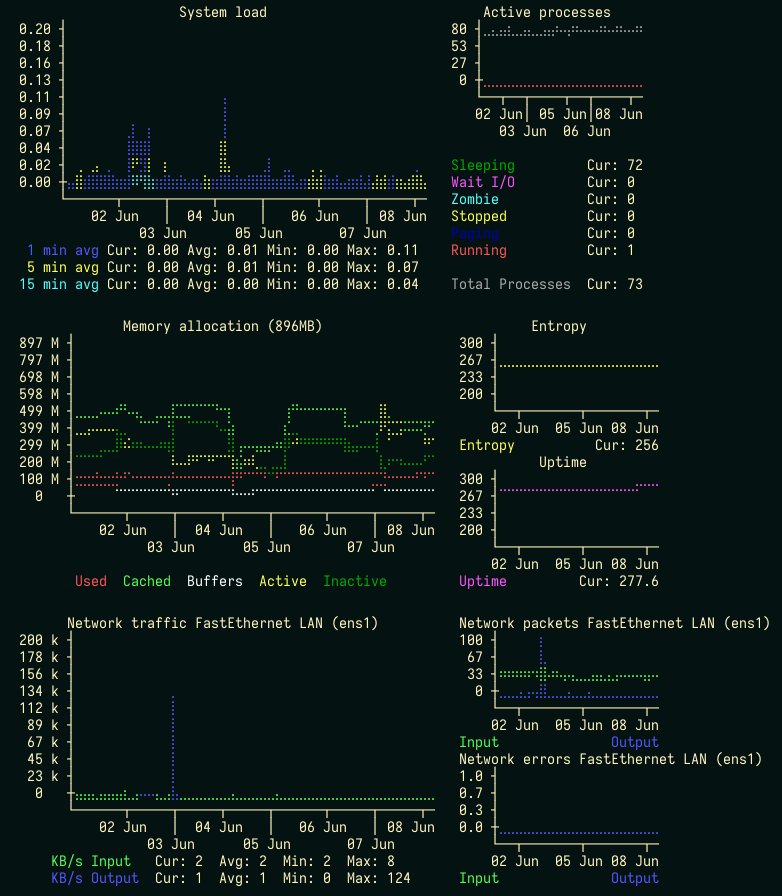
Gemini-page with Monitorix ascii-graphs in braille.
- System load average and usage (System load, Memory allocation, Active processes, Entropy, Uptime)
- Filesystem usage and I/O activity (Filesystem usage, Disk I/O activity, Inode usage, Time spent in I/O activity)
- Network traffic and usage (Traffic, Packets Errors)
- Icecast (Listeners, Bitrate)
 |
 |
Install
Requirements:
Monitorix- installed and started system servicerrdtool- python package to provide access to *.rrd database filesbrasciichart- python package to ascii-graph
Installing rrdtool python-package can require developer
packages: python3.x-dev, librrd-dev.
$ sudo apt install python3.9-dev librrd-dev
$ pip install GmMonitorix
After GmMonitorix successfully installed, remove dev-packages if not required:
$ sudo apt remove python3.9-dev librrd-dev
The Gemini-server account should have write-access in the work directory.
To protect monitorix page with user certificate, place .admins file with
user's certificate fingerprints into this work directory.
GmCapsule
For GmCapsule server add to your config-file a section with CGI-settings.
[cgi.monitorix]
# monitoring gemini-page url-path
path = /monitorix/*

cwd = /writable/work/dir/

# path to a Python-interpreter with rrdtool, brasciichart, GmMonitorix
command = /path/to/python3 -m GmMonitorix
The monitoring gemini-page will be accessible
by gemini://<hostname>/monitorix/cgi URL.
Links
- Gemini Protocol
- Project Gemini FAQ
- Monitorix
- GmCapsule (codeberg.org)
- GmCapsule User manual :: Configuration
TODO
- all metrics
- support net traffic bit/s
- support FreeBSD, OpenBSD, NetBSD total memory bytes
- support uptime units: minutes, hours
- support OpenBSD, NetBSD with m_mused, m_macti only
Change log
v0.1.2
- Add Icecast (Listeners, Bitrate)
v0.1.1
- Add Filesystem Usage (Usage, Disk I/O, Inode, Time spent in I/O)
- Use rigid and limits from config
v0.1.0
Initial release
1 maintainer

Metadata
1 maintainer
Release files for GmMonitorix 0.1.2
For a detailed explanation of source distributions (sdists) and built distributions (wheels), please see the package formats documentation.
Source distribution (sdist)
| File | Size | Uploaded | |
|---|---|---|---|
| gmmonitorix-0.1.2.tar.gz | 24.1 kB | Details |
Built distribution (wheel)
| File | Interpreter | ABI | Platform | Reset |
|---|---|---|---|---|
| gmmonitorix-0.1.2-py3-none-any.whl | Python 3 | none | any | Details |
Total release size: 53.2 kB
Release files / gmmonitorix-0.1.2.tar.gz
| Download URL | gmmonitorix-0.1.2.tar.gz |
|---|---|
| Size | 24.1 kB |
| Tags | Source |
|
SHA-256 checksum How to use checksums |
f5478748b65e2a02c0b10f9f2d928576cdad3b57392f408a7d15c3788fc769da
|
|
BLAKE2b-256 checksum How to use checksums |
52586a900f1616340b064bed14e05c7a035aba3c10ff4d29179994a9cff15f51
|
| Upload date | |
|
Uploaded using Trusted Publishing? What is trusted publishing? |
No |
| Uploaded via |
twine/6.1.0 CPython/3.11.2
|
Release files / gmmonitorix-0.1.2-py3-none-any.whl
| Download URL | gmmonitorix-0.1.2-py3-none-any.whl |
|---|---|
| Size | 29.1 kB |
| Tags | Python 3 |
|
SHA-256 checksum How to use checksums |
b083f0a9c1a2d445e25300e686e9599398b0868cc27802467759cc7b14c5178c
|
|
BLAKE2b-256 checksum How to use checksums |
775894b222db8d536cc7c6b3dba16ce754c138c22fda82a9d2cdcc0e73fd9eb4
|
| Upload date | |
|
Uploaded using Trusted Publishing? What is trusted publishing? |
No |
| Uploaded via |
twine/6.1.0 CPython/3.11.2
|














