
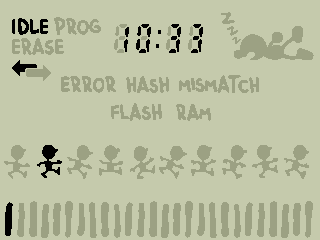


GnWManager
GnWManager is THE game-and-watch device manager. GnWManager is a command line tool who's responsible for getting firmware onto your device, managing the filesystem, and other device administrative tasks.
GnWManager accomplishes this via a small bundled pre-compiled firmware that gets executed from the STM32's RAM.
Features
- Simple installation.
- Works on all operating systems (Linux, MacOS, Windows).
- Automatic debugging probe detection.
- No need to specify if you have a stlink, jlink, CMSIS-DAP, or Raspberry Pi.
- Fast internal and external flash firmware flashing.
- Hardware-accelerated hashing for rapid duplicate discovery.
- Only syncs changed data.
- Minimizes flash erases and writes, extending flash lifespan.
- Double buffered, asynchronous, LZMA-compressed transfers for maximum speed.
- Hardware-accelerated hashing for rapid duplicate discovery.
- Complete filesystem management.
- Backup and restore files.
- Interactive filesystem explorer.
- Automatic Real-Time-Clock (RTC) configuration.
- Developer tools:
- Easily monitor device
printfstatements and launch GDB sessions. - Capture screenshots, regardless of the running firmware.
- Easily monitor device
Tutorials
Tutorials useful for typical end-users
Tutorials useful for developers
Compatibility
GnWManager works with all major operating systems: Windows, Mac, and Linux. GnWManager is also compatible with the following probes:
- Raspberry Pi Pico (Recommended)
- STLink
- JLink
- DAPLink
- Raspberry Pi (GPIO)
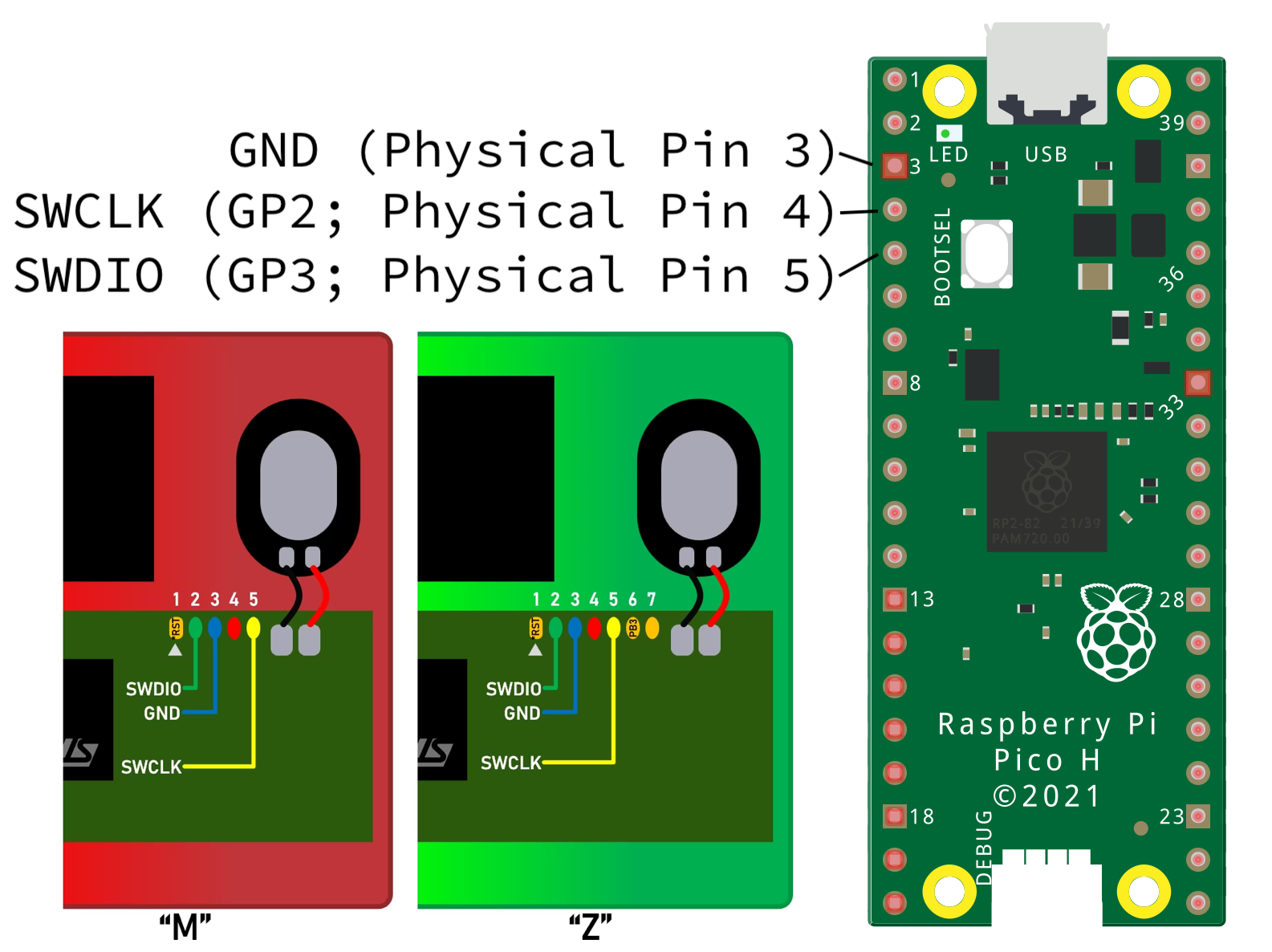
Raspberry Pi Pico
All Raspberry Pi Picos can be transformed into programmers via the picoprobe project.
- Download
picoprobe.uf2from picoprobe releases. - Hold BOOT button on the pico and plug it into the computer. It should show up as a USB drive. Drag and drop
picoprobe.uf2to it. - Hook up the 3 wires (GND, GP2, GP3) to (GND, SDCLK, SWDIO), respectively.
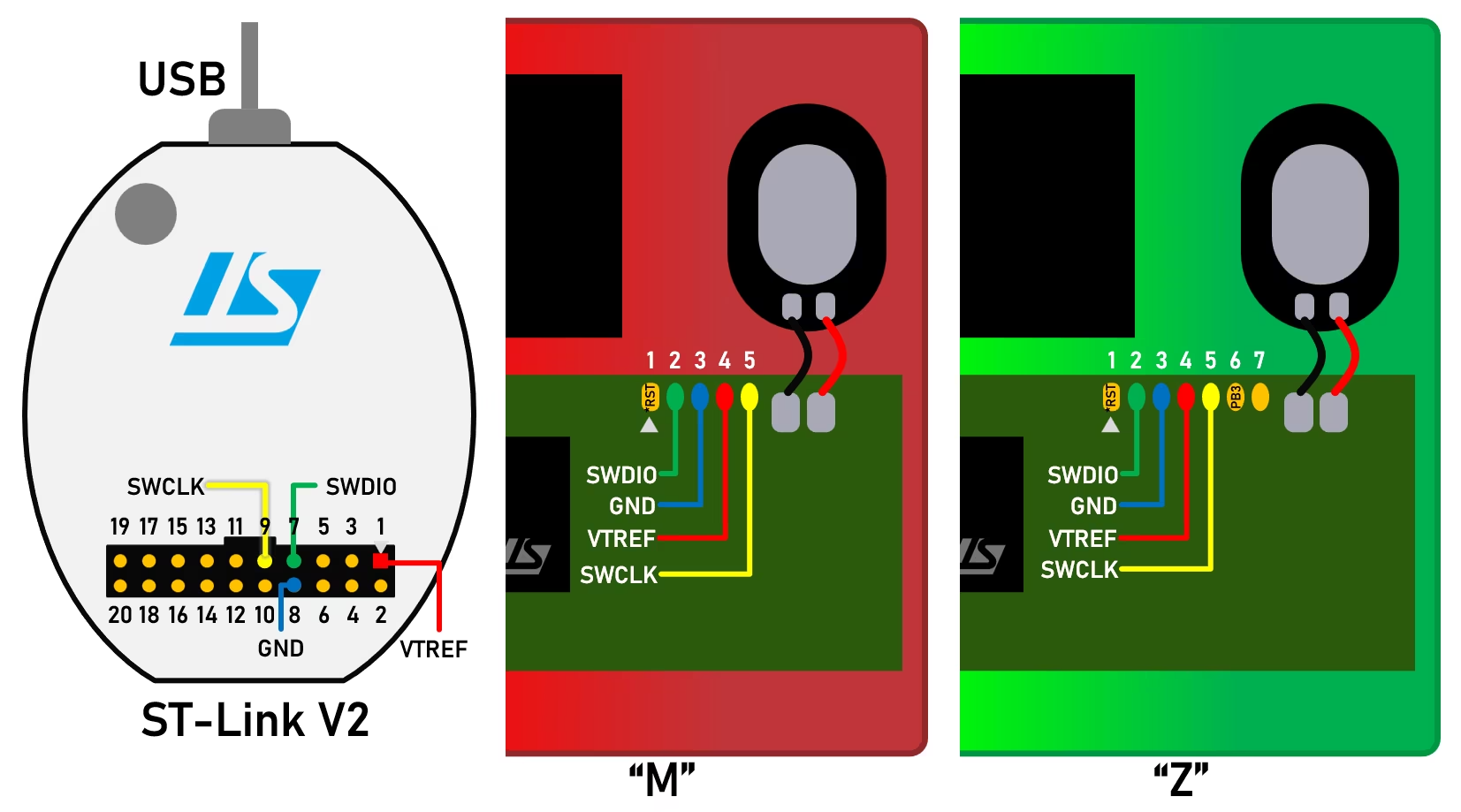
STLink
Hook up your STLink to your game and watch as follows:
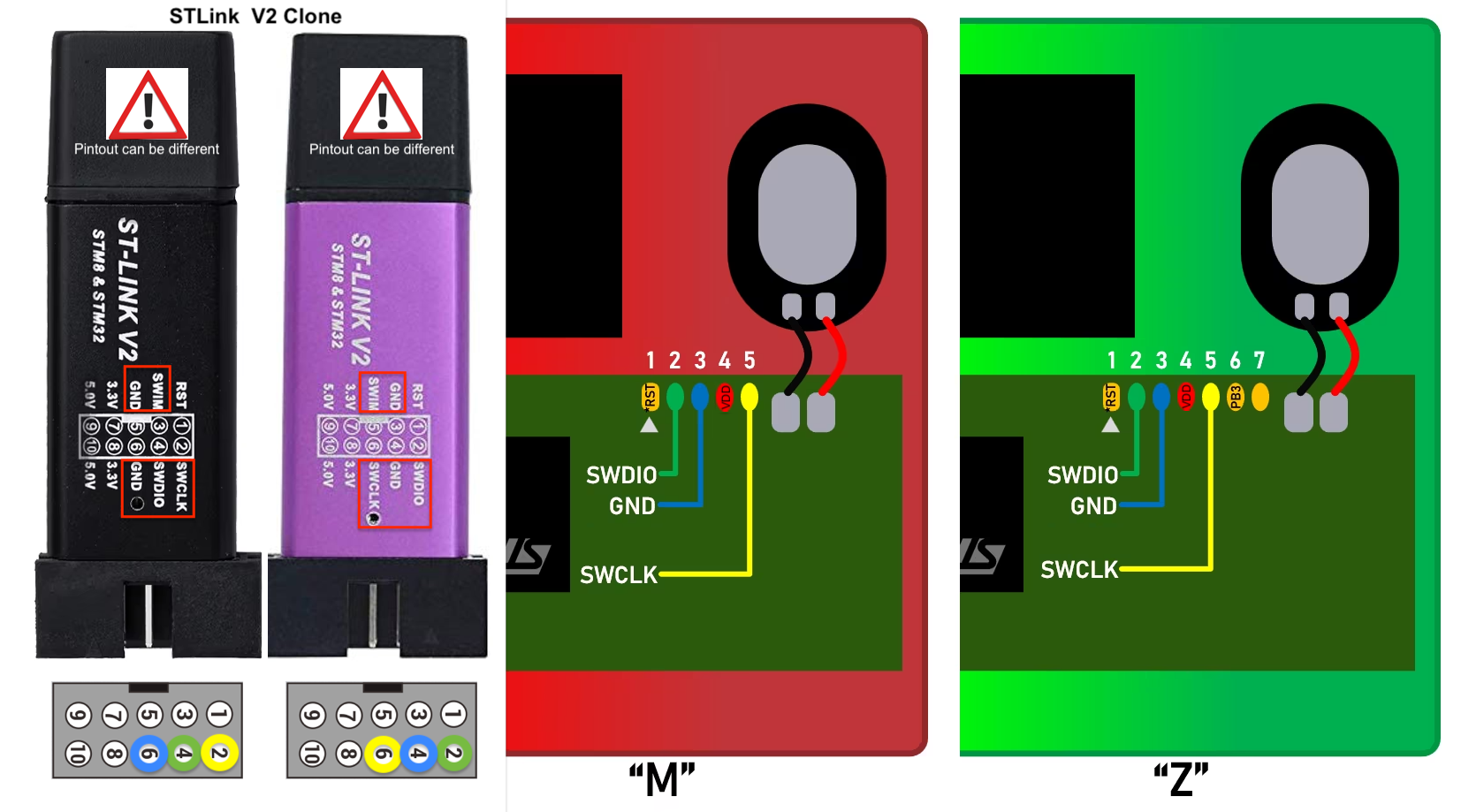
STLink Clone
Attention, Pinout can be different:
Raspberry Pi (GPIO)
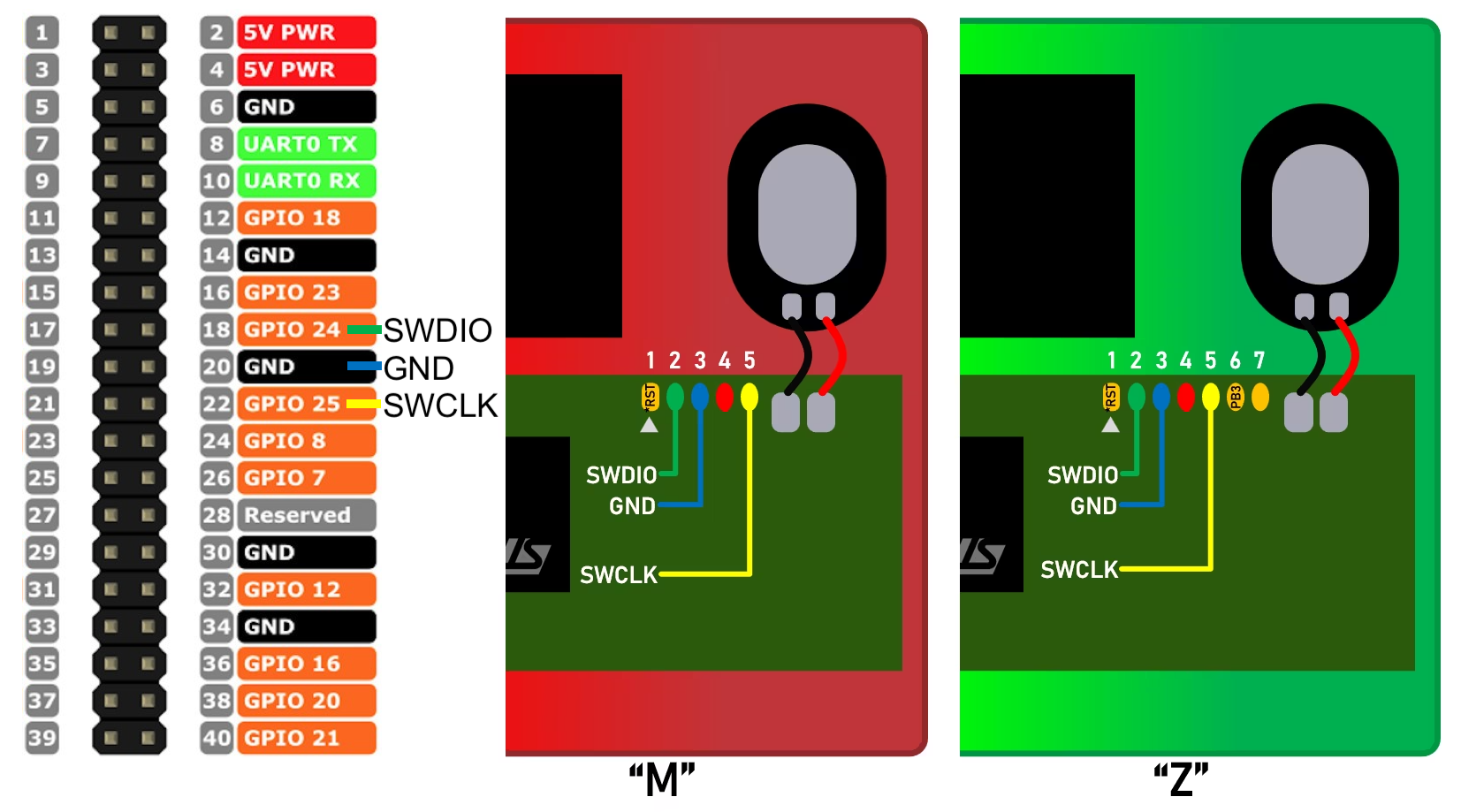
Hook up your Raspberry Pi to your game and watch as follows:
Usage
To see available commands, run gnwmanager --help.
$ gnwmanager --help

 Usage: gnwmanager [OPTIONS] COMMAND [ARGS]...

 Game And Watch Device Manager.
 Manages device flashing, filesystem management, peripheral configuration, and more.

╭─ Options ──────────────────────────────────────────────────────────────────────────╮
│ --version    -v                  Print gnwmanager version.                         │
│ --frequency  -f      INT_PARSER  Probe frequency. [default: None]                  │
│ --backend    -b      [pyocd]     OCD Backend. [default: pyocd]                     │
│ --help                           Show this message and exit.                       │
╰────────────────────────────────────────────────────────────────────────────────────╯
╭─ Commands ─────────────────────────────────────────────────────────────────────────╮
│ debug             GnWManager internal debugging tools                              │
│ disable-debug     Disable the microcontroller's debug block.                       │
│ erase             Erase a section of flash.                                        │
│ flash             Flash firmware to device.                                        │
│ format            Format device's filesystem.                                      │
│ gdb               Launch a gdbserver and connect to it with gdb.                   │
│ gdbserver         Launch a gdbserver.                                              │
│ install           Install third party executables, like openocd.                   │
│ lock              Re-lock your device.                                             │
│ ls                List contents of device directory.                               │
│ mkdir             Create a directory on device.                                    │
│ monitor           Monitor the device's stdout logging buffer.                      │
│ mv                Move/Rename a file or directory.                                 │
│ pull              Pull a file or folder from device.                               │
│ push              Push file(s) and folder(s) to device.                            │
│ sdpush            Push file(s) to SD Card connected to device.                     │
│ screenshot        Capture and transfer screenshots from device.                    │
│ shell             Launch an interactive shell to browse device filesystem.         │
│ start             Start firmware at location.                                      │
│ tree              List contents of device directory and its descendants.           │
│ unlock            Backs up and unlocks a stock Game & Watch console.               │
╰────────────────────────────────────────────────────────────────────────────────────╯
Need Help?
If you need any help, either open up a github issue here, or join the stacksmashing discord for live help.
When sharing gnwmanager output, it is recommended to increase the verbosity level:
- Via CLI argument:
gnwmanager --verbosity=debug - Via environment variable
export GNWMANAGER_VERBOSITY=debug
Developer Installation
If developing for GnWManager, perform the following steps to setup your local environment. We use pre-commit to run linting, and uv for python management.
git clone git@github.com:BrianPugh/gnwmanager.git
cd gnwmanager
uv sync  # Creates a virtual environment and installs dependencies.
uv run pre-commit install  # Ensures linting passes prior to committing
make -j4  # Builds stm32 firmware binaries.
When changing C sources, make must be re-ran to update the binaries located at:
gnwmanager/firmware.bin
gnwmanager/unlock.bin
Remote programmer server
Install gnwmanager and start a server using the usual backend options:
pip install gnwmanager
gnwmanager serve
# Or use an existing gwmeu GDB server:
gnwmanager --backend gdb --gdb-host localhost --gdb-port 1234 serve
# Or use PyOCD:
gnwmanager --backend pyocd serve
The backend is selected at startup. OpenOCD retains its existing programmer auto-detection, including Raspberry Pi GPIO. The WebSocket cannot select backends or run CLI commands. It exposes serialized low-level memory, register, clock, and explicit target-control operations. The client remains responsible for firmware mailbox coordination and flash operations.
The default endpoint is ws://127.0.0.1:8765/gdb, separately from the GDB TCP port.
The server stays available when no target is connected; clients can retry attachment.
Only one client can own the programmer at a time. Attachment, target control, and cleanup
use the selected backend's existing behavior, including the GDB backend's normal halt/resume
behavior. The server does not introduce a new GPIO driver or change backend policies.
For a Raspberry Pi, tunnel the default loopback endpoint from the browser computer:
ssh -L 8765:127.0.0.1:8765 user@raspberrypi
For direct network access, use serve --bind 0.0.0.0 --origin <browser-origin>.
--origin may be repeated. HTTPS clients can use --cert <certificate> --key <private-key>
and a browser-trusted wss:// endpoint.
OpenOCD GPIO wiring follows the existing GnWManager configuration: SWCLK GPIO25 (pin22), SWDIO GPIO24 (pin18), and GND. Existing Raspberry Pi support is unchanged.
1 maintainer

Metadata
1 maintainer
Release files for gnwmanager 0.25.1
For a detailed explanation of source distributions (sdists) and built distributions (wheels), please see the package formats documentation.
Source distribution (sdist)
| File | Size | Uploaded | Provenance | Actions |
|---|---|---|---|---|
| gnwmanager-0.25.1.tar.gz | 14.8 MB | With provenance | Details for gnwmanager-0.25.1.tar.gz |
Built distribution (wheel)
| File | Interpreter | ABI | Platform | Actions Reset |
|---|---|---|---|---|
| gnwmanager-0.25.1-py3-none-any.whl | Python 3 | none | any | Details for gnwmanager-0.25.1-py3-none-any.whl |
Total release size: 15.1 MB
Release files / gnwmanager-0.25.1.tar.gz
| Download URL | gnwmanager-0.25.1.tar.gz |
|---|---|
| Size | 14.8 MB |
| Tags | Source |
|
SHA-256 checksum How to use checksums |
66c1f629e297c48fe2368c2da70a77ab5184d458539eadc9f9ae8deabf9f652e
|
|
BLAKE2b-256 checksum How to use checksums |
69ab6bbae9d0caecb070825e631f2bbc4e43cf5578deaeeea71f4e8c13f98c72
|
| Upload date | |
|
Uploaded using Trusted Publishing? What is trusted publishing? |
Yes |
| Uploaded via |
twine/7.0.0 CPython/3.13.16
|
Provenance
Provenance describes where a file came from. On PyPI, provenance is shared via attestations, which provide a verifiable record of the build or publishing details. View details, limitations and caveats.


PyPI Publish Attestation
PyPI verified that this artifact, at this checksum, originated from the publisher listed below.
Signed by GitHub Actions, verified by PyPI on Oct 28, 2026.
Transparency logRelease files / gnwmanager-0.25.1-py3-none-any.whl
| Download URL | gnwmanager-0.25.1-py3-none-any.whl |
|---|---|
| Size | 369.8 kB |
| Tags | Python 3 |
|
SHA-256 checksum How to use checksums |
a6863f3c0164073834a427fb9443d6ebdf029b5fa42808e9939a45b7b64cb5f6
|
|
BLAKE2b-256 checksum How to use checksums |
b6256c95c86753b510f13dd32a8ee1f16c2d222a53ebf851c97aed4c1a52c9c8
|
| Upload date | |
|
Uploaded using Trusted Publishing? What is trusted publishing? |
Yes |
| Uploaded via |
twine/7.0.0 CPython/3.13.16
|
Provenance
Provenance describes where a file came from. On PyPI, provenance is shared via attestations, which provide a verifiable record of the build or publishing details. View details, limitations and caveats.
PyPI Publish Attestation
PyPI verified that this artifact, at this checksum, originated from the publisher listed below.
Signed by GitHub Actions, verified by PyPI on Oct 28, 2026.
Transparency logSecurity for gnwmanager 0.25.1
Provenance
Provenance describes where a file came from. On PyPI, provenance is shared via attestations, which provide a verifiable record of the build or publishing details. View details, limitations and caveats.
Full provenance
Both files in this release have been uploaded with provenance metadata.
Attestation for gnwmanager-0.25.1.tar.gz
PyPI Publish Attestation
PyPI verified that this artifact, at this checksum, originated from the publisher listed below.
Signed by GitHub Actions, verified by PyPI on Oct 28, 2026.
Transparency logA note on package security
PyPI is a repository for distributing packages, not a service for auditing them. While third-party security researchers and our staff do their best to detect and remove malicious packages, PyPI cannot guarantee the quality, security or suitability of any given package.
To learn more about protecting yourself from malicious actors, visit our package security documentation.














