
Listen for, collect and convert multimessenger skymaps
Verified details
These details have been verified by PyPIProject links
GitHub Statistics
Maintainers

Project description
gocart











gocart is a python package and command-line suite used to consume GCN Kafka streams.

Documentation for gocart is hosted by Read the Docs (development version and main version). The code lives on github. Please report any issues you find here.
Features
- Listen to GCN Kafka streams (currently LIGO-Virgo-KAGRA only) and write alerts and skymaps to the local filesystem.
- Ability to 'echo' the Kafka stream by re-listening to the last N days of alerts (provided the alerts are still hosted on the GCN Kafka cluster).
- Alert content, FITS Header data and some extra value-added event parameters are written to a single machine-readable YAML file.
- The healpix skymaps are optionally converted to ascii files (one row per healpix pixel) and/or rendered as aitoff plots.
- Create your own plugin scripts to run whenever an alert is parsed.
- works well in conjunction with skyTag.
Installation
The easiest way to install gocart is to use conda:
conda create -n gocart python=3.9 pip gocart -c conda-forge
conda activate gocart
To upgrade to the latest version of gocart use the command:
conda upgrade gocart -c conda-forge
It is also possible to install via pip if required:
pip install gocart
Or you can clone the github repo and install from a local version of the code:
git clone git@github.com:thespacedoctor/gocart.git
cd gocart
python setup.py install
To check installation was successful run gocart -v. This should return the version number of the install.
Initialising gocart
Before using gocart you need to use the init command to generate a user settings file. Running the following creates a yaml settings file in your home folder under ~/.config/gocart/gocart.yaml:
gocart init
The file is initially populated with gocart's default settings which can be adjusted to your preference.
If at any point the user settings file becomes corrupted or you just want to start afresh, simply trash the gocart.yaml file and rerun gocart init.
GCN Kafka Credentials
When you first come to use gocart, you will need to add a GCN Kafka Client ID and Secret to the gocart.yaml settings file. To get these credentials you will need to signup for a GCN Notices account here.

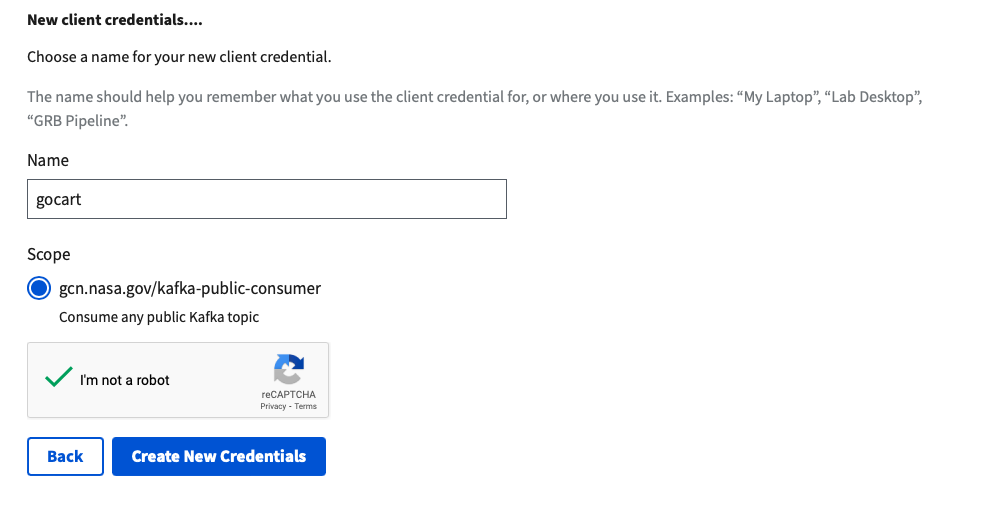
Once signed in, fill in a suitable name for your new client (any name will do, so gocart is as good a name as any). Fill in the captcha and click 'Create New Credentials'.
In the 'Customize Alerts' section, don't be concerned about what Notice Types to select as these are only used to generate template code in the next section. Not selecting any is fine. Click the 'Generate Code' button. You will now be presented with your newly created client credentials within the body of the code snippet:

Open your gocart settings file at ~/.config/gocart/gocart.yaml and copy and paste these credentials into the appropriate place.

Don't worry about the group_id parameter, it's initially set to XXXX but gocart will replace this with a unique value when it's first run. It is this group_id that allows GCN Kafka to remember which alerts you have or have not heard before. Note the example client above has been deleted, so the credentials quoted here will not work.
You are now ready to start using gocart.
SkyTag
gocart works very well in conjunction with skyTag, a tool to 'annotate' transient sources or galaxies with the percentage credibility region they reside within on a given HealPix sky map.
How to cite gocart
If you use gocart in your work, please cite using the following BibTeX entry:
@software{Young_gocart,
  author = {Young, David R.},
  doi = {10.5281/zenodo.7970742},
  license = {GPL-3.0-only},
  title = {{gocart. A GCN Kafka stream consumer and filter}},
  url = {https://zenodo.org/doi/10.5281/zenodo.7970742}
}
Project details
Verified details
These details have been verified by PyPIProject links
GitHub Statistics
Maintainers
Release history Release notifications | RSS feed


Download files
Download the file for your platform. If you're not sure which to choose, learn more about installing packages.
Source Distribution
Built Distribution
Filter files by name, interpreter, ABI, and platform.
If you're not sure about the file name format, learn more about wheel file names.
Copy a direct link to the current filters
File details
Details for the file gocart-0.4.9.tar.gz.
File metadata
- Download URL: gocart-0.4.9.tar.gz
- Upload date:
- Size: 264.6 kB
- Tags: Source
- Uploaded using Trusted Publishing? Yes
- Uploaded via: twine/6.1.0 CPython/3.13.12
File hashes
| Algorithm | Hash digest | |
|---|---|---|
| SHA256 |
e6c6d1350eafb1b9508135b50032476ee543198ff8773e292e43fd8a3edc547d
|
|
| MD5 |
06a0be007d4f94901216c59066fe730f
|
|
| BLAKE2b-256 |
3e59e04f8179f74ed99d93784b37803c5a36e3a5670ad437b99daacfd92ee77d
|
Provenance
The following attestation bundles were made for gocart-0.4.9.tar.gz:
Publisher:
publish.yml on thespacedoctor/gocart
-
Statement:
-
Statement type:
https://in-toto.io/Statement/v1 -
Predicate type:
https://docs.pypi.org/attestations/publish/v1 -
Subject name:
gocart-0.4.9.tar.gz -
Subject digest:
e6c6d1350eafb1b9508135b50032476ee543198ff8773e292e43fd8a3edc547d - Sigstore transparency entry: 1519240493
- Sigstore integration time:
-
Permalink:
thespacedoctor/gocart@65959c139b37182cd66c886a078556178547d57c -
Branch / Tag:
refs/tags/v0.4.9 - Owner: https://github.com/thespacedoctor
-
Access:
public
-
Token Issuer:
https://token.actions.githubusercontent.com -
Runner Environment:
github-hosted -
Publication workflow:
publish.yml@65959c139b37182cd66c886a078556178547d57c -
Trigger Event:
push
-
Statement type:
File details
Details for the file gocart-0.4.9-py3-none-any.whl.
File metadata
- Download URL: gocart-0.4.9-py3-none-any.whl
- Upload date:
- Size: 267.9 kB
- Tags: Python 3
- Uploaded using Trusted Publishing? Yes
- Uploaded via: twine/6.1.0 CPython/3.13.12
File hashes
| Algorithm | Hash digest | |
|---|---|---|
| SHA256 |
35026cb55edf91314e92feac7c3e4d75879327736af07405ab4926edab4a8fd6
|
|
| MD5 |
29b7eba4bd766e4330baa5a3f48ad843
|
|
| BLAKE2b-256 |
537ad565acf014f3d101abb84ceb99f1f07888332e208efbaf0672f13e10d615
|
Provenance
The following attestation bundles were made for gocart-0.4.9-py3-none-any.whl:
Publisher:
publish.yml on thespacedoctor/gocart
-
Statement:
-
Statement type:
https://in-toto.io/Statement/v1 -
Predicate type:
https://docs.pypi.org/attestations/publish/v1 -
Subject name:
gocart-0.4.9-py3-none-any.whl -
Subject digest:
35026cb55edf91314e92feac7c3e4d75879327736af07405ab4926edab4a8fd6 - Sigstore transparency entry: 1519240500
- Sigstore integration time:
-
Permalink:
thespacedoctor/gocart@65959c139b37182cd66c886a078556178547d57c -
Branch / Tag:
refs/tags/v0.4.9 - Owner: https://github.com/thespacedoctor
-
Access:
public
-
Token Issuer:
https://token.actions.githubusercontent.com -
Runner Environment:
github-hosted -
Publication workflow:
publish.yml@65959c139b37182cd66c886a078556178547d57c -
Trigger Event:
push
-
Statement type:






