
High performance CLI YouTube downloader (video / audio / shorts / playlists) with smart caching and auto quality handling

Project description
📹 gold-dl - The Simplest YouTube Downloader CLI
Telegram User Dev ~ @CB6BB
Enjoying my project? Please show your appreciation by starring it on GitHub! ⭐
[!NOTE] >
gold-dlis built on top ofpytubefix, make sure to have the latest version ofpytubefixby running:pip install --upgrade pytubefix

[!NOTE] Have a new feature? Please don't hesitate to tell me!
🤔 why gold-dl?
This command-line wizard lets you download YouTube videos or playlists straight from your Terminal, powered by Pytubefix. It works like a charm on Windows, Mac, and Linux, so you can rock it on any platform.
While other tools make you wade through a swamp of settings and configs, gold-dl keeps it simple. Just drop in your URL, and voilà! It’ll take you on a smooth ride to your favorite videos, no complex options needed—just fun downloading! 🔥
🛠️ Installation
Getting gold-dl up and running is a breeze! First, ensure you have Python installed. Just pop open your terminal and type:
python --version
If you see something like Python 3.x, you’re all set! If not, head over to Python's downloads page to grab it.
Once you’re good to go, install gold-dl with a single command:
pip install gold-dl --break-system-packages
And just like that, you’re ready to download some awesome videos! 🎉
📈 Upgrade
Stay in the loop with the latest features on GitHub! To upgrade your gold-dl tool, simply run:
pip install --upgrade gold-dl --break-system-packages
Then you’re all set to keep downloading from your Terminal! 🥳
🦸 Quick Start
Getting started with gold-dl is a piece of cake! Just use the following command style:
gold-dlp "YOUTUBE_LINK" [PATH]
[!NOTE] The
[URL]is [Required] and it should be between""
The[PATH]is optional—if you don’t specify one, it’ll save to your current terminal directory. Easy-peasy!
👨💻 Usage
Arguments
| Arguments | Description |
|---|---|
URL |
The URL of the YouTube video. This argument is [Required]. |
PATH |
The path to save the video. Defaults to the current working directory. [Optional] |
Options
| Option | Description |
|---|---|
-v or --version |
Displays the current version number. |
-a or --audio |
Download audio only, skipping prompts. |
-f or --footage |
Download video only, skipping prompts. |
🕵️♂️ Examples
For lots of examples, check them out here! Take a deep dive and discover all the ways to use gold-dl. 🚀
🥰 Contributing
Pull requests are welcome. For major changes, please open an issue first to discuss what you want to change. please follow the contributing guidelines
📎 License
This project is licensed under the MIT License.
📸 Screenshots
Download video with specify the save location
Chose what type you want to download

Chose what what resolution you want to download(if the type is video)
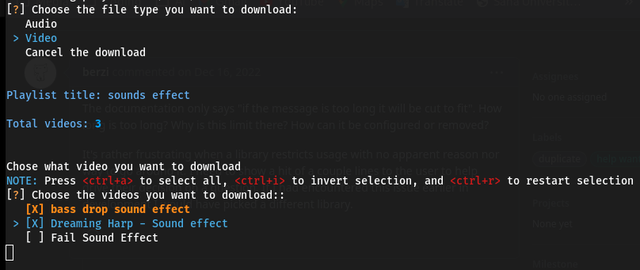
If you download a playlist, you can choose what video you want to download, or even all of them
Do not know how to use it? just type gold-dlp --help
⏳ Todo List
- Notification System
- Auto Update package if new version available
- Support Optional Numbering for Downloaded Playlist Videos
- Improve code health
- Support downloading sounds (mp3 format not a audio/mp4)
- Support Subtitles Download
- Support setting for downloading folder
- Download Thumbnails with Videos and Audio
Release history Release notifications | RSS feed


Download files
Download the file for your platform. If you're not sure which to choose, learn more about installing packages.
Source Distribution
Built Distribution
Filter files by name, interpreter, ABI, and platform.
If you're not sure about the file name format, learn more about wheel file names.
Copy a direct link to the current filters
File details
Details for the file gold_dl-0.0.1.tar.gz.
File metadata
- Download URL: gold_dl-0.0.1.tar.gz
- Upload date:
- Size: 16.7 kB
- Tags: Source
- Uploaded using Trusted Publishing? No
- Uploaded via: twine/6.2.0 CPython/3.13.7
File hashes
| Algorithm | Hash digest | |
|---|---|---|
| SHA256 |
4f42e78f7b6a37ba625142f7601e7594ef3b9214b2d9bf8d2854bb22199d5127
|
|
| MD5 |
072eb0b64de04f42a8ac208bf720acf1
|
|
| BLAKE2b-256 |
83bf69148591ee9597b9e9c557bde57d0e2c0ecb662ca14f8eacf470f1d67251
|
File details
Details for the file gold_dl-0.0.1-py3-none-any.whl.
File metadata
- Download URL: gold_dl-0.0.1-py3-none-any.whl
- Upload date:
- Size: 19.7 kB
- Tags: Python 3
- Uploaded using Trusted Publishing? No
- Uploaded via: twine/6.2.0 CPython/3.13.7
File hashes
| Algorithm | Hash digest | |
|---|---|---|
| SHA256 |
6b3f827cf04dc8c593b07c1e9ebf844ae0d529296e37184101c948bed4170d65
|
|
| MD5 |
ca82454193c4089df49696019684737b
|
|
| BLAKE2b-256 |
1f0806ebca1f77ff8d5e143290ac3f010ebd5399c143f9466dd5aa475afefb74
|






