

An open, graphical platform for image-to-recruitment modeling of peripheral nerve stimulation.







golgi takes a peripheral nerve from image to stimulated fiber population through a single point-and-click interface — no programming required — and mirrors every step in a scriptable Python API and command-line interface for batch and high-performance use. It builds anatomically realistic, multifascicular nerve models and computes fiber-type-selective recruitment end to end, on a fully open finite-element stack with no commercial dependencies (no COMSOL, ANSYS or Abaqus).
✨ Highlights
- No-code graphical interface. The entire image-to-recruitment pipeline runs in a browser-based GUI — built for experimentalists and clinicians, not only computational modelers.
- Fully open solver stack. Anisotropic finite-element fields via FEniCSx/DOLFINx and meshing via TetGen/Gmsh — no proprietary solver required.
- Genuine 3-D and branching anatomy. Reconstructs real three-dimensional nerves and traces curved, fascicle-following fiber trajectories through bifurcations, enabling branch-selective stimulation analysis that straight-fiber, cross-section-only tools cannot address.
- Realistic biophysics. Activation thresholds via interchangeable NEURON (PyFibers) and AxonML GPU-surrogate backends, with literature-backed fiber populations and tissue properties (Cole–Cole / IT'IS), and explicit perineurium contact impedance.
- Current steering & selectivity. Arbitrary multi-contact (tri-/quadri-/N-polar) montages, recruitment curves, fascicular and branch selectivity, and side-by-side design comparison.
- Verifiable reproducibility. Every study exports as an integrity-hashed, self-contained bundle whose image-to-recruitment provenance is checkable byte-for-byte with a single command.
See the workflow in action
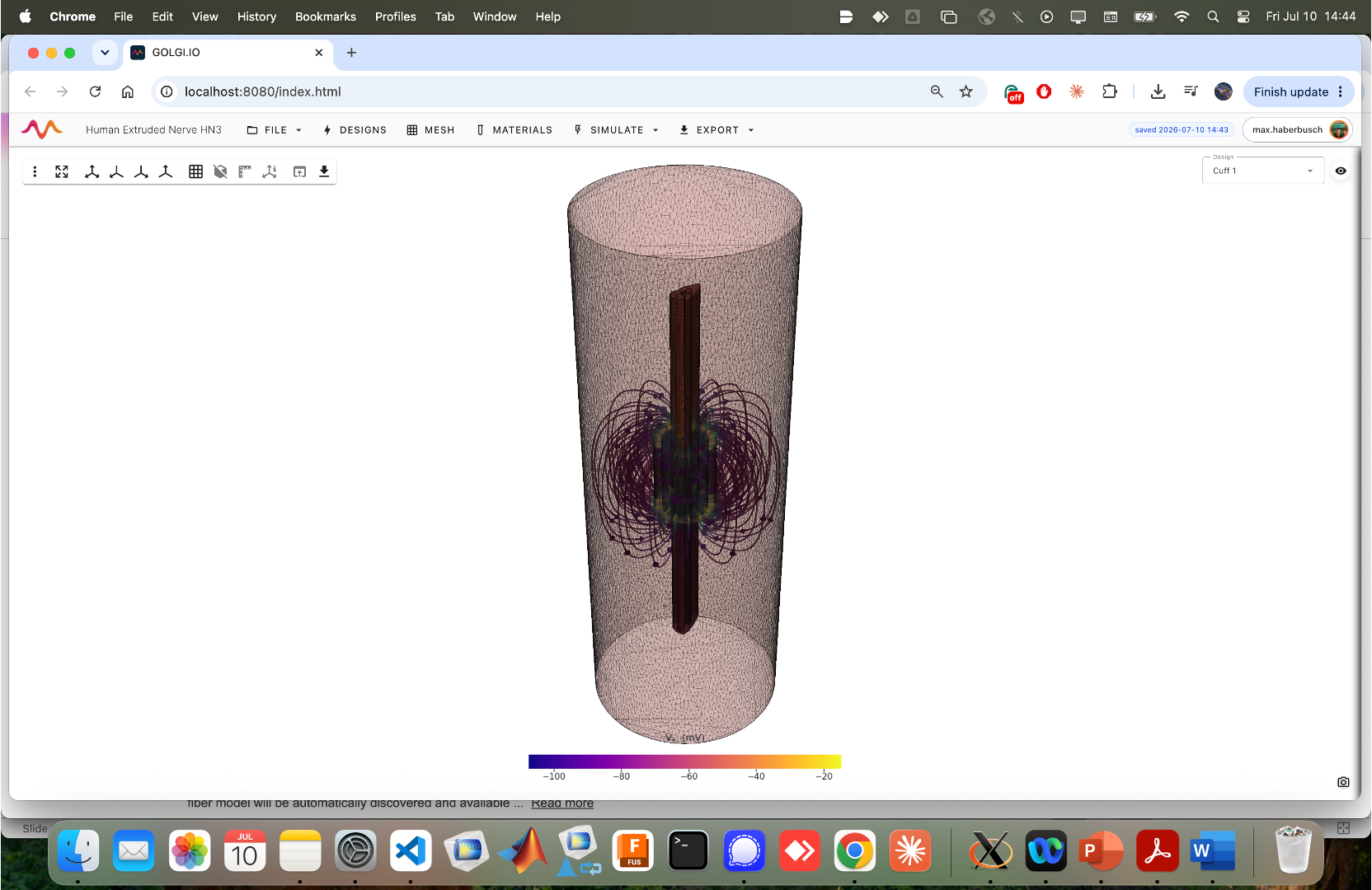 The browser-based graphical interface guides users through the complete image-to-recruitment workflow: import or segment a nerve, design the cuff and electrodes, generate the finite-element mesh, solve the electric field, populate realistic fiber trajectories, and analyze recruitment and selectivity. Every operation performed in the GUI is mirrored by the Python API and command-line interface, allowing interactive studies to scale seamlessly to scripted and high-performance workflows.
Follow the step-by-step GUI Tutorial to build your first study, or see the Pipeline Overview for the algorithms and implementation details behind each stage.
How golgi compares
golgi's contribution is the combination most peripheral-nerve tools split apart: a no-code GUI, genuine 3D branching anatomy, and a fully open solver stack — with reproducible study bundles on top.
| Feature | golgi | ASCENT | NRV | Sim4Life | DIY ³ |
|---|---|---|---|---|---|
| Graphical interface | ✅ | ❌ | ❌ | ✅ | ❌ |
| Fully open-source¹ | ✅ | ◐ | ✅ | ❌ | ◐ |
| 3D nerve geometries | ✅ | ◐ | ◐ | ✅ | ◐ |
| Curved fibers through branches | ✅ | ❌ | ❌ | ✅ | ◐ |
| Multiple fiber backends | ✅ | ✅ | ◐ | ◐ | ◐ |
| Reproducible bundled workflows² | ✅ | ◐ | ◐ | ◐ | ❌ |
Legend: ✅ Supported ◐ Partial support ❌ Not supported. ¹ Requires no commercial FEM solver. ASCENT uses COMSOL for finite-element modeling (FEM); NRV uses FEniCS. ² One-command, hashed, reproducible simulation bundles. ³ DIY refers to a custom workflow assembled from NEURON and a finite-element solver (e.g., FEniCS or COMSOL), with capabilities depending on the implementation. Comparison reflects typical/default usage and is meant to position golgi, not to exhaustively rank tools — each of the above is excellent within its design goals.
Three interfaces, one study
Every operation acts on a single shared golgi.Study state, so a graphical session, a script, and a
batch job are fully interchangeable:
- Graphical UI (Trame, browser-based) — point-and-click; the primary interface.
- Python API (
golgi.Study) — mirrors every GUI action for scripting and batch studies. - Command-line interface (
golgi …) — for cluster and continuous-integration use.
Installation
golgi's compiled scientific core (FEniCSx/DOLFINx, PETSc, Gmsh, VTK, NEURON) is installed with conda/mamba; golgi itself and the pure-Python stack come from PyPI. Three ways, from most to least turnkey:
1. Docker image (zero setup, Linux/macOS/Windows)
docker run --rm -p 8080:8080 -v "$PWD/golgi_data:/data" ghcr.io/cellularsyntax/golgi:v1.1.0
# → open http://localhost:8080 ; studies persist in ./golgi_data
The image is built and tested by CI from the Dockerfile in this repository and is also
archived on Zenodo as a tarball (docker load -i golgi-1.1.0-*-docker.tar.gz). It runs the GUI, the
Python API (docker run ... python my_script.py) and the CLI (docker run ... golgi replay study.zip);
see docker/README.md.
2. Pinned conda environment (Linux, macOS; Windows via WSL2)
mamba env create -f environment.yml      # pinned versions of the release environment
mamba activate golgi
python -m pyfibers.compile               # compile PyFibers' NEURON mechanisms (once)
golgi fetch-tissue-db                    # optional: IT'IS tissue-properties database (see below)
golgi                                    # launch the GUI
environment.yml pins the scientific stack (DOLFINx 0.10.0, Gmsh 4.15.2, VTK 9.6.1, NEURON 9.0.1,
PyFibers 0.8.5, Trame 3.12, TetGen 0.8.4) and installs golgi in editable mode from the repository
root. For byte-exact replication of the release environment, the fully resolved lock files are
environment.<platform>.lock (conda, --explicit format) plus requirements-pip.<platform>.txt:
mamba create -n golgi --file environment.osx-arm64.lock      # or environment.x86_64.lock (Linux)
mamba activate golgi && pip install -r requirements-pip.osx-arm64.txt && pip install -e .
3. Manual
mamba create -n golgi -c conda-forge python=3.12 fenics-dolfinx=0.10 gmsh python-gmsh pyvista vtk meshio h5py neuron cxx-compiler
mamba activate golgi
pip install -e ".[neuron]"
Only the FEniCSx core, NEURON and the C++ meshers are conda-provided (they are not portably
pip-installable); the GUI, meshing wrappers, visualization and analysis stack (Trame, PyVista/VTK,
TetGen, bcrypt, …) is declared in pyproject.toml. The IT'IS tissue-properties database (used for
Cole–Cole conductivity) is not redistributed with golgi — golgi fetch-tissue-db downloads it
directly from the IT'IS Foundation (golgi
still runs without it, falling back to a Custom preset). The optional extras — an NVIDIA GPU (CUDA)
for the AxonML high-throughput backend (separately licensed by Duke University, not bundled) and a
MedSAM2/SAM2 checkpoint for promptable segmentation (stub-segmenter fallback) — are documented on
the Installation wiki page.
Projects are stored under ~/Documents/Golgi/Projects by default; set GOLGI_PROJECTS_ROOT to
relocate them (the Docker image uses /data).
Quick start
Launch the graphical interface:
golgi                 # then open the printed local URL in your browser
# (equivalently: python -m golgi.app --port 8080)
Work through the pipeline — import/segment, design the cuff, mesh, set materials, solve the field, populate fibers, and analyze recruitment — entirely by point-and-click. See the GUI Walkthrough.
Or script the identical study through the API:
import golgi
from golgi.jobs.schemas import SweepRequest

s = golgi.Study.create("vagus_study")
s.import_nerve("nerve.stl")                       # STL / NAS / OBJ surface
s.set_mesh(use_epi=True, perineurium_ci=True)     # multi-region + perineurium contact impedance
s.set_electrodes([{                               # a 4×5 segmented ring array
    "name": "ring array",
    "electrode_type": "ring-array (NxM)",
    "array_n_rows": 4, "array_n_cols": 5,
}])
s.run_mesh()                                      # multi-region TetGen mesh
s.run_fem()                                       # anisotropic FEM + per-contact lead fields
s.set_fiber_seed(n_fibers=600, fiber_method="streamlines")
s.run_fibers()                                    # curved 3D trajectories
result = s.run_sweep(SweepRequest(                # recruitment across amplitude
    mode="recruitment", amplitudes_mA=[0.1, 0.25, 0.5, 1.0, 2.0]))
s.export_bundle("vagus_study.golgi")              # integrity-hashed, replayable bundle
A complete, runnable version is in examples/recruitment_sweep.py
(it runs on a built-in synthetic nerve, no data required).
Reproducible study bundles
Any study exports as a single .golgi bundle whose MANIFEST.json records the pipeline directed
acyclic graph with a SHA-256 hash of every input, output, and stage, plus the exact software version
and a frozen dependency list. A recipient verifies it byte-for-byte (or is shown the first stage that
differs) with one command:
golgi replay vagus_study.golgi
The bundles behind every figure in the paper are archived on Zenodo and replay byte-for-byte: doi.org/10.5281/zenodo.21300944 (concept DOI — always resolves to the latest version). Fetch them with:
python paper_figs/fetch_bundles.py          # download + checksum-verify all bundles
golgi replay <bundle.golgi.zip>             # verify byte-for-byte
golgi figure <bundle.golgi.zip>             # render quick-look panels
This bundle path is the third-party reproduction route.
paper_figs/make_figures.pyregenerates the full multi-panel figures instead, and needs the authors' completepaper_figs/out/working tree (raw meshes, FEM, sweeps, renders) — not the bundles.
See Reproducible Study Bundles.
Command line
golgi                                        # GUI server (http://localhost:8080)
golgi --host 0.0.0.0 --port 8080 --no-browser  # headless host / container
golgi export  ./vagus_study vagus_study.golgi.zip   # pack a project into a study bundle
golgi import  vagus_study.golgi.zip ./vagus_copy    # unpack a received bundle
golgi replay  vagus_study.golgi.zip                 # verify every file + stage hash against MANIFEST.json
golgi replay  vagus_study.golgi.zip --json          # machine-readable verification report
golgi fetch-tissue-db                               # IT'IS Cole–Cole tissue database
python examples/recruitment_sweep.py                # full pipeline on a synthetic nerve (no data)
python examples/benchmark.py --fibers 12            # per-stage wall time + peak memory report
Testing
pytest -q                     # solver-free tests: API contract, bundle integrity, CLI (seconds)
pytest -q -m integration      # + end-to-end pipeline on the synthetic reference nerve (~10–30 min)
The suite has three tiers (see tests/README.md): (1) solver-free unit tests of the
golgi.Study API contract, the study-bundle export/import/verification code and the CLI; (2) the
end-to-end pipeline test (import_nerve → run_mesh → run_fibers → run_fem → run_sweep → export_bundle)
that checks every stage's artifacts; (3) a regression test that compares the activation thresholds of
the 12-fiber reference study against recorded values (tests/reference/). GitHub Actions runs tier 1
on Linux and macOS, tiers 2–3 on Linux with the pinned conda environment, and builds and tests the
Docker image on every push; tagged releases are pushed to ghcr.io/cellularsyntax/golgi.
Documentation
Full documentation, tutorials, and reference live in the project wiki:
Repository layout
golgi/
├── golgi/              # the package
│   ├── app.py          # Trame GUI (the primary interface)
│   ├── api.py          # headless golgi.Study API
│   ├── cli.py          # export / import / replay / compute-worker
│   ├── pipeline/       # mesh · fem · fibers · fiber_sim · sweep · selectivity · recording
│   ├── compute/        # FEniCSx solvers + TetGen/Gmsh runners
│   ├── conductivity/   # Cole–Cole · IT'IS DB · perineurium
│   ├── segmentation/   # promptable image segmentation + 3D reconstruction
│   ├── scene/          # 3D scene, cuff fitting, electrode patches
│   ├── figures/        # figure registry · export presets · PDF report
│   ├── projects/       # study bundles · replay · sweep cache
│   ├── jobs/           # in-process · subprocess · SLURM runners
│   ├── auth/           # users · sessions · audit log
│   └── ui/             # drawers · dialogs · components
├── cuff_designer.py    # ASCENT-style parametric cuff primitives
├── examples/           # runnable headless examples + benchmark
├── paper_figs/         # scripts that regenerate the paper figures
├── tests/              # API contract · bundle integrity · CLI · end-to-end + reference regression
├── docker/             # compose file, build-and-test script, container notes
├── Dockerfile          # reproducible container image
├── environment.yml     # pinned conda environment (+ environment.<platform>.lock)
└── .github/workflows/  # CI: unit (Linux/macOS) · integration · Docker
Intended use
golgi is research software for in-silico modeling of peripheral nerve stimulation. It is not a medical device and is not intended for clinical diagnosis, treatment planning or any other clinical decision-making. Model predictions inherit the assumptions of the underlying tissue and fiber models and should be interpreted accordingly.
License
golgi is free and open-source software under the GNU Affero General Public License, version 3 or later (AGPL-3.0-or-later) — see LICENSE.
This license is required by golgi's dependency stack: golgi links Gmsh (GPLv2-or-later) and
TetGen (AGPL-3.0, via the tetgen module) as libraries, and serves a Trame browser GUI, so
the AGPL network-use clause (§13) applies. See THIRD_PARTY_LICENSES.md for
the full dependency license inventory and compatibility notes (including the GPL-2.0-only PyFibers and
the proprietary, optional AxonML backend). Redistributing golgi inside a closed-source or
commercial product additionally requires separate commercial licenses for TetGen (WIAS) and Gmsh.
Data released alongside golgi — the micro-CT imaging datasets and the golgi study bundles (Zenodo) — is licensed separately under CC-BY-4.0.
Built with
golgi stands on an all-open scientific stack:
| Role | Built on |
|---|---|
| Finite-element field solver | FEniCSx/DOLFINx · PETSc/SLEPc (MUMPS sparse direct solve) |
| Meshing | Gmsh (surfaces) · TetGen (tetrahedral volumes) · meshio |
| Fiber biophysics & thresholds | NEURON + PyFibers; AxonML (optional GPU surrogate) |
| Tissue properties | IT'IS Foundation material database |
| 3D visualization & rendering | PyVista · VTK |
| Graphical interface | Trame + Vuetify (browser-based) |
| Geometry & segmentation | scikit-image · OpenCV · SimpleITK · trimesh · PyMeshFix |
| Numerics & figures | NumPy · SciPy · Matplotlib · Plotly |
| Data & auth | SQLAlchemy · bcrypt |
Inspired by and complementary to the open peripheral-nerve modeling community — ASCENT and NRV.
1 maintainer

Metadata
1 maintainer
Release files for golgi-nerve 1.1.0
For a detailed explanation of source distributions (sdists) and built distributions (wheels), please see the package formats documentation.
Source distribution (sdist)
| File | Size | Uploaded | |
|---|---|---|---|
| golgi_nerve-1.1.0.tar.gz | 307.1 kB | Details |
Built distribution (wheel)
| File | Interpreter | ABI | Platform | Reset |
|---|---|---|---|---|
| golgi_nerve-1.1.0-py3-none-any.whl | Python 3 | none | any | Details |
Total release size: 600.0 kB
Release files / golgi_nerve-1.1.0.tar.gz
| Download URL | golgi_nerve-1.1.0.tar.gz |
|---|---|
| Size | 307.1 kB |
| Tags | Source |
|
SHA-256 checksum How to use checksums |
4095eae66119ac15cf060c2f64ade036316a54e6428e5e978b31fb1dc04829bb
|
|
BLAKE2b-256 checksum How to use checksums |
4bb611518f63ff690ff38c2913d987aa819478544db6895f9f6340d3a42da581
|
| Upload date | |
|
Uploaded using Trusted Publishing? What is trusted publishing? |
No |
| Uploaded via |
twine/7.0.0 CPython/3.11.9
|
Release files / golgi_nerve-1.1.0-py3-none-any.whl
| Download URL | golgi_nerve-1.1.0-py3-none-any.whl |
|---|---|
| Size | 292.9 kB |
| Tags | Python 3 |
|
SHA-256 checksum How to use checksums |
f6f4a4c501bccdded2d8979f264dd291e1e851fbf78044f53fb34432c865580d
|
|
BLAKE2b-256 checksum How to use checksums |
0bd78441beb75e882cbd82453f4446feb619bfd1fcc9238217b2fa08cff51128
|
| Upload date | |
|
Uploaded using Trusted Publishing? What is trusted publishing? |
No |
| Uploaded via |
twine/7.0.0 CPython/3.11.9
|













