
Trust scoring for GitHub contributors using graph-based ranking on contribution graphs
Verified details
These details have been verified by PyPIProject links
GitHub Statistics
Maintainers

Project description
 Good Egg
Trust scoring for GitHub PR authors using graph-based analysis of contribution history.
Why
AI has made mass pull requests trivial to generate, eroding the signal that a PR represents genuine investment. Good Egg is a data-driven answer: it mines a contributor's existing track record across the GitHub ecosystem instead of requiring manual vouching. See Methodology for the full approach.
Quick Start
Try Good Egg without installing anything (requires uv):
# Requires a GitHub personal access token
GITHUB_TOKEN=<token> uvx good-egg score <username> --repo <owner/repo>
This runs Good Egg in a temporary environment with no install needed.
Installation
pip install good-egg          # Core package
pip install good-egg[mcp]     # With MCP server support
GitHub Action
Add Good Egg to any pull request workflow:
name: Good Egg
on:
  pull_request:
    types: [opened, reopened, synchronize]
permissions:
  pull-requests: write
jobs:
  score:
    runs-on: ubuntu-latest
    steps:
      - uses: 2ndSetAI/good-egg@v0
        with:
          github-token: ${{ secrets.GITHUB_TOKEN }}
Add checks: write to permissions if you enable check-run: true.
Example PR comment
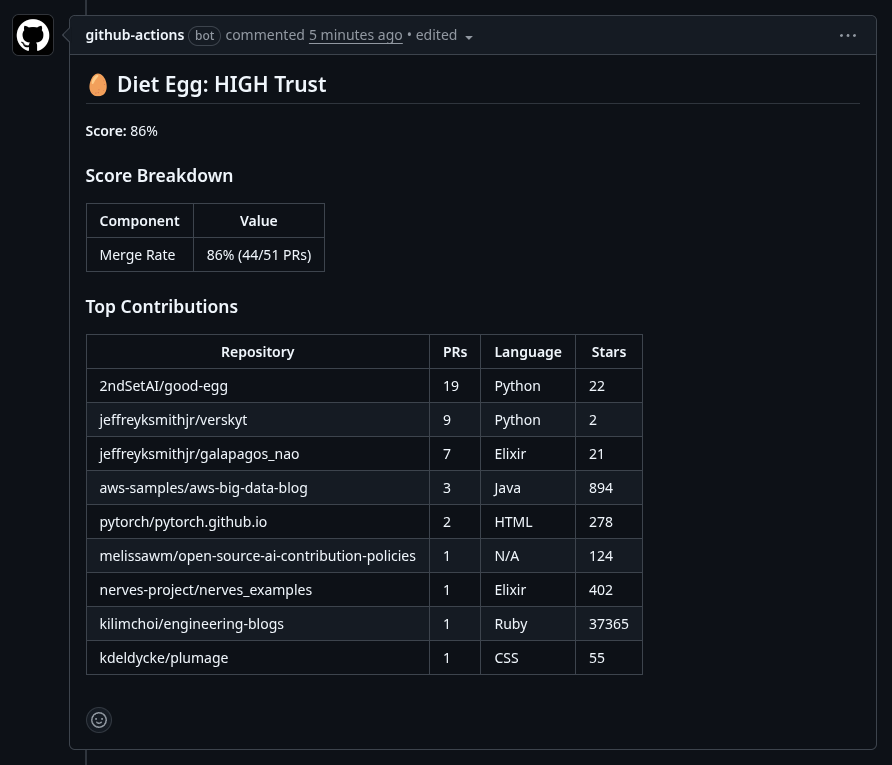
See docs/github-action.md for inputs, outputs, and advanced configuration.
CLI
good-egg score <username> --repo <owner/repo>
good-egg score octocat --repo octocat/Hello-World --json
good-egg score octocat --repo octocat/Hello-World --verbose
good-egg cache-stats
good-egg cache-clear
good-egg --version
good-egg --help
Python Library
import asyncio
import os

from good_egg import score_pr_author

async def main() -> None:
    result = await score_pr_author(
        login="octocat",
        repo_owner="octocat",
        repo_name="Hello-World",
        token=os.environ["GITHUB_TOKEN"],
    )
    print(f"{result.trust_level}: {result.normalized_score:.2f}")

asyncio.run(main())
See docs/library.md for full API documentation.
MCP Server
pip install good-egg[mcp]
GITHUB_TOKEN=ghp_... good-egg-mcp
Add to Claude Desktop (claude_desktop_config.json):
{
  "mcpServers": {
    "good-egg": {
      "command": "good-egg-mcp",
      "env": { "GITHUB_TOKEN": "ghp_your_token_here" }
    }
  }
}
See docs/mcp-server.md for tool reference.
Scoring Models
Good Egg supports two scoring models:
| Model | Name | Description |
|---|---|---|
v1 |
Good Egg (default) | Graph-based scoring from contribution history |
v2 |
Better Egg | Graph score + merge rate + account age via logistic regression |
To use v2, set scoring_model: v2 in your .good-egg.yml, pass
--scoring-model v2 on the CLI, or set scoring-model: v2 in the action
input. See Methodology for how the
v2 model works.
How It Works
Good Egg builds a weighted contribution graph from a user's merged PRs and runs personalized graph scoring to produce a trust score relative to your project. See Methodology for details.
Trust Levels
| Level | Description |
|---|---|
| HIGH | Established contributor with a strong cross-project track record |
| MEDIUM | Some contribution history, but limited breadth or recency |
| LOW | Little to no prior contribution history -- review manually |
| UNKNOWN | Insufficient data to produce a meaningful score |
| BOT | Detected bot account (e.g. dependabot, renovate) |
| EXISTING_CONTRIBUTOR | Author already has merged PRs in this repo -- scoring skipped |
Configuration
thresholds:
  high_trust: 0.7
  medium_trust: 0.3
graph_scoring:
  alpha: 0.85
Environment variables with the GOOD_EGG_ prefix can override individual
settings. See docs/configuration.md for the full
reference and examples/.good-egg.yml for a
complete example.
Troubleshooting
See docs/troubleshooting.md for rate limits, required permissions, and common errors.
License
MIT
Egg image CC BY 2.0 (Flickr: renwest)
Project details
Verified details
These details have been verified by PyPIProject links
GitHub Statistics
Maintainers


Download files
Download the file for your platform. If you're not sure which to choose, learn more about installing packages.
Source Distribution
Built Distribution
Filter files by name, interpreter, ABI, and platform.
If you're not sure about the file name format, learn more about wheel file names.
Copy a direct link to the current filters
File details
Details for the file good_egg-1.1.0.tar.gz.
File metadata
- Download URL: good_egg-1.1.0.tar.gz
- Upload date:
- Size: 294.8 kB
- Tags: Source
- Uploaded using Trusted Publishing? Yes
- Uploaded via: twine/6.1.0 CPython/3.13.7
File hashes
| Algorithm | Hash digest | |
|---|---|---|
| SHA256 |
fa33aada78c47b1fe3af04469b734f2ed8d2eb0affea13b2a6f18322dd098068
|
|
| MD5 |
4576958f7c2e704c71bf0a01a3c4551a
|
|
| BLAKE2b-256 |
cadbe3cc69ef5251cbbb359ac9918be1c8370cad03a899c62e215907a76a6d39
|
Provenance
The following attestation bundles were made for good_egg-1.1.0.tar.gz:
Publisher:
release.yml on 2ndSetAI/good-egg
-
Statement:
-
Statement type:
https://in-toto.io/Statement/v1 -
Predicate type:
https://docs.pypi.org/attestations/publish/v1 -
Subject name:
good_egg-1.1.0.tar.gz -
Subject digest:
fa33aada78c47b1fe3af04469b734f2ed8d2eb0affea13b2a6f18322dd098068 - Sigstore transparency entry: 999054139
- Sigstore integration time:
-
Permalink:
2ndSetAI/good-egg@712da70d285ef883059c4957eb4a92e6ed4cd9c2 -
Branch / Tag:
refs/tags/v1.1.0 - Owner: https://github.com/2ndSetAI
-
Access:
public
-
Token Issuer:
https://token.actions.githubusercontent.com -
Runner Environment:
github-hosted -
Publication workflow:
release.yml@712da70d285ef883059c4957eb4a92e6ed4cd9c2 -
Trigger Event:
push
-
Statement type:
File details
Details for the file good_egg-1.1.0-py3-none-any.whl.
File metadata
- Download URL: good_egg-1.1.0-py3-none-any.whl
- Upload date:
- Size: 31.7 kB
- Tags: Python 3
- Uploaded using Trusted Publishing? Yes
- Uploaded via: twine/6.1.0 CPython/3.13.7
File hashes
| Algorithm | Hash digest | |
|---|---|---|
| SHA256 |
7ebf673421907051a43ac3c6e5b50375c2cdff53a85ef3ea29c1f0960adb3f97
|
|
| MD5 |
b25f5822a75f603d1f2321badacc48ff
|
|
| BLAKE2b-256 |
1ba6fe2cb3e0dcccd0f1e50c7f7ce55ba23525c913ecd29f6d92fec97f12301c
|
Provenance
The following attestation bundles were made for good_egg-1.1.0-py3-none-any.whl:
Publisher:
release.yml on 2ndSetAI/good-egg
-
Statement:
-
Statement type:
https://in-toto.io/Statement/v1 -
Predicate type:
https://docs.pypi.org/attestations/publish/v1 -
Subject name:
good_egg-1.1.0-py3-none-any.whl -
Subject digest:
7ebf673421907051a43ac3c6e5b50375c2cdff53a85ef3ea29c1f0960adb3f97 - Sigstore transparency entry: 999054225
- Sigstore integration time:
-
Permalink:
2ndSetAI/good-egg@712da70d285ef883059c4957eb4a92e6ed4cd9c2 -
Branch / Tag:
refs/tags/v1.1.0 - Owner: https://github.com/2ndSetAI
-
Access:
public
-
Token Issuer:
https://token.actions.githubusercontent.com -
Runner Environment:
github-hosted -
Publication workflow:
release.yml@712da70d285ef883059c4957eb4a92e6ed4cd9c2 -
Trigger Event:
push
-
Statement type:






