
gooey-quick
Turn type-hinted Python program into a GUI application with few additional lines of code
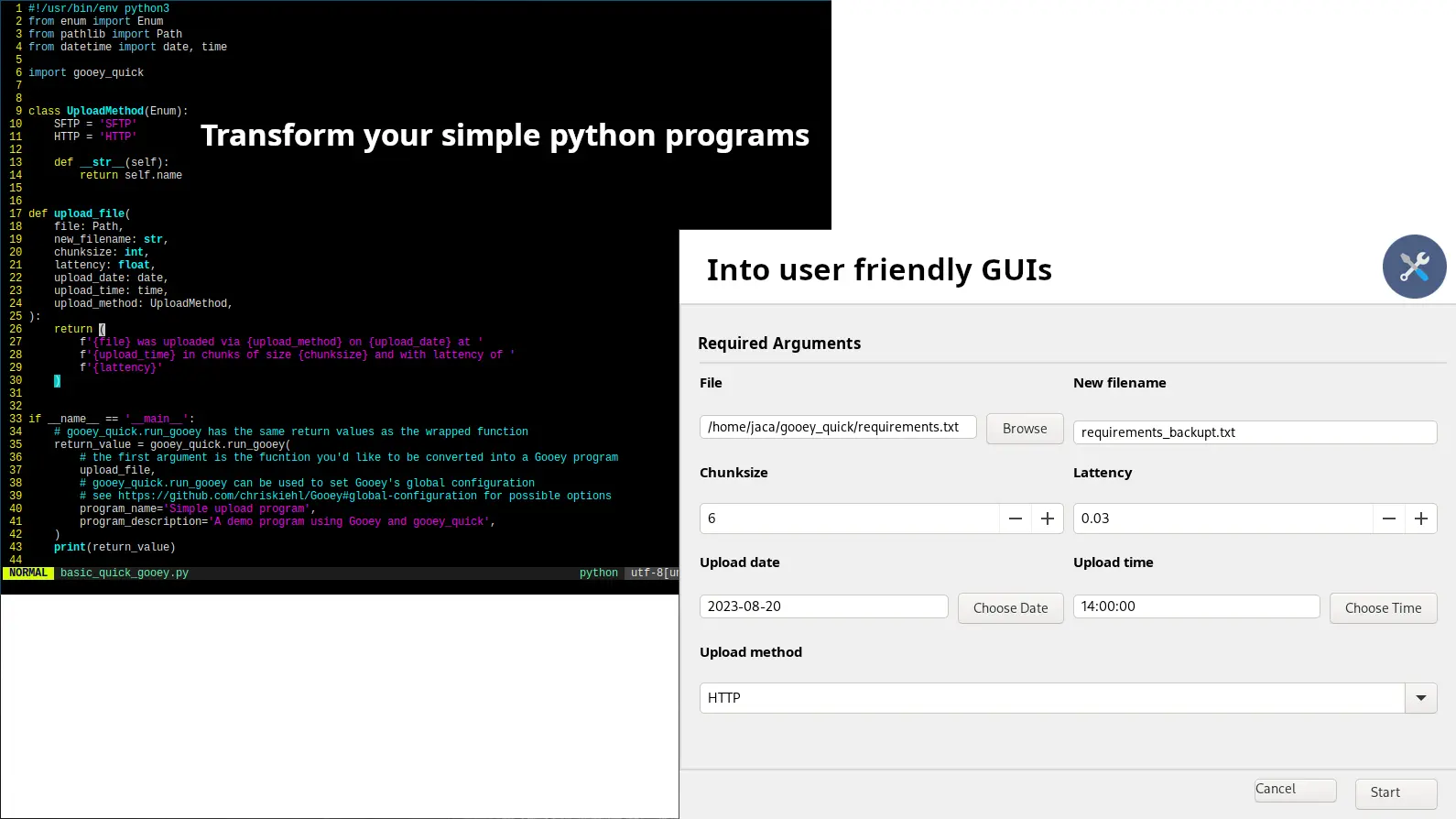
Table of contents
Quick Start
Installation
You can install gooey-quick via pip:
pip install gooey-quick
or by cloning the repository directly:
git clone https://github.com/jacadzaca/gooey_quick.git && ./setup.py
Usage
You can integrate gooey-quick with your code as easily as so:
import gooey_quick


def some_function_you_want_to_gooeyfiy(
    name: str,
    repeat_count: int,
):
    for _ in range(repeat_count):
        print(f'Hello {name}')


if __name__ == '__main__':
    gooey_quick.run_gooey(some_function_you_want_to_gooeyfiy)
Gooey global configuration
You can set Gooey's global options
by setting them in the call to gooey_quick.run_gooey like so:
import gooey_quick


def some_function_you_want_to_gooeyfiy(
    name: str,
    repeat_count: int,
):
    for _ in range(repeat_count):
        print(f'Hello {name}')


if __name__ == '__main__':
    gooey_quick.run_gooey(
        some_function_you_want_to_gooeyfiy,
        program_name='Simple demo program',
        program_description='A demo program using Gooey and gooey_quick',
    )
What is it?
gooey-quick is a library that generates a Gooey-based GUIs from methods' signatures.
Why is it?
A lot of GUI programs that are written in an office setting are wrappers around simple python code. Handcrafting GUIs can be cumbersome, while dealing with argparse-like interface becomes more annoying as the program grows (e.g. you have 6 tabs in your Advanced layout Gooey program). With gooey-quick you should forget about the above and focus on the programs' features.
How does it work?
gooey-quick uses python's built-in typing and introspection functionalities to analyze objects' signatures and generate a fancy GUI using the amazing Gooey by chriskiehl.
Examples
Simple 'Flat layout' application
#!/usr/bin/env python3
from enum import Enum
from pathlib import Path
from datetime import date, time

import gooey_quick


class UploadMethod(Enum):
    SFTP = 'SFTP'
    HTTP = 'HTTP'


def upload_file(
    file: Path,
    new_filename: str,
    chunksize: int,
    lattency: float,
    upload_date: date,
    upload_time: time,
    upload_method: UploadMethod,
):
    assert type(upload_method) is UploadMethod
    return (
        f'{file} was uploaded via {upload_method.name} on {upload_date} at '
        f'{upload_time} in chunks of size {chunksize} and with lattency of '
        f'{lattency}'
    )


if __name__ == '__main__':
    # gooey_quick.run_gooey has the same return values as the wrapped function
    return_value = gooey_quick.run_gooey(
        # the first argument is the fucntion you'd like to be converted into a Gooey program
        upload_file,
        # gooey_quick.run_gooey can be used to set Gooey's global configuration
        # see https://github.com/chriskiehl/Gooey#global-configuration for possible options
        program_name='Simple upload program',
        program_description='A demo program using Gooey and gooey_quick',
    )
    print(return_value)
Start Gooey in Advanced mode with 3 different tabs:
#!/usr/bin/env python3
from pathlib import Path
from typing import Optional
from datetime import date, datetime

import gooey_quick


def search_history(
    history_file: Path,
    wanted_phrase: str,
    min_occure_date: Optional[date] = None,
    max_occure_date: Optional[date] = None,
) -> Optional[tuple[date, str]]:
    occurance_date = date(year=2002, month=7, day=22)
    the_phrase = "wow you have discovered my secret phrase!"
    occurance_in_range = True

    if min_occure_date is not None and max_occure_date is not None:
        print(f'Looking for {wanted_phrase} from {min_occure_date} to {max_occure_date}...')
        occurance_in_range = occurance_date in range(min_occure_date, max_occure_date)

    if wanted_phrase in the_phrase and occurance_in_range:
        return f'{occurance_date}: {the_phrase}'


def append_to_history(
    history_file: Path,
    phrase: str,
    occurance_date: date = datetime.now().date()
):
    return f'Appending {phrase} to {history_file} at {occurance_date}...'


def remove_from_history(
    history_file: Path,
    phrase: str,
):
    return f'Removing {phrase} from {history_file}...'


if __name__ == '__main__':
    # when passing a dict to gooey_quick.run_gooey, the keys become
    # the tabs descriptions, while the values are the function to
    # create the gui from
    return_value = gooey_quick.run_gooey(
        {
           'Add phrase': append_to_history,
           'Remove phrase': remove_from_history,
           'Search phrases': search_history,
        },
        # set Gooey's global config as per: https://github.com/chriskiehl/Gooey#layout-customization
        navigation='TABBED',
        program_name='Gooey subparser layout from function dict',
        program_description='Presents how to create a bundeled configuration with gooey_quick',
     )
    print(return_value)
For more see the docs/examples/ directory.
Packaging
Please refer to either the official guide or this tutorial
1 maintainer

Metadata
1 maintainer
Release files for gooey-quick 1.0.1
For a detailed explanation of source distributions (sdists) and built distributions (wheels), please see the package formats documentation.
Source distribution (sdist)
| File | Size | Uploaded | Provenance | Actions |
|---|---|---|---|---|
| gooey-quick-1.0.1.tar.gz | 12.2 kB | Without provenance | Details for gooey-quick-1.0.1.tar.gz |
Built distribution (wheel)
| File | Interpreter | ABI | Platform | Actions Reset |
|---|---|---|---|---|
| gooey_quick-1.0.1-py3-none-any.whl | Python 3 | none | any | Details for gooey_quick-1.0.1-py3-none-any.whl |
Total release size: 21.3 kB
Release files / gooey-quick-1.0.1.tar.gz
| Download URL | gooey-quick-1.0.1.tar.gz |
|---|---|
| Size | 12.2 kB |
| Tags | Source |
|
SHA-256 checksum How to use checksums |
dd4fc9e344c2f3210498d5b0ecf90d734309c83d002c866cda5bdf18820cdb7a
|
|
BLAKE2b-256 checksum How to use checksums |
64c5eb1f976d46c25b3327aa363646a559d8ca61530fcbcda8fb92798a109b82
|
| Upload date | |
|
Uploaded using Trusted Publishing? What is trusted publishing? |
No |
| Uploaded via |
twine/4.0.2 CPython/3.11.6
|
Release files / gooey_quick-1.0.1-py3-none-any.whl
| Download URL | gooey_quick-1.0.1-py3-none-any.whl |
|---|---|
| Size | 9.1 kB |
| Tags | Python 3 |
|
SHA-256 checksum How to use checksums |
fdcee4c14109490df7abc85ff275490140f5bd8bb64916245fdefe88288428e9
|
|
BLAKE2b-256 checksum How to use checksums |
689f32791b7cece6507b1cfb03155760bdc423642dd4a2b62d7e3057571ed8cd
|
| Upload date | |
|
Uploaded using Trusted Publishing? What is trusted publishing? |
No |
| Uploaded via |
twine/4.0.2 CPython/3.11.6
|
Security for gooey-quick 1.0.1
Provenance
Provenance describes where a file came from. On PyPI, provenance is shared via attestations, which provide a verifiable record of the build or publishing details. View details, limitations and caveats.
No provenance found
None of the files in this release were uploaded with provenance metadata.
A note on package security
PyPI is a repository for distributing packages, not a service for auditing them. While third-party security researchers and our staff do their best to detect and remove malicious packages, PyPI cannot guarantee the quality, security or suitability of any given package.
To learn more about protecting yourself from malicious actors, visit our package security documentation.














