
agents-cli
The CLI and skills for building agents on Gemini Enterprise Agent Platform.
Get Started | Skills | Commands | PyPI | Issues | Docs | Release Notes | Star us
Turn your favorite coding assistant into an expert at building and deploying agents on Google Cloud.
Agents CLI in Agent Platform (agents-cli) gives your coding agent the skills and commands to build, scale, govern, and optimize enterprise-grade agents — so you don't have to learn every CLI and service yourself.
Works seamlessly with: Antigravity CLI • Claude Code • Codex • and any other coding agent.
Get Started
Prerequisites: Python 3.11+, uv, and Node.js.
1. Install
uvx google-agents-cli setup
Or just the skills — your coding agent will handle the rest
npx skills add google/agents-cli
2. Open your coding agent
Launch Antigravity CLI, Claude Code, Codex, or any coding agent you prefer.
3. Build your first agent
Ask your coding agent to build something — e.g. "Use agents-cli to build a caveman-style agent that compresses verbose text into terse, technical grunts"
See the full tutorial for a step-by-step walkthrough.
Browse the full documentation →
Agent Skills
| Skill | What your coding agent learns |
|---|---|
google-agents-cli-workflow |
Development lifecycle, code preservation rules, model selection |
google-agents-cli-adk-code |
ADK Python API — agents, tools, orchestration, callbacks, state |
google-agents-cli-scaffold |
Project scaffolding — create, enhance, upgrade |
google-agents-cli-eval |
Evaluation methodology — metrics, datasets, LLM-as-judge, adaptive rubrics |
google-agents-cli-deploy |
Deployment — Agent Runtime, Cloud Run, GKE, CI/CD, secrets |
google-agents-cli-publish |
Gemini Enterprise registration |
google-agents-cli-observability |
Observability — Cloud Trace, logging, third-party integrations |
CLI Commands
| Command | What it does |
|---|---|
agents-cli setup |
Install CLI + skills to coding agents |
agents-cli create <name> |
Create a new agent project |
agents-cli eval run |
Run the agent over the eval dataset and grade the traces |
agents-cli deploy |
Deploy to Google Cloud |
agents-cli publish gemini-enterprise |
Register with Gemini Enterprise |
See all commands
| Command | Description |
|---|---|
agents-cli login |
Authenticate with Google Cloud or AI Studio |
agents-cli login --status |
Show authentication status |
| Scaffold | |
agents-cli create <name> |
Create a new agent project |
agents-cli scaffold enhance |
Add deployment or CI/CD to an existing project |
agents-cli scaffold upgrade |
Upgrade project to a newer agents-cli version |
| Develop | |
agents-cli run "prompt" |
Run agent with a single prompt |
agents-cli install |
Install project dependencies |
agents-cli lint |
Run code quality checks (Ruff) |
| Evaluate | |
agents-cli eval run |
Run agent inference and grade the traces |
agents-cli eval generate |
Run agent inference over eval cases |
agents-cli eval grade |
Grade generated traces against metrics |
agents-cli eval dataset synthesize |
Synthesize multi-turn eval scenarios for your local agent |
agents-cli eval compare |
Compare two eval result files |
agents-cli eval analyze |
Cluster failure modes from grade results |
agents-cli eval metric list |
List available metrics |
agents-cli eval optimize |
Auto-tune agent prompts using eval data |
| Deploy & Publish | |
agents-cli deploy |
Deploy to Google Cloud |
agents-cli publish gemini-enterprise |
Register with Gemini Enterprise |
agents-cli infra single-project |
Provision single-project infrastructure |
agents-cli infra cicd |
Set up CI/CD pipeline + staging/prod infrastructure |
| Other | |
agents-cli info |
Show project config and CLI version |
agents-cli update |
Force reinstall skills to all IDEs |
How it works
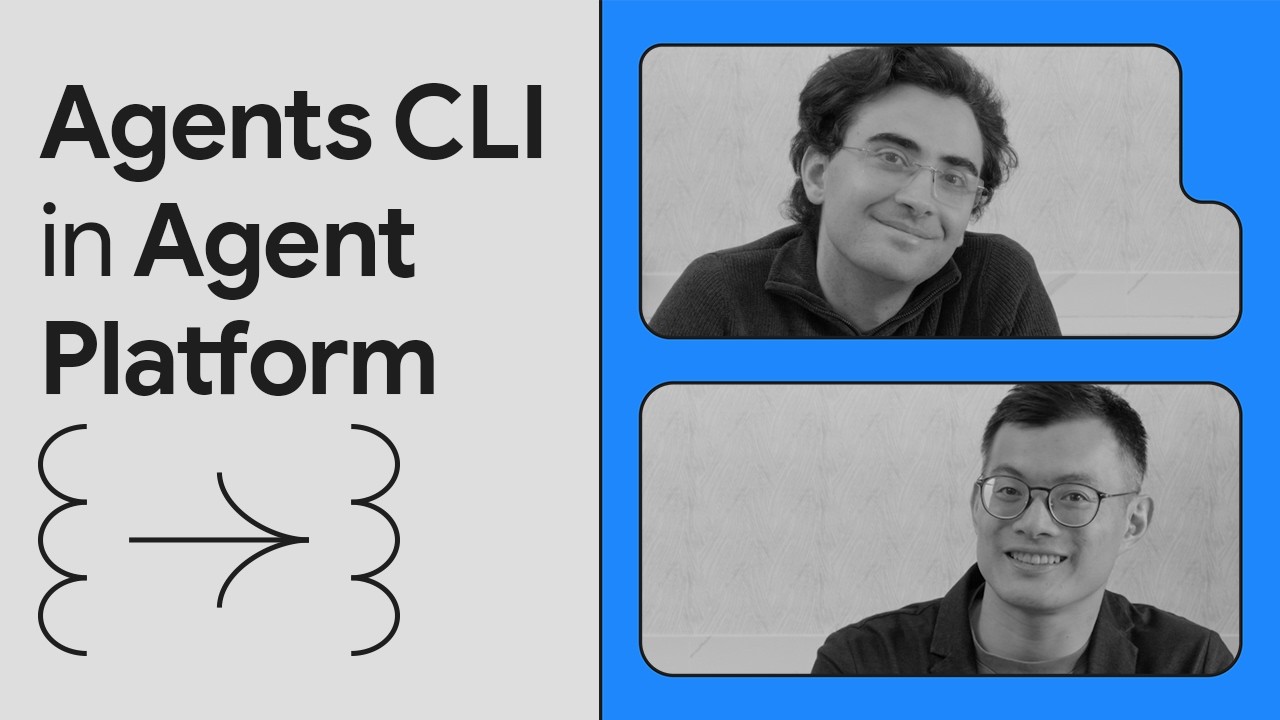
Architecture
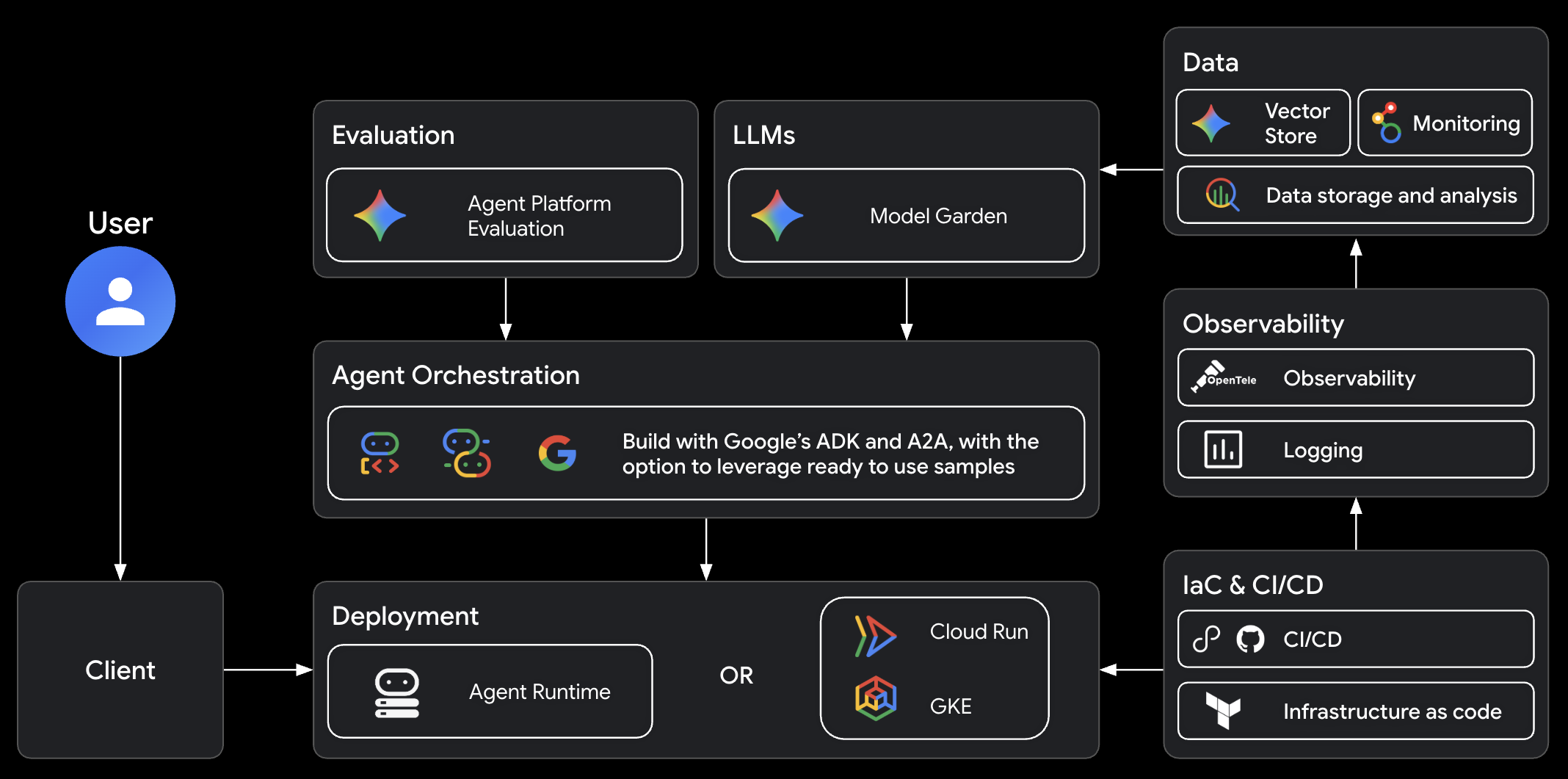
The Google Cloud agent stack that agents-cli builds on:
FAQ
Is this an alternative to Antigravity CLI, Claude Code, or Codex?
No. agents-cli is a tool for coding agents, not a coding agent itself. It provides the CLI commands and skills that make your coding agent better at building, evaluating, and deploying ADK agents on Google Cloud.
How is this different from just using adk directly?
ADK is an agent framework. agents-cli gives your coding agent the skills and tools to build, evaluate, and deploy ADK agents end-to-end.
Do I need Google Cloud?
For local development (create, run, eval), no — you can use an AI Studio API key to run Gemini with ADK locally. For deployment and cloud features, yes.
Can I use this with an existing agent project?
Yes. agents-cli scaffold enhance adds deployment and CI/CD to existing projects.
Can I use agents-cli without a coding agent?
Yes. The CLI works standalone — you can run agents-cli scaffold, eval, deploy, and every other command directly from your terminal. The skills just make it easier for coding agents to do it for you.
How can I extend agents-cli with other skills?
agents-cli skills cover the agent-building lifecycle (scaffold, ADK code patterns, evals, deploy, publish, observability). For adjacent concerns, you could install another skill suite alongside. For example, agent-skills covers general software-engineering workflows (ideation, spec gates, planning, code review), and google/skills covers Google Cloud foundations (BigQuery, Cloud Run, Firebase, GKE).
Feedback
We value your input — it helps us improve agents-cli for the community.
- Bugs & feature requests: open an issue — 👍 the ones you want prioritized
- Share what you built: we'd love to hear about your projects! Reach out at agents-cli@google.com to share your agent or provide feedback
Contributing
The best way to contribute is through feedback: bug reports, feature requests, and ideas shared via issues to directly shape our roadmap.
See the contributing guide for details.
Telemetry
By default, agents-cli emits a single usage signal per command invocation to help
improve the tool and better understand how it's used. Each signal
is a structured log entry written to your own Google Cloud project:
GOOGLE_CLOUD_PROJECT, or else the default project of your Application Default
Credentials (logName=projects/<project>/logs/agents-cli), where you can query
it in Cloud Logging. It records only the metadata such as command name
(e.g. deploy, scaffold.create), exit code, error class, duration (measured
from command dispatch to exit, so it excludes CLI startup), CLI/Python versions,
and OS — never file contents, arguments, or other input. Commands added by
extensions are recorded without their names.
The request that writes the entry also carries usage metadata in its
User-Agent and X-Goog-Api-Client headers, which Google receives for
agents-cli usage analytics: the CLI and Python versions, the OS and its release,
the CPU architecture, the command name and a random per-invocation ID. The log
entry's contents, such as the exit code, error class and duration, stay in your
project.
To opt out of sending telemetry, use one of the following environment variables:
# our cli-specific variable
# 0, false, no, or off (case-insensitive):
export AGENTS_CLI_TELEMETRY=0

# donottrack.sh standard variable
export DO_NOT_TRACK=1
Use agents-cli info to see the current telemetry state.
Terms of Service
agents-cli leverages Google Cloud APIs. When you deploy agents, you'll be deploying resources in your own Google Cloud project and will be responsible for those resources. Please review the Google Cloud Service Terms for details.
1 maintainer

Metadata
1 maintainer
Release files for google-agents-cli 1.9.0
For a detailed explanation of source distributions (sdists) and built distributions (wheels), please see the package formats documentation.
Source distribution (sdist)
| File | Size | Uploaded | |
|---|---|---|---|
| google_agents_cli-1.9.0.tar.gz | 1.2 MB | Details |
Built distribution (wheel)
| File | Interpreter | ABI | Platform | Reset |
|---|---|---|---|---|
| google_agents_cli-1.9.0-py3-none-any.whl | Python 3 | none | any | Details |
Total release size: 2.6 MB
Release files / google_agents_cli-1.9.0.tar.gz
| Download URL | google_agents_cli-1.9.0.tar.gz |
|---|---|
| Size | 1.2 MB |
| Tags | Source |
|
SHA-256 checksum How to use checksums |
2df8bda19946979adabdd0df33e45bcf1375dc05d6719fefc7e731675a346c6b
|
|
BLAKE2b-256 checksum How to use checksums |
bd2df0e0a23f4908f6642dff5613fac0b6350453532bb00fdf1896f3b1cb29c2
|
| Upload date | |
|
Uploaded using Trusted Publishing? What is trusted publishing? |
Yes |
| Uploaded via |
twine/6.2.0 CPython/3.11.2
|
Provenance
Provenance describes where a file came from. On PyPI, provenance is shared via attestations, which provide a verifiable record of the build or publishing details. View details, limitations and caveats.


PyPI Publish Attestation
PyPI verified that this artifact, at this checksum, originated from the publisher listed below.
Signed by Google Cloud, verified by PyPI on Oct 6, 2026.
Transparency logRelease files / google_agents_cli-1.9.0-py3-none-any.whl
| Download URL | google_agents_cli-1.9.0-py3-none-any.whl |
|---|---|
| Size | 1.4 MB |
| Tags | Python 3 |
|
SHA-256 checksum How to use checksums |
45b38ffe57f9361449a6b6366d466eb4b6874cbea153f31178c5b1c1ee25ef9f
|
|
BLAKE2b-256 checksum How to use checksums |
7b0af7a9b116fd887df0759a1d72f18c47ed8d1beb93e596408dcefb2a8d18d4
|
| Upload date | |
|
Uploaded using Trusted Publishing? What is trusted publishing? |
Yes |
| Uploaded via |
twine/6.2.0 CPython/3.11.2
|
Provenance
Provenance describes where a file came from. On PyPI, provenance is shared via attestations, which provide a verifiable record of the build or publishing details. View details, limitations and caveats.
PyPI Publish Attestation
PyPI verified that this artifact, at this checksum, originated from the publisher listed below.
Signed by Google Cloud, verified by PyPI on Oct 6, 2026.
Transparency log













