
Evalbench - evaluation benchmarking framework

Project description
EvalBench
EvalBench is a flexible framework designed to measure the quality of generative AI (GenAI) workflows around database specific tasks. As of now, it provides a comprehensive set of tools, and modules to evaluate models on NL2SQL tasks, including capability of running and scoring DQL, DML, and DDL queries across multiple supported databases. Its modular, plug-and-play architecture allows you to seamlessly integrate custom components while leveraging a robust evaluation pipeline, result storage, scoring strategies, and dashboarding capabilities.
Getting Started 
Follow the steps below to run EvalBench on your local VM:
Note: Evalbench requires Python 3.10 or higher and uv for dependency management.
1. Clone the Repository
Clone the EvalBench repository from GitHub:
git clone git@github.com:GoogleCloudPlatform/evalbench.git
2. Set Up a Virtual Environment
Navigate to the repository directory and create a virtual environment using uv:
cd evalbench
uv venv
source .venv/bin/activate
3. Install Dependencies
Install the required Python dependencies using uv:
uv sync
4. Configure GCP Authentication (For Vertex AI | Gemini Examples)
If gcloud is not installed already, follow the steps in gcloud installation guide.
Then, authenticate using the Google Cloud CLI:
gcloud auth application-default login
This step sets up the necessary credentials for accessing Vertex AI resources on your GCP project.
We can globally set our gcp_project_id using
export EVAL_GCP_PROJECT_ID=your_project_id_here
export EVAL_GCP_PROJECT_REGION=your_region_here
5. Set Your Evaluation Configuration
For a quick start, let's run NL2SQL on some sqlite DQL queries.
- First, read through sqlite/run_dql.yaml and see the configuration settings we will be running.
Now, configure your evaluation by setting the EVAL_CONFIG environment variable. For example, to run a configuration using the db_blog dataset on SQLite:
export EVAL_CONFIG=datasets/bat/example_run_config.yaml
6. Run EvalBench
Start the evaluation process using the provided shell script:
./evalbench/run.sh
Overview
EvalBench's architecture is built around a modular design that supports diverse evaluation needs:
- Modular and Plug-and-Play: Easily integrate custom scoring modules, data processors, and dashboard components.
- Flexible Evaluation Pipeline: Seamlessly run DQL, DML, and DDL tasks while using a consistent base pipeline.
- Result Storage and Reporting: Store results in various formats (e.g., CSV, BigQuery) and visualize performance with built-in dashboards.
- Customizability: Configure and extend EvalBench to measure the performance of GenAI workflows tailored to your specific requirements.
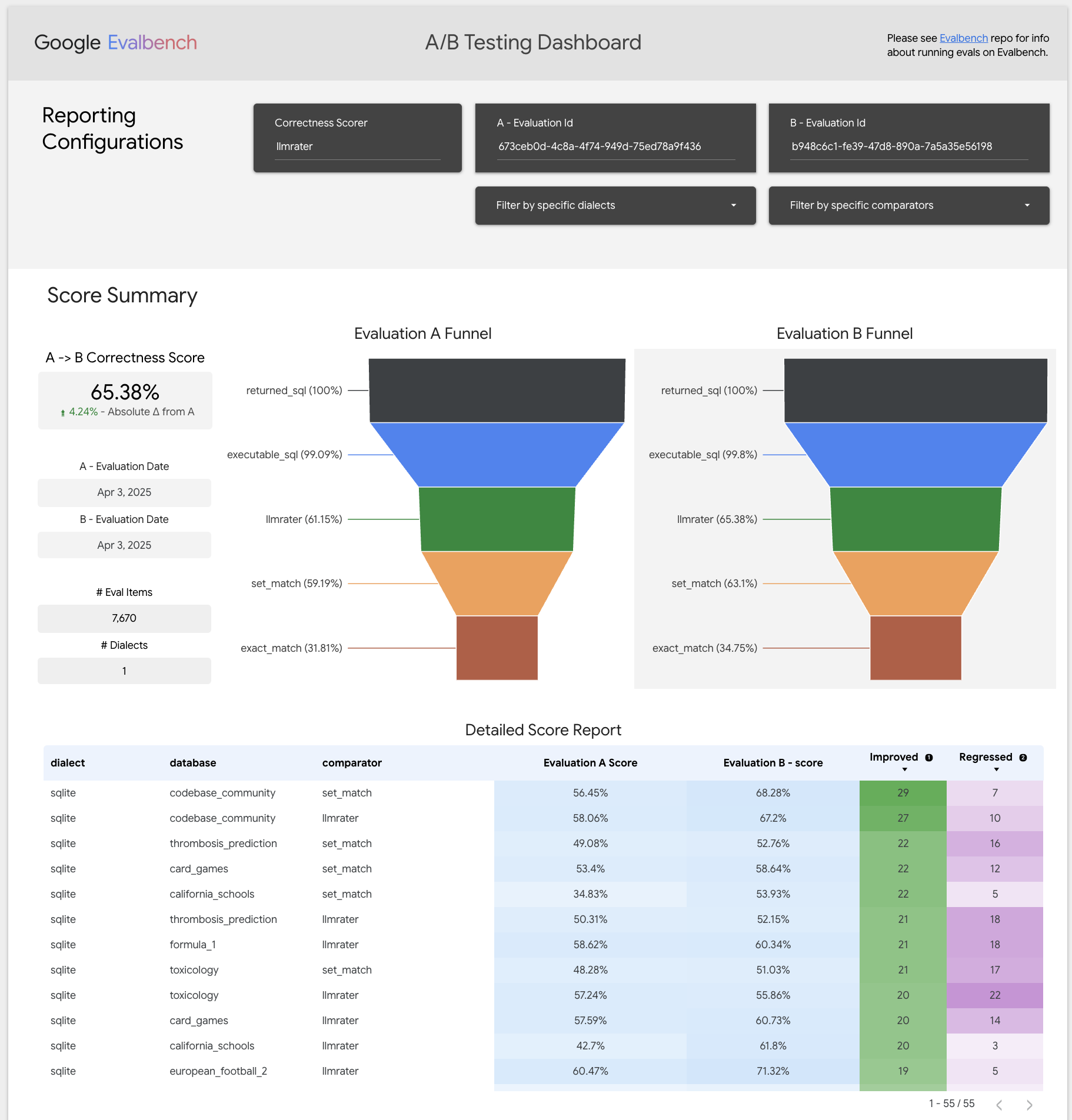
Evalbench allows quickly creating experiments and A/B testing improvements (Available when BigQuery reporting mode set in run_config)
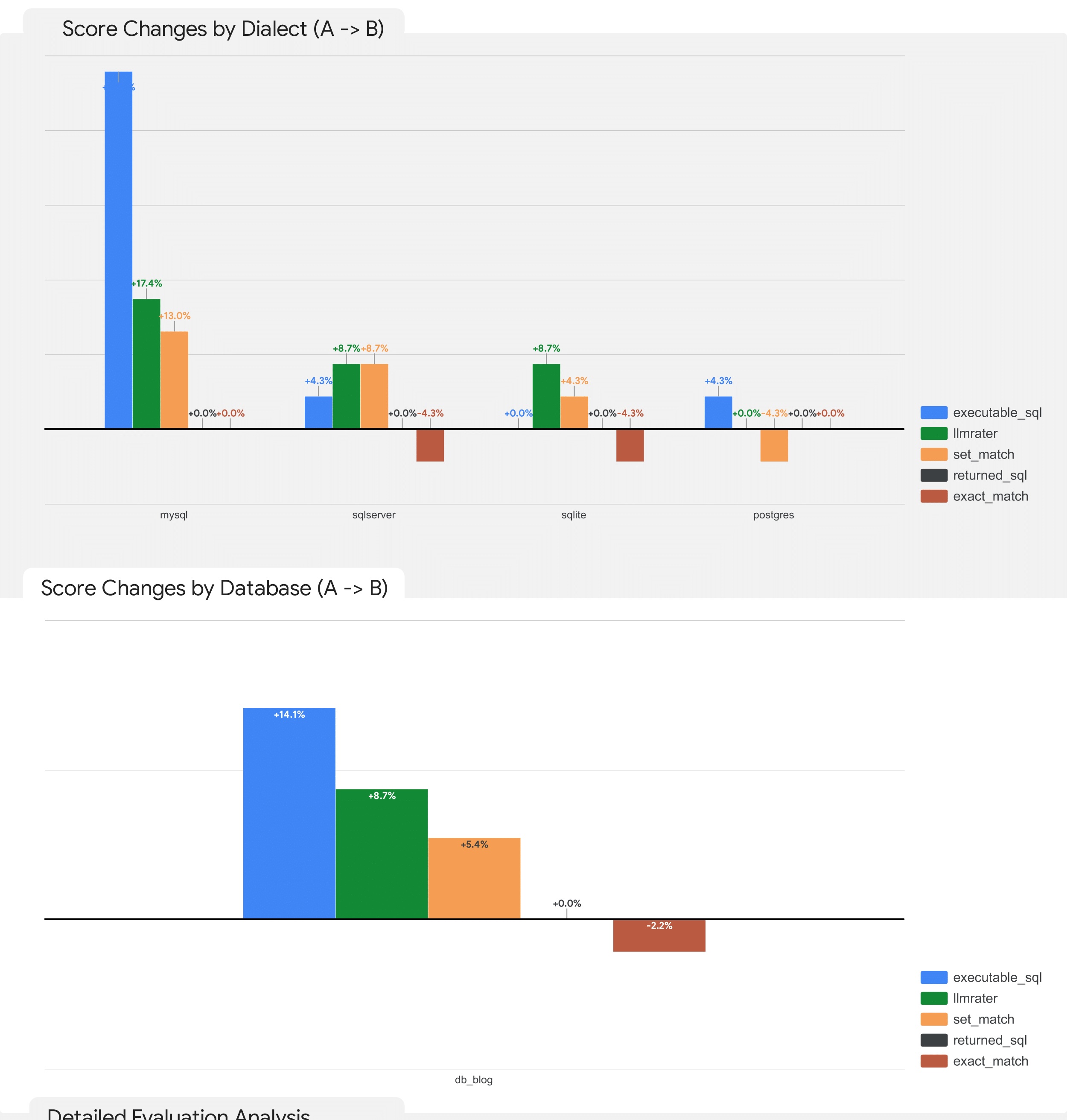
This includes being able to measure and quantify the specific improvements on databases or specific dialects:
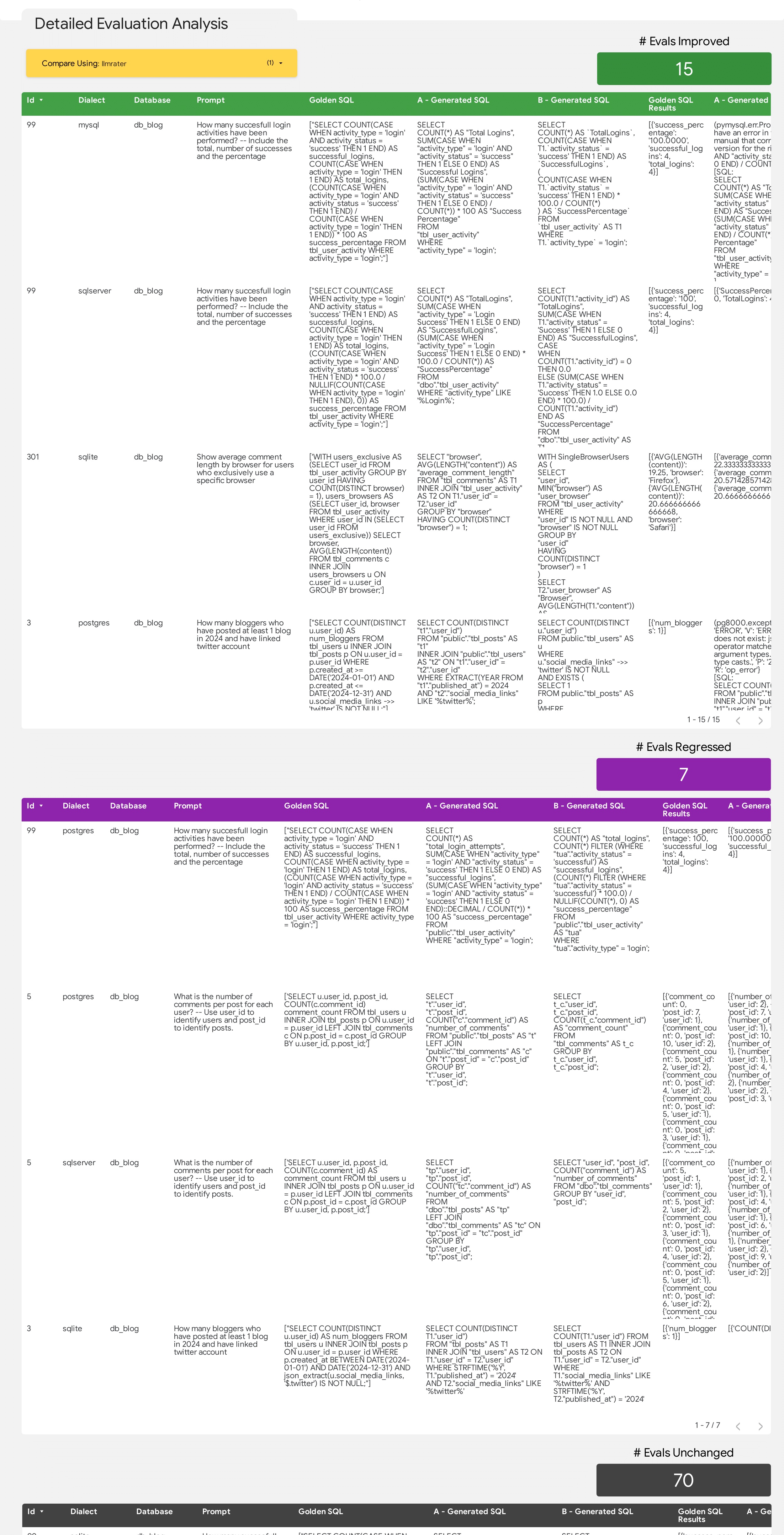
And allowing digging deeper into the exact details of the improvements and regressions including highlighting the changes, how they impacted the score and a LLM annotated explanation of the scoring changes if LLM rater is used.
A complete guide of Evalbench's available functionality can be found in run-config documentation
Please explore the repository to learn more about customizing your evaluation workflows, integrating new metrics, and leveraging the full potential of EvalBench.
For additional documentation, examples, and support, please refer to the EvalBench documentation. Enjoy evaluating your GenAI models!
Release history Release notifications | RSS feed

Download files
Download the file for your platform. If you're not sure which to choose, learn more about installing packages.
Source Distribution
Built Distribution
Filter files by name, interpreter, ABI, and platform.
If you're not sure about the file name format, learn more about wheel file names.
Copy a direct link to the current filters
File details
Details for the file google_evalbench-1.7.1.tar.gz.
File metadata
- Download URL: google_evalbench-1.7.1.tar.gz
- Upload date:
- Size: 186.8 kB
- Tags: Source
- Uploaded using Trusted Publishing? Yes
- Uploaded via: twine/6.2.0 CPython/3.11.2
File hashes
| Algorithm | Hash digest | |
|---|---|---|
| SHA256 |
20c85830c9f21a9507c72f809dde4b5053767fc4870476c09306bb43456ea0fc
|
|
| MD5 |
508dcde79effd03390c4de56e96fa563
|
|
| BLAKE2b-256 |
752db95743719395a74a4afed827e5c5157b28290130baceee223e8c5bc0d0f2
|
Provenance
The following attestation bundles were made for google_evalbench-1.7.1.tar.gz:
Publisher:
evalbench-py@oss-exit-gate-prod.iam.gserviceaccount.com
-
Statement:
-
Statement type:
https://in-toto.io/Statement/v1 -
Predicate type:
https://docs.pypi.org/attestations/publish/v1 -
Subject name:
google_evalbench-1.7.1.tar.gz -
Subject digest:
20c85830c9f21a9507c72f809dde4b5053767fc4870476c09306bb43456ea0fc - Sigstore transparency entry: 1519727045
- Sigstore integration time:
-
Token Issuer:
https://accounts.google.com -
Service Account:
evalbench-py@oss-exit-gate-prod.iam.gserviceaccount.com
-
Statement type:
File details
Details for the file google_evalbench-1.7.1-py3-none-any.whl.
File metadata
- Download URL: google_evalbench-1.7.1-py3-none-any.whl
- Upload date:
- Size: 266.8 kB
- Tags: Python 3
- Uploaded using Trusted Publishing? Yes
- Uploaded via: twine/6.2.0 CPython/3.11.2
File hashes
| Algorithm | Hash digest | |
|---|---|---|
| SHA256 |
cc20838de5b209ec792845798cdf5b8f28e1ae3c99485d88d39557a004b9cc4c
|
|
| MD5 |
3e958c7f45edab036556b03420a38ef9
|
|
| BLAKE2b-256 |
e850d9a87162da4dc068a1a1fe56c2d647174adccc6c05b98ee39c5c8ec9e28b
|
Provenance
The following attestation bundles were made for google_evalbench-1.7.1-py3-none-any.whl:
Publisher:
evalbench-py@oss-exit-gate-prod.iam.gserviceaccount.com
-
Statement:
-
Statement type:
https://in-toto.io/Statement/v1 -
Predicate type:
https://docs.pypi.org/attestations/publish/v1 -
Subject name:
google_evalbench-1.7.1-py3-none-any.whl -
Subject digest:
cc20838de5b209ec792845798cdf5b8f28e1ae3c99485d88d39557a004b9cc4c - Sigstore transparency entry: 1519727037
- Sigstore integration time:
-
Token Issuer:
https://accounts.google.com -
Service Account:
evalbench-py@oss-exit-gate-prod.iam.gserviceaccount.com
-
Statement type:






