
Google Flights scraper (API) implemented in Python

Project description
Google Flights Scraper ✈️
Fast flight data scraper from Google Flights which fetches and decodes flight information based on user's filters. Based on a Base64-encoded Protobuf URL string.
Features
- 🔎 Search: Searching for airport and airlines IATA codes (2-letter and 3-letter location code respectively)
- 🏷️ Filter Creation: Define custom filters for flights ( departure/arrival airports, airlines, dates, trip type, passengers, seat type, and maximum stops)
- ⚙️ Data Fetching: Fetch flight data from Google Flights using either JavaScript-based parsing or local HTML parsing.
- 🔓 Decoding: Decode the fetched flight data into structured objects for easy processing.
Installation
pip install google-flight
or if you want to run it local (with Playwright):
pip install google-flight[local]
Usage/Examples
- Create a Filter
- Define the search criteria for flights using the create_filter (for ?tfs=) to perform a request. Then, add flight_data, trip, seat, and passengers to use the API directly.
from google_flights import create_filter, Passengers, FlightData, search_airline, search_airport

flight_filter = create_filter(
    flight_data=[
        FlightData(
            airlines=search_airline("RyanAir"),  # Airline codes - "FR" and "RK" - can be passed as list ["FR","RK"]
            date="2025-07-20",      # Date of departure
            from_airport=search_airport("Kaunas")  # Departure airport ["KUNs"]
            to_airport=["MAD"],  # Arrival airports
        ),
    ],
    trip="one-way",  # Trip type
    passengers=Passengers(adults=1, children=0, infants_in_seat=0, infants_on_lap=0),
    seat="economy",  # Seat type
    max_stops=1,     # Maximum number of stops
)
- Fetch Flight Data
- Fetch flight data using the get_flights_from_filter
from google_flights import get_flights_from_filter

flight_data = get_flights_from_filter(flight_filter, data_source='js', mode="common")
- Result
- The following parameters would be included in the API result:
✈️ Airline (code & name)
🔢 Flight number
🛫 Departure airport (code & name) & departure time
🛬 Arrival airport (code & name) & arrival time
📅 Departure date
⏱️ Travel duration
🛡️ Aircraft type
💺 Seat class (including seat pitch)
🌱 CO₂ emissions (grams)
💶 Price (EUR)
🔄 Layovers (direct or stops)
✨ Features (Wi‑Fi, in‑seat power, video, media streaming, etc.)
Contributing
I'll work with this project more in future, as I have plans for it. So contributions are always welcome!
Roadmap
-
Additional bug checking
-
Add more possibilities, as finding the shortest and economic path
💡Idea
It all started with a simple thought: “When is the best time to purchase a flight ticket?” and I found this website:
It actually offers pretty decent information, even predictions on whether to wait or buy now. However, their training data was already outdated, resulting in false predictions. So, I decided to build my own version. What did I need?
A scraper!
Since Google doesn't provide a public API, we, simple people who don't want to pay - are creating our own scraper.
The idea is straightforward: build a scraper that returns all results based on your filters.
Initially, I tried Playwright. It worked (and remains in the project as an alternative). We need smth different, which is faster and stable.
Then I examined the Google Flights URL: https://www.google.com/travel/flights?tfs=GisSCjIwMjUtMDctMjUoATICQlQyAkZSagUSA01BRHIFEgNLVU5yBRIDVk5PQgEBSAGYAQI%3D
Notice the tfs parameter:tfs=GisSCjIwMjUtMDctMjUoATICQlQyAkZSagUSA01BRHIFEgNLVU5yBRIDVk5PQgEBSAGYAQI%3D, which looks like base64. We need to decode it! How?
But raw decoding yields too much noise. Which protocol does Google use? - Correctly Protobuf!
And what we can see here:
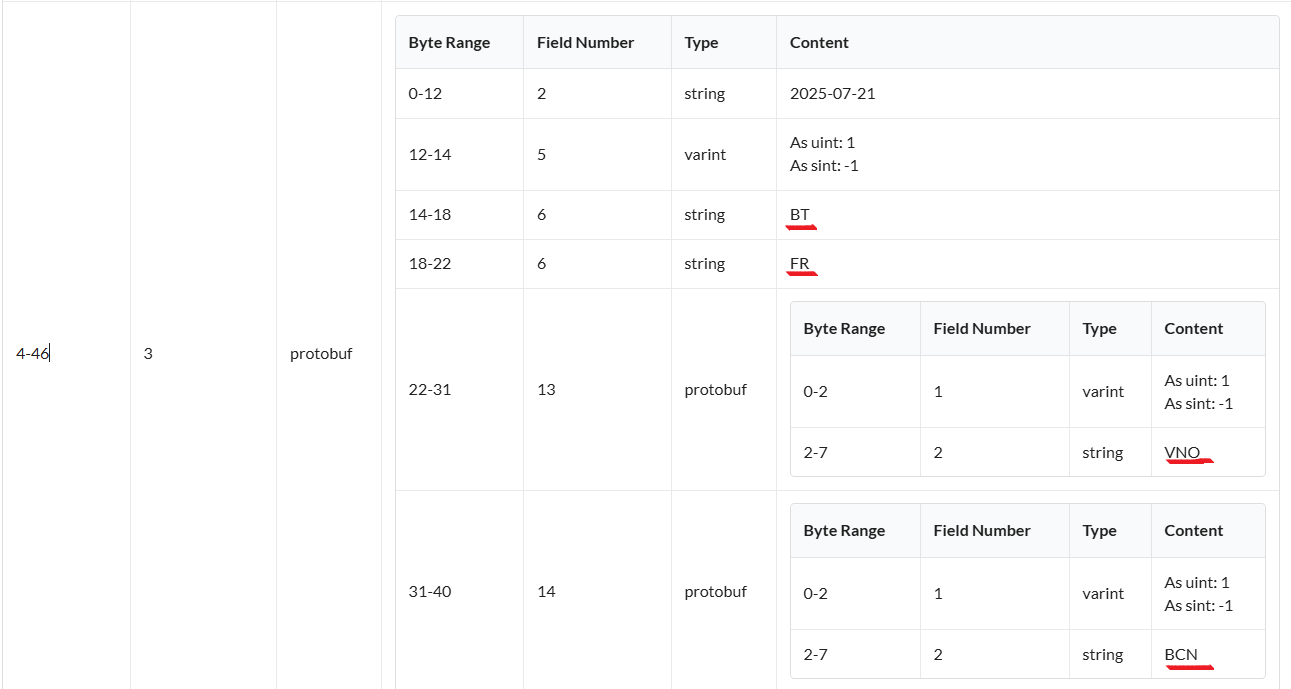
That's our data! Half of the object is done. Next we need to parse, and get results.
Using data embedded in the response's script tag (<script class="ds:1">), I'm able to get much more data than what is parsed from the HTML.
There are a few challenges: some fields require hardcoding. For example, features (in-seat power, etc.) are coded as: [null, null, null, null, null, null, null, null, null, null, null, 3]
You can see the features array is [… , 3] with that 3 sitting in slot 11 (zero-based).
We know slot 11 maps to Wi-Fi, and the code 3 means “for a fee” (whereas 2 would be "for free", and null means “not available”). With the same logic every else, which you need to find by yourself.
However, this approach is much faster than Playwright and provides richer data than pure HTML scraping!
🚀 About Me
I'm a Python developer with a deep passion for Data Science and ML Engineering.
I’m constantly exploring new techniques and tools to enhance my skills and dive into solving real-world problems through data-driven insights. Whether it's building models or optimizing data pipelines or analyzing data
🔗 Links


Download files
Download the file for your platform. If you're not sure which to choose, learn more about installing packages.
Source Distribution
Built Distribution
Filter files by name, interpreter, ABI, and platform.
If you're not sure about the file name format, learn more about wheel file names.
Copy a direct link to the current filters
File details
Details for the file google_flights-0.0.7.tar.gz.
File metadata
- Download URL: google_flights-0.0.7.tar.gz
- Upload date:
- Size: 17.2 kB
- Tags: Source
- Uploaded using Trusted Publishing? No
- Uploaded via: twine/6.1.0 CPython/3.12.2
File hashes
| Algorithm | Hash digest | |
|---|---|---|
| SHA256 |
beafe8b84e7af95652e26c613fb69cefaf5ef2b1223f22252ffed7ee86b4d97e
|
|
| MD5 |
7e0baeda2428f7520c9c653b3568f47c
|
|
| BLAKE2b-256 |
6b6e5ea74f43ea40713cb8bbf280dfb7dd50a3a0acf59ace2032e2bf6682543a
|
File details
Details for the file google_flights-0.0.7-py3-none-any.whl.
File metadata
- Download URL: google_flights-0.0.7-py3-none-any.whl
- Upload date:
- Size: 20.3 kB
- Tags: Python 3
- Uploaded using Trusted Publishing? No
- Uploaded via: twine/6.1.0 CPython/3.12.2
File hashes
| Algorithm | Hash digest | |
|---|---|---|
| SHA256 |
591e9405236a5b9c62787ba6d4429b1cb40b9452a0061ef17d13f98461caff92
|
|
| MD5 |
add00a2e5777d3ec2d464e8b8eba4342
|
|
| BLAKE2b-256 |
95bd51d1f32a4c861c993a8e7a8f520fc67127b05ccfc2fa0652ccfb96e8949e
|






