
google-okf





google-okf is a production-grade, open-source Python library designed to automatically connect to various enterprise data sources and convert them into the standard Google Open Knowledge Format (OKF).
By standardizing database schemas, collections, documentation, playbooks, and APIs into clean Markdown files with structured YAML frontmatter, google-okf acts as the critical intermediate context-assembly layer for Retrieval-Augmented Generation (RAG) pipelines and agentic AI systems.
📚 Interactive Documentation
For detailed installation guides, programmatic APIs, and configuration references: 👉 google-okf Documentation Site
🧩 Role in the RAG Pipeline
Standard RAG pipelines often struggle with raw data ingestion. Extracting text from documents or querying database schemas directly yields fragmented, unstructured contexts that degrade LLM retrieval accuracy.
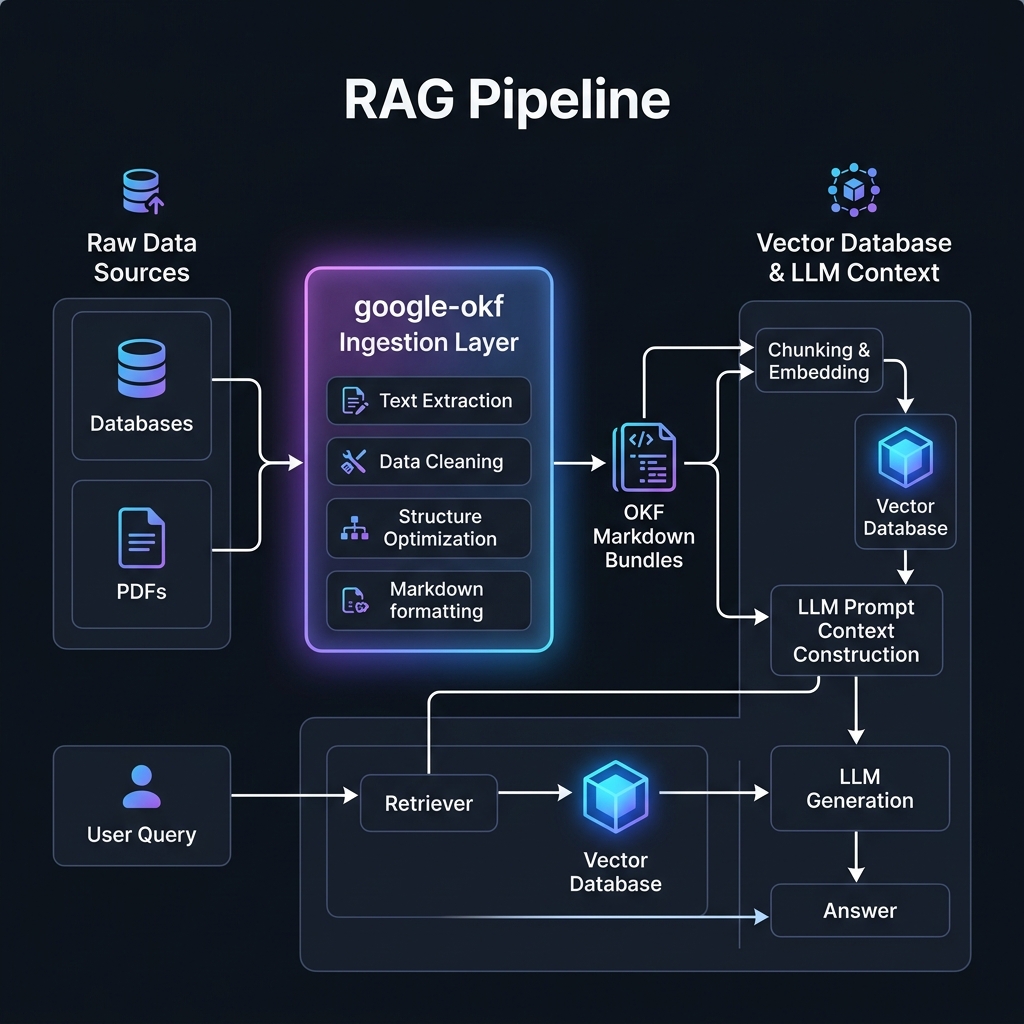
google-okf acts as the Ingestion & Semantic Translation Layer before the chunking and embedding steps. By converting raw data sources into a structured directory of Markdown files with rich YAML metadata and cross-referenced hyperlinks, it enables Metadata-RAG (filtered search) and Graph-RAG (traversing relational entities).
RAG Pipeline Ingestion Flow:
What is Google OKF?
The Open Knowledge Format (OKF v0.1) is an open, vendor-neutral standard introduced by Google Cloud to formalize the "LLM Wiki" pattern. Instead of feeding raw, fragmented, and inconsistent documentation or database formats directly into vector databases, OKF structures knowledge into a unified, version-controlled (Git-friendly) directory tree:
- YAML Frontmatter: Self-describing metadata for routing, filtering, and identification (requires a
typefield; recommendstitle,description,resourceURI,tags, andtimestamp). - Markdown Body: Structurally clean, human- and LLM-readable text content.
- Semantic Links: Standard markdown links mapping relationships between concepts, enabling AI agents to walk and traverse a semantic knowledge graph.
⚡ Highlighted Features
- 🔌 Flat File Connector (
DocumentProducer):- Extracts raw text from PDF, DOCX, Markdown, and TXT files.
- Captures file metadata (creation/modification times, paths) automatically.
- 🗄️ Relational Database Connector (
MySQLProducer):- Scans table schemas, column types, primary keys, and foreign keys.
- Auto-generates clean Markdown schema tables.
- Automatically maps foreign keys into relative markdown links (forming a semantic entity graph).
- Automatically handles SSL negotiation for secure databases (e.g. AWS RDS or Aiven).
- 🍃 NoSQL MongoDB Connector (
MongoDBProducer):- Samples documents from specified collections to dynamically infer BSON schema structures.
- Outputs collection concepts with type structures mapped to Markdown.
- 🛠️ Command Line Interface (
google-okfCLI):google-okf init: Bootstrap a blank bundle.google-okf produce: Run connectors using command arguments or a YAML configuration file.google-okf lint: Verify YAML syntax, required frontmatter fields, and check for broken relative links.
- 🏗️ Extensible
BaseProducer:- Easy-to-use abstract interface to write custom connectors for any proprietary data source (e.g., Notion, Jira, Slack, S3).
- 🤖 Modern CI/CD Publishing:
- Verified unit tests running across Python
3.12,3.13,3.14, and3.15on Windows, macOS M1/M2, and Linux. - Secure release deployments using OIDC Trusted Publishing to PyPI.
- Verified unit tests running across Python
Installation
Install the package via pip:
pip install google-okf
Or using uv (recommended):
uv add google-okf
Command Line Interface (CLI)
The library provides a CLI tool named google-okf.
1. Initialize a Bundle
Create a blank OKF folder structure with default subdirectories:
google-okf init my_knowledge_bundle
2. Run a Producer
Run a connector to extract metadata from a source and write it into a bundle folder:
Flat Files:
google-okf produce --type files --src-dir ./raw_documents --out-dir my_knowledge_bundle
MySQL / Relational DB:
google-okf produce --type mysql --uri "mysql+pymysql://user:pass@host:port/dbname?ssl-mode=REQUIRED" --out-dir my_knowledge_bundle
MongoDB:
google-okf produce --type mongodb --uri "mongodb+srv://user:pass@cluster.mongodb.net/" --db-name "my_database" --out-dir my_knowledge_bundle
3. Using a Configuration File
You can also store connection details in a YAML config file (config.yaml):
producer: mysql
uri: "mysql+pymysql://user:pass@host:port/dbname?ssl-mode=REQUIRED"
output_dir: "my_knowledge_bundle"
And run it with:
google-okf produce --config config.yaml
4. Lint and Validate Compliance
Verify that all YAML frontmatter compiles, required fields are present, and all internal relative markdown links resolve correctly:
google-okf lint my_knowledge_bundle
Programmatic Usage
1. Flat Files Import
from google_okf import DocumentProducer, write_bundle

# Initialize producer for a folder of documents
producer = DocumentProducer(
    source_dir="./financial_statements",
    output_prefix="documents/financials",
    tags=["finance", "annual-report"]
)

# Extract and write to bundle
concepts = producer.produce()
write_bundle("my_okf_bundle", concepts)
2. MySQL / SQL Database Import
from google_okf import MySQLProducer, write_bundle

# Connection URI (uses SQLAlchemy syntax)
connection_uri = "mysql+pymysql://user:pass@host:16512/defaultdb?ssl-mode=REQUIRED"

producer = MySQLProducer(
    connection_uri=connection_uri,
    output_prefix="database/tables",
    schema="default"  # Optional schema filter
)

# Extract tables, column types, keys, and links
concepts = producer.produce()
write_bundle("my_okf_bundle", concepts)
3. MongoDB Collection Schema Inference
from google_okf import MongoDBProducer, write_bundle

producer = MongoDBProducer(
    connection_uri="mongodb+srv://user:pass@cluster.mongodb.net/?appName=Cluster",
    database_name="upi_db",
    output_prefix="database/collections",
    sample_size=15  # Number of documents to sample for type inference
)

# Sample documents, infer schemas, and write collections
concepts = producer.produce()
write_bundle("my_okf_bundle", concepts)
Troubleshooting
MongoDB SSL Handshake Failures (TLSV1_ALERT_INTERNAL_ERROR)
When connecting to a MongoDB Atlas cluster, you may encounter the following error:
SSL handshake failed: ac-xxx-shard.mongodb.net:27017: [SSL: TLSV1_ALERT_INTERNAL_ERROR] tlsv1 alert internal error (_ssl.c:1010)
Root Cause
This is a secure connection rejection enforced by the MongoDB Atlas cluster. It occurs because the client IP address from which your script is running is not whitelisted in your Atlas database security settings. Passing tlsAllowInvalidCertificates=True or modifying certificates in code will not bypass this, as the server firewall terminates the TLS negotiation immediately at the TCP/TLS layer.
Solution
- Log in to your MongoDB Atlas Console.
- Under the Security header in the left sidebar, click Network Access.
- Click + Add IP Address.
- Click Add Current IP Address to authorize your local machine, or input
0.0.0.0/0(Allow Access from Anywhere) to permit connections from any network (useful for transient cloud deployments). - Click Confirm and wait 1–2 minutes for the access list to deploy.
MySQL / PyMySQL SSL Connection Parameter Crashing
When passing connection URLs that require SSL (e.g. from providers like Aiven or AWS RDS), using ssl-mode=REQUIRED in query parameters can cause the PyMySQL driver to throw an exception: Connection.__init__() got an unexpected keyword argument 'ssl-mode'.
Solution
google-okf automatically intercepts query parameters containing ssl-mode, ssl_mode, or ssl=true. It strips them from the raw connection string so the driver does not crash, and configures the engine to pass the required SSL context parameters (connect_args={"ssl": {}}) under the hood to ensure an encrypted channel. No manual dictionary setup is necessary.
Contributing & Testing
Development is managed using uv or pip. To run unit tests locally:
# Clone the repository
git clone https://github.com/SachinMishra-ux/Open_Knowledge_Format.git
cd Open_Knowledge_Format

# Sync dependencies and run tests
uv sync
uv run python -m unittest discover tests
🗺️ Roadmap & Upcoming Features
To bridge the gap between raw enterprise datasets and production-grade RAG, we are actively developing the following extensions:
-
🚀 Multimodal Document & Layout Parsing
- Current Limit: Flat-file extraction only captures raw textual content, ignoring images, flow structures, and tabular data layouts.
- Upcoming Upgrade: Integration of multimodal layout-aware OCR (e.g. LayoutParser, PyMuPDF) to automatically extract nested tables and convert embedded images/diagrams directly into vector-compatible Markdown representations.
-
🔌 Enterprise-Grade Connectors
- Current Limit: Supports PDF/DOCX flat files, MySQL, and MongoDB.
- Upcoming Upgrade: Native support for PostgreSQL, cloud data warehouses (BigQuery, Snowflake), and enterprise suite systems like SAP to automatically map large enterprise resource networks into OKF.
-
🧠 Semantic Relation Auto-Discovery
- Upcoming Upgrade: Machine learning utilities to automatically scan imported markdown documents, detect semantic linkages (e.g., table-to-table dependencies, topic cross-references), and write relative markdown links to build a Graph-RAG-ready schema tree.
👤 Author
- Sachin Mishra
- 📧 Email: sachinmishra.ux@gmail.com
- 🐙 GitHub: @SachinMishra-ux
License
This project is licensed under the MIT License — see the LICENSE file for details.
1 maintainer

Metadata
1 maintainer
Release files for google-okf 0.1.3
For a detailed explanation of source distributions (sdists) and built distributions (wheels), please see the package formats documentation.
Source distribution (sdist)
| File | Size | Uploaded | |
|---|---|---|---|
| google_okf-0.1.3.tar.gz | 2.4 MB | Details |
Built distribution (wheel)
| File | Interpreter | ABI | Platform | Reset |
|---|---|---|---|---|
| google_okf-0.1.3-py3-none-any.whl | Python 3 | none | any | Details |
Total release size: 2.4 MB
Release files / google_okf-0.1.3.tar.gz
| Download URL | google_okf-0.1.3.tar.gz |
|---|---|
| Size | 2.4 MB |
| Tags | Source |
|
SHA-256 checksum How to use checksums |
e907f19fcea02d67406c3fd9068b2b1a4b95b0595823b03bf0f9745f6345734e
|
|
BLAKE2b-256 checksum How to use checksums |
fd5bad4c95ae772904d8108df4c3edddbbb267fb12356887798422db70fc6078
|
| Upload date | |
|
Uploaded using Trusted Publishing? What is trusted publishing? |
Yes |
| Uploaded via |
twine/6.1.0 CPython/3.13.12
|
Provenance
Provenance describes where a file came from. On PyPI, provenance is shared via attestations, which provide a verifiable record of the build or publishing details. View details, limitations and caveats.


PyPI Publish Attestation
PyPI verified that this artifact, at this checksum, originated from the publisher listed below.
Signed by GitHub Actions, verified by PyPI on Jul 2, 2026.
Transparency logRelease files / google_okf-0.1.3-py3-none-any.whl
| Download URL | google_okf-0.1.3-py3-none-any.whl |
|---|---|
| Size | 21.5 kB |
| Tags | Python 3 |
|
SHA-256 checksum How to use checksums |
fa52bf081eb4b16e59423d505382c9c0a7b734fdd4e52f026b9ed0c51ff1671f
|
|
BLAKE2b-256 checksum How to use checksums |
a3ad58969e362b9375069fe4bf2e22d06a2e3bdc7c8b849c651c396524aa7f87
|
| Upload date | |
|
Uploaded using Trusted Publishing? What is trusted publishing? |
Yes |
| Uploaded via |
twine/6.1.0 CPython/3.13.12
|
Provenance
Provenance describes where a file came from. On PyPI, provenance is shared via attestations, which provide a verifiable record of the build or publishing details. View details, limitations and caveats.
PyPI Publish Attestation
PyPI verified that this artifact, at this checksum, originated from the publisher listed below.
Signed by GitHub Actions, verified by PyPI on Jul 2, 2026.
Transparency log













