
google-yubikey
Generate Google Service Account tokens with your YubiKey!
Motivation
This is perhaps the most secure way to use Google Service Account (SA) credentials outside of Google Cloud, since the private key never leaves the device, and so it cannot be leaked or stolen without physically stealing the YubiKey.
Additionally, each operation is protected with a YubiKey PIN, providing a 2nd factor of authentication as something a user knows (in addition to something a user has, which is the YubiKey itself).
In this way, a single YubiKey can represent the identity of a user across many SAs, without the need to send the private key material over the wire at any point.
This makes it even more secure than SA impersonation, where a user's long-term refresh token has been traditionally stored on their machine, and could thus be compromised.
Requirements
Python 3.7+
YubiKey 4+, FIPS and NEO
The key must have PIV feature to be eligible. For the specific list of compatible models, please see here and here.
Please note that the private key is stored on one of the available
PIV certificate slots,
which does NOT interfere with other functionality,
like web 2FA authentication or OpenPGP.
You can choose the slot freely (by default, it's 9a).
Setup
pip3 install google-yubikey
Usage
-
Set up YubiKey PIN, as explained here.
-
Run this only once to set up a private key on the YubiKey, or to renew it after expiration:
google-yubikey generate-key > yubikey.pemThe output
yubikey.pemkey above is public - to be used in the next step. -
Install Google Cloud SDK and run:
gcloud auth login
gcloud beta iam service-accounts keys upload yubikey.pem \
    --iam-account <service_account_email>
gcloud auth revoke # optional, but recommended
This is needed only for setting up YubiKey with a SA. Your user account must have at least
Service Account Key Adminrole oriam.serviceAccountKeys.createpermission on the target SA(s).As a good practice, the last command revokes your Google Cloud SDK credentials, which limits the potential for their exposure only to the time of the public key upload.
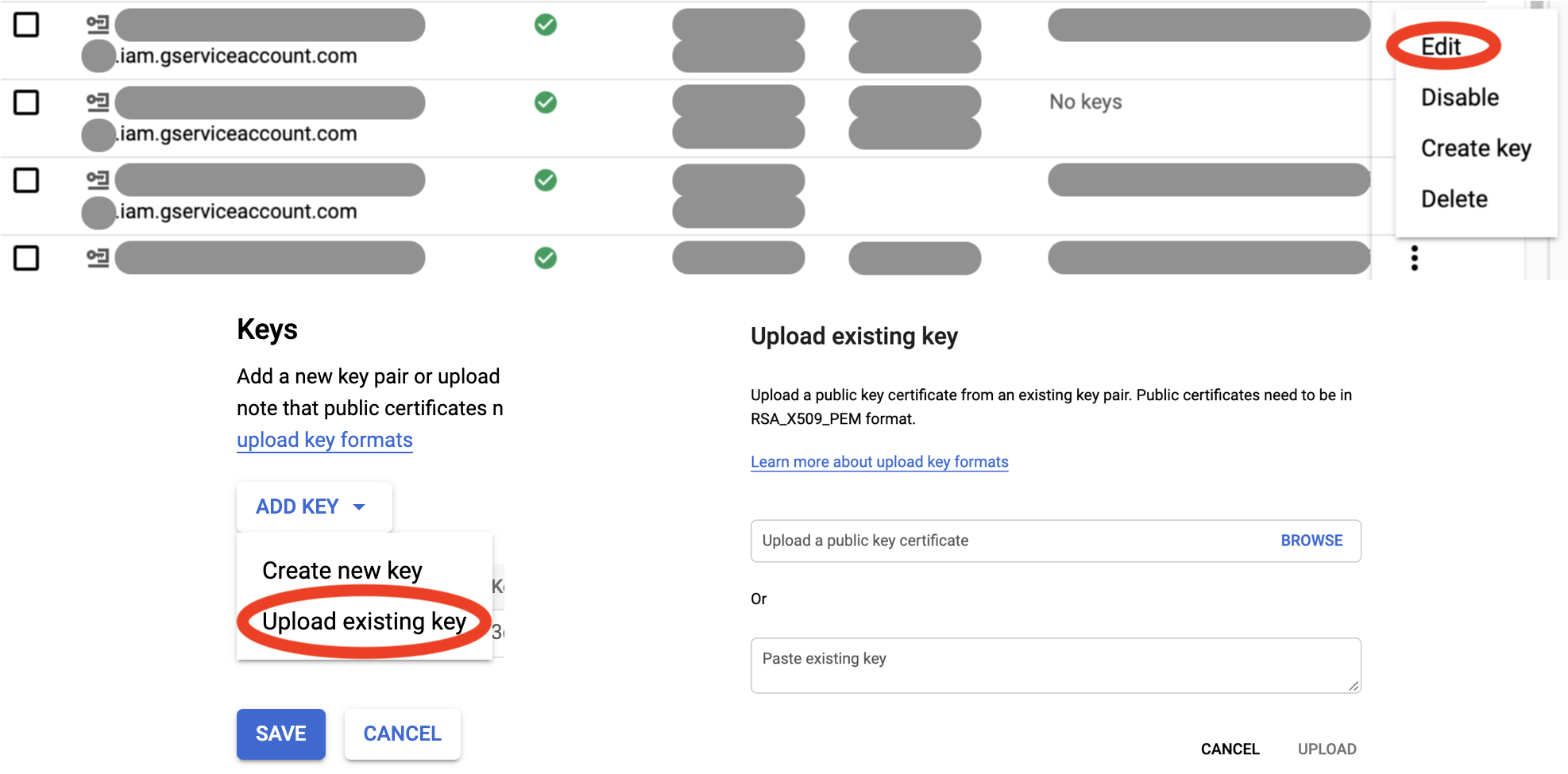
Alernatively to step 3, you can upload
yubikey.pemfrom step 2 via Google Cloud Console for the target SA(s): -
Run this every time you'd like to generate a SA token:
google-yubikey token -a <service_account_email>By default, this command will generate a Google OAuth 2.0 access token. You can also generate an ID token using
-t id.The command prints the token to standard output, so it can be easily assigned to a variable for integration into your scripts.
-
To use YubiKey for Google Cloud SDK or your existing applications, you can start a local metadata server that emulates Google Compute Engine (GCE) environment for token generation:
sudo google-yubikey serve -a <service_account_email> -n <numeric_project_id>Unfortunately, this command needs to be run with elevated privileges, since it opens privileged port 80 on a link-local alias IP, to emulate GCE. However, according to security best practices, it drops privileges for the server workers.
Once the server is running, you can use regular commands as if you were running them on a GCE instance (!), for example:
gcloud config set account <service_account_email>
gcloud auth list
gsutil ls
docker run --rm -it google/cloud-sdk:alpine bq ls
node app.js # a JavaScript app that uses Google client libraries
When these commands request a token from the metadata server (behind the scenes), it will ask you for the YubiKey PIN, and cache it and the token for a short time to improve user experience.
As you can see, there's no need to download SA keys and set
GOOGLE_APPLICATION_CREDENTIALSanymore! -
Further customization options are available through:
google-yubikey [<command>] -h
Disclaimer
This tool is still early on in the development. It works, but may have unusual edge cases that make it fail for your setup. Please use with caution, and raise an issue if you come across one.
1 maintainer

Metadata
1 maintainer
Release files for google-yubikey 0.4.11
For a detailed explanation of source distributions (sdists) and built distributions (wheels), please see the package formats documentation.
Source distribution (sdist)
| File | Size | Uploaded | |
|---|---|---|---|
| google-yubikey-0.4.11.tar.gz | 224.2 kB | Details |
Built distribution (wheel)
| File | Interpreter | ABI | Platform | Reset |
|---|---|---|---|---|
| google_yubikey-0.4.11-py3-none-any.whl | Python 3 | none | any | Details |
Total release size: 237.0 kB
Release files / google-yubikey-0.4.11.tar.gz
| Download URL | google-yubikey-0.4.11.tar.gz |
|---|---|
| Size | 224.2 kB |
| Tags | Source |
|
SHA-256 checksum How to use checksums |
2ea94f97f442fe11bcd47fad205c4705c609aad3243e5947aa112a979407fc44
|
|
BLAKE2b-256 checksum How to use checksums |
883ffcaa8285fc97377f2e790dea4f3b46d28d5b906491b32859f487c756722c
|
| Upload date | |
|
Uploaded using Trusted Publishing? What is trusted publishing? |
No |
| Uploaded via |
twine/3.2.0 pkginfo/1.5.0.1 requests/2.24.0 setuptools/50.3.0 requests-toolbelt/0.9.1 tqdm/4.48.2 CPython/3.8.5
|
Release files / google_yubikey-0.4.11-py3-none-any.whl
| Download URL | google_yubikey-0.4.11-py3-none-any.whl |
|---|---|
| Size | 12.8 kB |
| Tags | Python 3 |
|
SHA-256 checksum How to use checksums |
8d4b8ed1d2be9f2406e013617c22e98da6616e743bc544d2ef153b3e73ca0550
|
|
BLAKE2b-256 checksum How to use checksums |
8539fd1af2ea63330080537eb6bf90e15053c08ffd60953b631e1ef8d4c22506
|
| Upload date | |
|
Uploaded using Trusted Publishing? What is trusted publishing? |
No |
| Uploaded via |
twine/3.2.0 pkginfo/1.5.0.1 requests/2.24.0 setuptools/50.3.0 requests-toolbelt/0.9.1 tqdm/4.48.2 CPython/3.8.5
|














