
GOogle SHeets DataBase - Python client to key-value database based on Google Sheets

Project description
goshdb
GOogle SHeets DataBase - Python client to key-value database based on Google Sheets
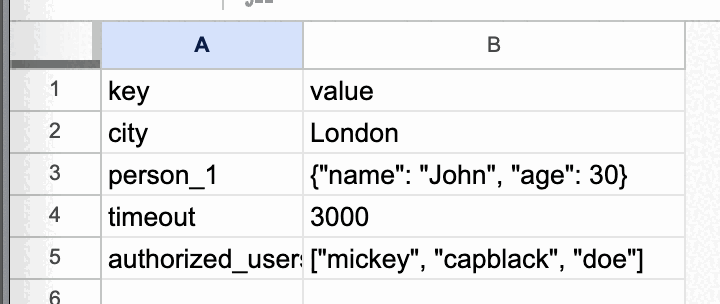
Sheet works as a table and has the following look & structure:
Use cases
- Store configuration with ability to change it on the fly
- Store data that should be shared between multiple users / machines
- Write status of a long-running process and observe it in real-time in Google Sheets
- Review data modification history in Google Sheets UI (File -> Version history -> See version history)
Features
- Simple key-value interface (get/set string/object)
Advantages
- Free storage (Google Sheets API has free quota)
- Concurrent read (Supports parallel read from multiple clients)
- No need to create a server
- User-friendly Google Sheets UI for data review & modification
- No need to install any software on the client side (only Python)
- Simple get/set methods instead of SQL queries
- No need to create a database schema (just create a new sheet)
- Data backup, synchronization, availability, and security are managed by Google Sheets
Limitations
- Not suitable for high-frequency read/write operations (Google Sheets API has read/write quota: 300/minute per project, 60/minute per user per project)
- Not suitable for concurrent write (Google Sheets API has no locking mechanism)
- Not suitable for very large data (Google Sheets has a limit of 10 million cells per spreadsheet, i.e. 5 million key-value pairs
- Not suitable for high-speed data access (Google Sheets API has a delay, takes ~0.3-1 second per get/set operation)
- Not suitable for complex queries, types, data structures, relations, validation and indexing (only key-value interface)
- Not suitable for sensitive & high-security data (Google Sheets API has access to all spreadsheets in the account)
Installation
pip install goshdb
Configuration
See this video for step-by-step instruction & demo
Step 1. Select a Google account that will be used to access the spreadsheet
Details
- Though
Tableuses only provided spreadsheet, credentials technically allow to read/write all the spreadsheets in the account. - So it's recommended to use
Tablewith a special service (non-personal) account that doesn't have critical/secret spreadsheets that might be compromised.
Step 2. Create a spreadsheet in your Google Sheets account.
Details
- You should share the spreadsheet and provide write access to the account that will be used to access it (see Step 1).
Step 3. Obtain credentials.json file with this the instruction
Details
- If you do this for the first time - take
credentials.jsonand put it insecret_dir. - On a first attempt to create
Tableit'll open a browser window, ask you to sign in the target test account. - Then the
token.jsonfile will be generated automatically and put insecret_dir. - The
token.jsonfile will be used automatically for further access to the target spreadsheet. - You can use
token.jsonto access the spreadsheet from another machine without completing the steps above
Usage
from goshdb import authenticate, Table
from pathlib import Path

# Take spreadsheet ID from your spreadsheet URL:
# https://docs.google.com/spreadsheets/d/[SPREADSHEET_ID]/edit#gid=0
SPREADSHEET_ID = '...'
# Provide a sheet name. It should be either new sheet or existing one that follows the required structure.
SHEET_NAME = '...'

# Authenticate
creds = authenticate(Path('path/to/secret_dir'))
# Create a Table object. If you do this for the first time - it'll open a browser window (see Step 3 details)
table = Table(
    creds=creds,
    spreadsheet_id=SPREADSHEET_ID,
    table_name=SHEET_NAME
)

# Write a key-value pair
table.set_string('city', 'London')
print(table.get_string('city'))  # London
table.set_object('person_1', {'name': 'John', 'age': 30})
print(table.get_object('person_1'))  # {'name': 'John', 'age': 30}


Download files
Download the file for your platform. If you're not sure which to choose, learn more about installing packages.
Source Distribution
goshdb-0.4.0.tar.gz
(9.6 kB
view details)
Built Distribution
Filter files by name, interpreter, ABI, and platform.
If you're not sure about the file name format, learn more about wheel file names.
Copy a direct link to the current filters
goshdb-0.4.0-py3-none-any.whl
(10.4 kB
view details)
File details
Details for the file goshdb-0.4.0.tar.gz.
File metadata
- Download URL: goshdb-0.4.0.tar.gz
- Upload date:
- Size: 9.6 kB
- Tags: Source
- Uploaded using Trusted Publishing? No
- Uploaded via: poetry/1.8.3 CPython/3.10.14 Darwin/23.6.0
File hashes
| Algorithm | Hash digest | |
|---|---|---|
| SHA256 |
5b5cbfe6397c8554bfea24af16162b79e304bbe4563517865b5408d295a29c51
|
|
| MD5 |
aa1ff1f5dfab1d19dad172922c29a8a6
|
|
| BLAKE2b-256 |
18fb859717ee80604409a66d8b4baaf5646eb0a0fb3507726a500fe5668758ff
|
File details
Details for the file goshdb-0.4.0-py3-none-any.whl.
File metadata
- Download URL: goshdb-0.4.0-py3-none-any.whl
- Upload date:
- Size: 10.4 kB
- Tags: Python 3
- Uploaded using Trusted Publishing? No
- Uploaded via: poetry/1.8.3 CPython/3.10.14 Darwin/23.6.0
File hashes
| Algorithm | Hash digest | |
|---|---|---|
| SHA256 |
ee0b16b417ed3a5a273c50bbc69b632d5c6795a90bda62c1475ed3bc890cd53f
|
|
| MD5 |
eb4074a1f548283a4692b0a6c9cece7c
|
|
| BLAKE2b-256 |
49423ea41d99f8f2e9a10823551048c4592981e69dd1cb15de3b2f2b9924d440
|






